On this page
Review update (September 25, 2026): The merged September 25 source resolves and records an exact regional GA Kubernetes patch on first deployment and refuses implicit version changes on owned reruns. Pricing restoration is bound to the captured prior state and actual normalized PUT response; concurrent or unknown writable drift retains the recovery manifest. The ELF test uses a digest-pinned nginx 1.30 image. These are source/offline validation results, not a fresh Azure deployment.
Review update (September 25, 2026): The published version pin is a tested snapshot, not the latest patch. Verify Kubernetes, Helm, PowerShell, node OS and sensor support before every new deployment; do not assume sensor and chart version numbers match. The source connector is subscription-based
AzureSecurityCenter(Legacy); Defender-portal integration can supply the same alerts through XDR, so use one validated ingestion path and check for duplicates. Microsoft now also documents automatic sensor provisioning; this lab’s Helm choice retains operator responsibility for upgrades.
Review update (September 25, 2026): Before enabling scheduled rules, account for overlapping five-minute schedules and one-hour lookbacks. The updated simple rules select source rows ingested in the last five minutes before expansion, following ingestion-delay handling. Gated-image rejection also needs supported registry findings; an image copied from a troubleshooting example alone does not prove that prerequisite.
Review update (September 25, 2026): The architecture PNG is an earlier illustration, not the current deployment contract: the source uses AKS 1.35 and three analytics rules; admission can Audit or Deny, and antimalware is triggered by executing a malicious binary rather than writing any file. Do not copy the diagram’s old alert IDs. The updated test executes a copied BusyBox ELF at
/tmp/nlzt-drift/busybox; the historical alert capture still does not prove this new revision ran in a tenant. Sensor release numbers and installable Helm-chart versions are separate; preserve the tested pin until a reviewed source update. The updated deployment uses cloud identifiers and no longer reads or passes a workspace shared key, consistent with Microsoft Helm instructions. Old Helm release history can retain earlier key material; review and rotate it separately.
In December, I published a post on securing the container supply chain, SBOM generation, image signing, and build provenance with GitHub Actions. That covered build-time security: making sure the image you ship is the image you built.
But what happens after deployment? Once a container is running on AKS, how do you detect a compromised workload, block an attacker from dropping a cryptominer binary, or prevent a vulnerable image from ever reaching the cluster?
That’s where runtime security comes in. Microsoft has shipped three features in Defender for Containers that, together, form a layered runtime defense stack:
| Layer | Feature | Status | What It Does |
|---|---|---|---|
| Deploy-time gate | Gated Deployment | GA | Evaluates images at admission; configured rules can audit or deny matching images |
| Runtime detection | Binary Drift | GA | Detects external executables and can alert on or block them within the documented support constraints |
| Runtime protection | Container Anti-Malware | GA | Detects and blocks malware inside running containers |
This post walks through preparing all three on AKS with Defender for Cloud, building Sentinel detections and a workbook for documented runtime alerts, and reviewing gated-deployment decisions in Admission Monitoring.
Revision boundary: the current hardened source was validated with Bicep compilation, PowerShell parsing, and mocked safety/rollback tests. It was not freshly deployed to Azure. Portal captures and observed alerts below are historical evidence from an earlier lab run, not proof that the current pinned revision was live-deployed or that a feature will behave identically in every subscription, region, cluster, or sensor version.
Hands-on Lab: All Bicep templates, KQL queries, and deployment scripts are in the reviewed companion revision.
Why Runtime Security Matters
Build-time controls (scanning, signing, attestation) are necessary but not sufficient. Here’s why:
- Containers drift. Attackers use
kubectl execto drop binaries, install tools, or modify configs inside running containers. The image was clean at deploy time; the runtime is not. - Zero-days bypass scanners. A vulnerability unknown at build time can be exploited in production before the next scan runs.
- Supply chain attacks target runtime. A compromised base image can survive CI/CD checks, while admission-time init-container or sidecar changes occur after the image was built.
- Legitimate images can be weaponized. An attacker who gains cluster access can deploy a clean
ubuntuimage and use it as a beachhead, no CVEs, no signatures to catch.
Microsoft reported that 51% of workload identities in its cited dataset were completely inactive, identifying a potential attack surface. That statistic does not establish exploitation or lateral movement through every inactive identity.
MITRE ATT&CK Mapping
| Technique | ID | Detection Layer |
|---|---|---|
| Exploit Public-Facing Application | T1190 | Gated Deployment, Anti-Malware |
| Command and Scripting Interpreter | T1059 | Binary Drift |
| Ingress Tool Transfer | T1105 | Binary Drift, Anti-Malware |
| Deploy Container | T1610 | Gated Deployment |
| Native API | T1106 | Binary Drift |
| Sensor termination | Consult the current alert’s ATT&CK mapping | Defender for Containers workload detection; not the binary-drift rule |
Architecture
The lab deploys a three-layer defense architecture on AKS:
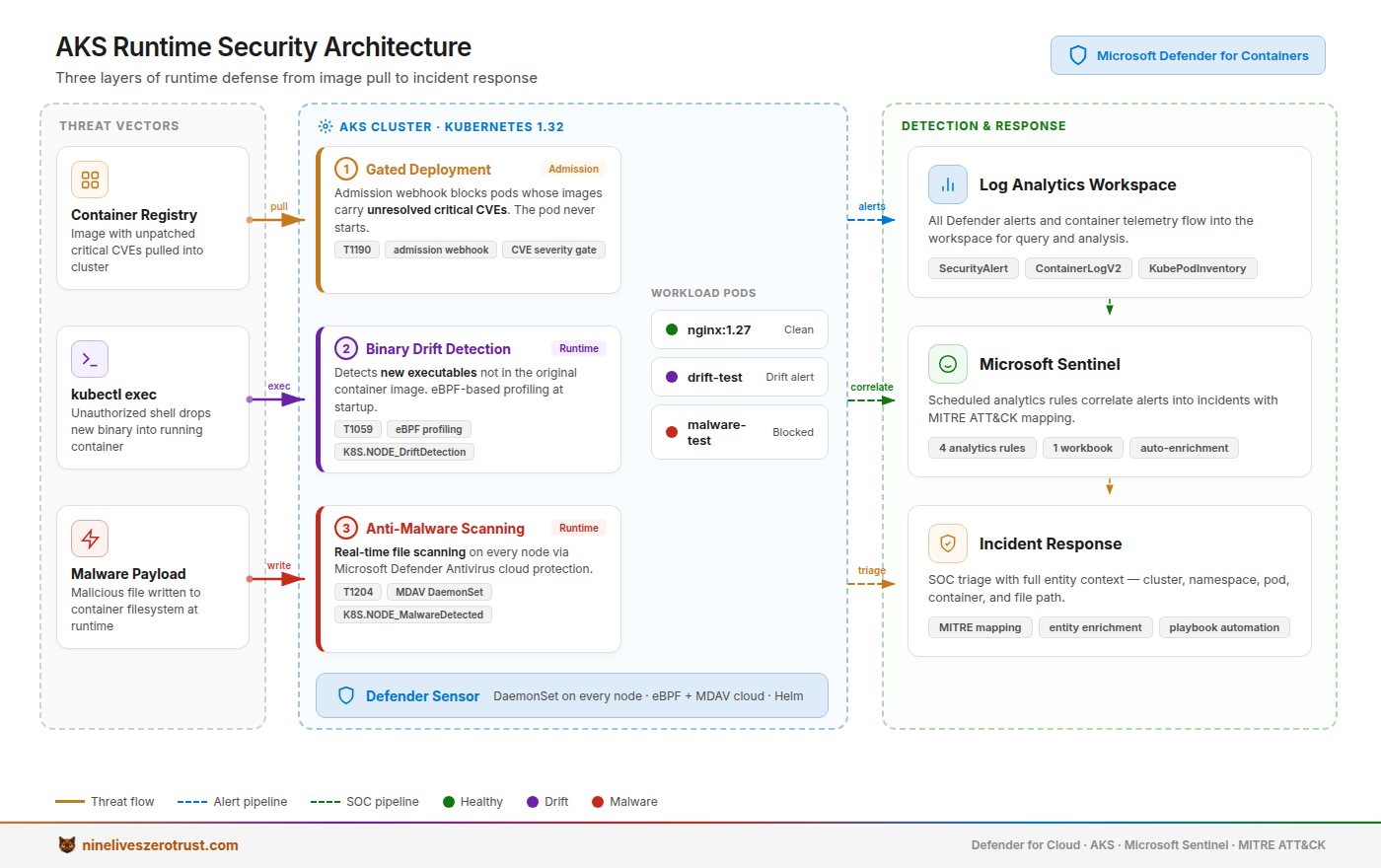
Three-layer defense architecture: Gated Deployment evaluates images at admission and reports decisions in Admission Monitoring; the Defender sensor monitors runtime binary drift and malware; documented runtime alerts and Kubernetes audit logs feed Sentinel for SOC visibility.
Components
- AKS Cluster, Single-node cluster with workload identity and Azure CNI
- Defender for Containers, Plan enabled at subscription level
- Defender Sensor, DaemonSet deployed through the lab bundle’s source-reviewed Helm chart pin (
0.11.5), with its anti-malware collector explicitly enabled; verify that pin against Microsoft’s current supported sensor line before deployment - Log Analytics Workspace: receives connector
SecurityAlertrecords and configured Kubernetes audit logs. Container Insights tables require a verified data-collection rule and association; this source review does not establish those tables populated. - Sentinel, Analytics rules and workbook for SOC visibility
Because the sensor is Helm-managed, the operator owns chart review and
upgrades. Microsoft notes that the portal can label a Helm-installed
subscription not supported for Gated deployment; if the rule flow offers to
auto-install components, choose Skip to avoid a conflicting managed
deployment. Gated deployment also requires Kubernetes 1.31 or later, OIDC on
AKS, Defender sensor with Security Gating, Registry access with Security
findings, and vulnerability findings artifacts for evaluated images. The lab
deploys AKS 1.35 with OIDC, but those service-side prerequisites still need to
be verified before attributing an admission result to the policy.
Lab Deployment
Prerequisites
- Azure subscription with Owner or Contributor + User Access Administrator role
- Tenant Security Admin or higher to create/modify runtime policies; subscription roles alone do not establish that permission (drift-policy prerequisites)
- Azure CLI v2.60+
- kubectl compatible with AKS Kubernetes 1.35
- Helm v3 or v4 (the helper selects the appropriate rollback flag)
- PowerShell 7.6 or later, enforced before either helper runs
- Your actual public VPN/NAT egress IPv4 CIDRs for API server access, supplied by your network owner
- Permission to read the lab workspace and cluster identifiers; no workspace shared-key retrieval is required
One-Command Deploy
git clone https://github.com/j-dahl7/aks-runtime-security-lab.git
cd aks-runtime-security-lab
git checkout 8f24b692735ec235bcb6b09e0af30f398c7c8f5f
# Replace this placeholder with your actual public operator egress.
$operatorEgress = @('<your-public-egress-ip>/32')

# Preview only: no Azure, kubeconfig, Kubernetes, Helm, or secret-file mutations
./scripts/Deploy-Lab.ps1 -Location "eastus" -ApiServerAuthorizedIpRanges $operatorEgress -WhatIf

# If the required paid subscription settings are not already enabled, review
# the active subscription and pricing before explicitly authorizing the change.
$env:CONFIRM_SUBSCRIPTION_SCOPE = "ENABLE-DEFENDER-FOR-CONTAINERS"

# Deploy everything (the confirmation is unnecessary when settings already match)
./scripts/Deploy-Lab.ps1 -Location "eastus" -ApiServerAuthorizedIpRanges $operatorEgress

# Infrastructure only (skip Sentinel rules)
./scripts/Deploy-Lab.ps1 -Location "eastus" -ApiServerAuthorizedIpRanges $operatorEgress -SkipSentinel
First deployment requires 1–20 explicit public IPv4 CIDRs, each /24 through /32. Broad, private, reserved, documentation, benchmark, malformed, or duplicate ranges are rejected. Validation cannot establish that an address is your actual egress; the script does not discover it or silently allow all addresses. Owned reruns reuse the exact recorded ranges when the parameter is omitted and reject changed inputs or live range drift. The API endpoint remains public behind this allowlist, and the lab retains local Kubernetes authentication. This is not a private or Entra-only cluster deployment.
The script creates:
- AKS 1.35 cluster (single node, Standard_D4s_v3) via Bicep
- Log Analytics workspace with Container Insights
- Defender for Containers plan enablement (with AntiMalware extension)
- Defender sensor via the lab bundle’s source-reviewed Helm chart pin (
0.11.5) with anti-malware collector; verify current Microsoft support and cluster compatibility first - 3 Sentinel analytics rules for binary drift, malware, and
kubectl exec - 1 Sentinel workbook
Portal steps required before testing: Configure the binary drift policy in Defender for Cloud > Environment Settings > Containers drift policy. The default is “Ignore drift detection”; change it to Drift detection alert, or use the GA Drift detection blocking action only after confirming the current cluster, cloud, sensor, policy, and network prerequisites. Review the anti-malware policy and Alert/Block action; policy updates can take up to 30 minutes to reach sensors. Then create a gated-deployment vulnerability-assessment rule under Environment Settings > Security Rules. Start with Audit, validate decisions in Gated deployment > Admission Monitoring, and move to Deny only when the intended scope and thresholds are correct. The deployment script does not create these policies.
After reviewing the three tracked queries, explicitly enable the disabled Sentinel rules and then run the bounded test helper:
./scripts/Deploy-Lab.ps1 -Location "eastus" -EnableSentinelRules
./scripts/Test-RuntimeSecurity.ps1
Deployment safety update, July 25, 2026:
-WhatIfexits after a preview-only summary. Before changing protection, the bundled deployment script checks for the known auto-provision policy, conflicting Defender Helm releases, and exact stale cluster-scoped resources. Helm runs with--atomic; credentials are passed through an owner-only temporary values file and deleted infinally; and a failed installation restores the captured Defender workspace/profile and exact prior exclusion-tag state. The bounded regression harness ispwsh ./tests/Test-DeployLabSafety.ps1.
The current revision also records the tenant, ARM resourceUID, API server/CA
fingerprint, and kube-system namespace UID in the private deployment manifest.
Runtime tests verify these identities, ownership, and the live API allowlist
before creating anything. A matching context alias alone is insufficient.
Foreign namespaces or pods are refused; each run creates unique owner-labeled
pods and checks their UID before exec, without pre-deleting existing pods.
Azure calls bind the captured subscription; Kubernetes and Helm calls bind the
verified context. Run both offline suites with
pwsh ./tests/Test-DeployLabSafety.ps1 and
pwsh ./tests/Test-RuntimeSafety.ps1.
Older manifests need an owned deployment rerun with explicit API ranges before runtime testing. Recorded identity changes, including certificate rotation, fail closed for independent operator review. Keep the local manifest trusted and avoid concurrent kubeconfig definition or pod administration; Kubernetes exec has no atomic UID precondition. Review the run selector printed by the helper before manually cleaning up its pods.
Supported Deployment Path
Use Deploy-Lab.ps1 for the entire lifecycle. Direct Bicep deployment or a raw
az security pricing write bypasses the manifest, collision preflight, shared
setting snapshot, Helm rollback, and Sentinel ownership checks that make reruns
and cleanup safe.
Cleanup
./scripts/Deploy-Lab.ps1 -Destroy -WhatIf
./scripts/Deploy-Lab.ps1 -Destroy
The guarded cleanup validates the exact manifest, resource-group owner token, and shared pricing before deletion. It deletes the owned group and verifies its absence before restoring captured pre-lab Defender pricing and extensions. Failed or incomplete deletion keeps protection enabled and retains the retry manifest. Restore rechecks shared-setting drift and verifies the result before removing the manifest; a retry also accepts an exact already-restored before-state. Other shared-setting changes are never overwritten. Use this lifecycle helper instead of deleting the group directly.
Layer 1: Gated Deployment
Gated deployment evaluates container images during Kubernetes admission. A matching security rule can record an Audit admission event or, when its action is explicitly set to Deny, prevent the workload from reaching the cluster.
How Gated Deployment Works
- When a pod creation request hits the Kubernetes API server, the Defender admission webhook intercepts it
- The webhook checks the image digest against Defender for Cloud’s vulnerability assessment database
- If the image has unresolved critical/high CVEs that match your security rules, the deployment is denied
- In Audit mode, the deployment proceeds and Defender creates an admission event for review; Deny rejects matching deployments
Configuration
Enable gated deployment in the Defender for Cloud portal:
- Navigate to Environment Settings > your subscription > Settings & Monitoring
- Under Containers, enable the Defender Sensor (with Security Gating) and Registry Access (with Security Findings) extensions
- Go to Environment Settings > Security Rules > Gated deployment > Vulnerability assessment
- Select Add Rule:
- Action: Start with Audit (allows deployment and records an admission event), switch to Deny after testing
- Scope: Select your AKS cluster or apply subscription-wide
- Conditions: Block images with Critical or High severity CVEs with available fixes
Testing Gated Deployment
# The guarded helper uses Microsoft's documented gated-deployment test image.
./scripts/Test-RuntimeSecurity.ps1 -SkipDrift -SkipMalware

# In Audit mode: the request is allowed; review Admission Monitoring
# In Deny mode: pod creation is rejected
An effective matching Deny rule returns an admission-webhook error. An allowed request can mean Audit mode, no matching rule, a missing vulnerability findings artifact, or an incomplete prerequisite. Review the authoritative timestamp, action, image digest, violations, triggered rule, and exemptions under **Defender for Cloud > Environment settings > Security rules > Gated deployment
Admission Monitoring**. Microsoft does not document a corresponding Sentinel
SecurityAlertAlertTypenamedGatedDeployment, so the lab does not invent one.
Layer 2: Binary Drift Detection
Binary drift is a valuable runtime signal. Container images are designed to be immutable, so a process whose executable was added after deployment can indicate compromise or an unauthorized operational change. On a supported, protected cluster with a configured drift policy, Defender can alert on or block that external process. Blocking has additional cluster, cloud, sensor, and Helm-version prerequisites, so verify the current support matrix before enabling it.
How Binary Drift Works
Microsoft documents the capability in terms of its behavioral contract rather than its internal implementation:
- Observe runtime processes, The Defender sensor supplies process activity from supported, protected clusters.
- Identify an external process, Defender determines that the executable did not originate in the container’s original image.
- Evaluate policy, Configured binary-drift rules are evaluated in priority order, and the first matching rule supplies the outcome.
- Apply the configured action, The outcome is GA drift-detection alerting, GA drift-detection blocking where supported, or ignore. Do not assume undocumented syscall interception, hash-comparison, or process-termination mechanics beyond that published contract.
Configuring Drift Policy
Navigate to Defender for Cloud > Environment Settings > Containers drift policy:
| Setting | Value |
|---|---|
| Rule name | Block drift in production namespaces |
| Action | Drift detection alert or Drift detection blocking (GA within documented support constraints) |
| Scope, Namespace | One Namespace Equals condition per intended namespace; do not enter a comma-joined value |
| Allow list | /usr/bin/apt-get, /usr/bin/dpkg (if needed for init scripts) |
Warning: The default catch-all action is Ignore drift detection, but Microsoft also pre-creates an Alert on Kube-System namespace rule. Review every effective rule rather than assuming no alerts can fire. There is currently no REST API for drift policy configuration; it must be set in the portal.
Tip: Start with alerting on the intended namespaces. Consider blocking only after reviewing measured alerts, confirming current support and prerequisites, and validating exclusions and rollback behavior in a non-production scope.
Testing Binary Drift
# Create a unique owned pod, wait for readiness, then copy and execute a BusyBox ELF with its harmless true applet.
./scripts/Test-RuntimeSecurity.ps1 -SkipMalware -SkipGated
When the feature, sensor, policy, and alert-ingestion path are healthy, Defender can generate an A drift binary detected executing in the container alert; this source review does not promise a fixed latency or outcome:
- Alert severity: Microsoft documents a high-severity alert for a matching unauthorized external process; verify the actual alert record and configured action
- Alert data: Container name, pod name, namespace, cluster, the drifted binary path
- MITRE mapping: T1105 (Ingress Tool Transfer), T1059 (Command and Scripting Interpreter)

Historical March 2026 alert capture from an earlier lab revision, showing container context and its recorded severity/mapping. It does not prove the current pinned test generated this alert.
KQL: Binary Drift Alerts
SecurityAlert
| where AlertType has_any ("DriftDetection", "BinaryDrift")
    or AlertName has "drift"
| extend ParsedEntities = parse_json(Entities)
| extend ExtProps = parse_json(ExtendedProperties)
| mv-expand Entity = ParsedEntities
| where tostring(Entity.Type) == "container"
| extend ContainerName = tostring(Entity.Name)
| extend PodName = tostring(Entity.Pod.Name)
| extend Namespace = tostring(Entity.Pod.Namespace.Name)
| extend ClusterName = CompromisedEntity
| extend DriftedBinary = tostring(ExtProps["Suspicious Process"])
| where isnotempty(ContainerName)
| project TimeGenerated, AlertSeverity, ClusterName,
    Namespace, PodName, ContainerName, DriftedBinary
| sort by TimeGenerated desc
KQL: Binary Drift Trend (Last 30 Days)
SecurityAlert
| where TimeGenerated > ago(30d)
| where AlertType has_any ("DriftDetection", "BinaryDrift")
    or AlertName has "drift"
| extend ParsedEntities = parse_json(Entities)
| mv-expand Entity = ParsedEntities
| where tostring(Entity.Type) == "container"
| extend ClusterName = CompromisedEntity
| extend Namespace = tostring(Entity.Pod.Namespace.Name)
| where isnotempty(ClusterName)
| summarize DriftCount = count() by bin(TimeGenerated, 1d), ClusterName, Namespace
| render timechart
Layer 3: Container Anti-Malware
Container antimalware was introduced in preview in February 2026 and its detection and blocking capabilities are now generally available. Microsoft’s current Defender for Cloud support documentation lists the supported clouds and cluster constraints; verify those boundaries and the sensor version before deployment. This layer catches what binary drift alone does not classify: executables that Defender identifies as malware at runtime.
Version and compatibility boundary: The source enables antimalware in the subscription-level ContainerSensor extension (
AntiMalwareEnabled: True) and Helm values (microsoft-defender-for-containers-sensor.antimalwareCollector.enabled=true). Its reviewed OCI chart pin is0.11.5; the upstream README records the inspected archive digest and optional workspace-credential behavior. The Microsoft sensor changelog, rechecked September 25, lists the0.11line as GA and sensor0.11.6as an August GA release. A sensor changelog entry does not establish that the corresponding chart tag was fetched or deployed by this review. Check publisher availability and cluster compatibility before a live run. The deployment prevents managed AKS and Helm sensors from coexisting.
How Container Anti-Malware Works
Microsoft documents the capability at its control boundary:
- Defender sensor and anti-malware collector, The current source bundle pins chart
0.11.5; confirm a currently supported, cluster-compatible version before deployment. - Executable launch, Runtime anti-malware evaluates when a container runs an executable that the system identifies as malicious. Writing a file alone is not the documented trigger.
- Ordered policy evaluation, Rules can scope by cluster, image, namespace, pod, container, or labels. The first matching rule supplies the action; default workload and host rules apply when no higher-priority rule matches.
- Configured action, The documented actions are Ignore Malware, Alert on Malware, and Block Malware. Treat a process exit code as supporting evidence only; verify the policy decision and resulting security alert.
Configuring Anti-Malware Rules
Navigate to Defender for Cloud > Environment Settings > Security rules > Antimalware:
| Setting | Value |
|---|---|
| Rule name | Block malware in all namespaces |
| Action | Block Malware or Alert on Malware (start with alerting while validating scope) |
| Scope, Cluster | equals: aks-runtime-lab |
| Scope, Namespace | Omit a namespace restriction to cover the chosen cluster; all is not a wildcard |
Testing Anti-Malware
The EICAR test file is the industry-standard way to test malware detection without using real malware:
# Write, mark executable, and attempt EICAR execution in a unique owned pod.
./scripts/Test-RuntimeSecurity.ps1 -SkipDrift -SkipGated
EICAR is a harmless test string. A nonzero container command does not by itself prove Defender blocked execution: the text file can fail for unrelated runtime reasons. Inspect the configured anti-malware action and Defender security alerts. Microsoft states that policy updates can take up to 30 minutes to reach sensors, and alert delivery has variable latency.
KQL: Anti-Malware Alerts
SecurityAlert
| where AlertType has "MalwareDetected"
    or AlertName has_any ("malware", "Malicious file")
| extend ParsedEntities = parse_json(Entities)
| extend ExtProps = parse_json(ExtendedProperties)
| mv-expand Entity = ParsedEntities
| where tostring(Entity.Type) == "container"
| extend ContainerName = tostring(Entity.Name)
| extend PodName = tostring(Entity.Pod.Name)
| extend Namespace = tostring(Entity.Pod.Namespace.Name)
| extend ClusterName = CompromisedEntity
| extend MalwareName = tostring(ExtProps["Malware Name"])
| extend FilePath = tostring(ExtProps["Suspicious Process"])
| extend ActionTaken = tostring(ExtProps["Action Taken"])
| where isnotempty(ContainerName)
| project TimeGenerated, AlertSeverity, MalwareName,
    FilePath, ActionTaken, ClusterName, Namespace, PodName, ContainerName
| sort by TimeGenerated desc
Sentinel Analytics Rules

Historical earlier-revision evidence from the lab cluster: binary drift, malware execution, reverse shell, network scanning, C2 communication, and Defender agent termination alerts. This is not current-revision deployment evidence.
Three analytics rules provide SOC coverage for documented runtime alerts and
Kubernetes audit activity. Each is configured for a five-minute schedule and a
one-hour lookback, but all three deploy disabled until
-EnableSentinelRules is explicitly supplied.
Note: Rules 1-2 query the
SecurityAlerttable, which is populated by the Defender for Cloud data connector; Rule 3 queriesAzureDiagnosticsKubernetes audit data. Alert and table availability vary by tenant, region, connector state, and ingestion path. Disabled rules do not fire automatically, so validate each query and data path before enabling it explicitly. Gated-deployment decisions remain in Admission Monitoring rather than an inventedSecurityAlerttype.
Rule 1: Binary Drift in Production Namespace
Fires when a drift alert resolves to a container in a namespace literally named default, production, or kube-system. Those names are a starter scope, not proof that a workload is production; tune the list and approved-workflow exclusions before enabling the rule.
SecurityAlert
| where ingestion_time() > ago(5m)
| where AlertType has_any ("DriftDetection", "BinaryDrift")
    or AlertName has "drift"
| extend ParsedEntities = parse_json(Entities)
| extend ExtProps = parse_json(ExtendedProperties)
| mv-expand Entity = ParsedEntities
| where tostring(Entity.Type) == "container"
| extend ContainerName = tostring(Entity.Name)
| extend PodName = tostring(Entity.Pod.Name)
| extend Namespace = tostring(Entity.Pod.Namespace.Name)
| extend ClusterName = CompromisedEntity
| extend DriftedBinary = tostring(ExtProps["Suspicious Process"])
| where Namespace in ("default", "production", "kube-system", "runtime-security-tests")
| where isnotempty(ContainerName)
| project TimeGenerated, AlertSeverity, ClusterName,
    Namespace, PodName, ContainerName, DriftedBinary
- Severity: High
- MITRE: T1105 (Ingress Tool Transfer), T1059 (Command and Scripting Interpreter)
Rule 2: Container Malware Detected
Fires on any anti-malware detection across all clusters. Includes the malware name and action taken (detected vs. blocked).
SecurityAlert
| where ingestion_time() > ago(5m)
| where AlertType has "MalwareDetected"
    or AlertName has_any ("malware", "Malicious file")
| extend ParsedEntities = parse_json(Entities)
| extend ExtProps = parse_json(ExtendedProperties)
| mv-expand Entity = ParsedEntities
| where tostring(Entity.Type) == "container"
| extend ContainerName = tostring(Entity.Name)
| extend PodName = tostring(Entity.Pod.Name)
| extend Namespace = tostring(Entity.Pod.Namespace.Name)
| extend ClusterName = CompromisedEntity
| extend MalwareName = tostring(ExtProps["Malware Name"])
| extend FilePath = tostring(ExtProps["Suspicious Process"])
| extend ActionTaken = tostring(ExtProps["Action Taken"])
| where isnotempty(ContainerName)
| project TimeGenerated, AlertSeverity, MalwareName,
    FilePath, ActionTaken, ClusterName, Namespace,
    PodName, ContainerName
- Severity: High
- MITRE: T1105 (Ingress Tool Transfer), T1204 (User Execution)
Rule 3: Suspicious kubectl exec into Container
Detects Kubernetes audit requests to the pod exec subresource, including kube-system. A namespace name does not establish a trusted caller. The request can launch any command, not only an interactive shell, so review the user, source IP, target pod, and command context before tuning specific automation exclusions.
AzureDiagnostics
| where Category == "kube-audit"
| where ingestion_time() > ago(5m)
| extend RequestObject = parse_json(log_s)
| extend Verb = tostring(RequestObject.verb)
| extend RequestURI = tostring(RequestObject.requestURI)
| extend UserAgent = tostring(RequestObject.userAgent)
| extend SourceIP = tostring(RequestObject.sourceIPs[0])
| extend Username = tostring(RequestObject.user.username)
| where Verb in ("create", "get")
| where RequestURI has "/exec"
| extend PodName = extract(@"/pods/([^/]+)/exec", 1, RequestURI)
| extend Namespace = extract(@"namespaces/([^/]+)/", 1, RequestURI)
| project TimeGenerated, Username, SourceIP,
    PodName, Namespace, UserAgent, RequestURI
- Severity: Medium
- MITRE: T1609 (Container Administration Command)
Hunting Queries
Beyond automated detection, three hunting queries support proactive investigation:
Hunt 1: Broader Container Process Alerts
This hunt groups existing Defender process-related alerts beyond the narrower drift analytics rule. It reads SecurityAlert, so it cannot inventory processes that never generated an ingested alert. Validate the alert identifiers and entity fields against your tenant’s records before relying on the results:
SecurityAlert
| where ProductName in~ ("Azure Security Center", "Microsoft Defender for Cloud")
| where AlertType has_any ("DriftDetection", "BinaryDrift",
    "SuspectProcess", "CryptoMiner", "ToolExecution") or AlertName has "drift"
| extend ParsedEntities = parse_json(Entities)
| extend ExtProps = parse_json(ExtendedProperties)
| mv-expand Entity = ParsedEntities
| where tostring(Entity.Type) == "container"
| extend ContainerName = tostring(Entity.Name)
| extend Namespace = tostring(Entity.Pod.Namespace.Name)
| extend ProcessName = tostring(ExtProps["Suspicious Process"])
| where isnotempty(ContainerName)
| summarize IngestedRows = count(),
    AlertTypes = make_set(AlertType),
    FirstSeen = min(TimeGenerated),
    LastSeen = max(TimeGenerated)
    by ProductName, ContainerName, ProcessName, Namespace
| sort by IngestedRows desc
Hunt 2: Administrative Audit Candidates from Unexpected Users
This starter hunt selects write requests associated with system:masters or an admin-like username, then removes sample known-name matches. Those name and group predicates do not establish effective Kubernetes RBAC, and an audit request does not by itself prove the operation succeeded. Replace the sample allowlist with reviewed identities and inspect response status and role bindings during triage:
let KnownAdmins = dynamic(["clusterAdmin", "aksService", "masterClient"]);
AzureDiagnostics
| where Category == "kube-audit"
| extend RequestObject = parse_json(log_s)
| extend Username = tostring(RequestObject.user.username)
| extend Groups = tostring(RequestObject.user.groups)
| extend Verb = tostring(RequestObject.verb)
| extend Resource = tostring(RequestObject.objectRef.resource)
| extend Namespace = tostring(RequestObject.objectRef.namespace)
| where Groups has "system:masters" or Username has "admin"
| where not(Username has_any (KnownAdmins))
| where Verb in ("create", "delete", "patch", "update")
| project TimeGenerated, Username, Verb, Resource,
    Namespace, Groups
| summarize ActionCount = count(),
    Actions = make_set(strcat(Verb, ":", Resource)),
    Namespaces = make_set(Namespace)
    by Username
| sort by ActionCount desc
Hunt 3: Network-Related Alerts with Public IPv4 Entities
This hunt selects network-related Defender alerts and their nonprivate IPv4 entities. It does not collect every container connection, validate an approved-destination list, or establish whether an IP entity is a source or destination. Confirm each alert’s network direction and container context before interpreting it as possible C2 or exfiltration:
SecurityAlert
| where ProductName in~ ("Azure Security Center", "Microsoft Defender for Cloud")
| where AlertType has_any ("NetworkActivity",
    "SuspiciousConnection", "C2Connection")
| extend ParsedEntities = parse_json(Entities)
| extend ExtProps = parse_json(ExtendedProperties)
| mv-expand Entity = ParsedEntities
| where tostring(Entity.Type) == "ip"
| extend DestinationIP = tostring(Entity.Address)
| extend ContainerName = tostring(ExtProps["Container Name"])
| where isnotempty(DestinationIP)
| where not(ipv4_is_private(DestinationIP))
| project TimeGenerated, ProductName, ContainerName,
    DestinationIP, AlertName, AlertSeverity
| sort by TimeGenerated desc
Full KQL for all hunting queries is in the reviewed companion source.
Bonus: Microsoft Attack Simulation Tool
Microsoft provides an official Defender for Cloud Attack Simulation tool that generates realistic container threat scenarios. It covers reconnaissance, lateral movement, secrets gathering, crypto mining, and web shell deployment:
SIMULATION_COMMIT="90f5524e3e6d43aef397de91fb2eff77f4322f0a"
SIMULATION_SHA256="4d6c3e91d2fec7a5186a24cefe3c79348623bc01df3c986ea7873fd29fb19dcc"
curl -sL "https://raw.githubusercontent.com/microsoft/Defender-for-Cloud-Attack-Simulation/${SIMULATION_COMMIT}/simulation.py" \
  -o simulation.py
echo "${SIMULATION_SHA256}  simulation.py" | sha256sum -c -
python3 simulation.py
The hash above pins only simulation.py. That launcher installs an unversioned Helm chart; pull, review and pin the chart separately before running it.
In a supported, correctly onboarded environment, the simulator is designed to exercise several MITRE ATT&CK techniques. Review its pinned source and safety scope before execution, and verify actual alerts in your tenant; this audit does not guarantee that it will generate a particular count or populate the workbook.
Sentinel Workbook
The lab deploys a workbook with four panels providing a unified view of container runtime security:
- Runtime Alert Timeline, Timechart of documented binary-drift and anti-malware alerts over time, colored by alert type
- Binary Drift by Namespace, Bar chart showing which namespaces have the most drift events, highlighting areas that need immutability enforcement
- Top Drifted Binaries, Table of the most frequently seen unauthorized executables across all clusters
- kubectl exec Audit Trail, Captured pod
execaudit requests with user, source IP, and target pod; requests may be interactive or noninteractive and may fail
The updated workbook accepts both documented ProductName values, retains ProductName as a source dimension, includes kube-system exec activity, and uses runtime alert-name fallbacks. Counts are ingested rows, not a claim of deduplicated underlying alerts. Gated-deployment decisions are reviewed separately in Defender for Cloud Admission Monitoring.
Key Takeaways
- Build-time and runtime security are complementary, Your CI/CD pipeline can identify known vulnerabilities before deployment. Runtime controls add visibility and protection for supported activity after deployment, subject to sensor, policy, and telemetry coverage.
- Binary drift is a high-value investigation signal, An executable not in the original image warrants review, but legitimate operational tooling can also create drift. Start with alerting; consider blocking only after measuring normal behavior and confirming current support, exclusions, prerequisites, and rollback constraints.
- Container anti-malware evaluates executable launch, Use EICAR only as a harmless test input, execute it, and verify the actual policy decision and alert rather than inferring a block from the command exit code.
- Gated deployment can be a last line of prevention, A matching, correctly scoped rule in Deny mode can prevent a workload from reaching the cluster. Audit allows the request and records an admission event for review in Admission Monitoring.
- Audit interactive access, Collect and query kube-audit telemetry for
kubectl exec; whether a Sentinel rule produces an alert depends on connector coverage, query logic, rule state, schedule, and data availability. - Layer your defenses, No single feature catches everything. The combination of gated deployment + binary drift + anti-malware + kube-audit monitoring creates defense in depth.
Resources
- Microsoft: Binary drift detection in Defender for Containers
- Microsoft: Container runtime anti-malware detection and blocking
- Microsoft: Kubernetes Gated Deployment
- Microsoft: Troubleshoot Gated Deployment
- Microsoft: Install the Defender for Containers sensor with Helm
- Microsoft Threat Intelligence: Kubernetes threat landscape
- Microsoft: Defender for Containers overview
- Microsoft: Defender for Cloud Attack Simulation Tool
- Microsoft: Defending Container Runtime from Malware (March 2026)
- MITRE ATT&CK: Containers Matrix
- Companion Lab: AKS Runtime Security
- Previous Post: Container Supply Chain Security

Jerrad Dahlager, CISSP, CCSP
Cloud Security Architect · Adjunct Instructor
Marine Corps veteran and firm believer that the best security survives contact with reality.
Have thoughts on this post? I'd love to hear from you.