On this page
If you manage Azure infrastructure through CLI, PowerShell, Terraform, or any tool that hits the ARM control plane, every write operation from a user account will require MFA.
Starting October 1, 2025, Microsoft began gradually rolling out Phase 2 of mandatory MFA enforcement. Phase 1 (October 2024) locked down the portal. Phase 2 extends that to Azure CLI, Azure PowerShell, Terraform, Bicep, the REST API, Azure SDKs, and the mobile app. Every create, update, or delete operation against management.azure.com will require MFA. July 1, 2026 is the hard cutoff. No more self-service extensions after that date.
Service principals and managed identities are exempt. Everything else is in scope: every user account, break-glass accounts, B2B guests, AD-synced service accounts, that svc-terraform@ someone provisioned in 2019.
The Timeline
| Date | What Happened |
|---|---|
| October 2024 | Phase 1 enforcement begins — Azure portal, Entra admin center, Intune admin center — all CRUD operations require MFA |
| February 2025 | Phase 1 extends to Microsoft 365 admin center |
| October 1, 2025 | Phase 2 enforcement begins gradual rollout — CLI, PowerShell, Terraform, Bicep, REST API, SDKs, mobile app |
| July 1, 2026 | Final postponement deadline — no self-service extensions after this date |
If you postponed Phase 1, your Phase 2 postponement was automatically linked to the same date. Global Administrators can adjust the Phase 2 start date, but only until July 1.
After enforcement begins, the only remaining option is a support ticket to Microsoft for a temporary lift — there is no opt-out. Microsoft’s own language: “There’s no way to opt out. This security motion is critical to the safety and security of the Azure platform.”
Note: Sovereign clouds (Azure Government, Azure China) are not currently subject to mandatory MFA enforcement.
What’s In Scope
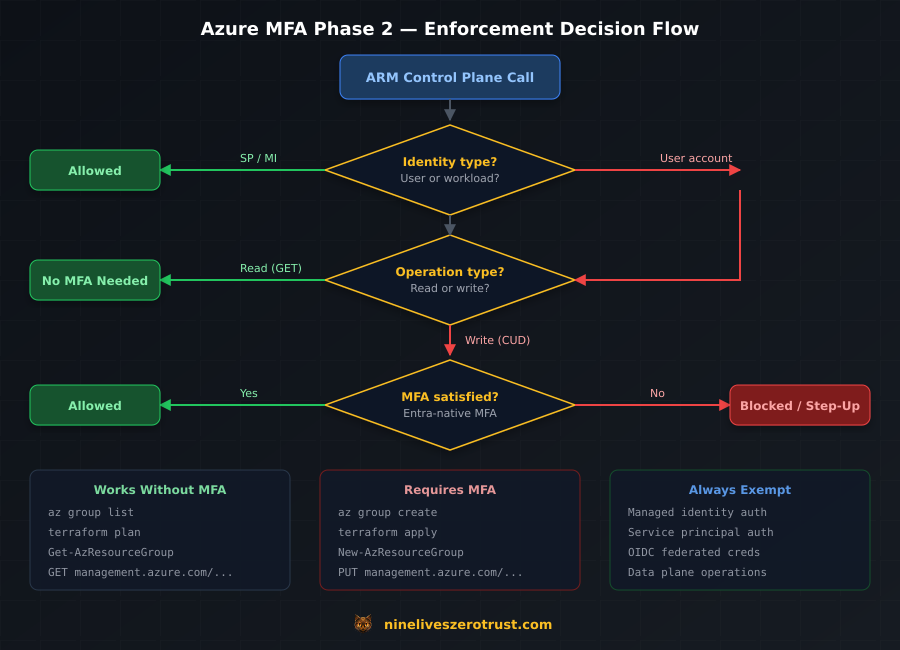
Phase 2 enforces MFA on create, update, and delete operations against the ARM control plane. Read operations are exempt.
| Component | In Scope | Notes |
|---|---|---|
Azure CLI (az) | Yes | App ID: 04b07795-8ddb-461a-bbee-02f9e1bf7b46 |
Azure PowerShell (Az) | Yes | App ID: 1950a258-227b-4e31-a9cf-717495945fc2 |
| Terraform / Bicep | Yes | Uses CLI or PowerShell app IDs for auth |
REST API (management.azure.com) | Yes | Server-side enforcement on the ARM endpoint |
| Azure SDKs (.NET, Python, Go, Java, JS) | Yes | Server-side enforcement on ARM calls |
| Azure mobile app | Yes | App ID: 0c1307d4-29d6-4389-a11c-5cbe7f65d7fa |
| Read operations (any tool) | No | az group list, Get-AzResourceGroup, terraform plan (all exempt) |
| Data plane (blob storage, Key Vault data, SQL) | No | Only management.azure.com is enforced |
| Microsoft Graph API | Generally no | Not part of ARM enforcement; Graph has its own CA policies |
In practice: az group list won’t trigger an MFA challenge, but az group create will. terraform plan reads state and skips MFA; terraform apply writes resources and requires it.
What’s Exempt
Workload identities are fully exempt. Managed identities and service principals are not affected by either phase.
What is not exempt:
- All user accounts (no exceptions, regardless of role or exclusions)
- Break-glass / emergency access accounts (must use FIDO2 or certificate-based MFA)
- B2B guest users (must satisfy MFA in either the home or resource tenant)
- AD-synced service accounts (if it’s a user object in Entra, it’s in scope)
- Conditional Access exclusions (CA policy exclusions do not override mandatory enforcement)
Minimum Tool Versions
For the best compatibility with MFA prompts (interactive token refresh, WAM broker support):
- Azure CLI: 2.76 or later
- Azure PowerShell: 14.3 or later
I ran this lab on CLI 2.81 and Az.Accounts 5.3.2. Both handled MFA flows cleanly.
Audit Your Exposure
I ran these audit queries in my lab tenant to find user accounts hitting the ARM control plane and check whether they had MFA registered.
Find User Accounts Using CLI and PowerShell
Query Entra sign-in logs for the Azure CLI and Azure PowerShell app IDs. This requires at least the Reports Reader role.
# Get recent sign-in events for Azure CLI and Azure PowerShell (top 50)
$cliAppId = "04b07795-8ddb-461a-bbee-02f9e1bf7b46"
$psAppId  = "1950a258-227b-4e31-a9cf-717495945fc2"

$uri = "https://graph.microsoft.com/v1.0/auditLogs/signIns?" +
       "`$filter=appId eq '$cliAppId' or appId eq '$psAppId'" +
       "&`$top=50" +
       "&`$select=userDisplayName,userPrincipalName,appDisplayName,appId,createdDateTime,status"

$response = Invoke-MgGraphRequest -Method GET -Uri $uri
$response.value | Select-Object userPrincipalName, appDisplayName, createdDateTime |
    Sort-Object createdDateTime -Descending |
    Format-Table -AutoSize
In my lab tenant, this returned sign-in events immediately:
userPrincipalName                 appDisplayName       createdDateTime
-----------------                 --------------       ---------------
jdahlager@████████████████████    Microsoft Azure CLI  2026-03-02T21:02:17Z
jdahlager@████████████████████    Microsoft Azure CLI  2026-03-01T00:22:16Z
jdahlager@████████████████████    Microsoft Azure CLI  2026-02-12T01:58:36Z
Each of these is a user account that hits ARM write operations after enforcement:
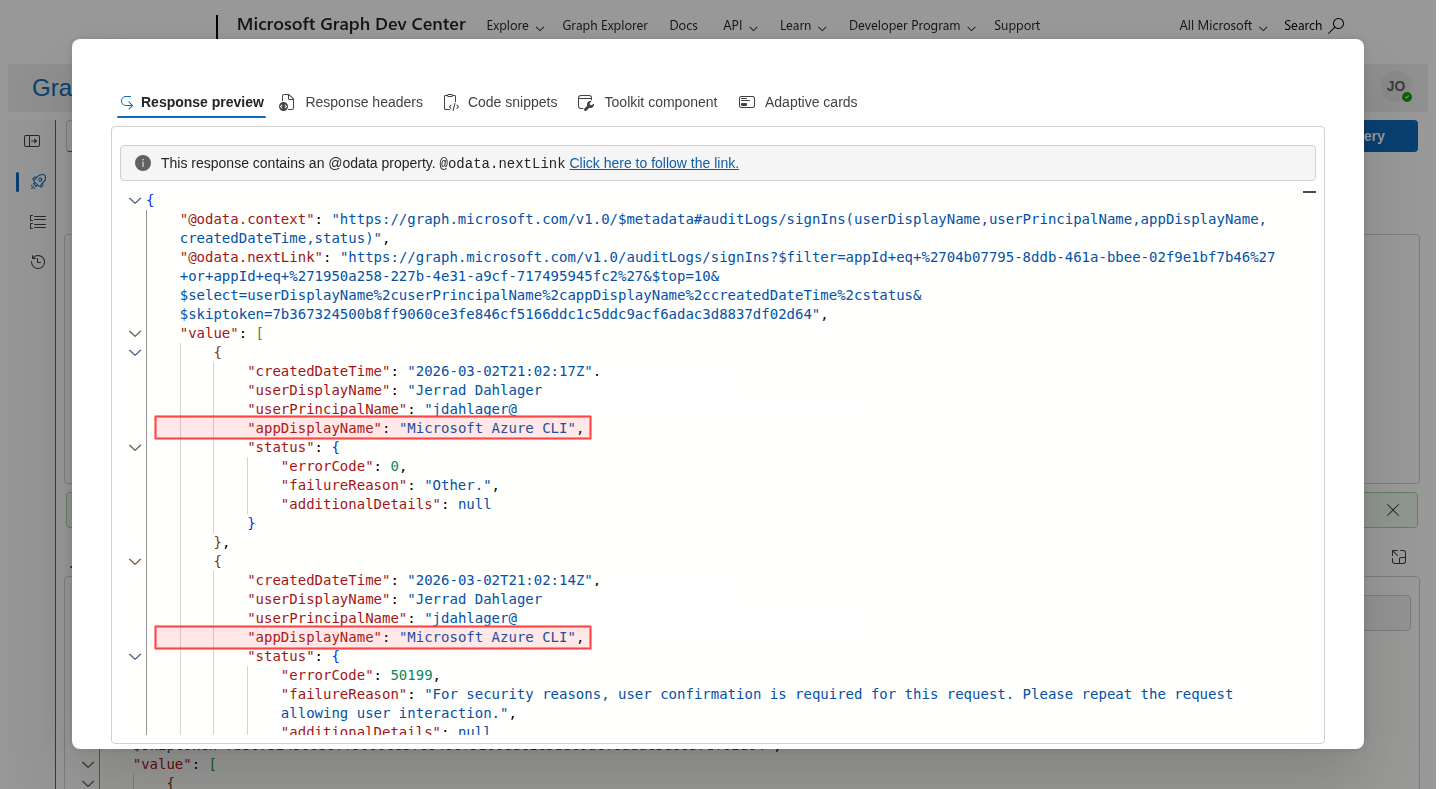
appDisplayName: "Microsoft Azure CLI", confirming user accounts are hitting the ARM control plane.Find Users Without MFA Registered
# Users with no MFA methods registered
$uri = "https://graph.microsoft.com/v1.0/reports/authenticationMethods/" +
       "userRegistrationDetails?" +
       "`$filter=isMfaRegistered eq false" +
       "&`$select=userDisplayName,userPrincipalName,isMfaRegistered,userType"

$headers = @{ ConsistencyLevel = "eventual" }
$response = Invoke-MgGraphRequest -Method GET -Uri $uri -Headers $headers
$response.value | Format-Table userDisplayName, userPrincipalName, userType -AutoSize
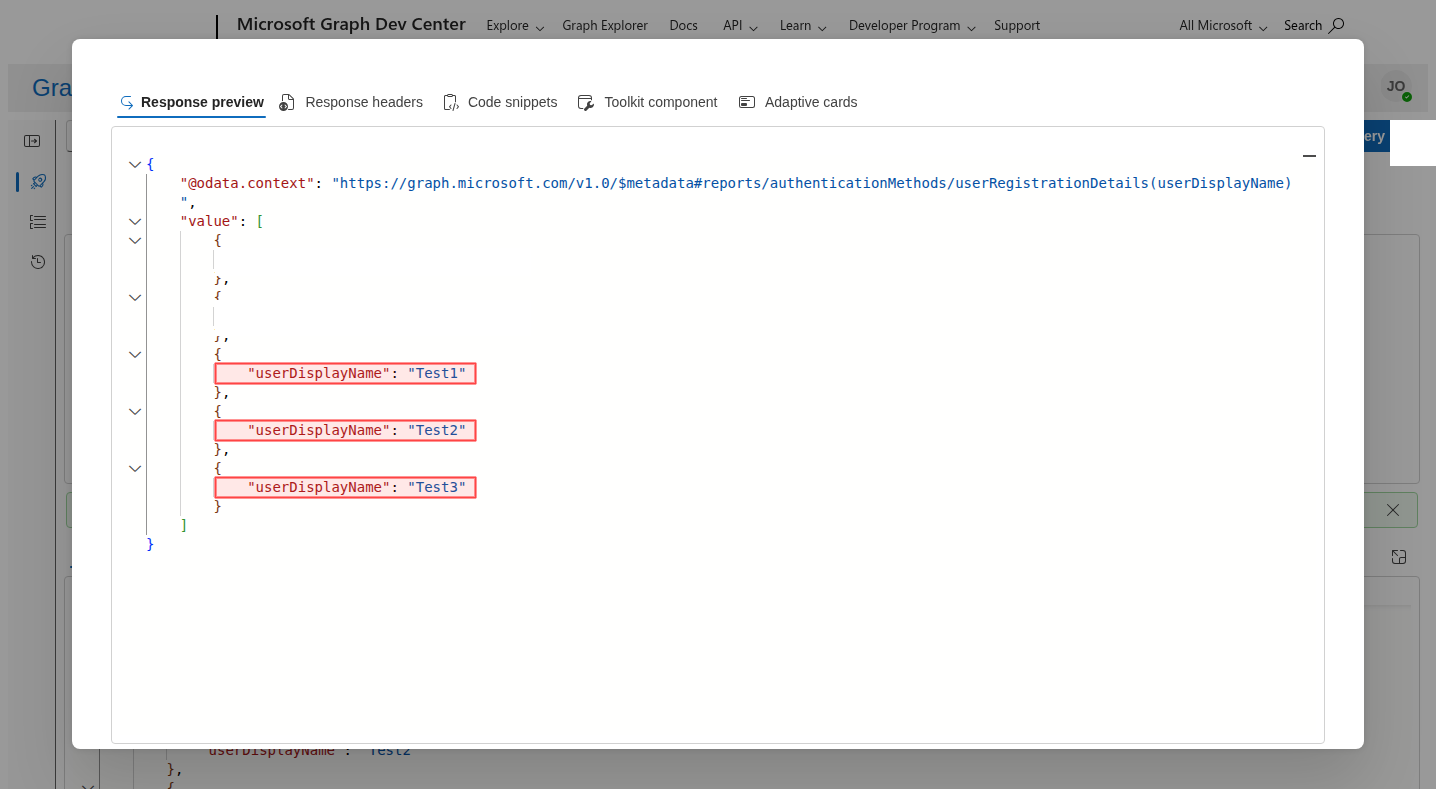
My lab tenant returned three accounts without MFA:
userDisplayName    userPrincipalName                       userType
---------------    -----------------                       --------
Test1              Test1@██████████████████████████████    member
Test2              Test2@██████████████████████████████    member
Test3              Test3@██████████████████████████████    member
Any account on this list that also shows up in the CLI/PowerShell sign-in logs will break after enforcement. Here is the same query in Graph Explorer:
Check for ROPC (Password Grant) Usage
The OAuth 2.0 Resource Owner Password Credentials (ROPC) flow is incompatible with MFA. If any automation uses UsernamePasswordCredential from an Azure SDK, it will break.
# Find ROPC sign-ins (grantType = password)
$uri = "https://graph.microsoft.com/beta/auditLogs/signIns?" +
       "`$filter=authenticationProtocol eq 'ropc'" +
       "&`$top=50" +
       "&`$select=userPrincipalName,appDisplayName,createdDateTime,authenticationProtocol"

$response = Invoke-MgGraphRequest -Method GET -Uri $uri
if ($response.value.Count -eq 0) {
    Write-Output "No ROPC sign-ins found. Good."
} else {
    $response.value | Format-Table -AutoSize
}
Note:
authenticationProtocolis currently available for this filter on thebetaendpoint. Thev1.0signInsschema doesn’t expose it reliably.
Microsoft has already deprecated UsernamePasswordCredential across all Azure Identity SDK packages:
| SDK | Package | Deprecated In |
|---|---|---|
| JavaScript/Node | @azure/identity | 4.8.0 |
| Python | azure-identity | 1.21.0 |
| .NET | Azure.Identity | 1.14.0-beta.2 |
| Go | azidentity | 1.9.0 |
| Java | azure-identity | 1.16.0-beta.1 |
If you find ROPC usage, there’s no fix that keeps the password flow. The migration target is a workload identity.
Migration Paths
Same fix for every scenario: replace user accounts in automation with workload identities.
1. Managed Identity (Azure-Hosted Workloads)
If your automation runs on Azure compute (VMs, App Service, Functions, Container Apps, AKS), managed identity is the simplest option — no credentials to manage, no MFA challenge, and system-assigned identities are tied to the resource lifecycle.
# Assign a role to a managed identity
az role assignment create \
  --assignee-object-id <managed-identity-object-id> \
  --assignee-principal-type ServicePrincipal \
  --role "Contributor" \
  --scope "/subscriptions/<subscription-id>/resourceGroups/<rg-name>"
In code, authentication is one line:
from azure.identity import ManagedIdentityCredential
from azure.mgmt.resource import ResourceManagementClient

credential = ManagedIdentityCredential()
client = ResourceManagementClient(credential, subscription_id)
2. Service Principal with Certificate
For workloads outside Azure, or when you need a non-human identity with explicit credential control:
# Create a service principal with a certificate stored in Key Vault
az ad sp create-for-rbac \
  --name "svc-terraform-prod" \
  --role "Contributor" \
  --scopes "/subscriptions/<subscription-id>" \
  --cert "TerraformProdCert" \
  --create-cert \
  --keyvault "your-keyvault-name" \
  --years 1
The --keyvault flag stores the certificate directly in Key Vault instead of dropping a PEM file on disk. If you omit it, the cert lands in the current directory — fine for testing, but not for production.
Authenticate in scripts:
Connect-AzAccount `
  -ServicePrincipal `
  -TenantId "your-tenant-id" `
  -ApplicationId "your-app-id" `
  -CertificateThumbprint "your-cert-thumbprint"
The certificate belongs in Key Vault or your CI system’s secret store.
3. Federated Credentials / OIDC (CI/CD Pipelines)
For GitHub Actions, Azure DevOps, or any OIDC-capable CI system, federated credentials eliminate stored secrets entirely. The CI platform issues a short-lived token that Azure trusts.
GitHub Actions setup:
# Create an app registration
appId=$(az ad app create --display-name "github-deploy-prod" --query appId -o tsv)

# Create the service principal
az ad sp create --id $appId

# Add federated credential for the main branch
az ad app federated-credential create --id $appId --parameters '{
  "name": "github-main",
  "issuer": "https://token.actions.githubusercontent.com",
  "subject": "repo:your-org/your-repo:ref:refs/heads/main",
  "audiences": ["api://AzureADTokenExchange"]
}'

# Assign the role
az role assignment create \
  --assignee $appId \
  --role "Contributor" \
  --scope "/subscriptions/<subscription-id>"
In the GitHub Actions workflow:
permissions:
  id-token: write

steps:
- uses: azure/login@v2
  with:
    client-id: ${{ secrets.AZURE_CLIENT_ID }}
    tenant-id: ${{ secrets.AZURE_TENANT_ID }}
    subscription-id: ${{ secrets.AZURE_SUBSCRIPTION_ID }}
No client secret, no certificate, no MFA challenge — the OIDC token exchange handles everything.
Decision Table
| Scenario | Recommended Method | Why |
|---|---|---|
| Azure-hosted automation (VMs, Functions, AKS) | Managed identity | Zero credential management, tied to resource lifecycle |
| GitHub Actions / Azure DevOps CI/CD | Federated credentials (OIDC) | No stored secrets, short-lived tokens |
| On-premises scripts | Service principal + certificate | Explicit credential, no MFA, rotatable |
| Multi-cloud / third-party CI | Service principal + certificate or OIDC | Depends on platform OIDC support |
Developer local az login | Interactive MFA | Register MFA and move on. This is the intended flow. |
Break-Glass Accounts
Break-glass accounts are user accounts, and mandatory MFA enforcement applies to them too — Conditional Access exclusions do not override the system-level requirement.
Microsoft’s guidance is to update break-glass accounts to use passkey (FIDO2) or certificate-based authentication for MFA, both of which satisfy the mandatory requirement without depending on a phone or authenticator app.
If your emergency access procedure relies on a username and password with no MFA, it stops working after enforcement.
Gotchas
AD-synced service accounts are user accounts. If you synced
[email protected]from on-premises AD to Entra, it’s a user object and it’s in scope — migrate it to a service principal or managed identity. (Exception: the Entra Connect / Cloud Sync synchronization service account itself is not affected.)B2B guests must satisfy MFA. The MFA requirement can be met in either the home tenant or the resource tenant, but it must be met. If your partners access your subscription via guest accounts, they need MFA configured somewhere.
Third-party MFA via legacy custom controls doesn’t count. If you rely on a third-party MFA provider integrated through legacy custom controls in Conditional Access, it will not satisfy mandatory MFA enforcement. You must use Entra-native MFA methods or migrate to the External Authentication Methods preview.
Test and dev tenants must comply. There is no “non-production exemption.” Every Entra tenant in the public cloud is subject to enforcement.
Postponement requires elevated access. Global Administrators must elevate access before they can postpone enforcement, and postponement must be done per-tenant.
Post-July 1 options are limited. After the self-service deadline, the only path is a Microsoft support ticket for a temporary lift.
terraform planis safe,terraform applyis not. Plan only reads state and skips MFA, while apply writes resources and requires it. This catches teams who test in CI withplanand don’t discover the issue untilapplyfails.The ROPC flow is dead. Any SDK code using
UsernamePasswordCredentialwill throw exceptions after enforcement, and there’s no workaround that preserves password-based auth.
Resources
- Mandatory MFA for Azure and other admin portals (authoritative source for dates, scope, and exemptions)
- Postpone Phase 2 enforcement (self-service postponement, until July 1, 2026)
- Elevate access for Global Administrators (required before postponing)
- Federated credentials for GitHub Actions (OIDC setup guide)
- Managed identity overview (Azure-hosted workload migration)
- External Authentication Methods (preview) (path for third-party MFA replacing legacy custom controls)
- Azure CLI interactive authentication (MFA-compatible sign-in flows)

Jerrad Dahlager, CISSP, CCSP
Cloud Security Architect · Adjunct Instructor
Marine Corps veteran and firm believer that the best security survives contact with reality.
Have thoughts on this post? I'd love to hear from you.