On this page
CISA released the Microsoft Expanded Cloud Logs Implementation Playbook on January 15, 2025. Its implementation guidance remains a practical baseline for deciding which Microsoft cloud audit signals belong in a defensible logging program.
That is fine. The reason it matters is not that every defender needs a new PDF to collect. The reason it matters is that identity attacks keep proving the same uncomfortable point.
Authentication is only the first half of the story.
An attacker can pass MFA through device code phishing, proxy a session through adversary-in-the-middle infrastructure, abuse OAuth, modify mailbox rules, search for sensitive files, or operate through a legitimate cloud workflow. If your logging plan stops at “user signed in successfully,” you can see the door open but not what happened after someone walked through it.
This post is not a full lab. It is a practical Sentinel-first coverage map for turning CISA’s guidance into something you can actually hunt with.
sentinel-urbac-lab-law. The row counts, last-seen timestamps, and gap status are lab data, not a theoretical source map.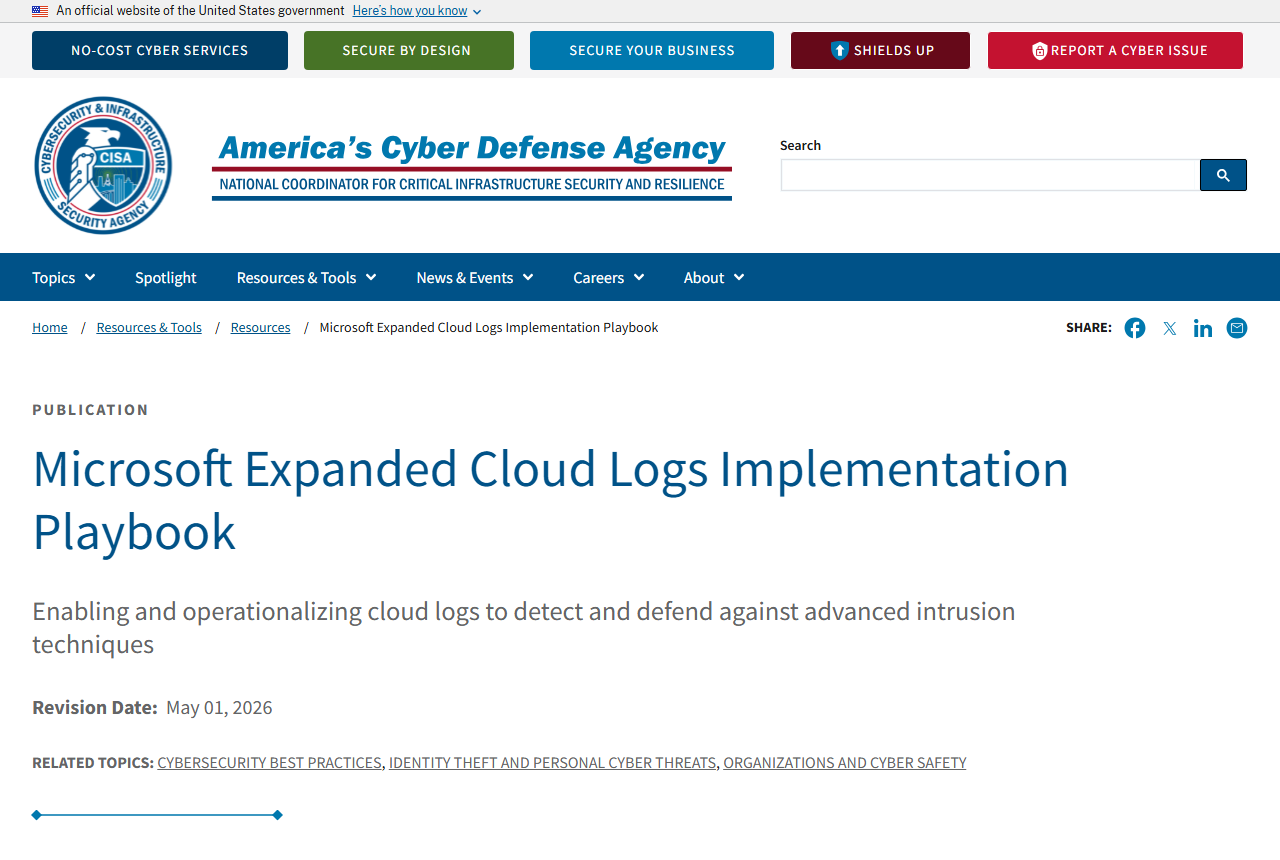
Logging Is a Zero Trust Control
Zero Trust is usually discussed as an access-control model. Verify the user. Verify the device. Evaluate risk. Scope access. Re-check when conditions change.
All true.
The easier layer to miss is action verification.
After authorization, what did the identity do?
- Did the user access mail?
- Did the session search SharePoint or Exchange?
- Did a new inbox rule appear?
- Did an OAuth app gain consent?
- Did a service principal get a new credential?
- Did someone change a Conditional Access policy?
- Did an Azure resource or diagnostic setting get modified?
Those questions are not answered by one table. They are answered by stitching together Entra ID, Microsoft Purview Audit, Microsoft 365 activity, Azure control-plane activity, and Defender alerts.
That is the real value of CISA’s playbook. It pushes defenders past “turn on logs” and toward “use the audit trail to detect and scope intrusion behavior.”
Minimum Viable Cloud Log Set
I would not start by ingesting every possible Microsoft log source and hoping the bill is kind. Start with the logs that answer identity-compromise questions.
| Priority | Log source | Sentinel table or location | Why it matters |
|---|---|---|---|
| Tier 1 | Entra interactive sign-ins | SigninLogs | Shows user sign-ins, app context, MFA, Conditional Access, risk, IP, device, and protocol signals. |
| Tier 1 | Entra non-interactive sign-ins | AADNonInteractiveUserSignInLogs | Shows token refresh and client activity that can matter after a session is stolen or replayed. |
| Tier 1 | Entra audit logs | AuditLogs | Captures directory changes such as app updates, credential additions, role assignments, and policy changes. |
| Tier 1 | Microsoft 365 unified audit | OfficeActivity and Purview audit search | Captures Exchange, SharePoint, OneDrive, Teams, and admin operations that show what happened after sign-in. |
| Tier 1 | Exchange mailbox operations | OfficeActivity / Unified Audit Log operations | Helps detect MailItemsAccessed, Send, inbox rules, mailbox searches, and delegated mailbox abuse. |
| Tier 2 | Azure control-plane activity | AzureActivity | Shows resource changes, Sentinel rule edits, diagnostic setting changes, and subscription-level actions. |
| Tier 2 | Defender and Sentinel alerts | SecurityAlert, incidents, Defender XDR | Adds detection context from Defender products and Sentinel analytics rules. |
| Tier 3 | Graph and specialized workload logs | Product-specific tables or Purview exports | Useful for deeper investigation when a tenant has the licensing and ingestion path to support it. |
The exact connector path depends on licensing, tenant type, and whether you are collecting through Microsoft Sentinel, the Defender portal, Purview, or another SIEM. The coverage goal stays stable. You need both authorization evidence and action evidence.
Lab Evidence: Validate Before You Claim Coverage
I checked this pattern against my Sentinel lab before writing detection guidance. The lab workspace had recent Entra sign-in, non-interactive sign-in, audit, and alert rows. The first pass did not have recent OfficeActivity rows.
That was not just a screenshot problem. It was the lab doing its job.
The Sentinel Microsoft 365 connector was configured for Exchange, SharePoint, and Teams, but Microsoft Purview unified audit ingestion was off in the tenant. I enabled unified audit ingestion, confirmed UnifiedAuditLogIngestionEnabled returned True, refreshed the Sentinel connector, and generated temporary Microsoft 365 workload activity. The first proven row to land in Sentinel was Exchange mailbox telemetry.
The first OfficeActivity row to land was Exchange MailItemsAccessed, which proves the mailbox-action side is now flowing in this lab. The rule stays the same. Do not mark a workload green until OfficeActivity itself shows rows for that workload. Connector configuration is not evidence. Rows are evidence.
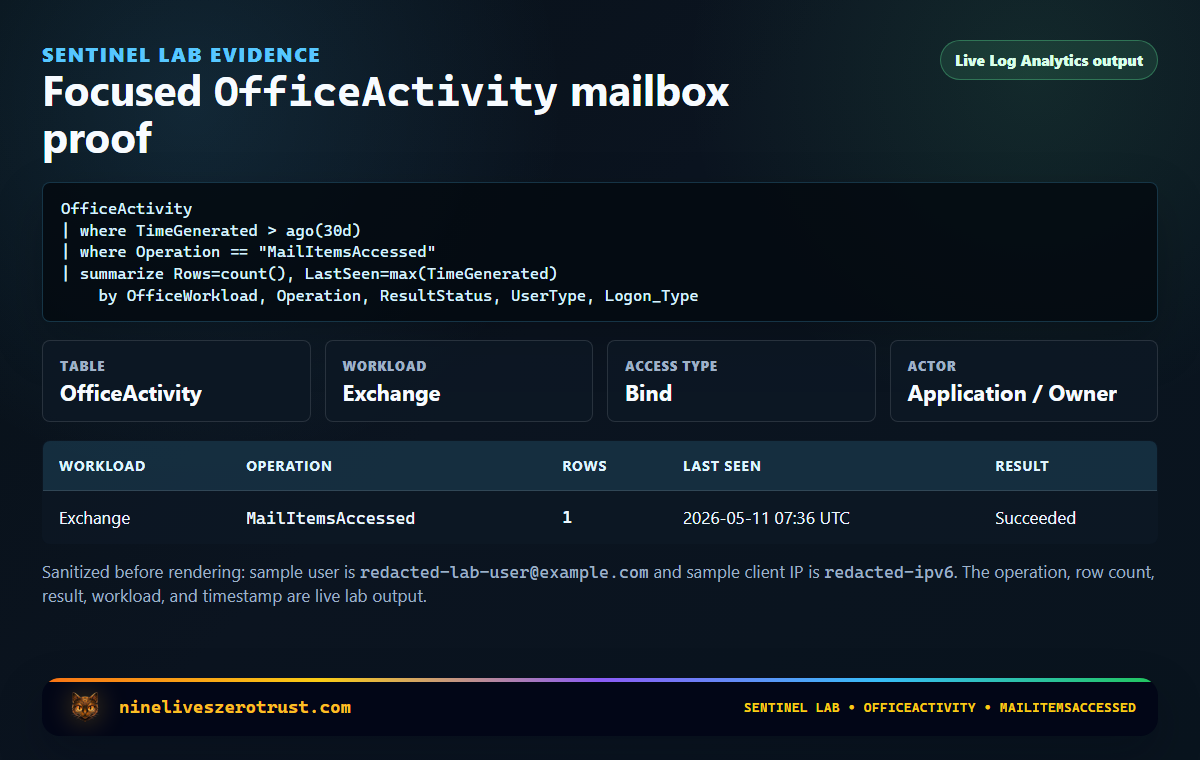
OfficeActivity query.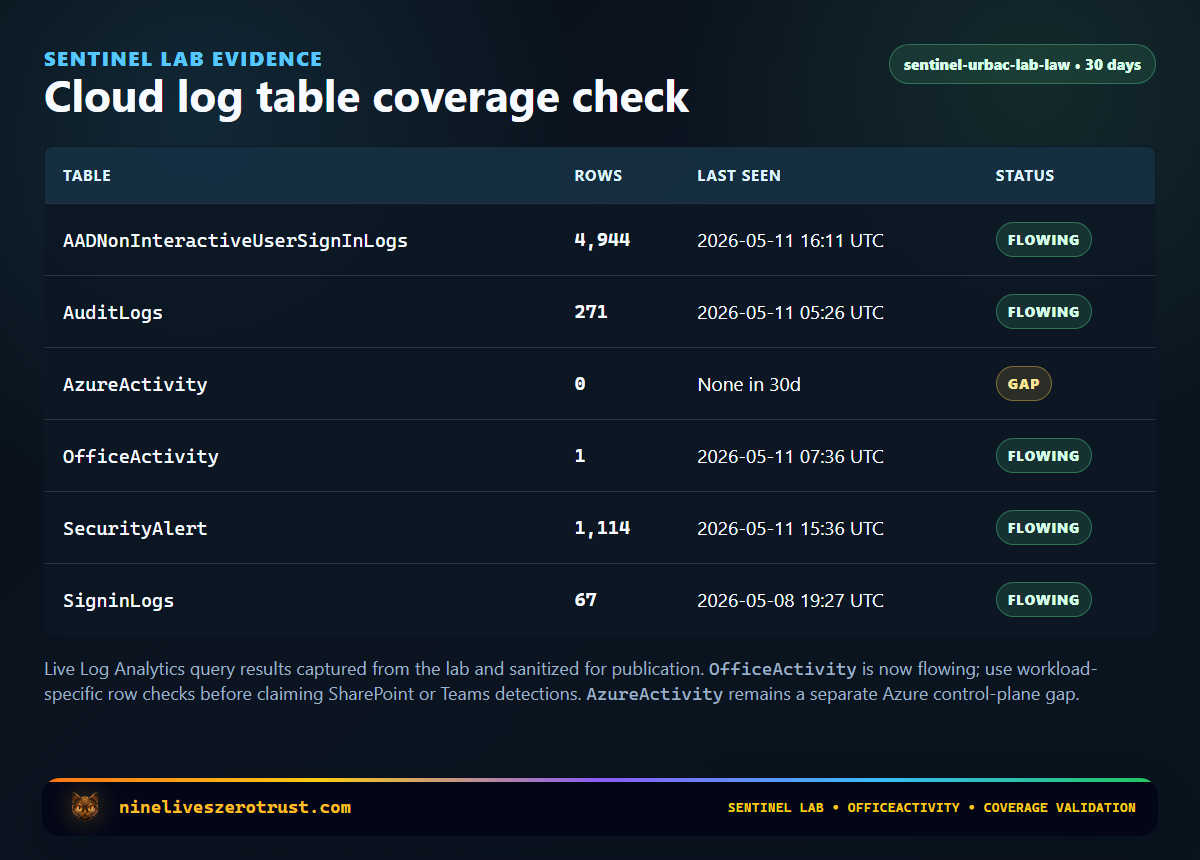
OfficeActivity is flowing for Exchange mailbox activity in this capture; SharePoint and Teams still need workload-specific row checks before claiming those detections.The populated rows are useful because they show that identity sign-ins, directory audit events, Sentinel/Defender alerts, and Exchange mailbox activity are available for correlation.
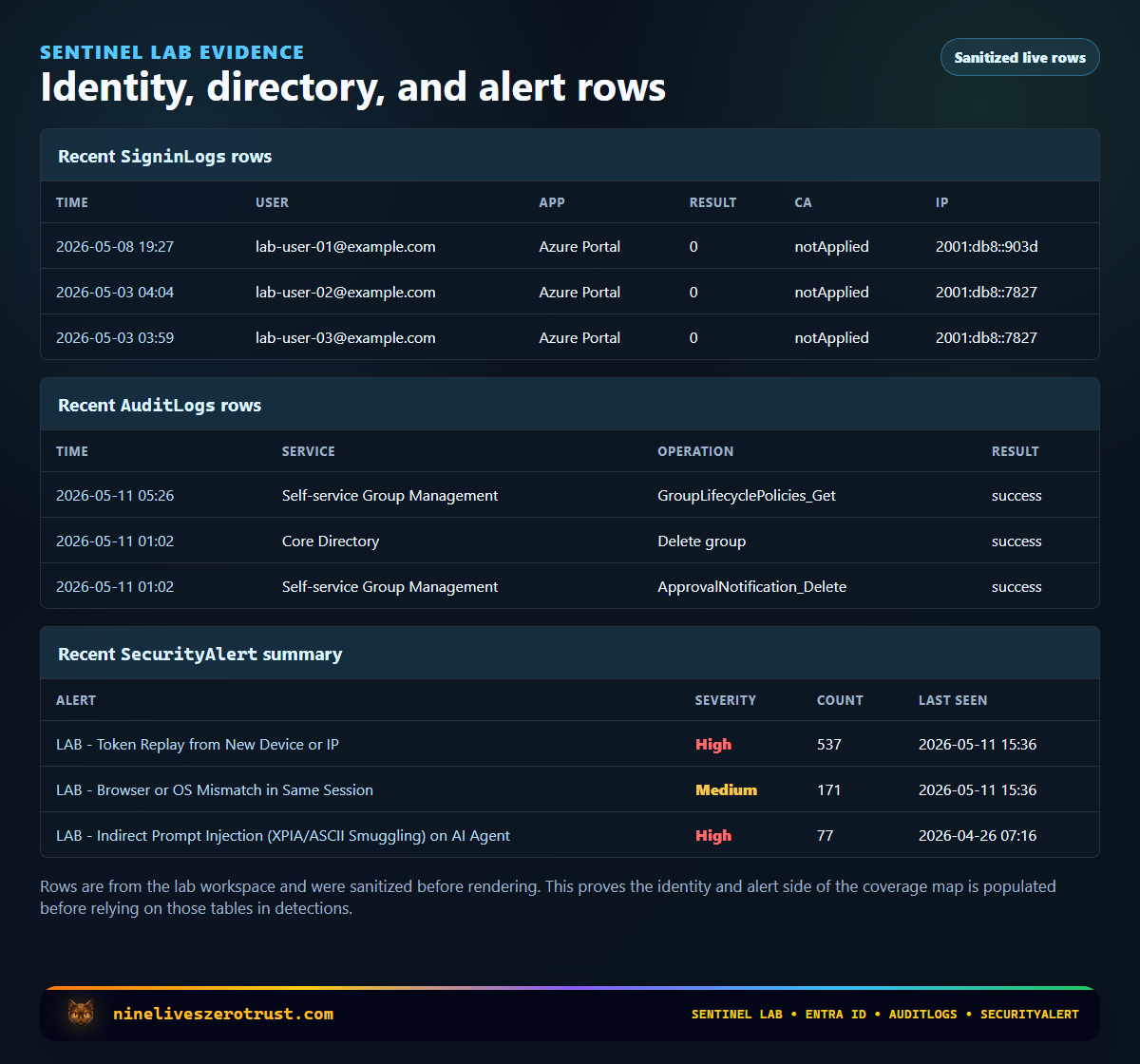
SigninLogs, AuditLogs, and SecurityAlert. The tenant values are redacted, but the operations and alert types show the correlation surface present in this capture.What This Lets You Detect
Device Code Phishing
Device code phishing is not just a weird sign-in pattern. It is a post-authentication problem. The attacker wants a token, then wants to use that token somewhere useful.
For the sign-in side, start with SigninLogs. Look primarily for AuthenticationProtocol == "deviceCode", suspicious app/client combinations, and successful authentication from unusual infrastructure. AADSTS50199 can be useful context in some device or native-app flows, but it is not a device-code-specific phishing signal by itself. I covered the detection flow in more detail in Block Device Code Phishing in Entra Without Breaking Legit Workflows.
Then pivot.
The question is not only “did the user approve a device code?” It is “what did the session do next?”
That is where OfficeActivity matters. Mail access, sends, inbox rules, SharePoint access, Teams activity, and search events can turn a suspicious sign-in into a scoped incident.
Session Hijacking and AiTM
Microsoft’s May 4, 2026 write-up on a multi-stage code-of-conduct phishing campaign described adversary-in-the-middle token compromise targeting more than 35,000 users across more than 13,000 organizations. That kind of attack can make a sign-in look legitimate enough to pass basic checks.
The hunting move is to correlate the sign-in with the follow-on trail.
- interactive sign-in from unusual infrastructure
- non-interactive token activity after the initial sign-in
- mailbox access from a new client or IP
- Exchange searches for sensitive terms
- inbox rule creation
- SharePoint or OneDrive access outside normal behavior
This is why AADNonInteractiveUserSignInLogs should not be treated as optional noise. Token refresh and client activity can be part of the story after the browser ceremony is over.
For more on the session side, see Detecting Infostealer Session Hijacking with Microsoft Sentinel.
OAuth and Application Abuse
OAuth abuse often leaves the classic login lane and moves into app and consent behavior. For that, AuditLogs becomes the first stop.
Ask questions like these:
- Was a new app registration created?
- Was an app granted consent?
- Was a credential added to an existing app?
- Did a service principal receive a privileged role?
- Did an app begin signing in from a new network or geography?
That connects directly to Detecting OAuth Redirect Abuse with Microsoft Sentinel and Entra ID. The sign-in tells you who authenticated. The audit log tells you what changed in the identity plane.
Mailbox Abuse
CISA’s playbook pays close attention to Microsoft Purview Audit events because mailbox and collaboration activity can reveal attacker intent.
The important events are not exotic.
MailItemsAccessedSendSearchQueryInitiatedExchangeSearchQueryInitiatedSharePoint- inbox rule creation or modification
- delegated mailbox access
- SharePoint and OneDrive file access
- Teams interaction history
Validate the exact Operation values in your own tenant before turning this into a rule. Microsoft documentation and product surfaces use more than one naming layer for search activity; SearchQueryInitiatedExchange and SearchQueryInitiatedSharePoint are the enablement event names, while other audit views may expose related search operations differently.
Those events help answer the question every incident lead eventually asks. What did they touch?
If a risky sign-in is followed by Exchange searches for “wire”, “invoice”, “password”, “contract”, or executive names, that is different from a sign-in with no downstream activity. If a mailbox starts sending or creating forwarding rules after token theft, that is no longer just an identity alert. That is business email compromise territory.
Cloud Resource Tampering
AzureActivity is not the center of the CISA playbook, but it belongs in the same Sentinel conversation.
Identity compromise does not always stop in mail. A compromised admin, service principal, or automation identity can modify Azure resources, diagnostic settings, Sentinel analytics rules, storage accounts, Key Vaults, role assignments, or policy objects.
For Microsoft-centric cloud response, AzureActivity gives you the broad control-plane trail that connects identity compromise to cloud blast radius. If you enable Sentinel health and auditing, SentinelAudit can add a more specific trail for analytics rule changes. SecurityAlert gives you alert context when Defender products or Sentinel rules detect part of the chain.
A Small KQL Pivot
This is not meant to be a production-ready analytic rule. Treat it as a hunting pattern for risky successful sign-ins followed by mailbox and collaboration activity. I would hunt blocked Conditional Access outcomes separately; ConditionalAccessStatus == "failure" means a triggered policy recorded a failure outcome, not that Conditional Access failed to evaluate.
let riskyUsers =
SigninLogs
| where TimeGenerated > ago(24h)
| where ResultType == 0
| where RiskLevelDuringSignIn in~ ("medium", "high")
    or RiskLevelAggregated in~ ("medium", "high")
    or IsRisky == true
| summarize
    FirstRiskySignIn = min(TimeGenerated),
    SignInApps = make_set(AppDisplayName, 5),
    SignInIPs = make_set(IPAddress, 5)
    by UserPrincipalName;
OfficeActivity
| where TimeGenerated > ago(24h)
// Validate search operation names against your tenant's OfficeActivity data.
| where Operation in~ (
    "MailItemsAccessed",
    "Send",
    "New-InboxRule",
    "Set-InboxRule",
    "SearchQueryInitiatedExchange",
    "SearchQueryInitiatedSharePoint"
)
| join kind=inner riskyUsers on $left.UserId == $right.UserPrincipalName
| where TimeGenerated between (FirstRiskySignIn .. FirstRiskySignIn + 6h)
| project
    TimeGenerated,
    UserId,
    OfficeWorkload,
    Operation,
    ClientIP,
    FirstRiskySignIn,
    SignInApps,
    SignInIPs,
    ResultStatus
| order by TimeGenerated desc
If that returns data, do not stop at the query. Pull the user’s sign-in timeline, mailbox operations, app consent history, role changes, and Defender alerts into one incident view. I am not showing a pretend joined result set here; the live lab output in this post is the coverage table and sanitized row evidence above.
Priority Tiers If Cost Matters
If budget or noise forces hard choices, make the tradeoff explicit.
Tier 1 - Identity attack visibility
SigninLogsAADNonInteractiveUserSignInLogsAuditLogsOfficeActivityfor Exchange, SharePoint, OneDrive, and Teams activity
These answer the most important identity incident questions. Who signed in, what app was involved, what changed, what mailbox or file activity followed, and whether the activity looks like a compromise.
Tier 2 - Investigation depth
AzureActivitySentinelAuditwhere Sentinel health and auditing are enabledSecurityAlert- Defender XDR advanced hunting tables where licensed and connected
- workload-specific logs for high-value systems
These help connect identity activity to control-plane changes, workload alerts, and cloud resource impact.
Tier 3 - Specialty coverage
- Graph activity where available
- long-retention exports
- data lake federation
- application-specific audit streams
These are useful, but I would not let them distract from getting the core identity and Microsoft 365 audit trail right first.
Things I Would Not Do
I would not rely only on SecurityAlert. Alerts are conclusions. Logs are evidence. You need both.
I would not assume Purview retention and Sentinel retention are the same thing. CISA notes that Microsoft increased default Audit Standard retention to 180 days in the Purview portal, but your Sentinel retention and archive strategy are separate operational decisions.
I would not skip non-interactive sign-ins because the table is noisy. Modern attacks often live in token behavior after the first successful authentication event.
I would not write detections that only ask “was the login suspicious?” The better detections ask, “was the login suspicious, and did sensitive activity follow?”
And I would not treat this as a compliance checkbox. The goal is not to prove logs are enabled. The goal is to make an attacker visible while there is still time to contain them.
Final Takeaway
Cloud logs are not forensic exhaust. They are the evidence layer for Zero Trust.
If identity is the new perimeter, telemetry is how you prove what crossed it.
CISA’s updated playbook is useful because it brings the conversation back to the defender’s real job. Turn authorization events into action-level visibility. In Sentinel, that means correlating Entra sign-ins, non-interactive activity, directory changes, Microsoft 365 audit events, Azure control-plane operations, and Defender alerts into one story.
The win is not collecting more data for its own sake.
The win is being able to answer the question that matters after a suspicious sign-in.
What did the identity do next?
References
- CISA. Microsoft Expanded Cloud Logs Implementation Playbook. Original resource page published January 15, 2025.
- CISA. Microsoft Expanded Cloud Logs Implementation Playbook v1.1 (PDF). May 2026 revision; its revision history preserves the January 2025 initial release.
- Microsoft Learn. Get started with auditing solutions.
- Microsoft Learn. Send data to Microsoft Sentinel using the Microsoft Entra ID data connector.
- Microsoft Learn. SigninLogs table reference.
- Microsoft Learn. OfficeActivity table reference.
- Microsoft Learn. AzureActivity table reference.
- Microsoft Learn. SecurityAlert table reference.
- Microsoft Learn. SentinelAudit table reference.
- Microsoft Learn. Microsoft Entra authentication and authorization error codes.
- Microsoft Security Blog. Breaking the code: Multi-stage “code of conduct” phishing campaign leads to AiTM token compromise.
- Microsoft Security Blog. Inside an AI-enabled device code phishing campaign.

Jerrad Dahlager, CISSP, CCSP
Cloud Security Architect · Adjunct Instructor
Marine Corps veteran and firm believer that the best security survives contact with reality.
Have thoughts on this post? I'd love to hear from you.