On this page
A Linux local privilege escalation bug is easy to dismiss if you only think in traditional server terms. An attacker already needs local access, so how bad can it be?
In cloud environments, that assumption breaks fast.
A compromised container, a self-hosted CI runner, a developer box, a notebook environment, or a low-privileged shell on a Linux workload can all become the starting point for something much bigger. With CVE-2026-31431, also known as Copy Fail, the concern is not just a single Linux host. The concern is what happens when local code execution meets a shared kernel, container workloads, cloud identities, and production infrastructure.
Microsoft Defender Security Research published its Copy Fail research on May 1, 2026. Microsoft describes CVE-2026-31431 as a high-severity Linux local privilege escalation vulnerability in the kernel cryptographic subsystem affecting major distributions, cloud Linux workloads, CI/CD environments, and Kubernetes clusters.
This post is a defensive response guide. No exploit code, no curl-to-root commands, and no reproduction steps. The goal is simple. Answer the questions a Microsoft-centric defender actually needs answered.
- Which Linux assets are exposed?
- Did Defender detect suspicious Copy Fail activity?
- Which cloud resources, clusters, or node pools are involved?
- What should be patched, isolated, recycled, rotated, or monitored?
Safety note. This guide is defensive. Do not run public exploit code outside systems you own or are explicitly authorized to test.
Agenda
- What Microsoft published about CVE-2026-31431.
- Why a “local” Linux privilege escalation becomes a cloud and Kubernetes problem.
- How Copy Fail changes the risk model for containers, CI runners, and shared Linux nodes.
- How to identify exposed devices with Microsoft Defender Vulnerability Management.
- How to hunt Defender XDR alerts and Linux process activity tied to Copy Fail.
- How to triage Defender for Cloud alerts in Microsoft Sentinel.
- How to validate AKS node image status and patch posture.
- What to do in the first 24 hours, from patching and isolation to rotation, recycling, and monitoring.
TL;DR
Copy Fail is tracked as CVE-2026-31431. As checked on May 3, 2026, NVD lists the CNA/kernel.org CVSS v3.1 score as 7.8 High with the vector AV:L/AC:L/PR:L/UI:N/S:U/C:H/I:H/A:H. NVD’s own assessment is not yet provided and the record can change as it is updated. CISA’s Known Exploited Vulnerabilities catalog lists CVE-2026-31431 with a May 1, 2026 date added and a May 15, 2026 due date for FCEB agencies under BOD 22-01. Other organizations should treat that date as a prioritization signal.
Microsoft’s May 1 research says the vulnerability can allow an unprivileged local user to escalate to root, affects multiple major Linux distributions, and becomes especially dangerous in cloud, CI/CD, and Kubernetes environments where untrusted or semi-trusted code can run on shared Linux hosts.
Start with the basics.
- Patch vulnerable Linux kernels.
- Inventory exposed devices with Microsoft Defender Vulnerability Management.
- Review Microsoft Defender XDR and Defender for Cloud detections.
- Treat suspicious container execution as possible node compromise.
- Recycle or rebuild affected nodes after credible compromise indicators.
- Use Microsoft Sentinel to centralize alerting, triage, and response.
What is Copy Fail?
Copy Fail is a Linux kernel local privilege escalation vulnerability. Microsoft’s write-up describes it as a logic flaw in the algif_aead module of the AF_ALG userspace crypto API. In practical defender terms, an attacker who can execute code as a local low-privileged user on a vulnerable kernel may be able to corrupt the page cache of readable files, including privileged binaries, in a way that can lead to root-level execution.
That does not make the vulnerability remotely exploitable by itself. Microsoft is careful about that distinction. The risk comes from chaining it after SSH access, malicious CI execution, a compromised container, a vulnerable web application, or any other path that gives the attacker local code execution first.
That is exactly why this is a cloud security story.
Why this matters in the cloud
“Local privilege escalation” sounds narrow until you map what “local” means in modern infrastructure.
A local foothold could be any of these.
- A compromised web container.
- A malicious CI job running on a self-hosted runner.
- A notebook or data science environment that executes untrusted code.
- A stolen SSH credential on a Linux jump host.
- A container with a mounted service account token.
- A build agent with access to source, artifacts, secrets, or cloud deployment roles.
- A pod running on the same node as more sensitive workloads.
Containers share the host kernel. CI runners execute code by design. Developer and build systems often have privileged network reach. Depending on configuration, Kubernetes node compromise can expose credentials, node certificates, workload identity paths, managed identity access, or cloud API reach.
The Zero Trust lesson is uncomfortable but useful. Do not treat “inside the node” as trusted. A pod, job, shell, or low-privileged Linux user should never be assumed harmless just because it does not start as root.
Microsoft Defender coverage
Microsoft’s May 1 research lists Defender coverage across several surfaces.
Exploit:Linux/CopyFailExpDl.A Exploit:Python/CopyFail.A Exploit:Linux/CVE-2026-31431.A Behavior:Linux/CVE-2026-31431Possible CVE-2026-31431 ("Copy Fail") vulnerability exploitationPotential exploitation of copy-fail vulnerability detectedThat leaves defenders with three jobs.
- Exposure. Which Linux devices are vulnerable?
- Detection. Did Defender observe suspicious Copy Fail activity?
- Cloud response. Which workloads, subscriptions, clusters, or node pools need containment and patching?
Validation architecture
Keep this validation defensive. You do not need exploit code to test the response path.
If you validate this workflow in a controlled Azure tenant, use a small setup.
- Microsoft Sentinel workspace.
- Microsoft Defender for Cloud enabled.
- Defender for Servers Plan 2 where available.
- Microsoft Defender for Endpoint onboarded to Linux test systems.
- A Linux VM or AKS node pool for posture validation.
- Optional AKS cluster with a Linux node pool.
- A simulated suspicious process chain or a private, authorized validation signal.
The goal is to validate the workflow before a real alert lands.
- Find exposed Linux assets.
- Search Defender XDR for product detections.
- Use process hunting only as a triage lens.
- Confirm Defender for Cloud alerts flow into Sentinel.
- Validate AKS node image patch posture.
- Decide whether to patch in place, isolate, recycle, or rebuild.
For this article, I validated the Sentinel and AKS response path in a controlled Azure environment without running Copy Fail exploit code. Azure Resource Manager showed Defender security monitoring enabled for aks-copyfail-lab, and Sentinel contained two Privileged container detected rows for that cluster. Azure Monitor profile collection was not enabled on the cluster, so the canary observation landed in the fallback CopyFailAksCapture_CL table instead of ContainerLogV2.
Validation evidence
The portal evidence screenshot below is from the Azure portal Logs blade. It is cropped to remove browser chrome and the account header. The generated screenshots after it are rendered from live Azure Resource Manager and Log Analytics queries so the values stay readable in the article.
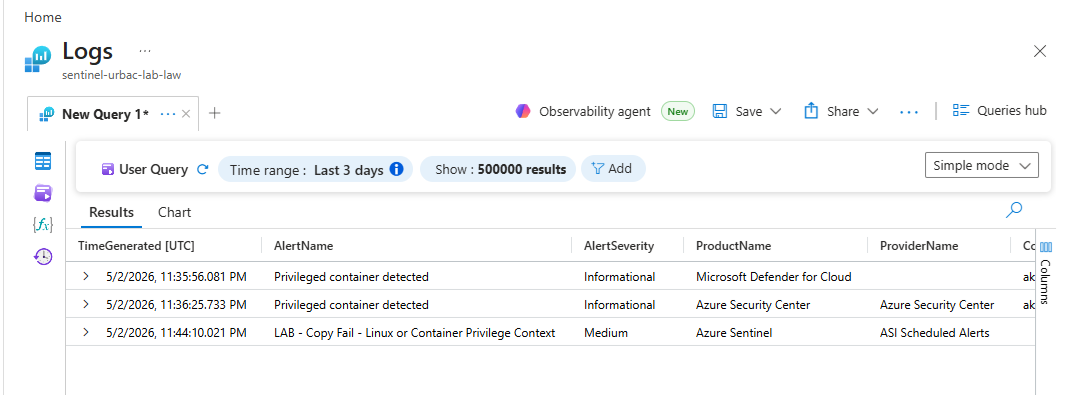
Privileged container detected rows and one Copy Fail validation rule row in SecurityAlert. The crop removes the browser chrome and account header.These generated screenshots are sanitized to omit tenant, subscription, and raw entity payload details.
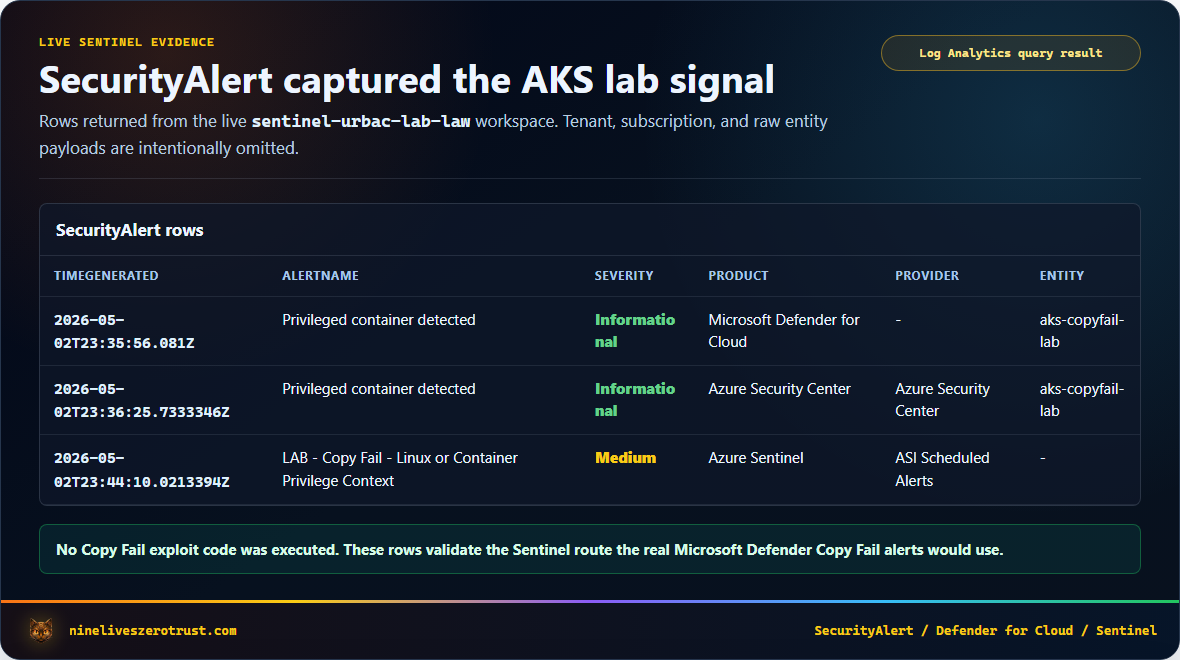
SecurityAlert rows from the validation workspace. Open the image for full-size table detail.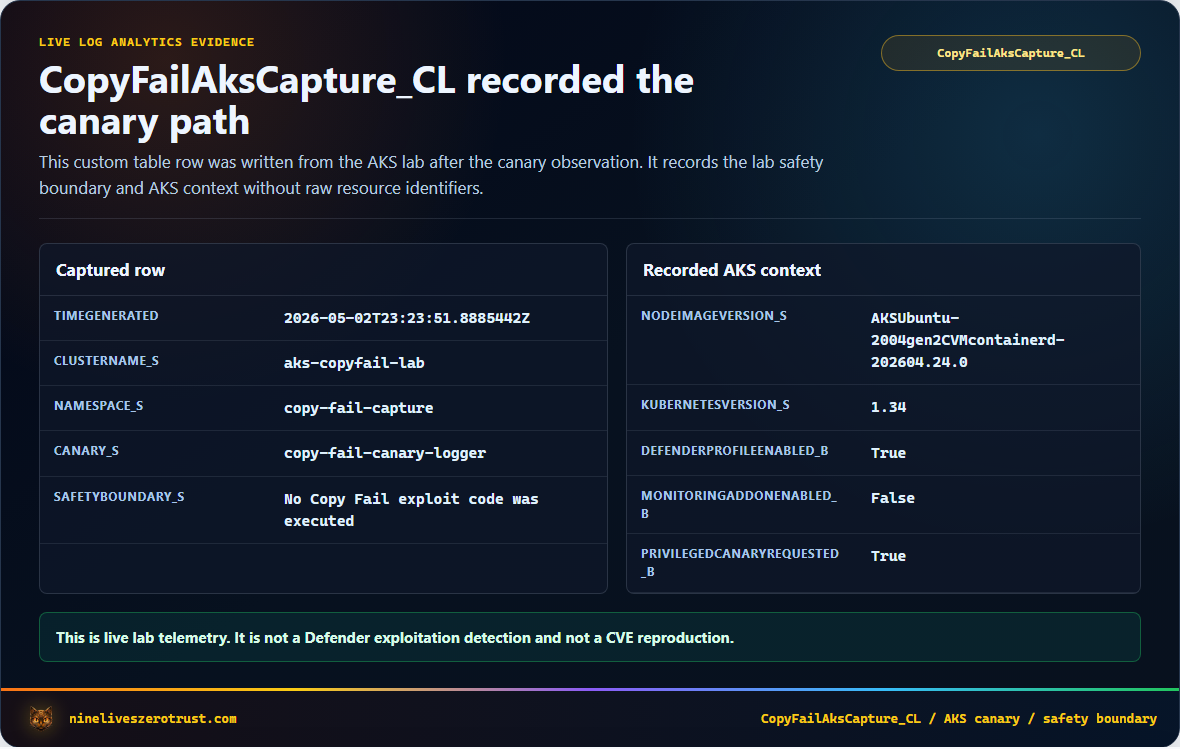
CopyFailAksCapture_CL row documenting the canary capture path. Open the image for full-size table detail.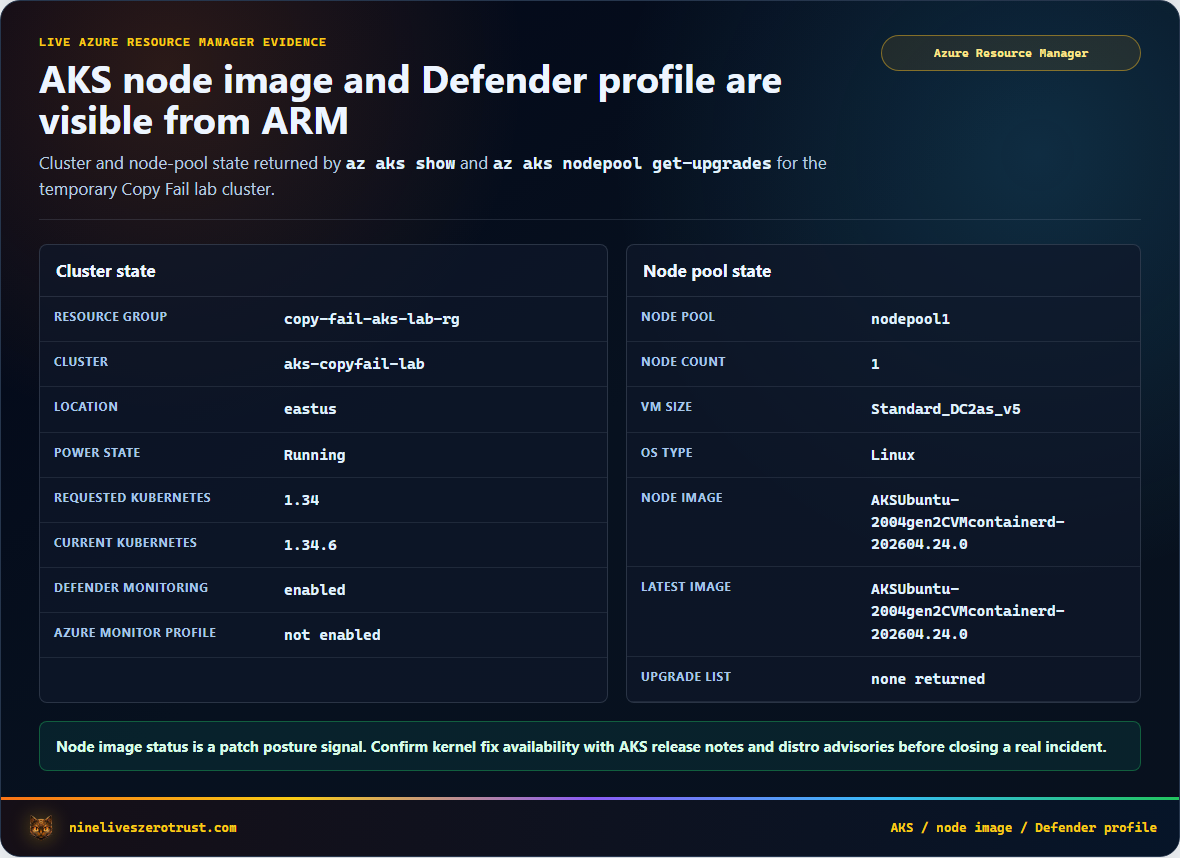
Exposure hunting with MDVM
Microsoft’s DeviceTvmSoftwareVulnerabilities advanced hunting table contains vulnerability records from Microsoft Defender Vulnerability Management, including OS information, CVE IDs, severity, and recommended updates. That makes it a fast path from headline CVE to asset inventory.
Find devices where Defender Vulnerability Management has surfaced CVE-2026-31431.
DeviceTvmSoftwareVulnerabilities
| where CveId == "CVE-2026-31431"
| project
    DeviceName,
    OSPlatform,
    OSVersion,
    OSArchitecture,
    SoftwareVendor,
    SoftwareName,
    SoftwareVersion,
    VulnerabilitySeverityLevel,
    RecommendedSecurityUpdate,
    RecommendedSecurityUpdateId,
    CveTags
| order by DeviceName asc
Then summarize by operating system and recommended update.
DeviceTvmSoftwareVulnerabilities
| where CveId == "CVE-2026-31431"
| summarize
    Devices=dcount(DeviceName),
    ExampleDevices=make_set(DeviceName, 10)
    by OSPlatform, OSVersion, VulnerabilitySeverityLevel, RecommendedSecurityUpdate
| order by Devices desc
This is where the incident response clock should start. Before writing clever detections, find the blast radius. Prioritize exposed assets by production criticality, internet exposure, Kubernetes membership, CI/CD role, and whether the workload has access to sensitive cloud identities or secrets.
Hunting Defender XDR alerts
Microsoft Defender XDR advanced hunting gives you two useful alert tables for endpoint-side and Defender XDR alert investigation. Defender for Cloud alerts are safer to hunt in Sentinel SecurityAlert unless your tenant explicitly routes the needed alert data into Defender XDR.
AlertInfostores alert metadata such as title, severity, category, service source, and detection source.AlertEvidencestores related entities such as devices, users, files, command lines, cloud resources, resource IDs, and subscription IDs.
Use this query to find Copy Fail-related alerts and their evidence.
let copyFailTerms = dynamic(["Copy Fail", "copy-fail", "CVE-2026-31431", "CopyFail"]);
AlertInfo
| where Timestamp > ago(14d)
| where Title has_any (copyFailTerms)
| project
    Timestamp,
    AlertId,
    Title,
    Severity,
    Category,
    ServiceSource,
    DetectionSource,
    AttackTechniques
| join kind=leftouter (
    AlertEvidence
    | project
        AlertId,
        EntityType,
        EvidenceRole,
        DeviceName,
        AccountName,
        AccountUpn,
        FileName,
        FolderPath,
        ProcessCommandLine,
        CloudResource,
        ResourceType,
        ResourceID,
        SubscriptionId
) on AlertId
| order by Timestamp desc
You can also run a triage query for suspicious Linux process lineage. This is not a Copy Fail signature. It is a lens for suspicious interpreter-to-privileged-utility behavior on Linux devices, especially when you already have exposure or alert context.
let LinuxDevices =
    DeviceInfo
    | summarize arg_max(Timestamp, OSPlatform, OSVersion, DeviceName) by DeviceId
    | where OSPlatform has_any ("Linux", "Ubuntu", "Debian", "RedHat", "RHEL", "SUSE", "Amazon");
let SuspectInterpreters = dynamic(["python", "python3", "perl", "ruby", "bash", "sh"]);
let PrivilegedUtilities = dynamic(["su", "sudo", "pkexec", "passwd", "mount", "umount", "newgrp", "chsh", "chfn"]);
DeviceProcessEvents
| where Timestamp > ago(7d)
| join kind=inner LinuxDevices on DeviceId
| where FileName in~ (PrivilegedUtilities)
| where InitiatingProcessFileName in~ (SuspectInterpreters)
    or InitiatingProcessCommandLine has_any ("AF_ALG", "algif", "splice", "CVE-2026-31431", "Copy Fail", "CopyFail")
    or ProcessCommandLine has_any ("AF_ALG", "algif", "splice", "CVE-2026-31431", "Copy Fail", "CopyFail")
| project
    Timestamp,
    DeviceName,
    OSPlatform,
    OSVersion,
    AccountName,
    FileName,
    ProcessCommandLine,
    InitiatingProcessFileName,
    InitiatingProcessCommandLine,
    InitiatingProcessParentFileName
| order by Timestamp desc
Do not treat this query as proof of exploitation. Treat it as a triage lens. The strongest case comes from Defender detections, vulnerable asset context, suspicious process lineage, cloud resource context, and whether the workload had a plausible initial-access path.
Sentinel view
Defender for Cloud alerts can be ingested into Microsoft Sentinel, giving the SOC a broader place to correlate cloud workload alerts with identity, endpoint, Kubernetes, and network telemetry.
Sentinel’s SecurityAlert table includes fields such as AlertName, AlertSeverity, ProductName, ProviderName, CompromisedEntity, Entities, ExtendedProperties, and AlertLink. For screenshots and shared validation evidence, avoid projecting raw Entities or ExtendedProperties by default; those fields can contain command-line material, tokens, or other sensitive incident context.
Search for Copy Fail-related Defender alerts in Sentinel.
SecurityAlert
| where TimeGenerated > ago(14d)
| where ProviderName != 'ASI Scheduled Alerts'
| where AlertName has_any ('Copy Fail', 'copy-fail', 'CVE-2026-31431', 'CopyFail')
    or AlertType has_any ('Copy Fail', 'copy-fail', 'CVE-2026-31431', 'CopyFail')
    or Description has_any ('Copy Fail', 'copy-fail', 'CVE-2026-31431', 'CopyFail')
| extend
    ExtendedPropertyKeys = bag_keys(parse_json(ExtendedProperties)),
    RawDetailsAvailable = isnotempty(Entities) or isnotempty(ExtendedProperties)
| project
    TimeGenerated,
    AlertName,
    AlertSeverity,
    ProductName,
    ProviderName,
    CompromisedEntity,
    RawDetailsAvailable,
    ExtendedPropertyKeys,
    AlertLink
| order by TimeGenerated desc
Summarize by product and provider.
SecurityAlert
| where TimeGenerated > ago(14d)
| where ProviderName != 'ASI Scheduled Alerts'
| where AlertName has_any ('Copy Fail', 'copy-fail', 'CVE-2026-31431', 'CopyFail')
    or AlertType has_any ('Copy Fail', 'copy-fail', 'CVE-2026-31431', 'CopyFail')
    or Description has_any ('Copy Fail', 'copy-fail', 'CVE-2026-31431', 'CopyFail')
| summarize Alerts=count(), Entities=make_set(CompromisedEntity, 20) by ProductName, ProviderName, AlertSeverity
| order by Alerts desc
SecurityAlert to collect Copy Fail signals, detect multiple impacted entities, and surface nearby Linux or container privilege context.Privileged container detected rows for aks-copyfail-lab and one scheduled validation alert. A real Copy Fail alert would use the same SecurityAlert triage path.One practical reminder from previous Defender for Cloud validation work is to validate the alert route in your own tenant. Depending on whether you use Sentinel in the Azure portal, Sentinel in the Defender portal, Defender XDR incident integration, subscription-based connectors, tenant-based connectors, or Continuous Export, alert routing can look different. Trigger or locate a fresh alert and confirm rows actually appear where your SOC expects them.
AKS patch and node image response
For AKS, do not stop at workload container images. Copy Fail lives in the Linux kernel, so the node image and kernel patch state matter.
Microsoft’s AKS node image guidance points to three response jobs.
- Check available node image upgrades with
az aks nodepool get-upgrades. - Compare your current
nodeImageVersion. - Upgrade node images with
--node-image-onlywhen an updated image is available, then verify fix availability against AKS release notes, your Linux distribution advisory, or the resulting kernel version.
Check node pool image versions.
az aks show \
  --resource-group <resource-group> \
  --name <cluster-name> \
  --query "agentPoolProfiles[].{name:name, osSku:osSku, nodeImageVersion:nodeImageVersion, orchestratorVersion:orchestratorVersion}" \
  --output table
Check available node image upgrades.
az aks nodepool get-upgrades \
  --resource-group <resource-group> \
  --cluster-name <cluster-name> \
  --nodepool-name <nodepool-name> \
  --output table
Microsoft’s AKS guidance also documents a Kubernetes label for node image versions.
kubectl get nodes -o jsonpath='{range .items[*]}{.metadata.name}{"\t"}{.metadata.labels.kubernetes\.azure\.com\/node-image-version}{"\n"}{end}'
If that label is absent in your cluster, use kubectl get nodes -o wide for kernel and node context and rely on Azure CLI for the authoritative nodeImageVersion.
Upgrade a specific node pool image without upgrading Kubernetes.
az aks nodepool upgrade \
  --resource-group <resource-group> \
  --cluster-name <cluster-name> \
  --name <nodepool-name> \
  --node-image-only
--node-image-only, then verify the kernel fix from trusted release data.If a cluster has credible exploitation indicators, patching alone may not be enough. Treat the node as potentially compromised, especially if the original foothold was a container, CI workload, or service with access to secrets.
The response plan should include these steps.
- Cordon and drain suspicious nodes.
- Recycle or rebuild nodes after credible compromise.
- Patch node images.
- Rotate secrets available to affected workloads.
- Review workload identities and managed identities.
- Check lateral movement from the node.
- Review recent Kubernetes API activity.
- Validate Defender and Sentinel alerts.
Zero Trust response checklist
0-24 hours
- Identify vulnerable Linux devices and AKS node pools.
- Prioritize internet-facing, CI/CD, shared, and Kubernetes workloads.
- Patch kernels or update node images where fixes are available.
- Search Defender XDR alerts for Copy Fail detections.
- Search Sentinel for Defender for Cloud alerts.
- Review suspicious local execution on Linux systems.
- Isolate suspicious hosts or nodes.
- Treat suspicious container execution as potential node compromise.
24-72 hours
- Enable or validate Microsoft Defender for Endpoint on Linux systems.
- Enable Defender for Cloud workload protections where appropriate.
- Confirm Defender for Cloud alerts flow into Sentinel.
- Review CI runners and self-hosted build agents.
- Review privileged containers, host mounts, and workload identities.
- Rotate secrets exposed to suspicious workloads.
- Recycle nodes where exploitation is suspected.
- Document patch state and remaining exceptions.
Long-term
- Use automatic node image upgrades for AKS.
- Track AKS release status by region.
- Reduce privileged pods and hostPath mounts.
- Segment CI runners from production networks.
- Use just-in-time access for Linux administration.
- Alert on suspicious interpreter execution followed by privileged utilities.
- Maintain an emergency kernel patching playbook.
Lessons learned
Copy Fail is a reminder that cloud security is not only about cloud control planes. The Linux kernel still matters. Container boundaries still depend on the host. CI runners still execute code. A “local” bug can become a cloud incident when the local system is part of a larger identity, workload, or Kubernetes environment.
The Zero Trust move is to assume that any foothold can become a privilege boundary test.
Find the exposed systems. Hunt the detections. Patch the kernel. Recycle the node. Reduce the blast radius.
That is how a headline CVE becomes a practical Microsoft Defender and Sentinel response workflow.
What This Guide Does Not Claim
This guide does not claim exploitation in your tenant. It intentionally avoids exploit code and uses Defender and Sentinel response paths instead.
It does not claim that every Microsoft Defender table or alert type is populated in every tenant. MDVM, Defender for Endpoint, Defender for Cloud, and Sentinel ingestion depend on licensing, onboarding, connector state, and tenant rollout.
It does not replace patch validation from your Linux distribution, AKS release channel, or cloud platform. Treat the KQL examples as response accelerators, not as the source of truth for kernel fix availability.
What it does show is the workflow I would want ready before the alert lands. Start with exposure, move to Defender evidence, centralize triage in Sentinel, and ground node recovery decisions in blast radius.
Sources
- Microsoft Security Blog, CVE-2026-31431 Copy Fail vulnerability enables Linux root privilege escalation across cloud environments
- NVD CVE-2026-31431
- CISA Known Exploited Vulnerabilities Catalog for CVE-2026-31431
- Microsoft Learn, DeviceTvmSoftwareVulnerabilities table
- Microsoft Learn, AlertInfo table
- Microsoft Learn, AlertEvidence table
- Microsoft Learn, SecurityAlert table
- Microsoft Learn, AKS node image upgrades
- Microsoft Learn, ingest Microsoft Defender for Cloud alerts to Microsoft Sentinel

Jerrad Dahlager, CISSP, CCSP
Cloud Security Architect · Adjunct Instructor
Marine Corps veteran and firm believer that the best security survives contact with reality.
Have thoughts on this post? I'd love to hear from you.