On this page
Review update (September 25, 2026): The merged source disables Shared Key, uses the stable 2025-06-01 account settings API, scopes every StorageBlobLogs workbook panel to the lab account, and shows four correctly defined KPI tiles. It passed 35 offline tests, both Bicep builds, hash-locked SDK install/import and semantic analysis of all 12 rule/workbook queries. These checks did not deploy Azure resources or reproduce the April captures. Host antivirus can block the EICAR file; record that outcome without disabling protection.
Review update (September 25, 2026): The wrapper order is pricing, owned resource group/templates, disabled rules, connector, continuous export, then workbook. Preserve this order when diagnosing partial failure. The anonymous helper needs
STORAGE_ACCOUNT, and authenticated validation additionally needs the intended data-plane role. The merged README now matches the deployed account-only protection, ownership receipts and query contracts. Treat the attack-pattern inventory as practitioner context, not a statistically measured prevalence claim. NativeStorage.Blob_MalwareDownloadalerts can complement the post-detection correlation. Container-scoped on-demand scanning has a separately documented preview API path; do not assume the account-wide CLI command accepts a container scope.
Review update (September 25, 2026): A blob-tag ABAC condition is not a universal quarantine boundary. Disable Shared Key/account and service SAS paths where required, remove unconditioned read grants and anonymous access, and restrict tag-write permissions. The merged lab defaults to account-level protection and preserves shared subscription pricing and Sensitive Data Discovery. Optional subscription scanning requires two explicit controls, preserves existing caps, and sets a 10 GB per-account cap only for newly enabled scanning with no recorded cap. Classic-plan migration is refused because it cannot be rolled back. The subscription connector and Continuous Export combination records this tenant’s historical result, not a universal prerequisite: follow the current Defender ingestion guidance and avoid duplicate ingestion.
Storage is where malware waits. A blob uploaded to ingest/ by a pipeline step, a partner’s SFTP connector, or a misconfigured Logic App sits quietly until something downstream opens it, a Data Factory copy, a Function app, a Synapse notebook, a developer’s az storage blob download. The upload puts the round in the chamber; the retrieval is where it fires. For years the answer was “run AV on whatever reads it,” which is useless when the reader is a headless build runner with no EDR.
Defender for Storage Malware Scanning closes that gap for eligible block blobs uploaded through supported Blob Storage and ADLS Gen2 paths. The scan is asynchronous, so an uploaded blob remains readable while its verdict is pending. On supported non-HNS Blob accounts, a data-plane ABAC condition can deny access to blobs without a No threats found tag. After the verdict, Defender can write an index tag and raise a Defender for Cloud alert. Microsoft’s optional soft-delete action for malicious blobs is post-verdict remediation; it does not hold every unscanned blob in quarantine. I wanted to measure two things:
- How fast is “scan on upload” in practice?
- What does the full Sentinel story look like, the malware alert alone, or can you layer correlation on top?
What I measured
Uploading EICAR to a freshly-deployed lab storage account on the MSFT tenant:
| Event | Time (UTC) | Δ from upload |
|---|---|---|
az storage blob upload returns | 17:40:35 | 0 s |
Blob index tag Malware Scanning scan result: Malicious | 17:40:38 | +3 s |
Defender alert Storage.Blob_AM.MalwareFound raised | 17:40:39 | +4 s |
Later Sentinel SecurityAlert observation after export setup | 18:14:18 | Separate pipeline milestone; not a proven latency for the first upload |
| Scheduled Rule 1 fires on the alert | next 5-min poll | ~5 min |
The historical small-object scan completed in seconds. Microsoft’s current guidance says duration varies with file size, type, load, and storage latency. The later Sentinel timestamp was recorded after the missing export path was configured and additional uploads were tested; this table does not establish that it was the first upload’s alert arriving late. See Sentinel ingestion, the step worth verifying below.
Hands-on Lab: All Bicep, Sentinel rules, attack scripts, and the workbook are in the companion repo on GitHub.
Evidence boundary: The current hardened companion revision was reviewed with offline static and contract checks; it was not freshly deployed to Azure, no blob was uploaded, and no live Sentinel query was run for that revision. Measurements, portal captures, alerts, and incidents below are retained from the April 2026 validation of an earlier revision. They do not prove current deployment or promise the same timing, routing, or results in another tenant.
Why storage is a blind spot
A fast inventory of real-world attack patterns I’ve seen against blob storage in the last year:
- Phishing staging, attacker gets temporary SAS access, drops a malicious Excel or LNK into a public-ish container, and mails the URL to employees. Email, link, browser, or endpoint controls may still inspect or block the URL or download, but they do not give the storage account an at-rest malware verdict while the blob waits for retrieval.
- Supply chain payload stash, an attacker who’s already in CI drops a dropper into a container that a downstream build job fetches. The dropper is fetched by the build runner with a managed identity; the build runner has no EDR.
- Anonymous backup theft, a container left
allowBlobPublicAccess=trueby mistake. Backups, training data, or cached credentials get crawled by the usual scanners. - Cross-tenant data drop, a compromised B2B guest has Contributor rights to a shared account. Used for exfil on the way out.
The common thread: the storage layer itself has no idea what it’s holding. Everything downstream inherits that problem.
What Defender for Storage Malware Scanning actually does
Two sub-capabilities are worth separating:
- OnUpload Malware Scanning, eligible block blobs written through supported
PutBlob/PutBlockListpaths are hashed, scanned by Microsoft Defender Antivirus technology, and tagged with the result. Append blobs, page blobs, client-side encrypted data, NFS 3.0 uploads, and other documented exclusions are not covered. - Activity monitoring, unusual access patterns (anonymous from the internet, access from TOR exit nodes, sudden data egress) raise Defender alerts independent of the malware scan.
Key constraints worth internalizing before committing budget:
- Per-account, enablement is per storage account, not per container.
- File size cap, 50 GB per blob at current Microsoft Learn limits. The documented tag values are
No threats found,Malicious,Error, andNot scanned, plusScan timed outfor blobs that exceed Defender’s 30 min–3 hr scan window. Alert on the non-No threats foundstates too, not justMalicious. - Supported services, on-upload scanning covers eligible blobs in Blob Storage and ADLS Gen2; Queues, Tables, and Azure Files uploads are not in scope. On-demand scanning is a separate generally available feature for blobs and Azure Files.
- Result delivery channels, four options ship with the feature: blob index tags (default, what this lab uses), Defender for Cloud alerts, Event Grid events, and an opt-in
StorageMalwareScanningResultsLog Analytics table for a durable audit trail. Pick whichever matches your use case: tags for downstream gating, alerts for SOC workflow, Event Grid for real-time automation, the LA table for compliance/forensics. - Cost model, malware scanning is usage-billed in addition to the Defender for Storage plan. Rates and included allowances change; verify the target region and subscription against the current pricing page before enabling an uncapped deployment.
- Result tag naming, the tag keys are literally
"Malware Scanning scan result"and"Malware Scanning scan time UTC", with spaces. Plan for this when writing the blob-index-tag query that gates downstream consumers.
Architecture
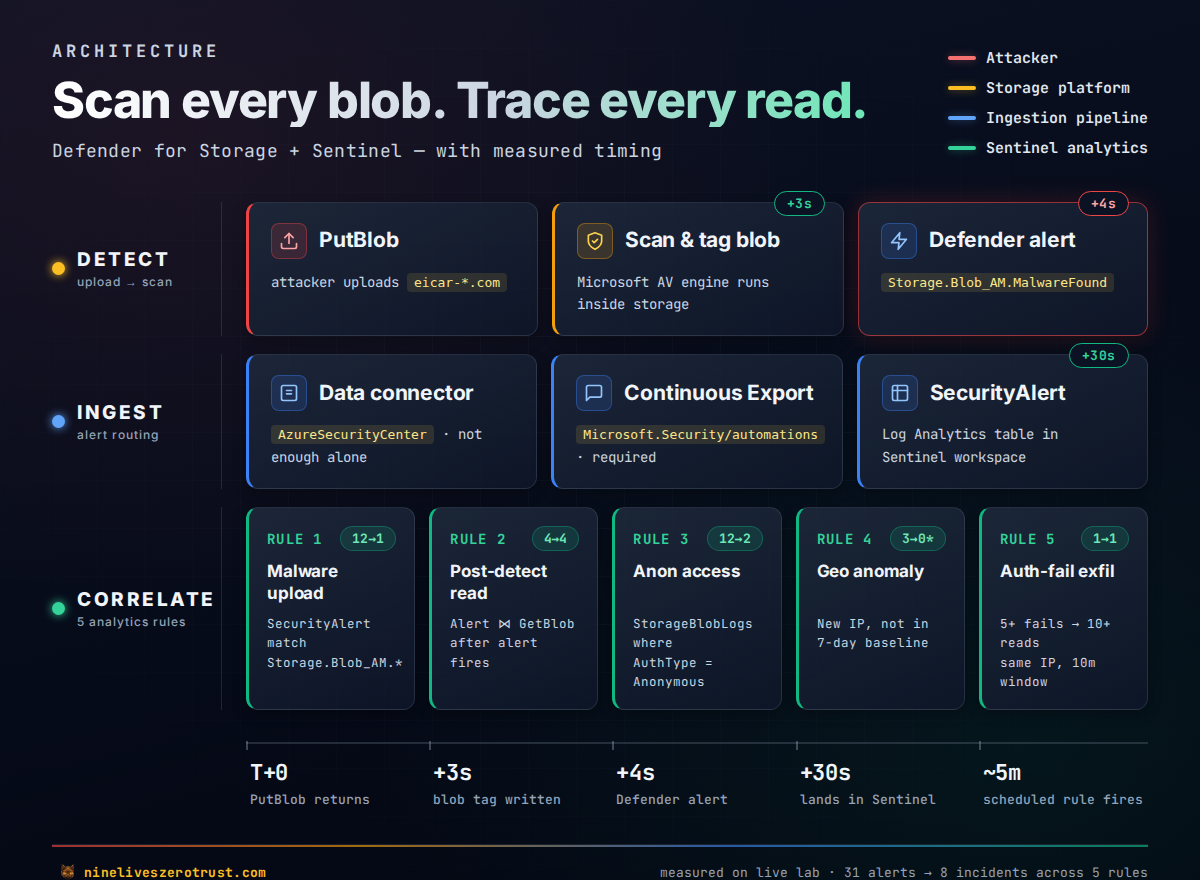
Two things are worth calling out on this diagram. First, the Ingest row has two nodes for a reason: in the tenant I tested, the Sentinel data connector by itself didn’t move alerts into SecurityAlert, enabling Continuous Export as well was what actually populated the table. Microsoft’s own docs are inconsistent on whether the connector alone is enough (see the next section), so validate your own tenant path with a fresh detection, especially if you also have the unified Defender XDR connector in play. Second, the Correlate row shows why this is worth standing up at all: the same StorageBlobLogs diagnostic stream that powers access logging is what lets you correlate a malware detection against the reads that followed it. That’s the difference between “we detected malware” and “we detected malware and three IPs pulled it before remediation.”
Sentinel ingestion: the step worth verifying
This one cost me 45 minutes of staring at an empty SecurityAlert table. Every Microsoft Sentinel tutorial for Defender for Cloud alerts says “enable the data connector.” I did. The UI tile flipped green. Zero alerts arrived. Meanwhile, Microsoft.Security/alerts (the Defender for Cloud API) had the alert sitting right there.
Root cause in the tenant I tested: the AzureSecurityCenter data connector flipped its state in Sentinel’s UI but did not actually move alerts into SecurityAlert on its own. A Defender for Cloud Continuous Export automation pointed at the workspace was what finally populated the table. Microsoft’s own docs are a bit inconsistent on this, the Sentinel connector guide implies the connector ingests alerts into SecurityAlert, while the Defender for Cloud export docs describe Continuous Export as the mechanism that populates SecurityAlert and SecurityRecommendation. That historical result is a tenant-specific observation. For a current deployment, inspect the supported connector path, verify a fresh detection, and check for duplicate rows before deciding whether both routes are needed. This is especially worth checking in tenants that also have the unified Defender XDR connector enabled, which changes the routing again.
Historical April configuration I validated (not the current ownership-aware deployment command):
# 1. Sentinel data connector used in the historical run
az rest --method PUT \
  --url "https://management.azure.com/subscriptions/<sub>/resourceGroups/<rg>/providers/Microsoft.OperationalInsights/workspaces/<ws>/providers/Microsoft.SecurityInsights/dataConnectors/defender-for-cloud?api-version=2023-02-01" \
  --body '{"kind":"AzureSecurityCenter","properties":{"subscriptionId":"<sub>","dataTypes":{"alerts":{"state":"Enabled"}}}}'

# 2. Continuous Export automation (what populated SecurityAlert in this lab)
az rest --method PUT \
  --url "https://management.azure.com/subscriptions/<sub>/resourceGroups/<rg>/providers/Microsoft.Security/automations/defender-alerts-to-sentinel?api-version=2023-12-01-preview" \
  --body '{
    "location": "<region>",
    "properties": {
      "isEnabled": true,
      "scopes":  [{"scopePath": "/subscriptions/<sub>"}],
      "sources": [{"eventSource": "Alerts"}],
      "actions": [{"actionType": "Workspace", "workspaceResourceId": "<workspace-id>"}]
    }
  }'
In this lab, deploying both made new Defender alerts start landing in SecurityAlert within ~30 seconds rather than not at all. The automation is forward-only, it doesn’t backfill, so alerts that existed before you created it stay in the Defender API but never reach Log Analytics. If you’re backfilling, re-trigger the detection (for this lab, just upload another EICAR).
The companion repo’s deploy-lab.sh does both in a single step. This was easily the single most useful thing I learned building this lab, and it is worth validating anywhere you rely on Defender for Cloud alerts in Sentinel.
Deploy the lab
The deployment combines Bicep with a guarded Bash/Python lifecycle and ARM REST calls. The wrapper captures shared state and ownership before creating the lab account/templates, disabled rules, Sentinel connector, continuous export and workbook. It does not change subscription pricing by default. New creation receipts distinguish successfully created objects from an interrupted write intent; unknown ownership stops cleanup with the manifest retained.
git clone https://github.com/j-dahl7/defender-storage-malware-sentinel.git
cd defender-storage-malware-sentinel
git checkout 6d09f4f29e3dc2a44c9b0be0725def039870b8fa

export SUBSCRIPTION="<sub-id>"
export WORKSPACE_RG="<sentinel-resource-group>"
export WORKSPACE_NAME="<sentinel-workspace-name>"
export LOCATION="eastus2"

az account show --query '{subscription:name,id:id}' -o table
az security pricing show --name StorageAccounts -o json

# Default: enable only the lab account; preserve subscription pricing.
# Optional shared-plan changes require ENABLE_SUBSCRIPTION_SCANNING=true
# and CONFIRM_SUBSCRIPTION_SCOPE=ENABLE-DEFENDER-FOR-STORAGE after review.
./scripts/deploy-lab.sh
The script:
- Captures shared pricing without writing it by default. An explicit subscription opt-in preserves existing discovery/cap settings and records normalized writable state; unknown fields or irreversible classic migration stop the run.
- Creates
storage-malware-lab-rgand deploysinfra/main.bicep, a storage account, three containers (ingest/processed/quarantine), StorageBlobLogs diagnostics wired to the Sentinel workspace, and a per-accountDefenderForStorageSettingsresource that overrides the subscription plan for this specific account. - Deploys
infra/sentinel-rules.bicep, five scheduled analytics rules disabled by default. Validate schemas, tables, ingestion latency and thresholds before enabling their exact IDs. A new deployment can opt in withENABLE_SENTINEL_RULES=true; reruns preserve existing rules. - Publishes the workbook.
The per-account override in Bicep looks like this:
resource malwareScanning 'Microsoft.Security/DefenderForStorageSettings@2025-06-01' = {
  name: 'current'
  scope: storage
  properties: {
    isEnabled: true
    malwareScanning: {
      onUpload: { isEnabled: true, capGBPerMonth: 5 }
    }
    overrideSubscriptionLevelSettings: true
  }
}
capGBPerMonth is the monthly scanned-volume cap, not a ceiling on all Azure charges. In a production account you want this bounded, a misconfigured pipeline that dumps a petabyte into ingest/ will otherwise hand you about $150,000 at $0.15/GB before other charges, if scanning is actually uncapped. The documented default cap is 10,000 GB per account per month; verify the effective cap and current pricing.
Attack 1: EICAR baseline
EICAR is the industry-standard “safe malware” test string, most AV engines flag it, and it doesn’t do anything. Perfect for a dev tenant.
# Keep the deployment-generated manifest; this preview creates no test files.
./attacks/upload-eicar.sh

# After reviewing the exact owned target, explicitly upload the test pair.
./attacks/upload-eicar.sh --execute
The current helper requires the active deployment manifest and matching live group, storage-account and private ingest-container provenance. It refuses arbitrary account/container overrides and older manifests without the recorded ingest-container ID; review and clean up that older deployment before a new run; the current source refuses to manufacture missing creation receipts. Explicit execution creates eicar-<random-run-id>.com and readme-<random-run-id>.txt, using service-side no-overwrite conditions. It never replaces an existing blob. An earlier successful upload remains visible if the second fails; the helper does not report a false complete pair.
For a new run, query the exact random blob names printed by the helper. The following query/output is retained historical April evidence; its timestamp-based names belong to the earlier implementation:
$ az storage blob tag list --account-name stmalwareexample \
    --container-name ingest --name "eicar-20260417T174035Z.com" \
    --auth-mode login
{
  "Malware Scanning scan result": "Malicious",
  "Malware Scanning scan time UTC": "2026-04-17 17:40:38Z"
}

$ az storage blob tag list --account-name stmalwareexample \
    --container-name ingest --name "readme-20260417T174035Z.txt" \
    --auth-mode login
{
  "Malware Scanning scan result": "No threats found",
  "Malware Scanning scan time UTC": "2026-04-17 17:40:38Z"
}
Both blobs scanned at the same second. The clean one got a benign verdict; EICAR got the malicious verdict.
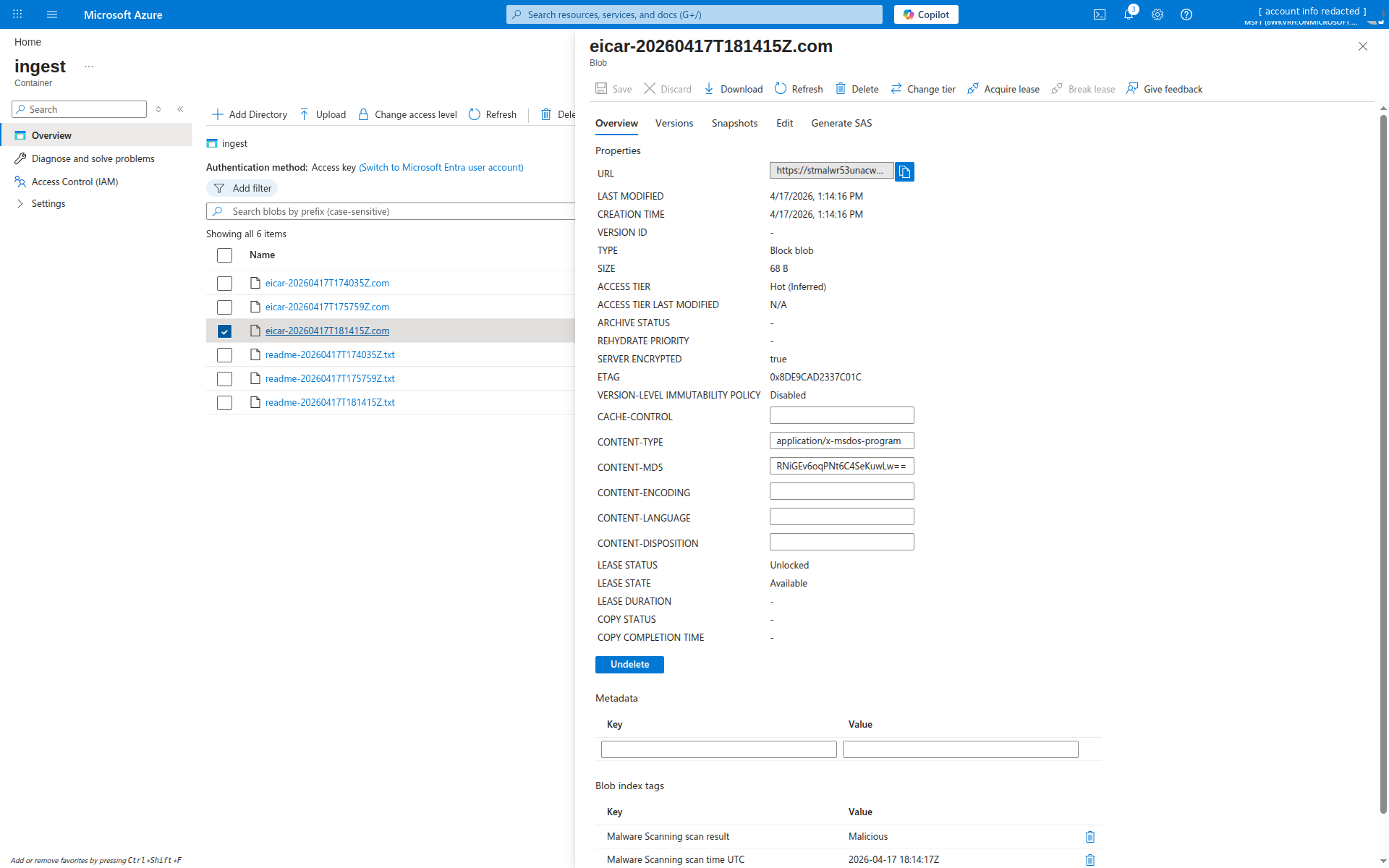
The Defender alert payload
The alert itself carries more than just “something’s wrong”:
AlertType:    Storage.Blob_AM.MalwareFound
Display:      Malicious blob uploaded to storage account
Severity:     High
Entities:     azure-resource (the storage account)
              filehash
              file (blob name)
              malware (Virus:DOS/EICAR_Test_File)
              blob-container (ingest)
              blob (blob name again)
Entity-rich. The malware entity carries the threat-intel family name (Virus:DOS/EICAR_Test_File in this case); for real malware it’ll be the Microsoft Defender family name and so is usable for correlation against Defender for Endpoint detections elsewhere in your estate.
Attack 2: anonymous access probe
The account is deployed with allowBlobPublicAccess=false, which ought to make anonymous reads impossible. Worth verifying, attackers poke storage accounts all day looking for the one that was misconfigured.
STORAGE_ACCOUNT="<exact-owned-lab-account>" ./attacks/simulate-anon.sh
Issuing anonymous requests against stmalwareexample/ingest
  [409] https://stmalwareexample.blob.core.windows.net/ingest?restype=container&comp=list
  [409] https://stmalwareexample.blob.core.windows.net/ingest/readme.txt
  [409] https://stmalwareexample.blob.core.windows.net/ingest/config.json
  [409] https://stmalwareexample.blob.core.windows.net/ingest/.env
  [409] https://stmalwareexample.blob.core.windows.net/ingest/backup.sql
Worth noting: the responses are 409 PublicAccessNotPermitted, not 403 AuthenticationFailed. That matters for KQL filtering, if you’re writing a rule on “403 storms”, you’ll miss the cleanest anonymous-probe signal. Rule 3 below looks for AuthenticationType == "Anonymous" rows in StorageBlobLogs instead of keying off HTTP status.
Sentinel analytics rules
Five rules. The excerpts below match the current deployed templates. The Bicep deployment substitutes the __STORAGE__ token; replace that token with the lab account name before a manual query. Typed source aliases cover all referenced storage paths, and count columns use long. Fuzzy fallback is an authoring aid, not proof of working ingestion or service-side acceptance in a tenant without the tables. Rules 1 and 3 gate fresh source rows; Rules 2 and 5 preserve the full correlation inputs and gate new evidence after joining. New related events can still create new results. Rule 4 retains its seven-day baseline; its one-hour recent window and Rule 5’s 15-minute failure window can miss data arriving outside their event-time bounds. Measure actual latency before enabling the rules.
Rule 1: Malicious file uploaded to blob storage
union isfuzzy=true
  (datatable(TimeGenerated:datetime, AlertName:string, AlertSeverity:string, ProductName:string, AlertType:string, Entities:string, AlertLink:string, CompromisedEntity:string)[]),
  (SecurityAlert
    | where ingestion_time() > ago(5m)
    | where ProductName in~ ("Microsoft Defender for Cloud", "Azure Security Center")
    | where AlertType startswith "Storage.Blob_AM"
  )
| project TimeGenerated, AlertName, AlertSeverity, AlertType, CompromisedEntity, Entities, AlertLink
Note the filter is startswith "Storage.Blob_AM", the actual alert type emitted by the service is Storage.Blob_AM.MalwareFound, not Storage.Blob_MalwareUploaded or any of the other plausible guesses. I initially wrote the rule against the latter, deployed it, uploaded EICAR, and got crickets. Always check the raw alert before finalizing your rule filters.
Severity: High. Creates an incident. In the historical run, grouping by DisplayName placed 12 Rule 1 firings from two EICAR uploads in one open incident. Grouping also depends on its configured time window and incident state. Per-file grouping would require appropriate entity mapping and a deliberately enabled grouping configuration; the pinned Rule 2 does not implement that design.
Rule 2: Post-detection blob read on infected file
This is the rule that turns a single malware alert into an incident with actual blast-radius information:
let storageAccount = "__STORAGE__";
let storageLogs = union isfuzzy=true
  (datatable(TimeGenerated:datetime, AccountName:string, CallerIpAddress:string, OperationName:string, StatusText:string, Uri:string, UserAgentHeader:string, AuthenticationType:string, IngestedAt:datetime)[]),
  (StorageBlobLogs | extend IngestedAt = ingestion_time());
let alerts =
  union isfuzzy=true
    (datatable(TimeGenerated:datetime, BlobUrl:string, AlertName:string, AlertIngestedAt:datetime)[]),
    (SecurityAlert
      | extend AlertIngestedAt=ingestion_time()
      | where ProductName in~ ("Microsoft Defender for Cloud", "Azure Security Center")
      | where AlertType startswith "Storage.Blob_AM"
      | extend ent = parse_json(Entities)
      | mv-expand ent
      | where tostring(ent.Type) == "blob"
      | extend BlobUrl = tostring(ent.Url)
      | project TimeGenerated, BlobUrl, AlertName, AlertIngestedAt
    );
alerts
| join kind=inner (
    storageLogs
    | where AccountName =~ storageAccount
    | where OperationName == "GetBlob"
    | where StatusText in ("Success", "SuccessWithThrottling")
    | extend BlobUrl = replace_string(tostring(Uri), ":443", "")
    | project ReadTime=TimeGenerated, BlobUrl, CallerIpAddress, UserAgentHeader, StatusText, ReadIngestedAt=IngestedAt
) on BlobUrl
| where ReadTime > TimeGenerated
// Retain the full correlation window; only emit pairs with a fresh side.
| where max_of(AlertIngestedAt, ReadIngestedAt) > ago(5m)
| summarize Reads=count(), Callers=make_set(CallerIpAddress, 25), UserAgents=make_set(UserAgentHeader, 10) by BlobUrl, AlertName, bin(TimeGenerated, 5m)
Two traps in this rule that the preview version of this post walked straight into:
- The
fileentity has an emptyUrlonStorage.Blob_AM.MalwareFound. The blob name lives there, but the actual URL is on the separateblobentity, so you have tomv-expandand filter onType == "blob", not"file", or the join evaluates to zero rows. StorageBlobLogs.Uriincludes:443(e.g.https://foo.blob.core.windows.net:443/ingest/file.ext), but theblobentity’sUrldoes not. Withoutreplace_string(Uri, ':443', ''), the string equality in the join never matches.
The logic: parse the Entities JSON out of each malware alert, pull the blob URL from the blob entity, join against StorageBlobLogs GetBlob events on the normalized URL, and keep only reads that happened after the alert fired. Any row that comes out is a post-detection retrieval to investigate.
Severity: High. Creates an incident with grouping disabled in the pinned Bicep. Its inactive matchingMethod: AllEntities field does not group by blob or caller, and the template defines no entity mappings. Historical incident counts below do not prove current per-entity grouping.
Rule 3: Anonymous access attempt
let storageAccount = "__STORAGE__";
union isfuzzy=true
  (datatable(TimeGenerated:datetime, AccountName:string, CallerIpAddress:string, OperationName:string, StatusText:string, Uri:string)[]),
  (StorageBlobLogs
    | where ingestion_time() > ago(10m)
    | where AccountName =~ storageAccount
    | where AuthenticationType == "Anonymous"
    | project TimeGenerated, AccountName, CallerIpAddress, OperationName, StatusText, Uri
  )
| summarize Attempts=count(), Operations=make_set(OperationName, 10), Blobs=make_set(Uri, 25) by CallerIpAddress, bin(TimeGenerated, 5m)
| where Attempts > 0
AuthenticationType == "Anonymous" selects anonymous requests that actually reached the diagnostic table, whether successful or rejected. Some requests fail before logging, so absence of a row does not prove that no probe occurred. Inspect the recorded caller and URI where available.
Rule 4: Geo-anomalous caller
Baseline the last 7 days of caller IPs against the storage account. Anything new shows up as a hit:
let storageAccount = "__STORAGE__";
let baselineWindow = 7d;
let storageLogs = union isfuzzy=true
  (datatable(TimeGenerated:datetime, AccountName:string, CallerIpAddress:string, OperationName:string, StatusText:string, Uri:string, UserAgentHeader:string, AuthenticationType:string, IngestedAt:datetime)[]),
  (StorageBlobLogs | extend IngestedAt = ingestion_time());
let NormalizeCallerIp = (caller:string) {
  case(
    caller matches regex @"^\[[0-9A-Fa-f:.]+\](:[0-9]+)?$", extract(@"^\[([0-9A-Fa-f:.]+)\](:[0-9]+)?$", 1, caller),
    caller matches regex @"^([0-9]{1,3}[.]){3}[0-9]{1,3}:[0-9]+$", extract(@"^([^:]+):[0-9]+$", 1, caller),
    caller
  )
};
let baseline =
  storageLogs
  | where AccountName =~ storageAccount
  | where TimeGenerated between (ago(baselineWindow) .. ago(1h))
  | extend IP = NormalizeCallerIp(tostring(CallerIpAddress))
  | where isnotempty(IP)
  | summarize by IP;
union isfuzzy=true
  (datatable(TimeGenerated:datetime, AccountName:string, CallerIpAddress:string, OperationName:string, Uri:string, StatusText:string)[]),
  (storageLogs
    | where AccountName =~ storageAccount
    | where TimeGenerated > ago(1h)
    | extend IP = NormalizeCallerIp(tostring(CallerIpAddress))
    | where isnotempty(IP)
    | where IP !in (baseline)
    | project TimeGenerated, AccountName, CallerIpAddress=IP, OperationName, Uri, StatusText
  )
| summarize Ops=count(), Operations=make_set(OperationName, 10), Blobs=make_set(Uri, 25), First=min(TimeGenerated), Last=max(TimeGenerated) by CallerIpAddress
| where Ops > 0
Two implementation notes:
CallerIpAddresscan include a source port, but splitting on every colon corrupts raw IPv6. The shared normalizer preserves unbracketed IPv6, unwraps bracketed IPv6 with or without a port, and removes a port only from unambiguous dotted IPv4.- Baselines cost query time, I run this one at
queryFrequency: PT1H, queryPeriod: P7D. Running it faster than hourly is throwing money at the Log Analytics query engine for no added signal.
This rule is deliberately deployed as “notification only” (no incident), the false-positive rate on net-new IPs is high, but it pairs well with Rule 1 as incident-enrichment context in Sentinel’s investigation view.
Rule 5: Bulk download after auth failures
The credential-spray-to-exfil pattern:
let storageAccount = "__STORAGE__";
let failWindow = 15m;
let readWindow = 10m;
let storageLogs = union isfuzzy=true
  (datatable(TimeGenerated:datetime, AccountName:string, CallerIpAddress:string, OperationName:string, StatusText:string, Uri:string, UserAgentHeader:string, AuthenticationType:string, IngestedAt:datetime)[]),
  (StorageBlobLogs | extend IngestedAt = ingestion_time());
let NormalizeCallerIp = (caller:string) {
  case(
    caller matches regex @"^\[[0-9A-Fa-f:.]+\](:[0-9]+)?$", extract(@"^\[([0-9A-Fa-f:.]+)\](:[0-9]+)?$", 1, caller),
    caller matches regex @"^([0-9]{1,3}[.]){3}[0-9]{1,3}:[0-9]+$", extract(@"^([^:]+):[0-9]+$", 1, caller),
    caller
  )
};
let fails =
  storageLogs
  | where AccountName =~ storageAccount
  | where TimeGenerated > ago(failWindow)
  | where StatusText startswith "Authorization" or StatusText in ("AuthenticationFailed", "Forbidden")
  | extend IP = NormalizeCallerIp(tostring(CallerIpAddress))
  | where isnotempty(IP)
  | summarize FailCount=count(), FailFirst=min(TimeGenerated), FailLast=max(TimeGenerated), FailIngestedAt=max(IngestedAt) by IP
  | where FailCount >= 5;
union isfuzzy=true
  (datatable(IP:string, Reads:long, FailCount:long, FailLast:datetime, ReadFirst:datetime)[]),
  (fails
    | join kind=inner (
        storageLogs
        | where AccountName =~ storageAccount
        | where OperationName == "GetBlob"
        | where StatusText in ("Success", "SuccessWithThrottling")
        | extend IP = NormalizeCallerIp(tostring(CallerIpAddress))
        | where isnotempty(IP)
        | project IP, ReadTime = TimeGenerated, ReadIngestedAt=IngestedAt
    ) on IP
    // Count only reads that follow the failure burst. Taking min() across every
    // read by this IP let a single earlier benign read move ReadFirst outside
    // the window and suppress the alert entirely.
    | where ReadTime between (FailLast .. FailLast + readWindow)
    | extend PairIngestedAt=max_of(FailIngestedAt, ReadIngestedAt)
    | summarize Reads = count(), ReadFirst = min(ReadTime), LatestIngestedAt=max(PairIngestedAt) by IP, FailCount, FailLast
    | where LatestIngestedAt > ago(10m)
    | where Reads >= 10
    | project IP, Reads, FailCount, FailLast, ReadFirst
  )
Five or more authentication failures from the same IP, followed by ten or more successful GetBlobs from that same IP within 10 minutes, is a credential-guessing-then-exfil pattern. Two things you need to get right, because the preview version of this post got both wrong:
- The real 403 status text is
AuthorizationPermissionMismatch(or sometimesAuthorizationError), notAuthorizationFailureorForbidden, which is what the REST error-code docs suggest.startswith "Authorization"catches all three shapes in one predicate. - Thresholds are calibrated for a lab. A busy infrastructure scanner will trip
FailCount >= 5alone, so tune both thresholds up for production and seriously consider requiring the successful reads to be on distinct blob paths before declaring exfil.
Manual validation boundary: the public attack scripts do not automate Rule 5 or create the under-privileged identity it needs. Completely unauthenticated garbage can die before
StorageBlobLogs, so a few malformed SAS strings are not a reliable test. Use a disposable authenticated principal that lacks the tested blob data-plane action, generate the authorization failures, then perform successful reads from the same controlled egress IP. The historical live incident below used that method; it is evidence of the rule, not a claim that one public helper command deterministically reproduces it.
Workbook
The workbook (infra/workbook.json) surfaces seven panels:
- KPI tiles, detections today, high-severity count, unique accounts flagged, unique files detected.
- Timeline,
Storage.Blob_AM.*alerts over time, split by severity. - Recent malware detections, table with timestamp, alert name, blob URI (from the
blobentity, so the URL actually resolves), compromised entity, alert link. - Top caller IPs (last 24h), per-IP totals for ops, reads, writes, and failures (using the
Authorization*filter pattern so it actually catches real 403s). - Anonymous access attempts chart, hourly column chart of anonymous-auth rows.
- Caller IP map, public caller IPs plotted geographically, heat-mapped by failure count, so private heartbeats don’t dominate the view.
- Malware alert investigation candidates, the pinned workbook groups historical malware alerts whose recorded blob URL names a container other than
quarantine; it does not join current storage inventory or remediation events. Verify the current blob version, existence, verdict, and access controls before deciding whether action is still needed. Earlier screenshots may retain the former Unremediated malicious blobs label; that label did not establish current remediation state.
For a SOC analyst triaging a malware alert, panels 3, 4, and 7 identify the recorded file and access activity to investigate. A current storage check is still required to establish whether that file remains accessible.
Gotchas worth writing down
Things the docs don’t spell out that bit me during the build:
(The single most useful lab finding, that in this tenant the Sentinel data connector alone did not populate SecurityAlert, while adding Continuous Export did, is called out separately above in Sentinel ingestion, the step worth verifying. Treat that as something to validate in your own Defender for Cloud → Sentinel path, especially if Defender XDR integration is enabled.)
- Plan enablement
extensionsarray is strict. The valid extension names are exactlyOnUploadMalwareScanningandSensitiveDataDiscovery. My first PUT included{"name": "Blobs"}(a guess based on old plan names) and got backError converting value "Blobs" to type ...PricingExtensionNames. additionalExtensionProperties: {"CapGBPerMonth": "..."}on the subscription-level extension returnsAdditional property 'CapGBPerMonth' is not supported. That property name was wrong. The subscription extension supportsCapGBPerMonthPerStorageAccount; the per-account resource usescapGBPerMonth(REST configuration). The historical move to the per-account setting fixed that run.- Alert type naming,
Storage.Blob_AM.MalwareFound, notStorage.Blob_MalwareUploaded/Storage.Blob_MalwareDetected/ any other plausible guess. Pin your filter to the actual string the service emits, or useAlertType contains "Malware". queryPeriodISO format, Sentinel rejectsPT7D. The correct ISO 8601 for “7 days” isP7D(theTis for time components only). The 7-day baseline rule would not deploy until I fixed this.queryPeriod >= 2drequiresqueryFrequency >= PT1H. Sentinel enforces this as a hard validation rule. You cannot have a 7-day baseline running every 30 minutes.- Blob index tag reads require
Storage Blob Data Owner(or theMicrosoft.Storage/storageAccounts/blobServices/containers/blobs/tags/readaction). NeitherContributornorStorage Blob Data Contributoris enough, the tag data-plane permissions are separate. StorageBlobLogs.CallerIpAddresscan include a source port. Strip it only from unambiguous dotted IPv4 or bracketed IPv6. Preserve raw IPv6 as a complete address; splitting on its first colon collapses unrelated callers into the same fragment.- Anonymous probe responses depend on the service version. Older requests can return
409 PublicAccessNotPermitted; bearer-challenge versions can return401. Write rule filters againstAuthenticationType == "Anonymous"rather than HTTP status codes. - The lab observed
AuthorizationErrorand other authorization-failure shapes. Current Rule 5 usesStatusText startswith "Authorization"plus explicitAuthenticationFailedandForbiddenvalues; it does not usehas_any(). Completely invalid SAS requests may be rejected before the retained operation logs, so use the documented authenticated-but-underprivileged principal for controlled validation. Storage.Blob_AM.MalwareFoundalerts include two entities for the blob:file(withName, emptyUrl) andblob(with bothNameand fullUrl). Rule 2’s join key must use theblobentity. If you grab thefileentity you get an empty URL and the join produces zero rows.StorageBlobLogs.Uriincludes the:443port (e.g.,https://foo.blob.core.windows.net:443/ingest/file.ext), but theblobentity’s Url inSecurityAlertdoes not.replace_string(Uri, ':443', '')normalizes the two for joins.
What this closes
- Phishing staging, eligible artifacts receive a verdict that downstream consumers can query before distribution; use a carefully scoped ABAC condition for RBAC-authorized reads, together with controls that disable alternative access paths and protect verdict tags.
- Supply chain drop, on supported non-HNS Blob accounts, pair scanning with a data-plane ABAC role assignment that grants reads only when the blob’s
Malware Scanning scan resultindex tag equalsNo threats found. (Azure Policy is the wrong tool for this, it enforces management-plane control, but blob reads are a data-plane operation and need data-plane enforcement.) For HNS/ADLS Gen2 or workflows you cannot gate at read time, use an event-driven consumer/quarantine control; Defender’s built-in soft-delete action for malicious blobs is post-verdict remediation. - Anonymous misconfig, Rule 3 reviews logged anonymous activity; rejected requests are not all guaranteed to appear in
StorageBlobLogs. - Exfil after detection, Rule 2 upgrades the raw alert into an incident only when the blob was actually retrieved post-detection.
What it doesn’t close
- Files > 50 GB, exceed the scanner’s size cap. Reject or separately inspect oversized files, and gate downstream consumers on
"Malware Scanning scan result" == "No threats found"(rather than !="Malicious") so missing, unsuccessful, or incomplete verdicts do not silently pass through. Azure Blob lifecycle management tiers or deletes matching objects; it does not split files or authorize reads. Arbitrary chunking can also prevent a scanner from recognizing the complete file, so it is not a substitute for supported whole-file inspection. - Queues and Tables, out of scope for Defender for Storage Malware Scanning. Queue payloads in particular are a common overlooked surface.
- Azure Files (on-upload), on-upload scanning is not supported for Azure Files. On-demand scanning for Files became generally available in May 2026, so existing shares can be scanned manually or on a schedule, but uploads are not protected inline.
- Time-of-check / time-of-use, the scan runs on write. A blob that was clean yesterday but whose contents were overwritten with malware today is re-scanned on the new write. A blob that was never re-uploaded after a scan-engine-definition update keeps its original verdict; if you need coverage against engine updates, trigger an on-demand scan over the container rather than assuming Defender rescans automatically.
- Encrypted/protected payloads, client-side encrypted blobs can’t be scanned, and password-protected archives return a
Scan failed - blob is protected by passwordverdict. Both cases leave the content opaque to the scanner, so treat the non-No threats foundtag as the exception rather than trusting the verdict. - Model artifacts with embedded code, pickles, TorchScript, etc. Those need AI-specific controls and alerting; see the Agent 365 Defender playbook for related Defender for AI Services coverage.
Validation: what I saw end-to-end
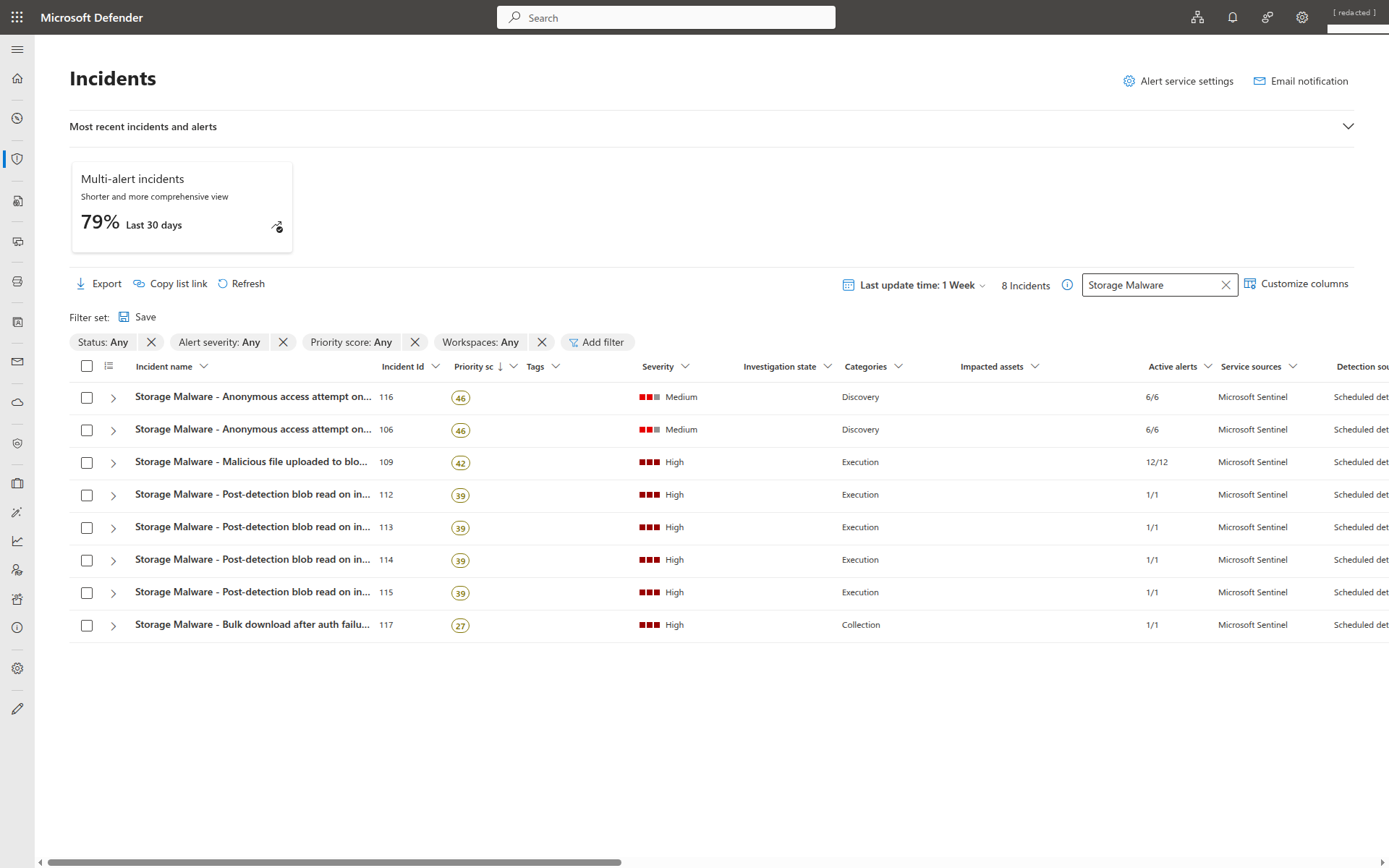
Storage Malware. That earlier run produced eight incident rows: 1 from Rule 1, 4 from Rule 2, 2 from Rule 3, and 1 from Rule 5. Rule 4 was notification-only. The fire-count table below totals 32; these historical counts do not establish the pinned revision's grouping behavior.Fire counts queried live from the Sentinel workspace on 2026-04-17 after roughly twelve hours of attack traffic (two EICAR uploads with the negative-control readme, two runs of the anonymous probe, a fifteen-blob download burst against the flagged file, and an AuthorizationPermissionMismatch storm from an under-privileged service principal followed by another successful-read burst from the same source IP):
| Rule | Fires | Depends on |
|---|---|---|
| Rule 1, Malicious file uploaded | 12 | SecurityAlert + Continuous Export |
| Rule 2, Post-detection blob read | 4 | Rule 1’s alert + StorageBlobLogs.GetBlob |
| Rule 3, Anonymous access attempt | 12 | StorageBlobLogs.AuthenticationType=Anonymous |
| Rule 4, Geo-anomalous caller | 3 | StorageBlobLogs + 7-day IP baseline |
| Rule 5, Bulk download after auth failures | 1 | StorageBlobLogs auth-fail → read pattern |
All five fired end-to-end. Rule 5 was the hardest to exercise: a handful of garbage SAS tokens or stray curls won’t match it, because malformed requests can be rejected before the retained diagnostic stream; this historical result does not establish a universal logging rule. Authentication must succeed and authorization must fail, which meant standing up a dedicated service principal with Reader on the subscription and no blob data-plane role, authenticating it via OAuth2 client credentials, and having it try GetBlob. Each request logs as AuthorizationPermissionMismatch, and then fifteen successful reads from the same caller IP within ten minutes makes the correlation match.
A few things jumped out running this:
- Two EICAR uploads, twelve distinct Rule 1 firings, one open incident. That earlier query polled every 5 minutes with a 1-hour lookback and repeated matching rows. The September 25 revision adds a five-minute source-ingestion gate; these older counts do not validate its current behavior. Grouping (
matchingMethod: Selected,groupByAlertDetails: [DisplayName]) rolls every one of those firings into the same incident, not one per file, but one per rule, because the display name is constant across firings. I verified this against liveSecurityIncident: all 12 Rule 1 alerts rolled into a single incident. Per-file incident design would also need validated entity mappings and grouping configuration; the historical count alone is not a current design recommendation. - Rule 2’s first firing lagged the malware alert by ~6 minutes in the historical run, with
StorageBlobLogsingestion delaying the join. That observation does not establish a minimum time-to-incident; ingestion and scheduling vary. For a preventive gate, enforce the scan verdict at the data-plane or consumer boundary instead of relying on a later Sentinel incident. - Rule 4 baseline quirk: on day zero the baseline (
StorageBlobLogs | where TimeGenerated between (ago(7d)..ago(1h))) is mostly empty, so the rule fires on every new IP. Expect noise in the first week and tighten as the baseline fills out. - Rule 5 took a full authenticated-but-unauthorized principal to exercise, a real mis-configured pipeline looks like this. Bad SAS tokens with garbage signatures don’t cut it, because those are rejected before they reach the logging layer.
Recommended rollout
- Choose the enablement scope deliberately. The lab defaults to resource-level protection. A production subscription-wide policy is a separate decision about coverage, ownership, billing and exclusions; it is not required to protect the lab account.
- Set a realistic
capGBPerMonthper account. A low-throughput service account is fine at 50 GB/mo; a data-lake account might need 10 TB/mo. Either way, don’t run uncapped. - Wire Defender alerts into Sentinel and validate with a fresh detection. Enable the
AzureSecurityCenterdata connector on the workspace and aMicrosoft.Security/automationsContinuous Export targeting the same workspace. In my lab, the connector alone showed green but produced zero rows inSecurityAlertuntil Continuous Export was in place; Microsoft’s own docs are inconsistent about which component is load-bearing (see Sentinel ingestion, the step worth verifying). Trigger a new detection, confirm that it lands inSecurityAlert, and record the end-to-end latency in your environment; timing and table availability vary by tenant, region, connector, and ingestion path. Continuous Export is forward-only, so re-trigger anything you want backfilled. This is doubly worth testing if your tenant also has the unified Defender XDR connector enabled, which changes the routing. - Deploy the five rules and the workbook against your Sentinel workspace. Start with Rule 1 creating incidents and Rules 2–5 in “enabled, no incident” mode for a soak period so you can understand what your noise floor looks like.
- Enforce a data-plane or consumer-side gate that only allows
"Malware Scanning scan result" == "No threats found", don’t just blockMalicious. Defender also producesNot scanned,Error,Scan timed out, andScan failed - blob is protected by passwordverdicts, plus cases where a blob might not carry a scan-result tag at all. A deny-Malicious gate lets all of those fall through silently. Prefer data-plane ABAC conditions over management-plane Azure Policy for supported non-HNS Blob accounts. Blob-index-tag conditions are not supported on hierarchical-namespace / ADLS Gen2 accounts; use an Event Grid or Log Analytics verdict workflow and a separate consumer/quarantine gate there. - Route Defender alerts to your SOC incident queue, with the tag-read query baked into the playbook so analysts can confirm the scan result independently from the portal view.
Further reading
- Malware Scanning in Defender for Storage, overview
- Defender for Storage alerts reference
StorageBlobLogsschema- MITRE T1204 User Execution
- MITRE T1567 Exfiltration over Web Service
Scan-on-upload is the control that finally puts storage accounts on the same footing as email and endpoints. The part that makes it useful for a real SOC isn’t the detection, it’s the telemetry that lands in Log Analytics at the same time, so “malware was uploaded” can become “malware was uploaded and exfiltrated to this caller in the same Sentinel incident.”

Jerrad Dahlager, CISSP, CCSP
Cloud Security Architect · Adjunct Instructor
Marine Corps veteran and firm believer that the best security survives contact with reality.
Have thoughts on this post? I'd love to hear from you.