On this page
Review update (September 26, 2026): The merged rules run every 15 minutes, retain their correlation lookbacks, and gate on recent ingestion from either relevant side. Rule 2 merges duplicate representations of a successful sign-in while retaining the latest ingestion and any unclear risk. Per-result alerting maps user/app/IP context without global suppression. The checker preserves multiline query arguments and verbatim UPN literals and bounds incident lookup in UTC. Active-role preflight includes transitive groups and scoped assignments; normal lab users may require independent administrator review and the explicit skip switch because role enumeration itself needs provider permissions. Do not grant an admin role to the lab user to make this check pass. Historical April evidence remains unchanged; these are offline/source checks.
Review update (September 25, 2026): Portal-proof images are historical April evidence and can show earlier enabled rules. They do not establish that the currently pinned disabled-by-default GUID rules were deployed. Rule 1 retains familiar clients without a client-ID exception. Rule 2 requires the full reviewed app/user/IP context; app ID alone must never suppress detection.
Review update (September 25, 2026): Inventory existing Microsoft-managed Block device code flow policies before adding another. Microsoft documents that new tenants created from July 1, 2026 block device code through security defaults; a blocked optional generator is an expected policy outcome, not proof the lab is broken. Do not disable tenant-wide security defaults just to produce telemetry. Check both Authentication protocol and Original transfer method during inventory. The URL correlation is a bounded hunt, not complete campaign coverage: use the returned
verification_uri, include currentlogin.microsoft.com/devicepaths, and inspect redirector/lure telemetry rather than relying only on a final Microsoft URL. See device-code guidance.
Device code phishing is nasty because the user does not hand over a password. They hand over a session.
The lure sends the victim to a legitimate Microsoft device sign-in page. The victim enters a short code. Entra ID issues tokens to the attacker’s waiting client. MFA can still be satisfied because the victim completed the approval ceremony at Microsoft, not on a fake login page.
Microsoft’s April 6, 2026 write-up on an AI-enabled device code phishing campaign makes the shift clear. This is no longer a novelty flow abused by hand. Microsoft described AI-driven infrastructure and end-to-end automation, plus Defender XDR detections for suspicious device code authentication, token replay, and post-compromise activity.
The wrong answer is “block device code flow everywhere tomorrow.” Some tenants still have legitimate device-code dependencies, including Azure CLI, PowerShell, Teams Rooms, shared devices, lab environments, and emergency workflows. The better answer is inventory first, carve out the few workflows that truly need it, then detect the abuse chain before a token turns into mailbox or payroll access.
Hands-on lab. The companion lab lives in the GitHub repo. It includes two disabled-by-default Sentinel rules, three Defender XDR hunts, sample replay data, an optional safe telemetry generator, owner-bound deployment and cleanup helpers, and a triage checklist.
Hardened implementation update, July 25, 2026: the Sentinel lifecycle uses two fixed workspace-scoped rule IDs, refuses foreign ID or display-name collisions, and requires the exact local provenance manifest plus ownership suffix before it can update or remove an existing rule. Both rules deploy disabled unless you explicitly request enablement. Optional Entra app cleanup uses the exact tenant, client, application-object, service-principal, and deployment-specific
uniqueNamevalues; display names are informational only, and the helper never deletes users.
After following the canonical README to create the deployment-specific, no-secret public client and capture its immutable outputs, the PowerShell 7+ generator signs in one dedicated non-admin lab user. It polls before approval to improve the chance of producing 50199/CmsiInterrupt-style telemetry, identity-checks the issued ID token, then discards the response without calling mail, Graph, or another workload.
git clone https://github.com/j-dahl7/entra-device-code-phishing-sentinel.git
cd entra-device-code-phishing-sentinel
git checkout 645acc1fbe5c107460ce5ab29b732088f364e4c9
$env:AZURE_TENANT_ID = "<tenant-guid>"
$env:SENTINEL_WORKSPACE_ID = "<workspace-guid>"
$env:DEVICE_CODE_LAB_CLIENT_ID = "<lab-client-guid>"
$env:DEVICE_CODE_LAB_USER = "lab-user@contoso.com"
.\scripts\run-device-code-telemetry-test.ps1 -Confirm
.\scripts\check-device-code-telemetry.ps1 `
  -ClientId $env:DEVICE_CODE_LAB_CLIENT_ID `
  -UserPrincipalName $env:DEVICE_CODE_LAB_USER
The exact client ID and user UPN are mandatory. Omit RunId for the strict identity predicate: when supplied, the pinned checker also includes rows with that RunId in UserAgent using an OR condition, which can broaden the result. This is a telemetry generator, not a phishing simulator. Use a dedicated lab account only.
Lab Deployment Safety Contract
The canonical README is the operational source of truth. The article explains the detection strategy; the repository owns the deployable KQL and lifecycle steps.
scripts/manage-sentinel-rules.ps1is the supported Sentinel deployment and removal path. It performs a read-only collision preflight, owns two deterministic rule IDs, and records the exact target and ownership proof in.device-code-sentinel-state.jsonbefore the first cloud write.- A rerun or removal is allowed only when the local manifest, rule ID, kind, display name, and ownership suffix all agree. A foreign ID or name collision stops the entire operation instead of adopting or overwriting the rule.
- Rules are disabled by default. Enablement requires
-EnableRules -Execute -Confirmafter you verify table availability, run the tracked KQL manually, and review any exact app/user/IP context exceptions. - The optional Graph Bicep deployment requires a fresh GUID-suffixed
uniqueNameand the existing dedicated user’slabUserObjectId; the service principal requires assignment and creates no loopback redirect URI. Retain the tenant ID, client ID, application object ID, service-principal object ID, anduniqueNameuntil cleanup is verified. scripts/cleanup-device-code-lab-artifacts.ps1reads only those exact Graph object IDs and validates fixed and deployment-specific ownership tags before deletion. It never searches by display name or UPN, and user cleanup is deliberately outside its scope.
Device code phishing attack flow
Real Microsoft Page. Wrong Session.
The user approves a legitimate code. Entra ID issues the token to the attacker's waiting client.
Waiting OAuth client
The adversary starts the device authorization flow and waits for the victim to complete it.
Enter code
The page is real, so URL reputation alone can miss the trick. The session context is the attack.
What the token can touch next
What Makes Device Code Phishing Different
Classic credential phishing tries to steal a username and password. Adversary-in-the-middle phishing tries to proxy a full browser session. Device code phishing is quieter. The attacker starts an OAuth device authorization flow and sends the victim the code.
The victim sees a real Microsoft page.
https://microsoft.com/devicelogin
The victim enters the code and approves the sign-in. The attacker never needs to know the password. The token is issued to the attacker’s client.
That creates a different detection problem. You are not looking only for failed passwords or impossible travel. You are looking for the sequence around the device code flow and the behavior after token issuance.
Microsoft’s campaign write-up calls out several high-value signals.
- A
50199interrupt followed by success in a short window, especially when correlated with device-code protocol or session context - Device code authentication from suspicious infrastructure
- URL clicks that precede device code authentication
- Device registration after compromise
- Inbox rule or mail access activity after token issuance
- Additional hunting hypothesis: changes in user-agent/client behavior after authentication; this is not a quoted signal from Microsoft’s cited campaign write-up
One important nuance is that 50199 is useful, but it is not device-code proof by itself. Microsoft documents AADSTS50199 as CmsiInterrupt, a user-confirmation interrupt. In this post, 50199 -> 0 is treated as a device-code-phishing signal only when it is correlated with AuthenticationProtocol == deviceCode, app/client identity, URL-click timing, session or correlation context, or post-token behavior.
The Legitimate Workflow Problem
Device code flow exists for a reason. It helps devices and tools sign in when a full browser flow is awkward or unavailable.
Legitimate examples include the following.
| Workflow | Why It Uses Device Code | Recommended Handling |
|---|---|---|
| Azure CLI or Azure PowerShell | Developer/admin shell login | Use narrowly justified user/resource/location exceptions; managed-device grants do not protect device-code flow |
| Teams Rooms and shared devices | Device provisioning and reauth | Use dedicated room/resource accounts, trusted locations, managed/compliant device conditions or device filters where applicable, documented app/resource IDs, and explicit monitoring |
| Lab or break-fix environments | Temporary admin access | Time-box and monitor with alerting |
| Legacy command-line tools | No embedded browser support | Replace where possible; exception otherwise |
The security goal is not to pretend those do not exist. The goal is to make every device-code use explainable.
Your first hunt should answer one question.
SigninLogs
| where TimeGenerated > ago(30d)
| extend AuthProtocol = tostring(column_ifexists("AuthenticationProtocol", ""))
| extend Result = tostring(ResultType)
| where AuthProtocol =~ "deviceCode"
    or ResultDescription has "device code"
    or Result == "50199"
| summarize Events=count(), Users=dcount(UserPrincipalName), IPs=dcount(IPAddress)
    by AppDisplayName, AppId
| order by Events desc
If this query shows applications nobody can explain, you have your first cleanup list. Use AppDisplayName only to help an analyst read the inventory. Record immutable app and user IDs with the expected workflow and source IP; a familiar app ID alone is not a detection exception.
Detection Architecture
Data-source requirements matter. SigninLogs requires Entra ID diagnostic logs flowing into Log Analytics or Sentinel. UrlClickEvents requires Defender for Office 365 Safe Links telemetry. CloudAppEvents requires Defender for Cloud Apps and connected Microsoft 365/SaaS activity. EntraIdSignInEvents requires Microsoft Entra ID P2 data in Defender XDR advanced hunting.
Correlate the Session Chain
Device-code abuse is weak as a single signal. It gets loud when sign-ins, clicks, app identity, and post-token actions line up.
50199 -> successFind the interrupted device-code ceremony and the follow-on success.
risk + app + sessionBring Defender XDR sign-in context into the chain.
lure -> auth windowConnect the phishing delivery moment to the sign-in.
mailbox + SaaS actionsWatch what the issued token does after authentication.
User + session + app + time windowRule 1: 50199 -> successNo client-ID exception; corroborate and tune before enabling.
allowlist drivenExceptions require an exact app, user and source-IP context with clear recorded risk.
mailbox, device, SaaSEscalate when the token starts touching sensitive workflows.
Native Browser Telemetry and Earlier Rule Revisions
Rendered from the earlier lab's SigninLogs and az sentinel alert-rule list results after the controlled browser sign-in.
LAB - Nine Lives Device Code Telemetry
The lab app produced a real 50199 -> 0 sequence for the dedicated, anonymized lab user.
- 50199
- 2026-04-26 02:51:39Z
- Success
- 2026-04-26 02:52:53Z
- Correlation
00000000...000000
LAB - Device Code - 50199 Followed by Success
- Severity
- High
- Frequency
- 15 minutes
- Tactics
- Initial Access + Defense Evasion
LAB - Device Code - Unapproved Client
- Severity
- Medium
- Frequency
- 1 hour
- Tactics
- Initial Access + Credential Access
50199 -> 0 sign-in sequence and the two earlier rule revisions were enabled. It does not establish current rule deployment, enablement, or current workspace contents.The evidence panel records an earlier controlled live run in which the browser ceremony produced the shape the first Sentinel rule hunts for: 50199 at 2026-04-26T02:51:39Z, followed by success at 2026-04-26T02:52:53Z, for the same dedicated lab user, public-client app, and correlation ID. The July 25 hardening review was separate and offline; it did not repeat that sign-in or run live tenant queries.
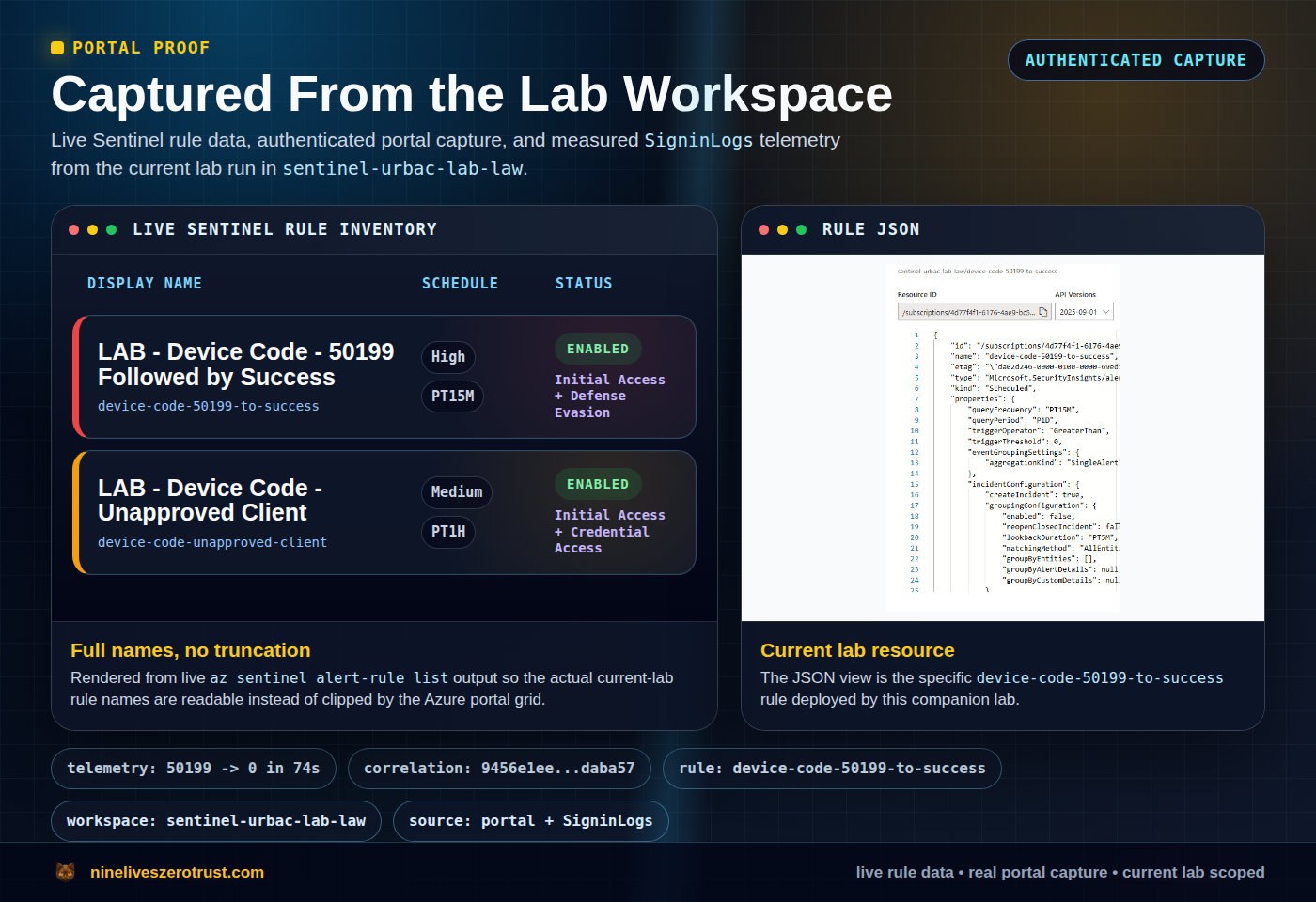
device-code-50199-to-success rule.This lab uses five detection layers.
- Device code interrupt followed by success
- Device code authentication by an unapproved app or client
- URL click followed by suspicious device-code sign-in
- Post-token mailbox access or inbox rule creation
- Device registration or persistence after device-code auth
The strongest alerts come from correlation. A single device-code sign-in might be benign. A rare sender URL click, followed by 50199 -> success, followed by inbox rule creation should be treated as high priority.
Rule 1 - Device Code Interrupt Followed by Success
Microsoft’s Storm-2372 and device-code guidance repeatedly points at the same shape. An interrupt or failure appears, then a successful sign-in follows shortly after. In Defender XDR, Microsoft shows this as ErrorCode values 50199 and 0 grouped by user, session, or correlation context. The 50199 value still needs context; do not treat it as a device-code-only error.
Use the tracked Sentinel source: 01-device-code-50199-to-success.kql. The query rejects empty correlation keys, prefers the immutable Entra UserId, falls back to a normalized UPN only when that object ID is absent, and requires success within the bounded five-minute window.
This rule has no client-ID exception. It retains correlations for Azure CLI, Azure PowerShell, and other familiar clients because a public client ID does not prove a legitimate workflow. Application display names remain useful analyst context, but they are attacker-controlled and never form the trust boundary.
Microsoft Authentication Broker is also not exempt. It can be legitimate in brokered authentication and device-registration scenarios, but Microsoft has reported Storm-2372 abusing its client ID in device-code flows. Review documented use cases, enrollment restrictions, trusted locations, managed or compliant device requirements, dedicated accounts, and device-registration monitoring when designing the allowed workflow.
Rule 2 - Device Code Flow From an Unapproved Client
Use 02-unapproved-device-code-client.kql to combine explicit device-code telemetry with a properly correlated 50199 -> 0 sequence and de-duplicate the union. Its ApprovedDeviceCodeContexts table is empty by default. An optional reviewed exception must match an exact application ID, immutable user object ID, and source IP together.
Even a matching tuple stays visible unless both recorded risk levels are none and the risk state is cleared. Low, medium, high, hidden, missing, and unknown risk are retained; the correlated path also preserves risk from the preceding interrupt. Hidden risk can reflect unavailable Identity Protection data, so it is not evidence that a sign-in is safe. Inventory and review the workflow before adding any tuple. Teams Rooms, CLI, PowerShell, and look-alike clients receive no default exception, and display names never suppress an event. The retained rule name Unapproved Client and its resource ID remain unchanged for ownership compatibility.
Rule 3 - URL Click Followed by Device Code Auth
This is a Defender XDR advanced hunting pattern because the valuable correlation crosses email click telemetry and Entra sign-in telemetry.
Use 01-url-click-to-device-code-auth.kql. It matches the complete device-login paths as URL substrings, then requires a relevant click, a 50199 interrupt, and a later success in separate bounded windows; simply finding both error codes somewhere in an aggregate is not enough.
The point is not that every click is malicious. The point is sequence. UrlClickEvents provides a UPN rather than an Entra object ID, so this hunt retains a normalized UPN join. Validate aliases and guest identities in your tenant before operationalizing it.
Rule 4 - Post-Token Mailbox Abuse
Attackers do not stop at sign-in. They read mail, create forwarding or inbox rules, and search for payroll or invoice context.
Microsoft’s April 6 guidance includes CloudAppEvents hunting examples for Exchange activity. This query is a Defender XDR advanced hunting pattern. Exporting CloudAppEvents alone does not supply its EntraIdSignInEvents join dependency in Sentinel. In its supported data environment, it looks for mailbox control changes shortly after suspicious device-code activity.
Use 02-post-token-mailbox-abuse.kql. It joins EntraIdSignInEvents.AccountObjectId to CloudAppEvents.AccountObjectId and requires a non-empty session ID. It does not assume that CloudAppEvents.AccountId contains a UPN.
If your tenant has payroll systems like Workday behind SSO, add CloudAppEvents for those apps too. That is where device-code auth becomes business impact.
Rule 5 - Device Registration After Device Code Compromise
Some campaigns register devices after token compromise. Treat device registration as a persistence signal when it follows a suspicious authentication sequence. Like the mailbox hunt, this version uses Defender XDR CloudAppEvents.
Use 03-device-registration-after-device-code.kql. The repaired hunt follows Microsoft’s documented Add registered owner to device. shape: it retains RawEventData.ObjectId as UPN context and joins the complete, nonzero GUID in RawEventData.Target[1].ID to AccountObjectId. Missing/malformed IDs and other actions are excluded. Confirm that target-array shape in retained tenant events; the source does not guess at undocumented variants (Microsoft hunt).
That raw field is connector- and tenant-sensitive. Confirm that it represents the registering user’s Entra object ID in your own data before turning the hunt into an alert; do not treat a display field or UPN-shaped string as equivalent proof.
This is not a volume rule. One unexpected device registration after suspicious auth is enough to trigger urgent investigation.
Response Playbook
When the alert fires, do not only reset the password. The attacker may already hold refresh tokens.
- Contain the affected identity and revoke sign-in sessions. Where justified, temporarily disable the account during investigation. Revocation is not instantaneous invalidation of every existing access token or application session; validate containment per resource. See Microsoft device-code response guidance.
- Confirm risky sign-in state and user risk in Entra ID Protection.
- Review mailbox rules, forwarding, delegates, and transport rules.
- Search CloudAppEvents for Workday, payroll, finance, HR, and file access after the device-code event.
- Remove unapproved registered devices and authentication methods.
- Review OAuth grants and app consent.
- Document any reviewed app/user/IP detection context and separately apply the appropriate Conditional Access policy change.
Conditional Access Strategy
Start in report-only mode. Block broad device code flow only after you know what it will break.
For a policy that targets All resources, Microsoft requires excluding the
Device Registration Service resource (01cb2876-7ebd-4aa4-9cc9-d28bd4d359a9)
when device-code-based registration must keep working. Teams device exceptions
are user/account exclusions, not per-app exceptions: an excluded resource
account can use device code flow against any resource otherwise in that
policy’s scope. Keep those groups narrowly assigned, owner-approved, and
monitored.
Suggested rollout:
| Phase | Action | Outcome |
|---|---|---|
| 1 | Inventory device-code sign-ins for 30 days | Know real dependencies |
| 2 | Record exact app/user/IP contexts, workflow owners, reasons, and review dates | Document exceptions |
| 3 | Create report-only CA policy blocking device code flow | Measure blast radius |
| 4 | Alert on unapproved contexts and retain approved contexts with risk or missing risk data | Catch abuse while tuning |
| 5 | Enforce for users and apps with no dependency | Reduce attack surface |
For high-risk users, prefer enforcement sooner. For shared devices and admin workflows, make the exception explicit and auditable.
Conditional Access authentication-flow policies also use protocol tracking. A session originally created through device-code flow can remain protocol-tracked through refreshes, so later access that does not visibly start as device code may still be affected by a device-code-flow policy. That matters when you troubleshoot blocks after enforcement.
The optional app/user/IP context table in Rule 2 tunes detection only. It does not enforce Conditional Access or establish that a shared egress IP, familiar account, or client is safe. Scope Conditional Access through users, target resources and cloud apps, authentication-flow controls, locations, and report-only testing. Microsoft does not support managed-device grant controls or device-state conditions for device-code flow (grant-control limitation) before enforcement.
What This Lab Demonstrates: and Does Not Prove
The repository gives you a reproducible way to inspect the detection chain without claiming more validation than was performed.
- The neutral replay lets you inspect the expected event shape without writing tenant data.
- The optional generator can create lab-owned sign-in telemetry, but it requests only
openid profile, identity-checks and discards the token response, and never generates mailbox, device-registration, or SaaS activity. - The checker requires the exact lab client ID and user UPN. Optional RunId matches the complete
NineLivesLab/1.0 (run:<RunId>)marker with an OR fallback; it can still include rows outside the identity predicate. Omit it when you require strictly identity-scoped results, and inspect the reported query scope. - The July 25 hardening review compiled both Bicep templates, parsed every PowerShell entry point, exercised collision and ownership failures with offline mocks, and reconciled the canonical and bundled copies byte for byte.
- The September 4 context change passed offline policy fixtures, source contracts, and Bicep compilation. It did not execute KQL in Sentinel or repeat the retained April tenant run; those historical results do not validate the new query revision.
That review made no live tenant write, approved no device code, and ran no live Entra, Sentinel, Log Analytics, or Defender query. The lab does not prove that every tenant emits identical telemetry, that the optional hunts return data in an unvalidated connector, or that one KQL rule catches every campaign. The reliable defense layers remain inventory, Conditional Access, Defender XDR, Sentinel correlation, and post-auth behavior hunting.
Why This Is Worth Publishing Now
This is where identity security is heading. The password is less often the prize. The session is the prize.
Device code phishing gives attackers a clean way to make users approve that session on real Microsoft infrastructure. The organizations that win are the ones that already know where device code flow is allowed, where it is blocked, and what post-auth behavior means trouble.
The SOC question is simple.
Can you explain every device-code sign-in in your tenant?
If the answer is no, this is a good weekend lab.

Jerrad Dahlager, CISSP, CCSP
Cloud Security Architect · Adjunct Instructor
Marine Corps veteran and firm believer that the best security survives contact with reality.
Have thoughts on this post? I'd love to hear from you.