On this page
Review update (September 25, 2026): The merged September 25 source now chooses a labeled executable identity from populated SHA1, then SHA256, then a normalized path; it excludes empty identity values. Its KQL semantic analysis and offline suite passed. The July tenant experiments remain the only live evidence; no September detection or tenant redeployment is asserted.
Review update (September 25, 2026): The October 1 Graph field removal remains a dated migration warning, not proof that a new schema was live-tested here. Verify current beta fields before reusing the inspection commands. NRT eligibility depends on the exact supported query and frequency, not a universal prohibition on aggregation. The retained read-only July inspection runs used a non-main validation branch; production dispatch should use an explicitly reviewed environment/branch policy. ATT&CK tactic labels also evolve independently of the provider API’s accepted enum values.
Review update (September 25, 2026):
CustomDetection.ReadWrite.Allcan change tenant-wide detection rules and their automated response actions; it is a high-impact permission even when it is the API’s least write scope. Microsoft notes thatInitiatingProcessSHA256is often empty inDeviceNetworkEvents; prefer populated SHA1 with an explicit fallback strategy before treating empty hashes as executable identity. Repository connection prerequisites also exclude B2B/delegated identities: create the connection from the operator’s home tenant. Published July Actions run links are subject to repository retention; the article does not promise their logs remain downloadable indefinitely.
Microsoft published its technical analysis of GigaWiper on July 9, 2026. Microsoft describes it as a modular backdoor with destructive capabilities, including scheduled-task persistence, RabbitMQ-over-AMQP command C2, Redis status and output reporting, potential file transfer to remote storage through the MinIO client, interactive system management, event-log clearing, fake ransomware, and several ways to make a Windows device unrecoverable.
Three days earlier, Microsoft updated its Sentinel Repositories documentation with a capability of direct interest to detection engineers: Defender XDR custom detection rules as code. The preview uses the Microsoft Security Bicep extension and the new Microsoft.Security/detectionRules@2026-06-01-preview resource.
The documentation update and threat-research post arrived close enough together to support a focused validation exercise.
How quickly can a SOC turn new Microsoft threat intelligence into a reviewed, tested, version-controlled Defender detection?
That workflow is the focus of this post. GigaWiper is the case study, and detection as code is the reusable capability.
Results at a glance
| Path or evidence | Result |
|---|---|
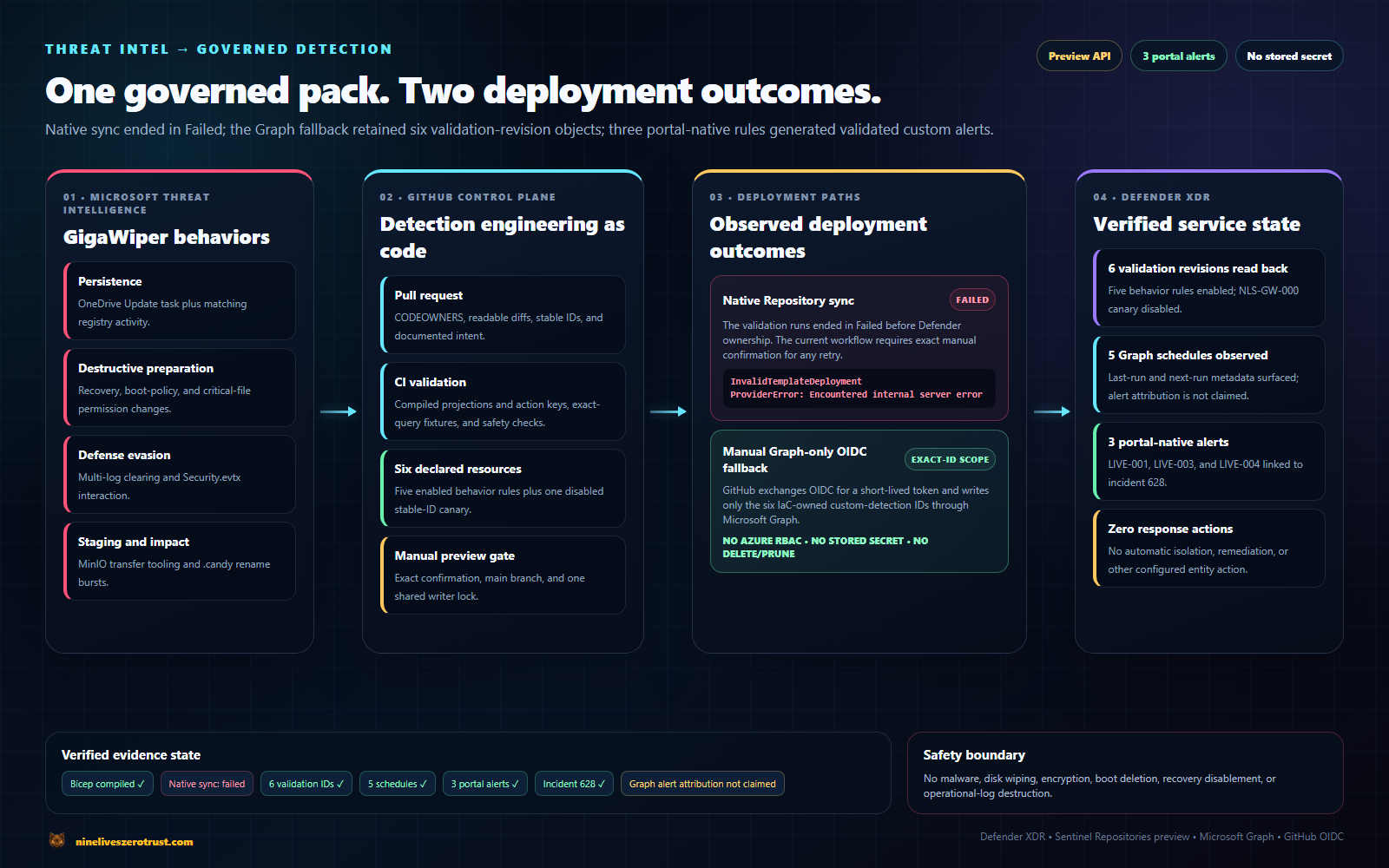
| Native Sentinel Repository synchronization | Did not complete during validation. The preview provider returned an internal error; the root cause remains unconfirmed. The validation connection was subsequently removed. |
| Graph fallback | Historical validation created or updated and read back six exact objects; all six were later retired. No alerts are attributed to them. |
| Portal-native validation | Exactly three custom alerts, from NLS-GW-LIVE-001, NLS-GW-LIVE-003, and NLS-GW-LIVE-004, were correlated into incident 628. |
| GigaWiper executed | No. The lab generated bounded benign telemetry only. |
| Recovery and boot behavior | NLS-GW-002 was validated with synthetic fixtures only. |
.candy rule | NLS-GW-005 matched live telemetry; no saved portal rule or alert is claimed. |
Previous source-audit boundary (August 13, 2026): the source revision reviewed then passed its offline
Test-Lab.ps1 -Jsonsuite. This review did not create or deploy cloud resources, generate telemetry, run a scheduler, produce alerts, or perform new cleanup. The most recent additional live-query attempt was July 25, when Defender returnedAccount mode is inactivebefore executing the query. Live results therefore remain historical evidence from July 11–14.
Companion lab: The complete Bicep pack, KQL hunts, GitHub Actions workflows, safe telemetry generator, synthetic fixtures, and evidence ledger are in j-dahl7/gigawiper-detection-as-code.
Every screenshot and diagram below links to its original-resolution file. On a phone, tap a dense figure to inspect its labels at full size.
Where custom detections fit
Microsoft already lists Defender protection for GigaWiper and related activity, including malware-family detections and ransomware behavior alerts. These organization-owned rules complement Microsoft-managed protection; they are not presented as a prerequisite for GigaWiper coverage.
Microsoft-managed detections provide vendor threat intelligence, signatures, behavior models, and broadly distributed protection. Organization-owned detections address a complementary need:
- the query logic is visible and reviewable;
- environmental context can be added;
- rule changes go through pull requests;
- stable identifiers support auditability;
- property changes can be rolled back with a Git revert followed by the configured deployment path; rule deletion remains a separate exact-ID operation because the Graph fallback deliberately does not prune removed files;
- related tools can be detected even when they do not match the exact known sample;
- a SOC can document exactly what it tested and what it did not.
The custom rules here are behavioral guardrails and detection-engineering examples. A match is an investigation signal, not automatic attribution to GigaWiper.
What changed in July: custom detections join Sentinel Repositories
Sentinel Repositories already supported analytics rules, automation rules, hunting queries, parsers, playbooks, and workbooks. The July preview adds Defender XDR custom detection rules through a different Bicep extension and resource provider.
The root configuration loads the Microsoft Security extension:
{
  "extensions": {
    "MicrosoftSecurity": "br:mcr.microsoft.com/bicep/extensions/microsoftsecurity:v1.0.1"
  }
}
A custom rule then uses the preview resource:
extension MicrosoftSecurity

resource detectionRule 'Microsoft.Security/detectionRules@2026-06-01-preview' = {
  id: 'nls-gw-003-event-log-destruction'
  displayName: 'NLS-GW-003 - Windows Event Log Destruction'
  description: 'nlzt-owner:gigawiper-detection-as-code:v1'
  status: 'enabled'
  queryCondition: {
    queryText: '''
DeviceProcessEvents
| where FileName =~ "wevtutil.exe"
| where ProcessCommandLine has_any (" cl ", " clear-log ")
| project Timestamp, DeviceId, ReportId, DeviceName, FileName, FolderPath, ProcessCommandLine, AccountName, InitiatingProcessFileName, InitiatingProcessCommandLine, ProcessIntegrityLevel, SHA256
'''
  }
  schedule: {
    frequency: 'PT1H'
  }
  detectionAction: {
    alertTemplate: {
      title: 'Windows event log clearing observed on {{DeviceName}}'
      description: 'Detects wevtutil clear operations. Confirm the targeted log, administrator intent, and whether several logs or Security.evtx were affected. Tune approved maintenance tooling explicitly.'
      severity: 'high'
      tactics: [
        {
          tactic: 'DefenseEvasion'
          techniques: [
            { technique: 'T1070.001' }
          ]
        }
      ]
      entityMappings: {
        hosts: [
          { id: 'device', deviceIdColumn: 'DeviceId' }
        ]
      }
    }
  }
}
ATT&CK taxonomy note: During this validation, the live Microsoft custom-detection service accepted the legacy
T1070.001mapping shown above. The current MITRE ATT&CK catalog identifies Clear Windows Event Logs asT1685.005. This records taxonomy and platform drift; it does not imply that the current preview provider accepts the newer mapping.
The preview requires Microsoft 365 E5 or an equivalent license that includes Defender XDR and a Sentinel workspace onboarded to the Defender portal. The standard GitHub Repository prerequisites still apply: collaborator access to the repository, GitHub Actions enabled, and Owner on the resource group to create the connection. Portal-native custom-detection creation is limited to the tenant’s primary Sentinel workspace and separately requires the applicable Defender or Sentinel management permissions plus access to the selected device scope.
The Repository/Bicep preview currently does not support custom details; custom-frequency restrictions apply specifically to Sentinel data. The general portal experience supports those capabilities, so this limitation is deployment-path specific. A custom rule can generate at most 150 alerts each time it runs. In this tenant during the July 11–12 validation window, the service accepted only one MITRE tactic per custom detection even though the public Graph model represents tactics as an array. The native-path provider response described below was a separate result.
Validation window: July 11–12, 2026
Resource API: 2026-06-01-preview
Bicep extension: v1.0.1
Portal: Microsoft Defender portal
Status: Preview
Treat every field and limitation as versioned. Preview behavior can change after this post is published.
A rule-ID constraint discovered during preview deployment
The first canary used a conventional GUID as its rule ID. Bicep compiled it successfully. The live Microsoft Security provider returned a validation error because the GUID began with a number.
In this deployment, the provider error was precise: a rule ID must be numeric, or it must begin with a letter and then contain only letters, numbers, dashes, and underscores. The maximum length reported by that live error was 100 characters. This is an observed preview-provider contract, not a regex currently published in the public Graph schema.
That matters because the same Microsoft documentation page also contains general Sentinel Bicep guidance to remove exported ARM id properties. Those instructions apply to a different content implementation. A Defender XDR custom detection using Microsoft.Security/detectionRules explicitly requires its own stable ID.
The lab now uses readable IDs such as:
nls-gw-001-onedrive-persistence
nls-gw-002-recovery-boot-tampering
nls-gw-003-event-log-destruction
A disabled canary provides an early validation point in a preview deployment. Its impossible-match query and disabled status prevented it from generating an alert while still exercising compilation and provider validation. That surfaced the contract before the same invalid ID pattern spread across the full pack.
Separating tactic validation from the native provider response
Two initial rules declared two tactics each: Persistence plus Defense Evasion for the scheduled-task chain, and Impact plus Defense Evasion for recovery tampering. Every template compiled, and the Repository workflow authenticated. The live deployment returned InvalidTemplateDeployment, while direct Bicep returned a generic provider error.
Submitting the same rule body to the documented Microsoft Graph custom-detection API returned a more specific service constraint:
InvalidInput - Only one tactic is currently supported.
The Graph response isolated the validation result to tactic metadata rather than Bicep compilation or KQL parsing; it did not by itself validate detection quality. During this validation, the preview service accepted a narrower tactic shape than the public Graph model represents. I kept the primary tactic on each rule, Persistence for the OneDrive-lookalike chain and Impact for recovery tampering, and added a CI guard that permits one tactic: block per rule before merge.
That Graph response is distinct from the later native Repository result. Graph returned an actionable InvalidInput response for the multi-tactic body. After that body was adjusted and all six rules were accepted directly, the native Repository path returned outer InvalidTemplateDeployment and inner ProviderError: Encountered internal server error for every exact template. The first was a specific content-validation response; the second was a non-specific native-path response with no confirmed root cause.
The detection-as-code lesson is that compiler success establishes schema shape, not service acceptance. A canary plus an API-level validation path can translate a non-specific deployment response into a testable repository contract.
Analytics rules and custom detections use different contracts
| Question | Sentinel analytics rule | Defender XDR custom detection |
|---|---|---|
| Primary query surface | Log Analytics and Sentinel tables | Advanced Hunting plus supported Sentinel data |
| Typical resource family | Microsoft.SecurityInsights/alertRules | Microsoft.Security/detectionRules |
| ID behavior | Exported ARM properties may need removal during Bicep conversion | Explicit stable rule ID is required |
| Deployment ownership | Portal, API, IaC, or Sentinel Repositories | Portal, Graph API, direct Bicep, or the new Repository preview |
| Response model | Sentinel incidents and automation | Defender alerts and supported response actions |
| Columns enforced by this lab | Depends on rule and entity mapping | This pack’s endpoint-query contract requires Timestamp, DeviceId, and ReportId from the relevant event |
The distinction matters when converting an existing Sentinel lab. Rather than wrapping existing analytics-rule JSON in Bicep, this post builds native Defender XDR custom detections against Advanced Hunting tables. The three-column check is deliberately scoped to this pack’s Device* queries and host mapping; it is not a claim that every custom-detection query in every supported data source has one universal column contract.
From a malware report to a behavior map
Microsoft documented 20 backdoor commands. I did not turn all 20 into alerts. More rules do not automatically create better coverage.
The lab selects five behaviors for its defensive scope and separates pre-impact or impact-adjacent signals from an impact-stage rename signal. Microsoft presents the backdoor commands as flexible, on-demand capabilities; this map does not assert a fixed execution order.
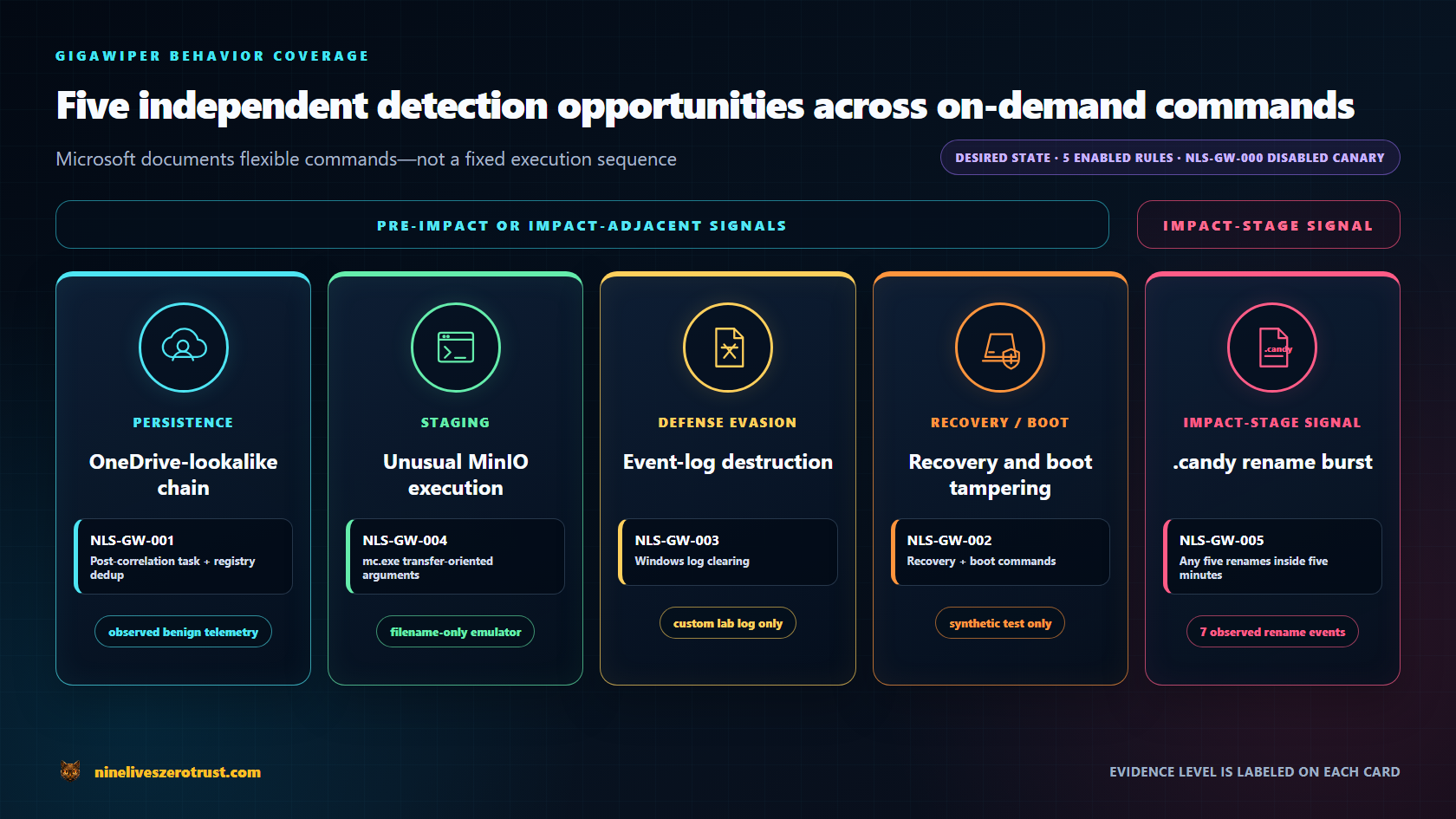
.candy rule detects an impact-stage rename burst but does not by itself establish encryption or data loss. This is a coverage map, not a deployment-state claim: the current NLS-GW-001 and NLS-GW-005 queries were revalidated read-only but were not redeployed to the validation Graph objects before those objects were retired.| Rule | Behavior | Table design | Evidence method |
|---|---|---|---|
| NLS-GW-001 | OneDrive Update task plus TaskCache or matching OneDrive registry activity | DeviceProcessEvents joined with DeviceRegistryEvents, then deduplicated after correlation | Observed benign telemetry plus a portal-native scheduled alert from the validation revision |
| NLS-GW-002 | Recovery and boot tampering commands | DeviceProcessEvents | Synthetic only |
| NLS-GW-003 | wevtutil log clearing | DeviceProcessEvents | Custom lab-log telemetry plus a portal-native scheduled alert |
| NLS-GW-004 | MinIO client transfer-oriented execution | DeviceProcessEvents | Filename-only safe emulator plus a portal-native NRT alert |
| NLS-GW-005 | Burst of .candy file renames | Optimized five-minute time-key window join | Live query results plus synthetic validation; no portal rule claimed |
NLS-GW-003 intentionally follows the command-line wevtutil behavior Microsoft reports for GigaWiper. Process and filename matching can miss renamed or wrapped tooling, direct Windows Event Log API use, or direct .evtx deletion. Security event 1102 and log-file tampering signals are useful defense-in-depth; this rule is not presented as exhaustive event-log-clearing coverage.
Why the network hunt is scoped to infrastructure and behavior
GigaWiper uses RabbitMQ over AMQP for commands and Redis for status and output. DeviceNetworkEvents can show the remote address, port, protocol, initiating process, path, hash, and command line. Those fields do not establish that an arbitrary TCP connection contains RabbitMQ or Redis application traffic.
The companion hunt therefore has two layers:
- an IOC hunt for the infrastructure Microsoft published;
- a behavioral hunt for rare executable-to-destination combinations involving the observed ports.
Neither is described as application-protocol inspection.
Continuous detection versus scheduled correlation
Microsoft’s continuous near-real-time custom detections have specific query constraints. A continuous query must use one supported table and cannot use joins or unions.
That divides this pack naturally:
| Detection | Design decision |
|---|---|
| Event-log clearing | Potential single-table NRT candidate after replacing operators outside the NRT-supported subset; no NRT rewrite was saved or validated in this lab |
| Recovery and boot tampering | Potential single-table NRT candidate after a compatible rewrite; no NRT rewrite was saved or validated in this lab |
MinIO mc.exe execution | The portal accepted the exact single-table query as Continuous in this tenant, but its has_any operator is not in Microsoft’s linked NRT operator list; revalidate or rewrite it before reuse |
.candy rename burst | Scheduled only as written; its multi-record aggregation is not NRT-compatible |
| Task plus registry persistence | Multi-table scheduled correlation |
All checked-in templates use the hourly frequency: PT1H contract. The live objects also exposed deprecated runtime and schedule fields, including lastRunDetails and nextRunDateTime, that Microsoft plans to remove on October 1, 2026. Automation should treat frequency as the durable schedule field. Accordingly, this article labels a rule NRT only where the exact preview behavior was deployed and observed.
GitHub validation, the native preview result, and a bounded Graph fallback
The pull-request validation workflow has no Azure or Graph deployment credentials. It performs only deterministic validation:
permissions:
  contents: read

jobs:
  validate:
    runs-on: ubuntu-24.04
    steps:
      - uses: actions/checkout@93cb6efe18208431cddfb8368fd83d5badbf9bfd # v5
        with:
          persist-credentials: false
      - run: az bicep install --version v0.45.6
      - shell: pwsh
        run: ./scripts/Test-Lab.ps1
The PowerShell test enforces the pack’s content and mutation-safety contracts:
- all six expected templates exist;
- every Bicep file compiles;
- rule IDs satisfy the live provider format;
- IDs and display names are unique;
- this pack’s endpoint queries return
Timestamp,DeviceId, andReportId; - each preview rule declares only one MITRE tactic;
- every compiled rule has the exact repository ownership marker and no current or deprecated response action;
- normalized exact-query fixtures cover all five behavior rules with one positive and one negative case each;
- endpoint creation requires a reviewed exact numeric image version, a local manifest, and unique Azure ownership tags; reuse is limited to an empty manifest-owned group still in the planned state;
- the direct ARM helper validates only, and safe telemetry cleanup performs collision and ownership checks before any exact, non-recursive removal; and
- endpoint lifecycle scripts pin exact
Az.AccountsandAz.Resourcesversions, while active CI pins its actions, Linux runner, and Bicep CLI.
The intended post-merge path was native Sentinel Repository synchronization. The connection configuration was accepted: it targeted main, selected CustomDetection, created the expected OIDC workflow, and provisioned the documented Microsoft Graph application permission. A token-safe diagnostic showed that the connection identity held CustomDetection.ReadWrite.All and could read a custom rule by exact ID.
Repeated generated Repository workflow attempts returned InvalidTemplateDeployment with an inner ProviderError: Encountered internal server error for all six corrected templates. The same content compiled, direct delegated Bicep reached the service, and direct Graph operations accepted and read the rules. The documented Owner prerequisite for creating the connection was already satisfied. A temporary Azure Security Admin assignment did not change the native deployment result and was removed. No additional documented provider-path role was identified. These observations locate the stage where native processing stopped; the root cause remains unconfirmed.
The connection-generated native workflow and helper used during validation are retained outside .github/workflows as non-reusable evidence artifacts, so they cannot run from the public repository. Merging to main validates content but does not retry the native path. A future native test requires a new Repository connection and freshly generated files; before use, those files must be reviewed, confirmation-gated, serialized against the Graph fallback, and authorized only after ownership is deliberately transferred.
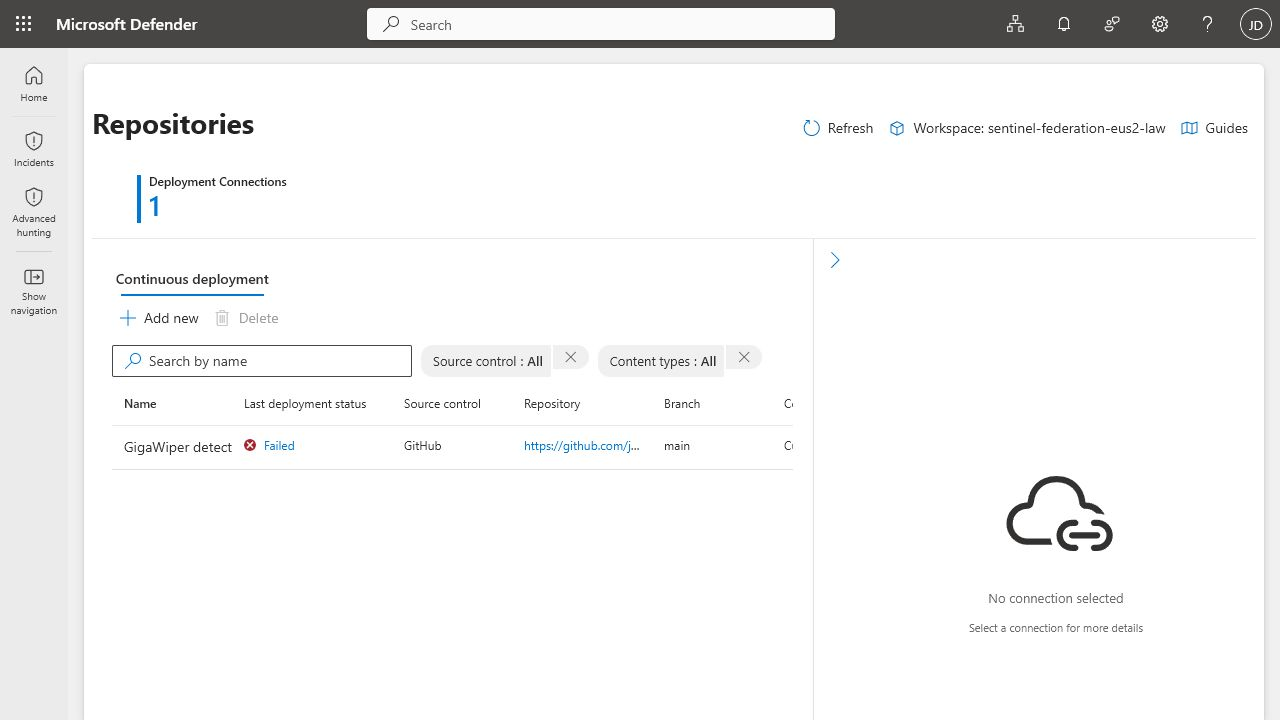
main as Failed. The workflow evidence ledger preserves the nested InvalidTemplateDeployment and provider error; this list view shows only the terminal state. The validation connection was subsequently removed.To keep the native and fallback outcomes distinct, I added a bounded fallback for this preview-era lab. The fallback:
- uses a dedicated Entra application with only
CustomDetection.ReadWrite.All; - exchanges GitHub OIDC for an app-only token, with no stored client secret;
- has zero Azure RBAC assignments;
- applies changes manually from
mainonly after the exact confirmationDEPLOY_PREVIEW_FALLBACK; its separate inspection mode is read-only, uses exact-ID GETs, and refuses to attribute an unmarked collision to this lab; - compiles the same checked-in Bicep before extracting the rule body;
- performs an exact-ID GET followed only by POST or PATCH;
- requires the exact repository ownership marker and zero response actions on the desired body before any tenant mutation;
- never deletes, prunes, adopts a differently identified rule, or updates an existing exact ID without that same marker and an alert-only action model;
- reads every exact ID back and verifies status, schedule, KQL, ownership marker, alert metadata, MITRE mapping, entity mapping, and zero response actions.
GitHub Actions run 29180593038 completed successfully on July 12, 2026. All six stable IDs returned HTTP 200 on update and passed read-back validation: nls-gw-000-canary remained disabled, and NLS-GW-001 through NLS-GW-005 remained enabled. At validation time, those Graph objects contained the revisions deployed by that run. The later hardened NLS-GW-001 query and optimized NLS-GW-005 query were independently re-run read-only against retained live telemetry, but neither current revision was applied to the validation objects and no new alert is attributed to either one. All six objects were subsequently deleted during exact-scope retirement.
Read-only exact-ID inspection runs 29193356536 and 29193929962 confirmed hourly scheduler metadata and zero current or deprecated response actions. After the safe events arrived, all five enabled rules showed lastRunDateTime 2026-07-12T13:09:25.6533333Z and nextRunDateTime 2026-07-12T14:09:25.6533333Z, with empty last-run status, error-code, and failure-reason fields. Those timestamps establish service scheduling only; no alert is attributed to the Graph-fallback objects.
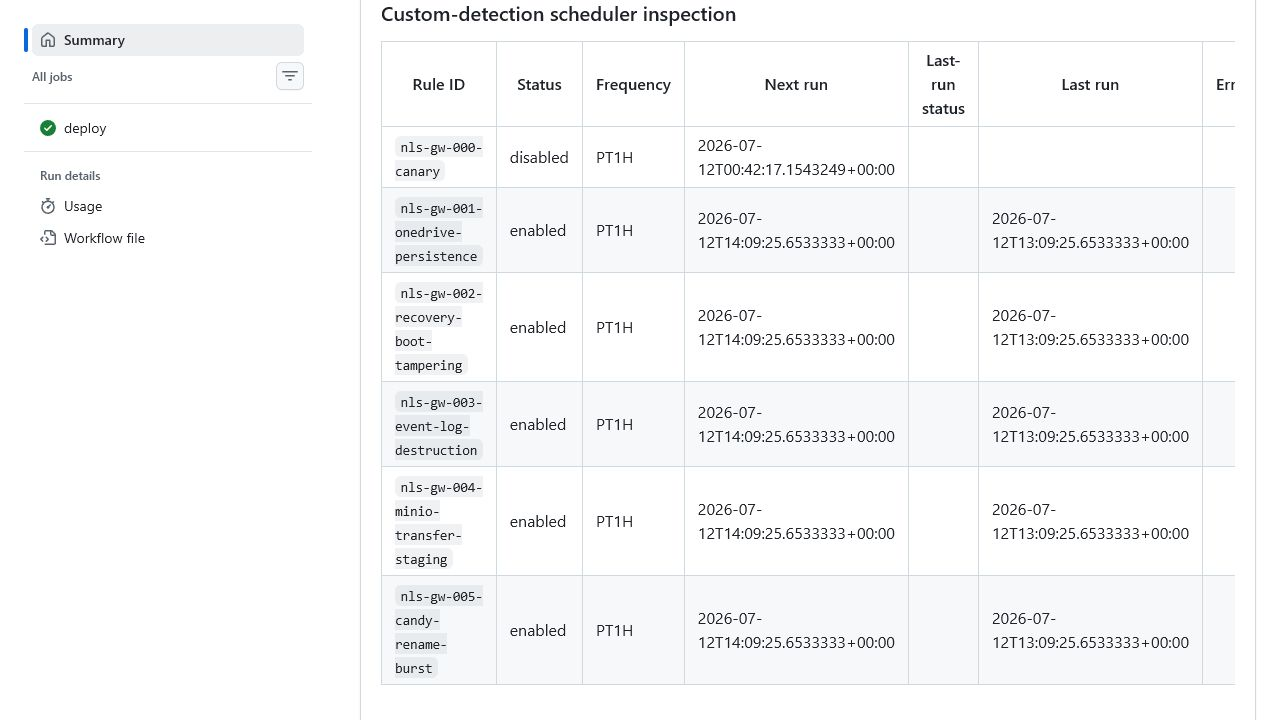
13:09:25Z last run, and a 14:09:25Z next run; the complete job summary also records zero response actions. Scheduler metadata is not alert attribution.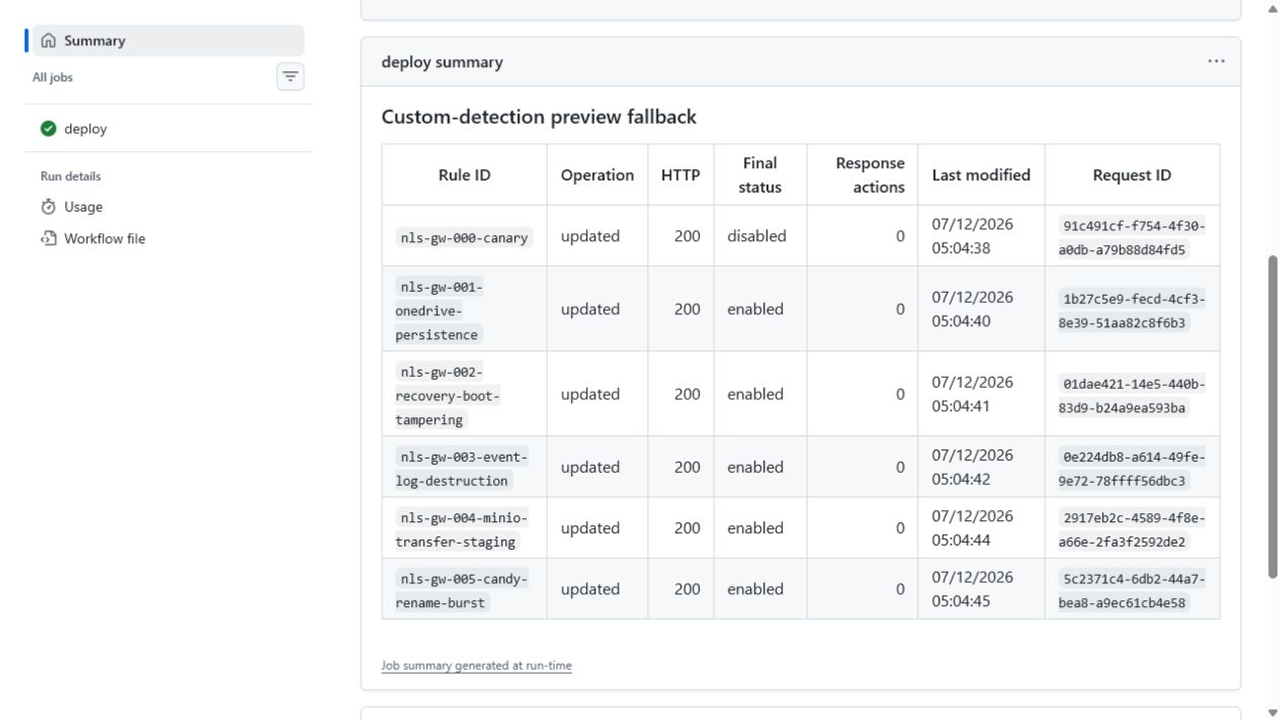
This fallback is separate from native Repository synchronization and is not presented as a general replacement for Sentinel Repositories. Microsoft documents beta APIs as unsuitable for production use, and this create/update path is currently available only in the Global service, not US Government L4, US Government L5 (DOD), or China operated by 21Vianet. CustomDetection.ReadWrite.All is the API’s least-privileged write permission, but it can write all custom detections in the tenant. The dedicated app, OIDC federation, environment restrictions, and zero Azure RBAC are therefore essential controls for this bounded fallback. It should remain mutually exclusive with a working native synchronization path.
Before the three separately created portal-native validation rules were added, the portal-list check did not satisfy the Graph-object visibility gate. The Hunting > Custom detection rules page returned no NLS-GW rows even though Microsoft Graph continued to read all six exact fallback objects successfully. The later portal-native rows do not establish visibility or alert attribution for those six different IDs. That validation-time visibility difference remains unexplained; because the objects were subsequently retired, no current visibility state is claimed and the evidence does not distinguish preview replication behavior from portal authorization or UI filtering.
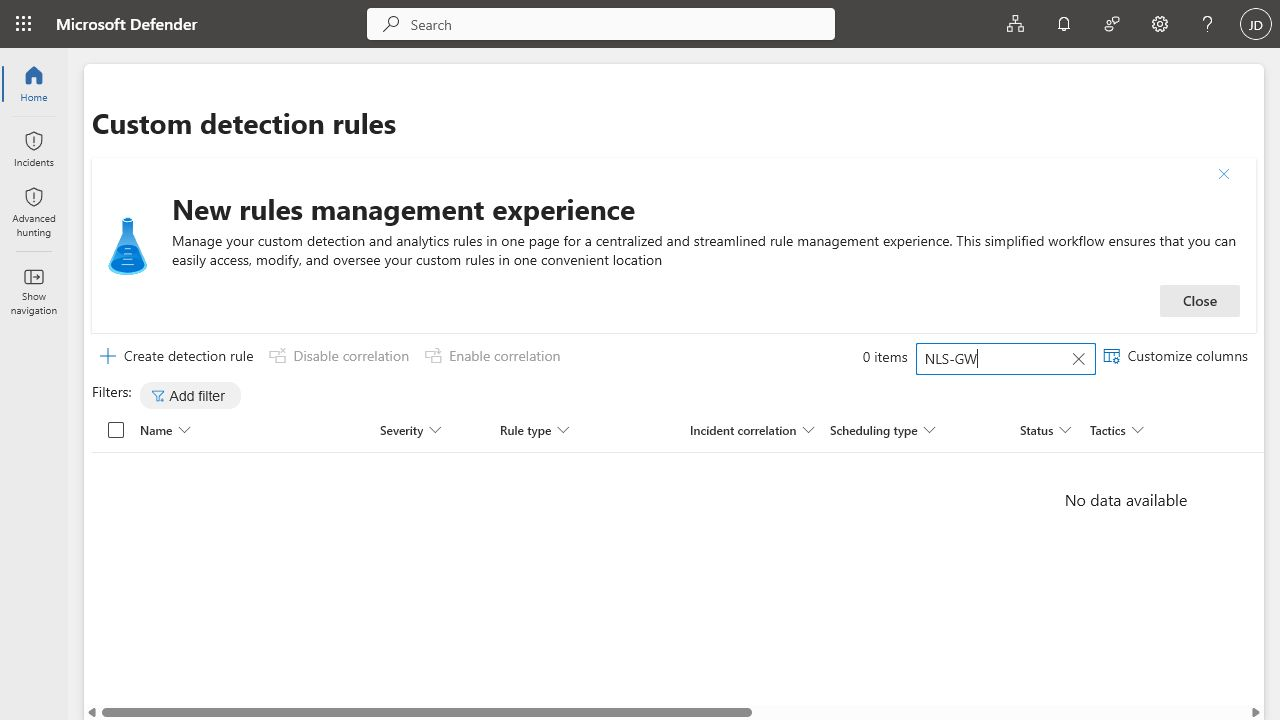
NLS-GW search returned zero rows even though Microsoft Graph continued to read all six fallback objects by exact ID. The later, separately created portal-native rules do not change the scope of this historical observation.Safe telemetry that exercises the detection path
The endpoint test script performs four bounded actions on a disposable, MDE-onboarded Windows VM.
Endpoint readiness requires separate checks. The extension can report onboarding success, SENSE can be running, and the registry can show onboarding state 1 while the tenant-level Defender for Endpoint service is still activating. In this lab, the machine API initially returned Account mode is inactive even though LastConnected was current. Microsoft documents that onboarding Defender for Endpoint through Defender for Cloud for the first subscription in a tenant can take up to 12 hours; later machines and subscriptions can take up to one hour. I waited until the machine API reported the endpoint Onboarded and Active, and until Advanced Hunting returned its DeviceInfo, before generating telemetry; local sensor health alone is not collection evidence.
1. Persistence correlation
It creates:
HKU\S-1-5-18\SOFTWARE\OneDrive\Environmentwhen the Azure Run Command executes as SYSTEM, orHKCU\SOFTWARE\OneDrive\Environmentin an interactive elevated run, with a value explicitly labeledSAFE-TELEMETRY-ONLY;- a scheduled task named
OneDrive Updatewhose action is only the inert, ownership-marked commandcmd.exe /c rem NLS-GigaWiper-SafeTelemetry.
The query correlates the process event with either the matching OneDrive registry activity or Windows’ own TaskCache\Tree\OneDrive Update registration. Live Server 2022 telemetry reliably surfaced the TaskCache entry but did not surface the harmless lab registry marker, so the checked-in rule preserves both paths because collection differs between these registry locations. The task does not run hidden, repeat every minute, download anything, or persist malicious code.
2. Event-log clearing
The script creates its own NLS-GigaWiper-Lab event log, writes one marker, and clears only that custom log. It never clears Security, System, Application, Setup, or ForwardedEvents.
3. MinIO filename simulation
The script copies cmd.exe into the lab directory as mc.exe and invokes it only to print a safe marker containing a transfer keyword. This validates filename and command-line telemetry. It does not validate MinIO client execution, network transfer, or exfiltration.
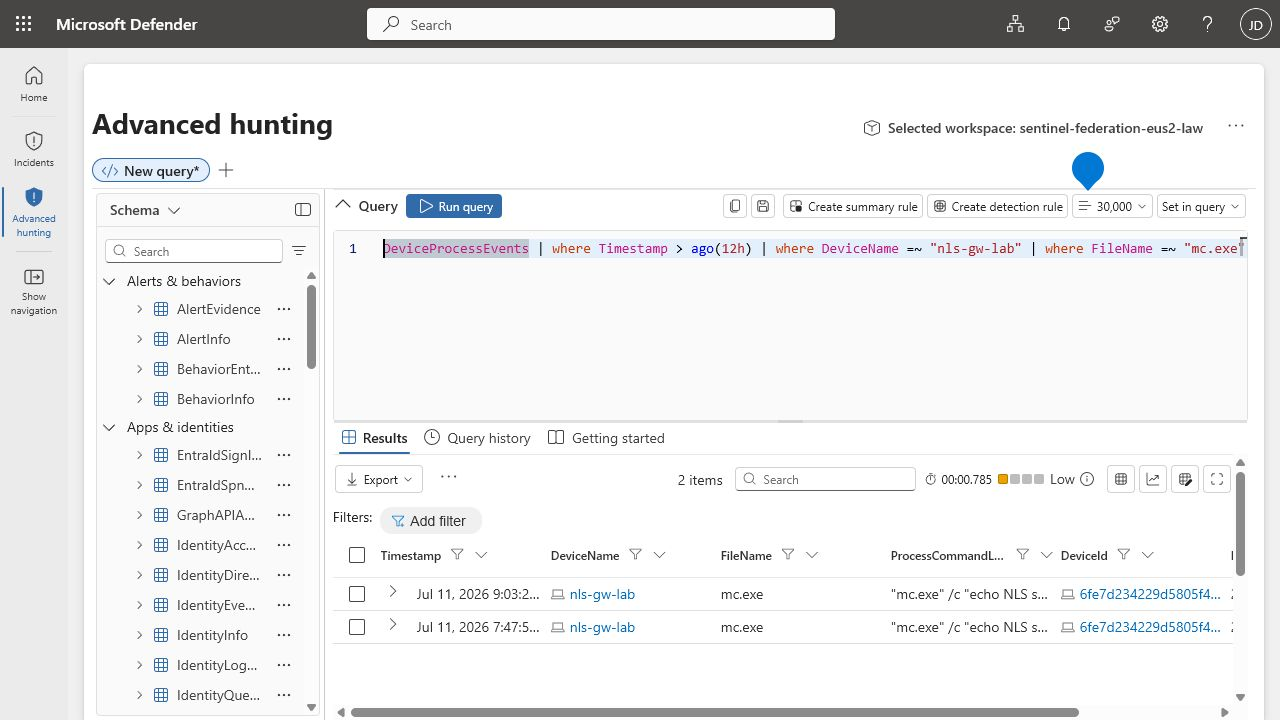
DeviceProcessEvents logic returned two mc.exe rows from nls-gw-lab. Both were bounded marker commands with no network transfer. These are telemetry matches, not custom alerts.4. .candy decoys
Eight inert copies of the lab VM’s %SystemRoot%\System32\cmd.exe are renamed from .tmp to .candy in Public Documents. They are never executed as .candy; no content is encrypted, deleted, or made unrecoverable. Two small text-file variants initially surfaced only their directory creation. The copy-plus-move variant arrived later: seven FileRenamed rows became visible after an ingestion delay, and the exact NLS-GW-005 query returned one seven-file burst. That historical ad-hoc run used public-*.candy, which is why the evidence graphic carries that label; the reproducible checked-in harness uses decoy-##.candy in the same observed Public Documents path.
The recovery and boot rule remains synthetic-only. The lab never executes reagentc /disable, boot-policy-changing bcdedit commands, permission changes against boot files, raw-disk operations, or wiping routines.
The exact checked-in queries returned Advanced Hunting matches for NLS-GW-001, NLS-GW-003, NLS-GW-004, and NLS-GW-005. Only the recovery and boot rule, NLS-GW-002, remains synthetic-only in this validation record.
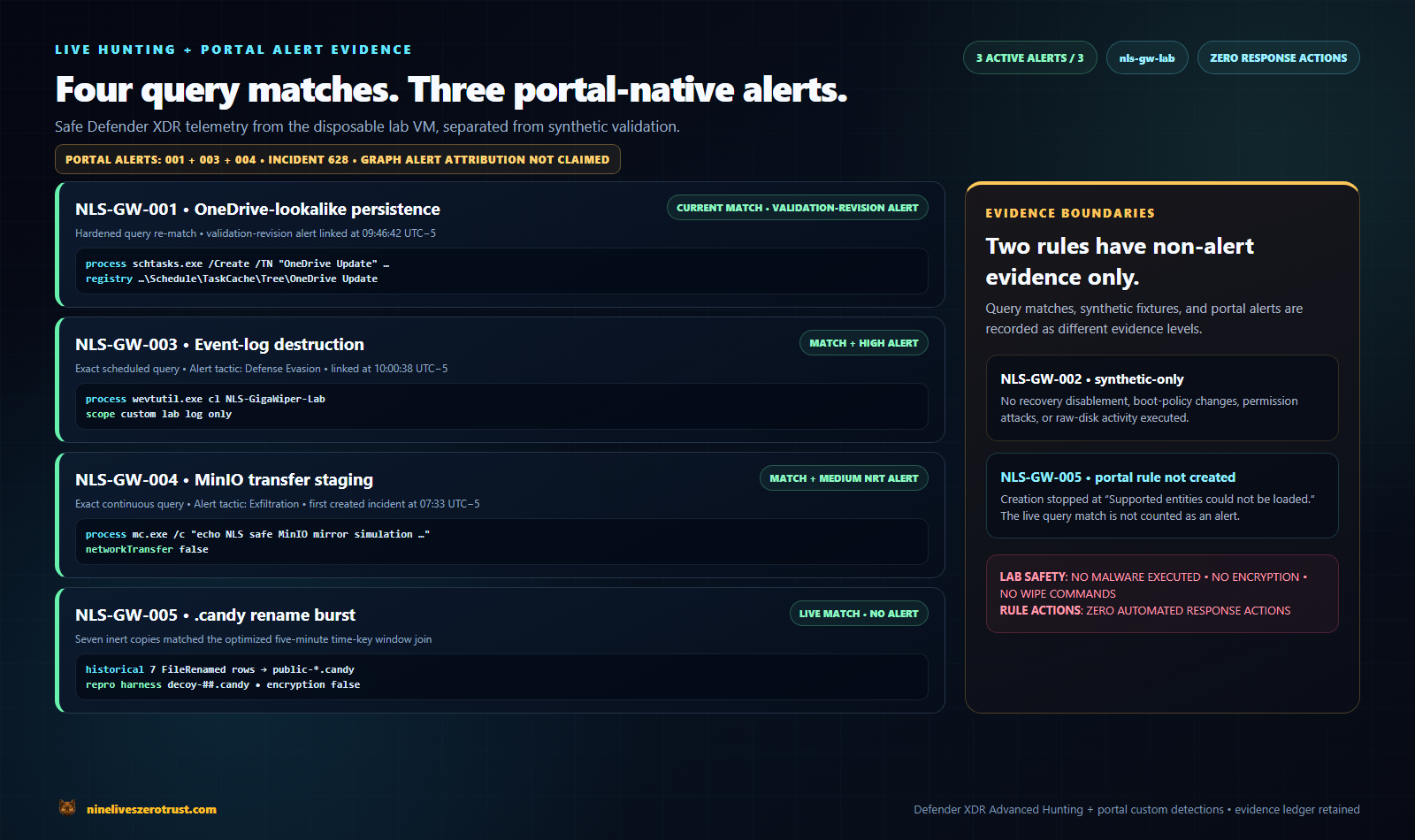
Three portal-native rules validate the scoped alerting paths
The Graph fallback confirmed that Microsoft Graph accepted and read back the six exact rule objects, but those objects did not appear in the unified Detection Rules page during validation. Their later scheduler metadata was not alert evidence. I therefore created three separate portal-native, alert-only custom detections to test the live evaluator without attributing those alerts to the native Repository connection or to Graph-created objects that were not visible in that page.
Each validation rule used the then-current checked-in query for its numbered detection and had zero response actions. Defender recorded all three as Custom detection alerts from Microsoft Defender for Endpoint, with each alert tied to the same onboarded nls-gw-lab device:
| Portal rule | Configuration | Portal-native alert evidence |
|---|---|---|
NLS-GW-LIVE-001 | High, Persistence, scheduled; created July 12 at 09:39:42 in the portal’s UTC-5 view | Initial evaluation completed and linked alert ede0f56adf-2532-41c2-98a8-ac08a2481201_aml to incident 628 at 09:46:42 |
NLS-GW-LIVE-003 | High, Defense Evasion, scheduled; created July 12 at 09:53:08 in the portal’s UTC-5 view | Initial evaluation completed and linked alert ed1f17e8f7-3600-4c97-867e-b6bd1c987c37_aml to incident 628 at 10:00:38 |
NLS-GW-LIVE-004 | Medium, Exfiltration, Continuous (NRT) | Alert eda016b9bd-4631-44d3-baa6-314b4f7ed032_aml appeared after a new post-creation marker, included it as last activity, and linked to incident 628 |
The alert-detail view records incident 628 at High severity with three active alerts out of three.
The NLS-GW-LIVE-001 and NLS-GW-LIVE-003 alerts were generated when Defender ran each new scheduled rule’s documented initial evaluation over prior benign endpoint telemetry. Microsoft says a newly saved custom detection checks up to 30 days of existing data before following its configured frequency. These were service-generated alerts from initial evaluation rather than synthetic datatable() results; the historical activity preceded rule creation. NLS-GW-LIVE-004 provides complementary evidence: the service-generated NRT alert incorporated a matching event after the rule was enabled. Because its first activity predates rule creation, I do not attribute the alert solely to the post-rule marker.
For NLS-GW-LIVE-004, the safe harness generated a new mc.exe marker only after the rule was active. It completed at 2026-07-12 12:30:45Z with NetworkTransfer=False, and Defender added the medium-severity custom alert to incident 628 at approximately 12:33Z. Its first activity was an earlier safe query match, while its last activity was the post-creation marker at 12:30:45Z. The portal accepted this exact query in this tenant even though its has_any operator is not in Microsoft’s linked NRT operator list; treat that as observed service behavior and revalidate or rewrite the query before reuse.
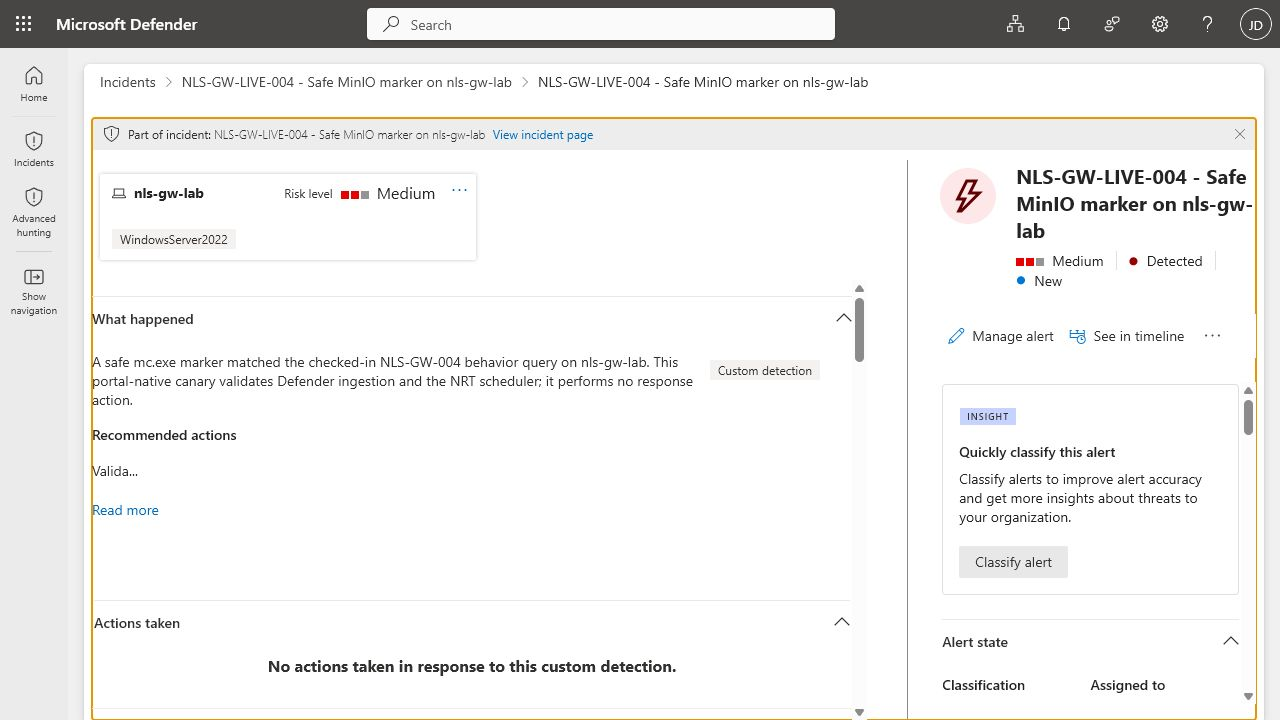
nls-gw-lab device and explicitly recorded that no actions were taken in response. The marker remained telemetry-only: it did not transfer data or trigger containment.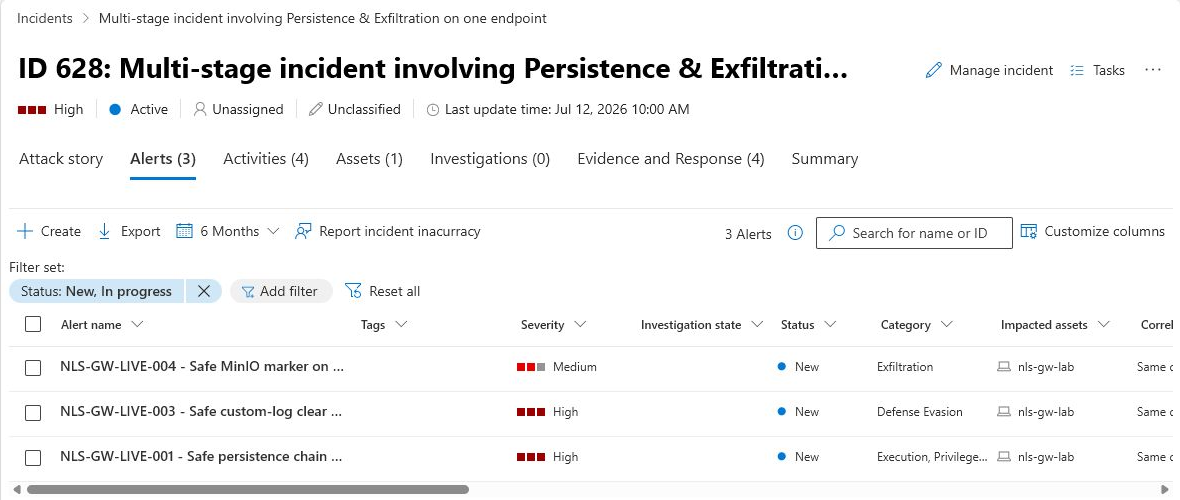
nls-gw-lab. The crop removes the global portal header and account or tenant identifiers; it does not alter the incident or alert rows. These are the separately created portal-native LIVE rules, not the six Graph-fallback objects.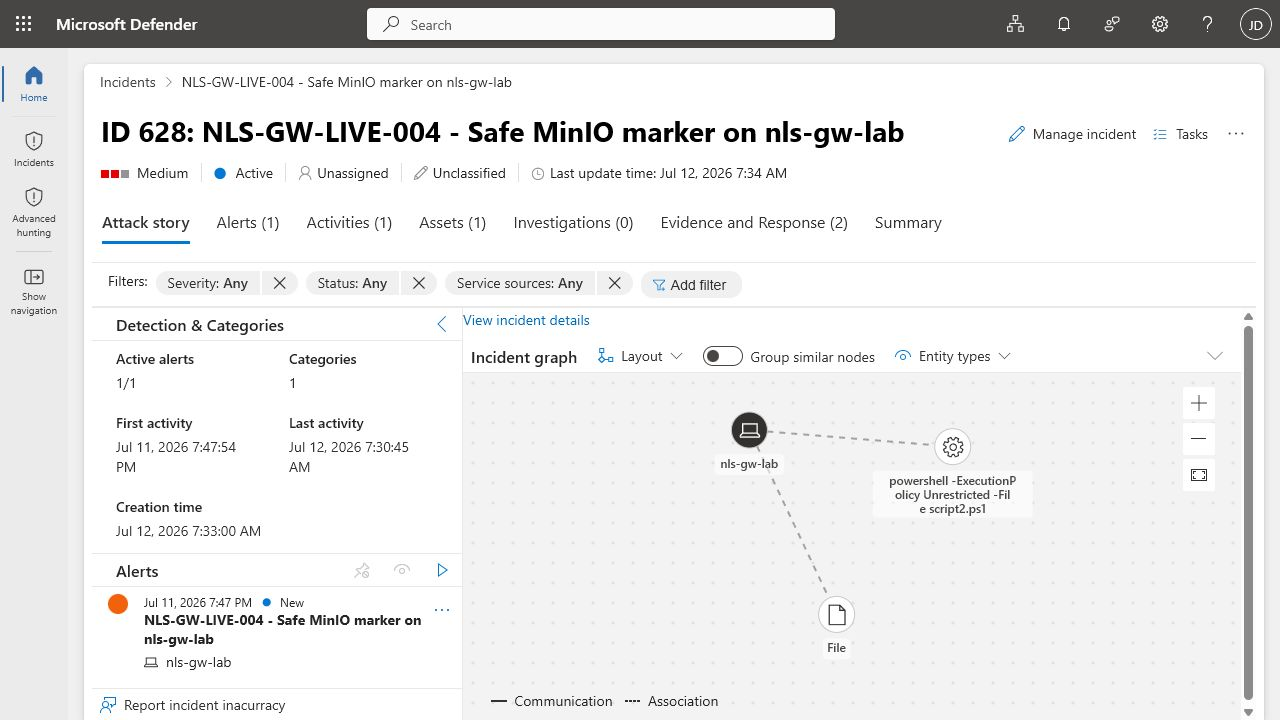
Evidence established: the three query revisions checked in during validation matched MDE-ingested telemetry; Defender’s scheduled and Continuous evaluators produced three portal-native custom alerts; all three were correlated into incident 628 on the same device; and zero response actions ran. NLS-GW-LIVE-001 and NLS-GW-LIVE-003 demonstrate initial scheduled evaluation over prior benign telemetry, while NLS-GW-LIVE-004 demonstrates that the NRT alert incorporated a new post-rule event as its last activity. A later audit hardened NLS-GW-001’s post-correlation deduplication; that current revision independently re-matched the retained live telemetry but was not deployed to the validation Graph or portal rules before retirement and is not attributed a new alert.
Evidence boundaries: this does not establish native Sentinel Repository synchronization, alert attribution to the six Graph-fallback objects, or execution of GigaWiper or destructive activity. During validation, the native connection reached the portal’s
Failedstate; that connection was subsequently removed, while its evidence was retained. The three attributed alerts belong only to the separately created portal-native validation rules.
NLS-GW-005 remains an explicit boundary. The exact optimized time-window query returned one seven-file match, and a representative raw-row query returned live DeviceFileEvents results. However, repeated attempts in fresh unified custom-detection wizards returned Supported entities could not be loaded and left Add assets disabled. Because that control remained unavailable, no NLS-GW-005 portal rule or custom alert is claimed. I record this as an observed wizard outcome with no assigned root cause, not as evidence that aggregate custom detections or NLS-GW-005 are unsupported. Its evidence remains live query validation, not alert validation.
Three evidence levels
These levels distinguish query behavior, sensor collection, and alert generation.
Observed benign telemetry
The endpoint performs the bounded action, Defender collects it, and the result appears in Advanced Hunting.
Synthetic query fixtures
datatable() rows exercise the KQL logic for actions that must not be performed. The fixture now embeds normalized exact copies of all five current behavior queries and checks five positive plus five negative cases, including the multi-process persistence regression and a .candy burst that crosses a clock boundary. The local validator prevents fixture/query drift, and the separate read-only runner executed all ten rows successfully through Advanced Hunting. A passing synthetic query shows query behavior against those rows. It does not establish sensor collection, scheduler operation, alert generation, or Defender protection.
Live deployment evidence
This level records what the control plane and service did, including paths that did not complete and their returned errors. In this validation window, Bicep compilation passed; native Repository synchronization returned InvalidTemplateDeployment and inner ProviderError; manual Graph fallback run 29180593038 updated and read back all six exact IDs; the deployment canary was disabled; and five behavior rules were enabled. Read-only inspection runs 29193356536 and 29193929962 returned hourly scheduler metadata for those five enabled rules, including a post-telemetry run at 13:09:25Z, and counted zero current or deprecated response actions across all six objects, but they did not attribute an alert to them. Safe telemetry reached Advanced Hunting. Separately, the portal-native NLS-GW-LIVE-001, NLS-GW-LIVE-003, and NLS-GW-LIVE-004 rules used the then-current checked-in queries and generated three portal-native custom alerts in incident 628 with zero response actions.
The reviewed revision’s evidence ledger records each claim. The three LIVE rules validate only their scoped alerting paths, scheduled for NLS-GW-LIVE-001 and NLS-GW-LIVE-003, and NRT for NLS-GW-LIVE-004. Native synchronization and the NLS-GW-005 wizard remain open validation items; Graph-object portal visibility remains an unresolved historical observation because those objects are retired. Graph scheduler metadata is not alert attribution.
Built-in coverage and organization-owned rules
Microsoft’s GigaWiper article lists built-in Defender detections for GigaWiper, FlockWiper, possible ransomware activity, and ransomware behavior in the file system. Keep those protections enabled.
The safe filename emulator also triggered a separate Defender for Endpoint alert, System executable renamed and launched. This records an additional Microsoft-managed behavioral detection, but it is not labeled as a GigaWiper-family detection or as one of this pack’s custom alerts.
The custom pack adds transparency and local context:
| Microsoft-managed protection | Organization-owned detection |
|---|---|
| Vendor intelligence and malware-family knowledge | Reviewable KQL and explicit assumptions |
| Signature and behavioral models | Environment-specific allowlists and baselines |
| Automatically updated by Microsoft | Changed through the organization’s pull-request process |
| Broad customer protection | Local response ownership and audit history |
| May identify the known family directly | Can identify similar pre-impact behavior without claiming family attribution |
One does not replace the other.
Response priorities for suspected destructive activity
When several signals correlate on the same endpoint, prioritize preservation and containment.
- Rapidly verify whether the activity is authorized. When multiple high-confidence destructive indicators are present, or authorization cannot be confirmed immediately, isolate the endpoint through Defender under your incident-response authority.
- Preserve volatile evidence and capture the process tree, network connections, logged-on users, and nearby alerts.
- Investigate scheduled tasks, services, registry modifications, firewall changes, and newly written executables.
- Block confirmed malicious infrastructure and hashes while retaining behavior-based hunting.
- Review identity activity from the device and revoke affected sessions or credentials.
- Determine whether files were staged or transferred before destructive activity.
- Validate offline, immutable, and separately administered recovery paths.
- Rebuild rather than trust a device after confirmed boot, recovery, or raw-disk tampering.
Automated device isolation is deliberately not enabled by the Bicep templates. A filename such as mc.exe or an administrator clearing a custom log is not enough context for automatic containment in every environment.
What the validation established
The most reusable result is the delivery pattern around the five Bicep rules:
- start with a disabled canary;
- compile locally and in CI;
- treat IDs as API contracts;
- retain the native-provider result alongside successful stages;
- keep the fallback manual, exact-ID, and separate from native synchronization;
- use least privilege: Graph-only OIDC and no Azure RBAC for the fallback;
- separate high-confidence alerts from hunts;
- test high-risk logic with synthetic fixtures;
- label the
.candyrule as an impact-stage signal without treating a rename as evidence of encryption; - keep response automation opt-in;
- maintain an evidence ledger;
- clean up only exact lab artifacts.
The enduring result is the governed path from threat intelligence to a verifiable custom-rule deployment. Three separately scoped portal-native rules provide recorded evidence of scheduled and NRT evaluation, alert creation, entity mapping, incident correlation, and zero response actions. The native Repository attempt is retained as historical evidence of an observed non-completion and is kept separate from that alert evidence; its validation connection was later removed. NLS-GW-005 remains query-validated only; no portal rule or alert is claimed.
Before retirement, the six Graph objects contained the validation revisions while the repository carried later hardening for NLS-GW-001 and NLS-GW-005. That documented drift remains a lifecycle lesson, not alert evidence. On July 14, 2026, all six exact Graph objects and the three portal-native validation rules were deleted and exact read-back returned 404; the Defender portal showed zero matching rules after refresh. Historical alert and incident evidence remains, while the repository now represents reusable desired state rather than an active tenant deployment.
Cleanup
After validating ownership of every existing lab artifact before the first deletion, the safe telemetry script removes only:
- the exact
OneDrive Updatelab task; - the exact
NLSLabMarkervalue at the selected lab registry path, while preserving the parent key; - the exact custom lab event log and source;
- the
NLS-GigaWiper-Labworking directory and decoys.
During validation, the Azure endpoint lived in a dedicated resource group with the platform’s default inbound deny, no custom inbound NSG rules, and an expiration tag. After evidence capture, that disposable resource group was deleted on July 14, 2026. The retained screenshots and hunting results remain historical validation evidence.
For a new run, the current endpoint helper requires an explicitly reviewed
marketplace image version and writes a local manifest before its first Azure
creation. The raw template composes that version from three nonnegative numeric
segments and accepts only the lab’s exact owner marker. Resource-group reuse is
limited to an empty group with that manifest and a planned state; a partial or
completed deployment must be cleaned up and recreated. The checked-in cleanup
helper requires the manifest plus the exact Azure ID and unique owner/deployment
tags. Cleanup removes the manifest only after Azure reports the resource group
absent; a missing or mismatched marker is a refusal condition, not a reason to
recreate the marker. Both lifecycle helpers also require the exact Az module
versions documented by the companion repository.
Custom-detection retirement was completed separately from endpoint cleanup:
- The validation Sentinel Repository connection, connection-created identities, assignments, secrets, and branch-scoped GitHub OIDC grants were removed. Deselecting Custom Detection Rules only stops that content type and is not identity cleanup; future tests must repeat exact ownership checks.
- The six exact Graph-fallback IDs,
nls-gw-000-canarythroughnls-gw-005-candy-rename-burst, were deleted through an exact-ID workflow. Follow-up reads returned 404 for every object. - The three portal-native rules,
NLS-GW-LIVE-001,NLS-GW-LIVE-003, andNLS-GW-LIVE-004, were deleted separately. A hard refresh showed zero matching portal rules, and their service reads returned 404. Incident 628 retains the historical three-alert evidence. - The dedicated fallback application, service principal, federated credential, Graph permission grant, and GitHub environment variables were removed after rule deletion and read-back verification.
- The credential-less
nls-gigawiper-validation-20260711diagnostic app, service principal, and tenant-wide Graph grants were removed after the final audit.
The checked-in fallback intentionally has no delete or prune mode. Do not use a complete-mode resource-group deployment as a shortcut.
Sources
- Microsoft Security Blog: GigaWiper: Anatomy of a destructive backdoor assembled from multiple malware
- Microsoft Learn: Manage content as code with Microsoft Sentinel repositories
- Microsoft Learn: Primary and secondary Sentinel workspaces in the Defender portal
- Microsoft Learn: Create custom detection rules in Microsoft Defender XDR
- Microsoft Learn: Supported KQL features in Azure Monitor transformations
- Microsoft Learn: Enable Defender for Endpoint integration in Defender for Cloud
- Microsoft Learn: DeviceNetworkEvents table schema
- Microsoft Learn: Windows
wevtutilcommand reference - Microsoft Graph: Detection rule resource type
- Microsoft Graph: Rule schedule resource type
- Microsoft Graph: Detection action resource type
- Microsoft Graph:
alertTemplateresource type - Microsoft Graph: Create a custom detection rule
- Microsoft Graph: Update a custom detection rule
- Microsoft Graph: Get a custom detection rule
- Microsoft Graph: CustomDetection.ReadWrite.All permission
- MITRE ATT&CK: Clear Windows Event Logs (
T1685.005) - MITRE ATT&CK: Detection of Event Log Clearing on Windows via Behavioral Chain (
DET0532) - GitHub Docs: Configuring OpenID Connect in Azure
How is your team bringing code review and evidence tracking into the Defender detection lifecycle? Find me on LinkedIn or through the other links below.

Jerrad Dahlager, CISSP, CCSP
Cloud Security Architect · Adjunct Instructor
Marine Corps veteran and firm believer that the best security survives contact with reality.
Have thoughts on this post? I'd love to hear from you.