On this page
My test Deployment had two ready pods. I deleted one. Kubernetes replaced it, and the new pod inherited the same writable-root-filesystem setting.
Kubernetes did exactly what you asked. The workload template still described that configuration.
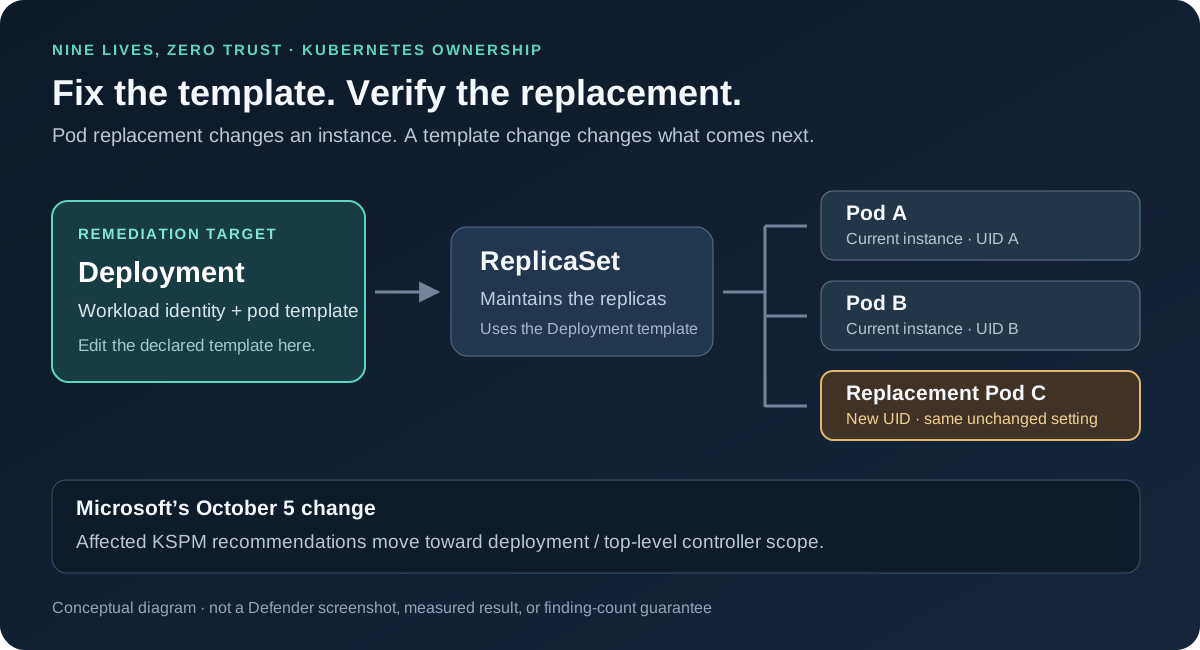
Microsoft’s October 5, 2026 Defender for Cloud update brings Kubernetes security posture management findings closer to that source of truth. Microsoft labels the change generally available and says affected misconfiguration recommendations are moving from individual running container instances to the container deployment or top-level controller, such as a Deployment or StatefulSet. It also warns that affected recommendations and their Secure Score impact may change. The announcement describes an update in progress; it does not establish when every tenant will display it. Microsoft release note.
That is a small release-note entry with a useful operational consequence: investigate the running container, but fix the configuration that keeps creating it.
The Finding Should Lead to the Fix
For a Deployment-managed application, the ownership chain normally runs from Deployment → ReplicaSet → Pod. The Deployment holds the desired pod template; the ReplicaSet maintains the requested replicas. Changing the template starts a rollout. Deleting one pod leaves that desired template intact, so replacement does not remove the underlying configuration. Kubernetes Deployments.
Consider a fictional checkout service with three identical replicas and a writable container root filesystem. That is three running copies of a setting the application team may be able to address in one template change. It is not necessarily three independent remediation decisions.
Microsoft’s container recommendation catalog includes read-only root filesystems, restricted Linux capabilities, and avoiding privileged containers. Those are concrete configuration questions: what does the workload need, where is the setting declared, and who owns that declaration?
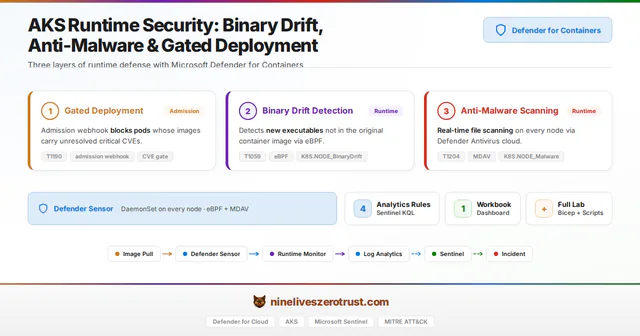
This follows a different question from my earlier AKS runtime-security article. Runtime controls look for activity such as a newly introduced executable. This update concerns the resource scope attached to posture recommendations. A posture finding can help identify a risky configuration without demonstrating an attack, and a scope change does not establish that an admission control blocked anything.
A Better Resource Scope Changes the Workflow
The useful test is whether the assessed workload remains identifiable through pod replacement and reaches the team that owns its template. That is the operational opportunity I see in this change, not a measured claim about Microsoft’s deduplication behavior.
| When reviewing a finding | Instance-centered habit | Controller-centered review |
|---|---|---|
| Identify the workload | Copy the current pod name into a ticket | Record cluster, namespace, owner kind/name, and container context |
| Find the responsible team | Look for whoever operates the node | Follow the workload to its deployment repository and owner |
| Apply remediation | Treat disappearance of the pod as closure | Change the template and verify the replacement workload |
| Measure progress | Compare raw affected-resource counts | Compare equivalent scope, configuration, and assessment state |
A controller does not erase useful container detail. A multi-container pod can have different settings for its application and sidecar. Keep the relevant container and check in the investigation rather than assuming every container in a Deployment is interchangeable.
StatefulSets make identity especially easy to misread. They preserve predictable pod identities such as database-0, but a replacement pod is still a new object. Kubernetes assigns each pod a UID; the same name does not mean the same object survived. StatefulSet identity, pod lifecycle.
The Small Experiment: Follow the Owner, Then Change the Template
The companion experiment separates two questions:
- Kubernetes: does replacing a pod preserve its controller and the selected configuration, and does changing the template alter replacement pods?
- Defender: what assessed resource and status does the service actually return for this workload during the observation window?
Those require different evidence. Kubernetes object snapshots answer the first. A real Defender assessment answers the second. A successful deployment, an empty query, or a local rule that recognizes a setting cannot stand in for a Defender result.
What Actually Happened in AKS
On October 7, 2026, I captured the two-pod workload, verified the selected pod and Deployment UIDs, deleted that one test pod, and waited for the workload to return to readiness. The comparison used the before and after Kubernetes snapshots, each checked against its saved SHA-256 digest.
| Observation | Before: 20:33:02 UTC | After: 20:55:54 UTC |
|---|---|---|
| Desired / ready replicas | 2 / 2 | 2 / 2 |
| Deployment object | Baseline UID | Same UID |
| Active ReplicaSet | One | Same ReplicaSet UID |
| Pod objects | Two baseline UIDs | One retained; one replaced by a new UID |
Template readOnlyRootFilesystem | Explicitly false | Still false |
| Root-filesystem setting in both pods | Matched the template | Still matched the template |
| Requested image and observed image-ID set | Baseline | Unchanged |
One pod disappeared. The writable-root setting did not. This is the distinction that matters when someone proposes “restart it” as the fix for a posture finding. The two capture times bound our observations; their difference is not a measurement of pod-replacement latency.
The sanitized comparison artifact contains the exact fractional-second timestamps, source hashes, and comparisons without raw resource IDs. Its after-phase label is rolled; the actual operation here was pod replacement, not a change to the Deployment template.
To compare your own complete captures, use their actual filenames with the companion helper:
python scripts/compare_captures.py `
  --before PATH_TO_BASELINE_JSON `
  --after PATH_TO_REPLACEMENT_JSON `
  --out results/replacement-comparison.json
The helper refuses mismatched scope or Deployment identity, incomplete captures, altered hashes, reversed timestamps, and an existing output file.
Change the Template, Then Replace Another Pod
I continued the Kubernetes experiment on the same Deployment: scale to four replicas, change the template’s root-filesystem field, then replace one of the corrected pods. Every capture below had all desired replicas ready.
| Capture on October 7, UTC | Ready pods | Active ReplicaSet | Template and every pod’s readOnlyRootFilesystem |
|---|---|---|---|
| 21:22:02 — fresh baseline | 2 | Original | false |
| 21:22:53 — scale to four | 4 | Original | false |
| 21:23:52 — template patch completed | 4 | New | true |
| 21:24:43 — replace one corrected pod | 4 | Same new ReplicaSet | true |
The Deployment UID and image remained unchanged. Scaling added two pod UIDs. The template patch produced four new pod UIDs and a different active ReplicaSet. The final replacement changed one pod UID; all four pods still carried readOnlyRootFilesystem: true.
Replacement preserved the original setting before the fix and the corrected setting afterward. The template was the difference.
The companion lab links the pinned source, runbook, and three additional comparison artifacts. Its single-field patch tests the expected container name before making the change. In the lab checkout, with its dedicated kubeconfig:
kubectl --kubeconfig private/kubeconfig -n nls-kspm-controller-lab `
  patch deployment kspm-scope-proof --type=json `
  --patch-file manifests/harden-readonly.patch.json
if ($LASTEXITCODE -ne 0) { throw 'Template patch failed' }

kubectl --kubeconfig private/kubeconfig -n nls-kspm-controller-lab `
  rollout status deployment/kspm-scope-proof --timeout=180s
if ($LASTEXITCODE -ne 0) { throw 'Rollout did not complete' }
This fixture uses a digest-pinned pause container with no application traffic. The observations establish configuration propagation and workload readiness; they are not an application compatibility test or an attempted filesystem-write test.
What the Defender Checks Established
The lab subscription already had Defender CSPM, Defender for Containers, and agentless Kubernetes discovery enabled. I verified the Defender security operator and established its documented Trusted Access binding to the cluster. The binding and corresponding in-cluster read role were present. That establishes access, not a completed discovery scan. Microsoft’s Trusted Access recovery procedure.
Checks through 21:26 UTC on October 7 returned no matching assessment in either the paginated ARM export or Azure Resource Graph. The Defender portion is inconclusive: I did not measure finding identity, controller-level cardinality, clearance, or a Secure Score change. An empty result is not a healthy verdict. Microsoft documents discovery delay, but not a guaranteed completion time for this specific KSPM assessment. Agentless discovery FAQ.
The release note supports the product change; the live experiment supports the Kubernetes remediation mechanism. Keep those two claims separate when reproducing it.
Inspect the Owner in Your Own Workload
For a read-only first look at your own selected lab context, inspect ownership rather than guessing it from a generated name:
kubectl --context <lab-context> -n <lab-namespace> get pods \
  -o custom-columns='NAME:.metadata.name,UID:.metadata.uid,OWNER_KIND:.metadata.ownerReferences[0].kind,OWNER:.metadata.ownerReferences[0].name'

kubectl --context <lab-context> -n <lab-namespace> get replicasets \
  -o custom-columns='NAME:.metadata.name,UID:.metadata.uid,OWNER_KIND:.metadata.ownerReferences[0].kind,OWNER:.metadata.ownerReferences[0].name'
These commands display the first owner reference as a quick inspection aid. Automation should inspect the references, select the controlling owner, verify its UID, and follow the chain. Kubernetes exposes these relationships in metadata.ownerReferences; string-splitting a pod name is not a reliable substitute. Owners and dependents.
For the writable-root example, the relevant field is the container’s securityContext.readOnlyRootFilesystem inside the workload’s pod template. An illustrative template fragment is:
spec:
  template:
    spec:
      containers:
        - name: application
          securityContext:
            readOnlyRootFilesystem: true
This is a field-location example, not a complete manifest or a blanket fix for every application. Some applications need writable paths for temporary files or caches. Supply narrowly scoped writable volumes where needed, test the application, and verify the rendered configuration from Helm, Kustomize, or your deployment pipeline. Setting the root filesystem read-only does not make mounted volumes read-only. Kubernetes security context.
Four Things to Audit Before the Dashboard Looks Different
1. Finding IDs and joins
Inspect one actual affected recommendation before rewriting integrations. Save its assessment identifier, assessed-resource identifier and type, relevant cluster/namespace/controller/container fields, status, and collection time. Compare like-for-like exports across the change.
The release note does not specify a universal replacement identifier format or promise that every assessment ID changes. Treat those as questions for observed payloads. A join that expects a running-container resource may need revision even when the human-readable recommendation sounds familiar.
2. Ticket creation and closure
Check what creates a new ticket: recommendation ID, resource ID, pod name, or some combination. Also check what closes it. “The pod disappeared” is a poor closure condition for an application whose controller is still creating the same configuration.
Keep the original evidence when reconciling a ticket to a controller. A migration should preserve the owner, exception rationale, and history rather than make old risk look newly discovered—or silently resolved. For a corrected workload, require configuration evidence and the appropriate subsequent assessment, not just a new pod name.
3. Exemptions and ownership
Review exemptions alongside their assessed resources. Confirm the intended workload still receives the intended treatment, and that a narrow exception has not become a broad assumption about the entire controller.
I am not claiming exemptions are lost or transferred automatically. The point is to test that assumption. Record the original scope, business justification, owner, and expiry; compare the resulting recommendation before changing or recreating anything.
4. Counts and Secure Score
Annotate the reporting change before explaining a sudden movement to leadership. A count of affected running instances and a count at controller scope describe different units. A drop can reflect a new scope rather than a deployed fix; an increase can require investigation without automatically indicating deterioration.
Track three things separately: the workload configuration, the assessment status, and the reporting model. Microsoft explicitly flags potential Secure Score impact in this update. It does not provide a fixed conversion ratio. Do not turn a three-replica illustration into a promise that three findings will become one.
What I Would Ask the Platform Team
Pick one affected application and walk it all the way through: recommendation → Kubernetes owner → deployment source → tested template change → resulting pods → refreshed assessment.
If the ticket cannot reach the deployment source, the remediation workflow is incomplete. If the template changed but the workload cannot start, the fix needs application testing. If the workload is corrected but Defender has not reassessed it yet, record that state without inventing a clearance time.
Controller scope is a better place to have this conversation because it connects the security finding to an object the application team actually manages. The practical win is durable remediation: the next replica should inherit the fix instead of bringing the same problem back.
Sources and Companion Reading
- Microsoft: October 5 KSPM controller-scope update
- Microsoft: Container security recommendation catalog
- Kubernetes: Deployments, StatefulSets, and owner references
- Kubernetes: Pod lifecycle and container security contexts
- Nine Lives: AKS runtime security with Defender for Cloud

Jerrad Dahlager, CISSP, CCSP
Cloud Security Architect · Adjunct Instructor
Marine Corps veteran and firm believer that the best security survives contact with reality.
Have thoughts on this post? I'd love to hear from you.