On this page
Review update (September 25, 2026): The integration identity used for incident comments can require tenant-wide incident-write permission, not a comment-only grant. Keep a dedicated identity, narrowly selected integrations and documented credential ownership/rotation; do not assume a generated integration provides managed identity or workload federation. The September 23 ISOC preview expands some authoring scenarios, but this article’s recorded preflight remains unvalidated for the generator. Use the current generator guidance for present eligibility.
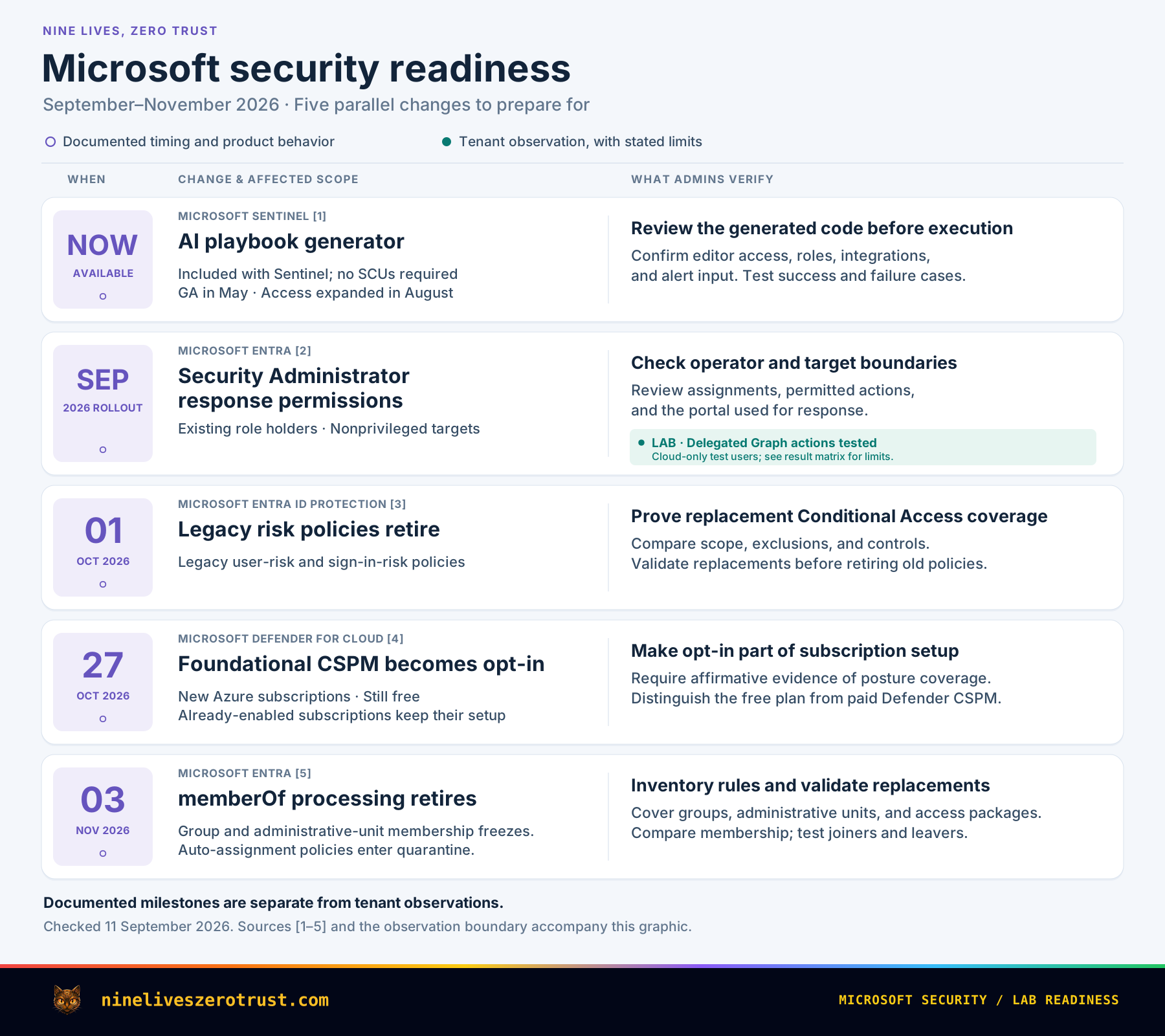
Microsoft’s fall security updates change several assumptions that are easy to leave buried in an old runbook: what a Security Administrator can do during an incident, whether Sentinel automation needs Security Copilot capacity, which risk-policy configuration stays supported, and whether a new Azure subscription receives free posture checks automatically.
The immediate work is to review responder access and automation permissions. The October and November deadlines also need transition plans for risk policies, subscription posture, and membership rules.
Review existing access, give each replacement a clear owner, and test the outcome your users or responders depend on. An unchanged role assignment or a green deployment does not guarantee that the surrounding security workflow is unchanged.
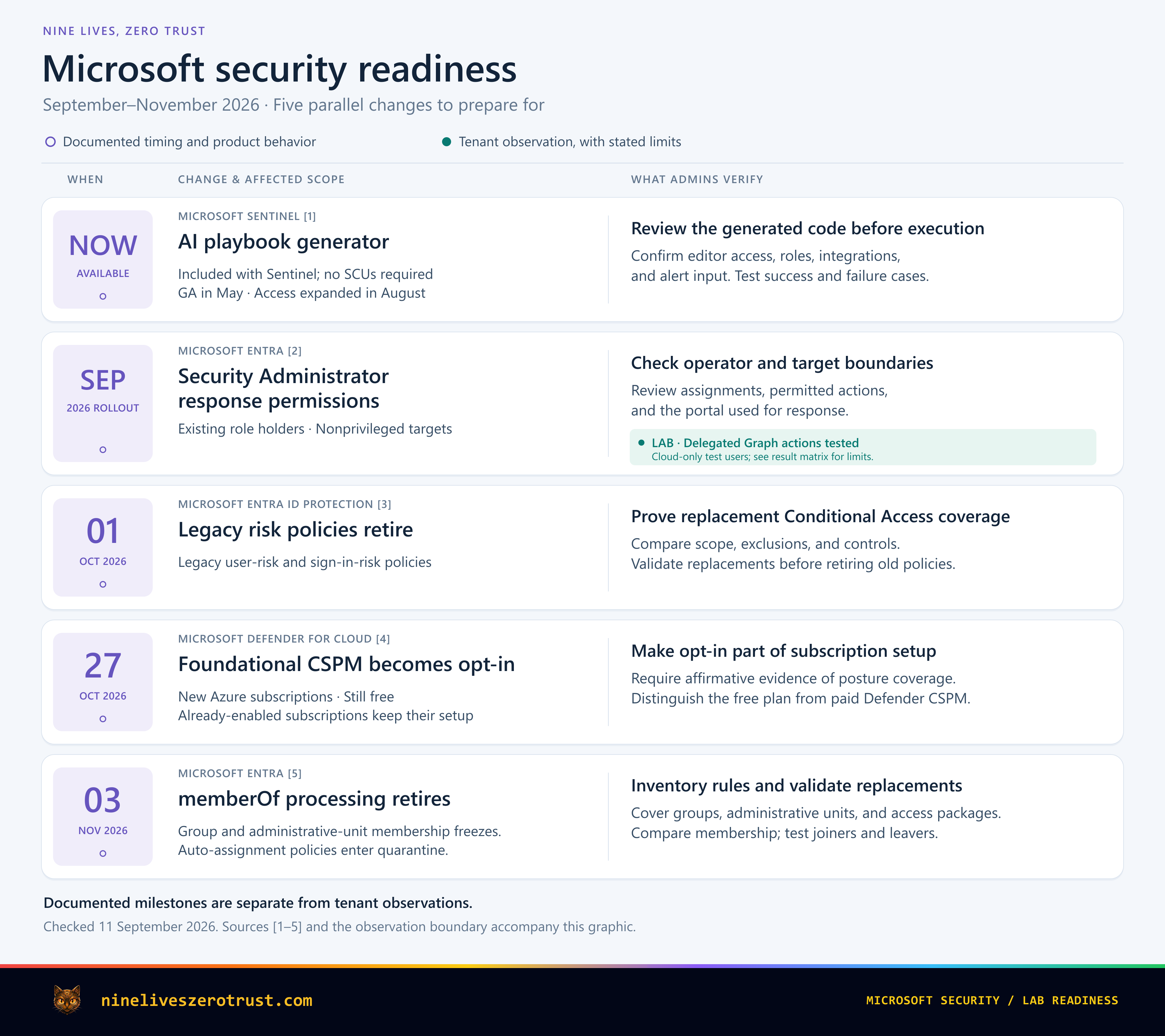
The Fall Changes at a Glance
Dates and first actions
Sentinel AI playbooks
Access expands without Security Copilot capacity.
Check workspace access and connections.
Security Administrator expands
More authority to act on identities.
Review role holders and response access.
Legacy risk policies retire
Risk controls move to Conditional Access.
Test Conditional Access replacements.
Free Foundational CSPM
Opt-in applies to new subscriptions.
Enable it in new-subscription setup.
memberOf processing ends
Replace affected group-derived membership rules.
Find dependencies; test membership removal.
The September role expansion and August Sentinel update are capabilities to evaluate now. The October and November items deserve a dated transition plan. That distinction keeps an interesting new feature from competing with a retirement that can interrupt an existing control.
Security Administrator Gets More Response Power
Microsoft’s September 1 announcement adds four actions to Security Administrator for nonprivileged users: disable an account, enable it, revoke sessions, and force a password reset. The announcement schedules rollout completion by the end of September 2026. September Entra update.
This matters even if your role assignments have been unchanged for months. The permission definition beneath an existing assignment is changing. A person who needs broad security configuration access may now have additional ways to interrupt a user’s access during an incident.
Choose the role around the job
Security Administrator, Security Operator, and Entra SOC Identity Responder overlap in response actions, but their wider responsibilities differ. Security Administrator includes broad security management. Security Operator covers security events and response. SOC Identity Responder concentrates on identity containment. Choose the role around the operator’s job, then review its complete permissions rather than treating four shared actions as interchangeable access. Built-in role reference.
For an access review, I would separate three questions:
- Who holds the role? Review direct and group-based assignments, plus eligible assignments where Privileged Identity Management is used.
- Which accounts should they act on? Include an ordinary account and a representative administrator account in a controlled test plan.
- Where will they perform the action? Verify the intended Defender or Entra workflow and its workload permissions, as well as the directory role.
Authorization and execution span products. Defender can initiate actions against connected identity systems, which have their own prerequisites. A delegated Graph test is useful evidence about that path; a portal runbook should also be exercised through the portal the team actually uses. Defender remediation actions.
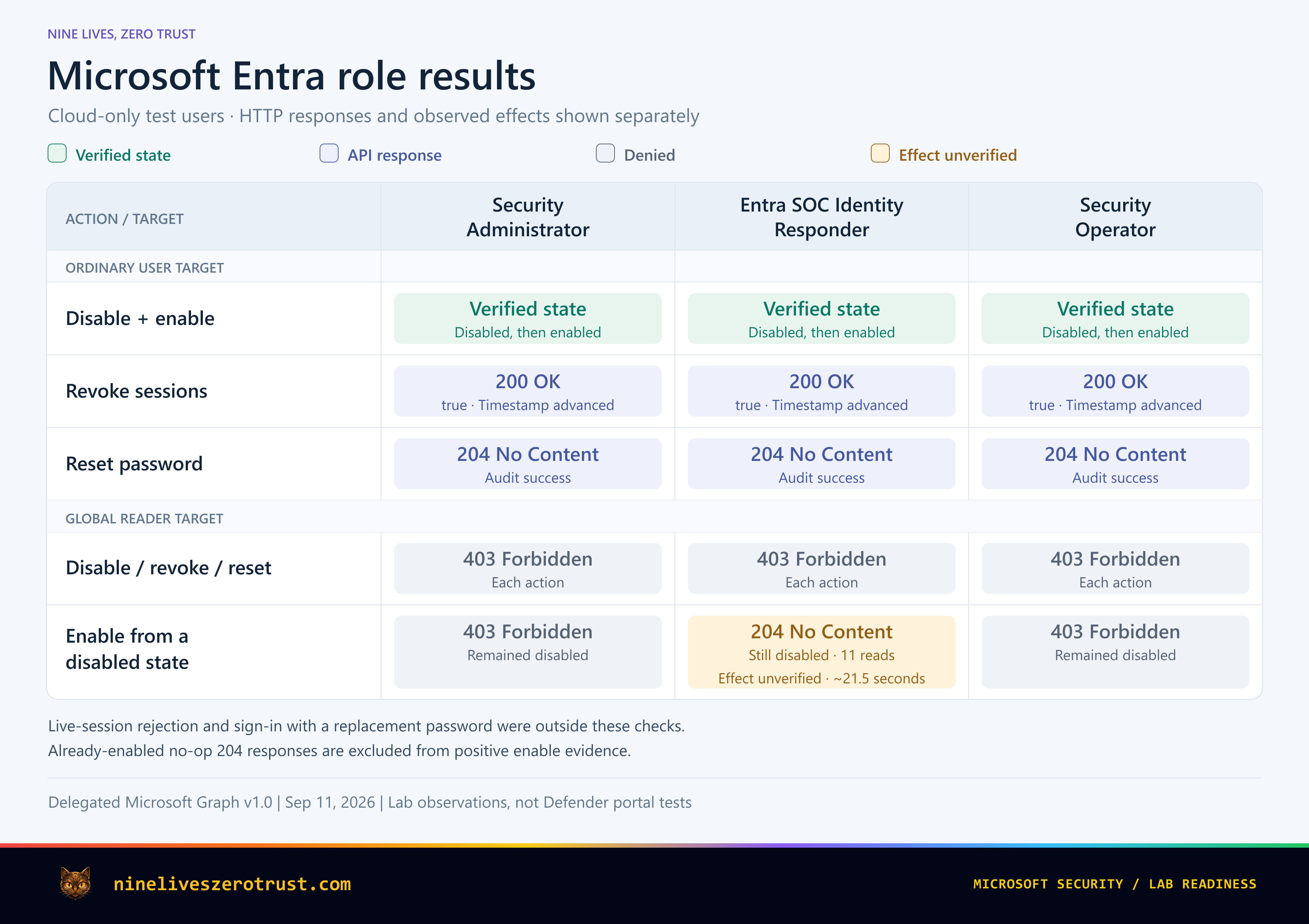
What the role comparison showed
I compared the three roles using separate test operators, the same client application and delegated Graph scopes, and two targets: an ordinary user and a disposable Global Reader administrator.
All three operators disabled and re-enabled the ordinary account, with reads confirming the state changes. Session-revocation requests advanced the session-valid-from timestamp. Password-reset requests produced successful audit events. Against the Global Reader target, all three were denied disablement, revocation, and password reset.
Observed Graph responses
Compare all three rolesSwipe table
| Target / action | Security Administrator | Entra SOC Identity Responder | Security Operator |
|---|---|---|---|
| Ordinary user | |||
| Disable / enable | State verifiedBoth directions | State verifiedBoth directions | State verifiedBoth directions |
| Revoke sessions | 200 OKTimestamp advanced | 200 OKTimestamp advanced | 200 OKTimestamp advanced |
| Reset password | 204 No ContentAudit success | 204 No ContentAudit success | 204 No ContentAudit success |
| Global Reader administrator | |||
| Disable / revoke / reset | 403 Forbidden | 403 Forbidden | 403 Forbidden |
| Enable From disabled | 403 Forbidden | 204 No ContentStill disabled11 follow-up reads | 403 Forbidden |
One tenant, delegated Graph calls. Session rejection and sign-in with the replacement password were not tested.
How to read these results
Excluded no-ops: enabling an already-enabled administrator returned 204 for all three roles. Those responses do not demonstrate a state change and are excluded.
Scope: delegated Microsoft Graph v1.0 calls against these two target types in one tenant. The comparison does not establish Defender portal behavior or authority over other administrator roles.
For the Global Reader target, SOC Identity Responder returned HTTP 204 for enablement, yet 11 follow-up reads over roughly 21 seconds still showed the account disabled. Verify the resulting state before treating an accepted request as success.
Microsoft’s sensitive-action guidance limits Security Administrator, Security Operator, and Entra SOC Identity Responder to nonadministrative accounts. Keep an escalation path for privileged identities, and confirm the intended target before acting. Sensitive-action limits.
When reviewing the audit trail, check the actor type and identity as well as the client application’s name. The password-reset event below identifies a User actor.
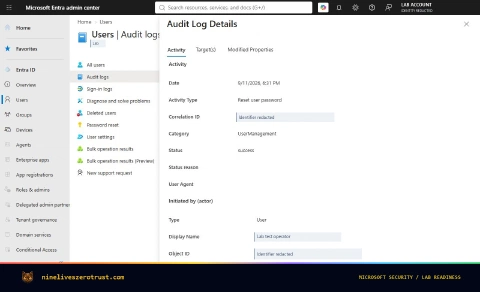
Successful password-reset audit event for the ordinary test account.
Microsoft’s role-reference and Defender action tables do not all describe the September expansion consistently yet. Check the actual role definition alongside the dated announcement and intended execution path. The permission set below contains all four response actions; a September 13 definition check confirmed they were still present. The nonadministrative-account boundary still applies.
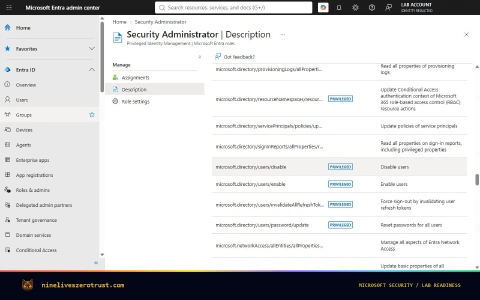
Security Administrator’s response permissions, captured September 11. Permission names do not override the documented restrictions on target accounts.
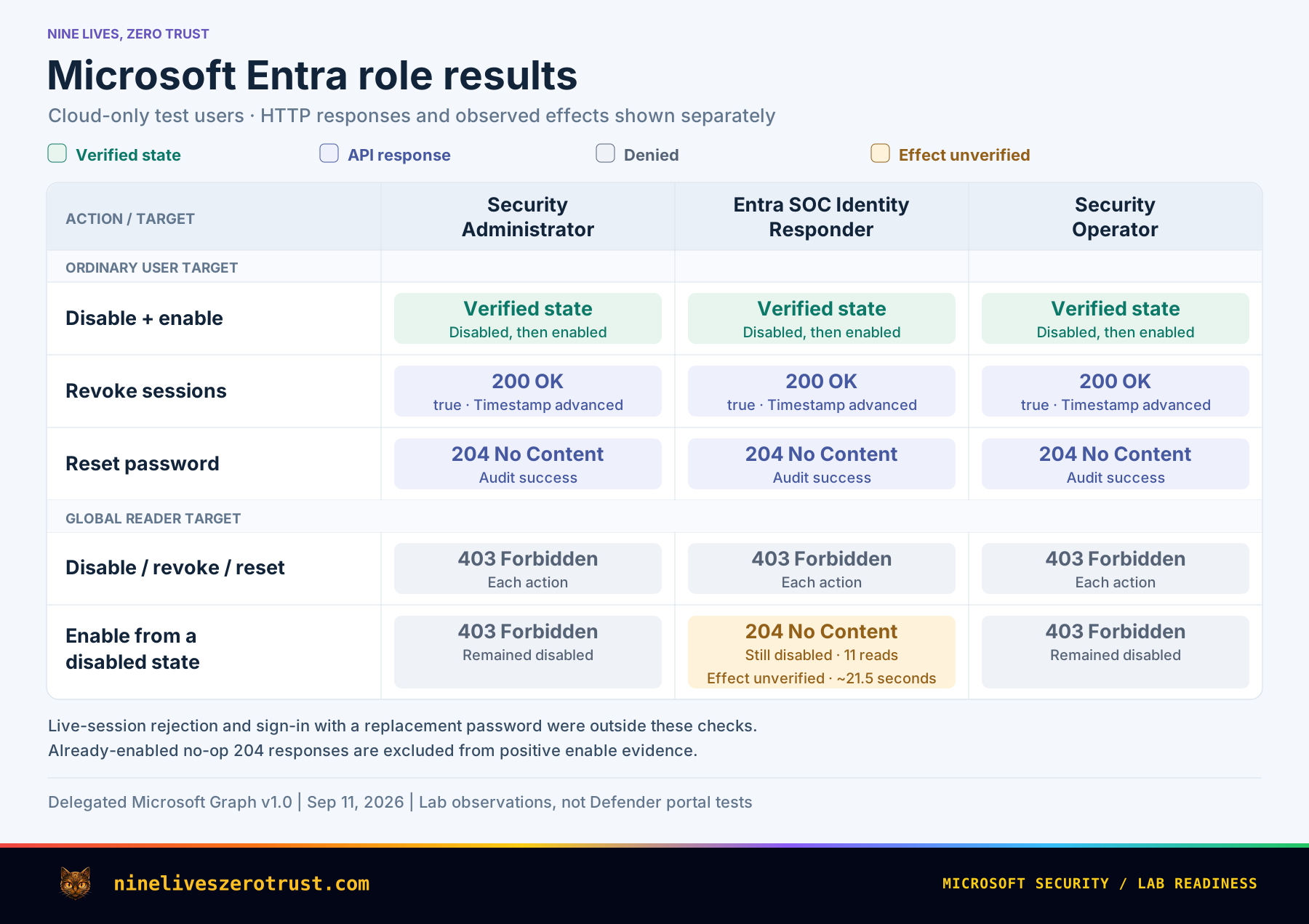
The detailed role results preserve the responses, administrator-enable edge case, and audit checks.
Sentinel’s AI Playbook Generator No Longer Requires Security Copilot
If your Sentinel automation checklist begins with provisioning Security Copilot capacity, it needs an update. Microsoft expanded access to the AI playbook generator on August 6 so Sentinel customers using the Defender portal can use it without enabling Security Copilot. The feature reached general availability in May; August simplified access. Microsoft also states that generating, testing, and running these playbooks consume no SCUs. Access expansion, Sentinel release history, August Defender update.
Understand the automation model
Traditional Sentinel playbooks use Azure Logic Apps. The generator produces editable Python that executes in a managed Sentinel runtime. Your team describes the workflow, reviews the generated implementation, and decides when to activate it. This changes the authoring experience while leaving ownership of the response with the SOC. Sentinel application card.
Integration Profiles describe an external service’s API base URL, authentication method, and credentials. The generator uses that information to build API calls. Its authoring experience starts with a plan and can produce code, documentation, a flow diagram, and tests. A useful instruction therefore specifies the alert input, target service, permitted side effects, and expected result. Current generator guide.
For example, “investigate suspicious URLs” is open-ended. “Extract URL indicators from this alert, query the approved reputation service, and add a short analyst comment to its incident” defines a smaller, more reviewable workflow.
Start with an enrichment pilot
A useful first pilot would enrich a phishing alert before adding containment actions. I would give it these acceptance conditions:
- It records which URL indicators were checked.
- An alert with no URLs does not receive an invented verdict.
- An unavailable reputation service produces a visible failure or incomplete result.
- Retrying the same alert does not create duplicate incident comments.
- The integration identity has only the permissions needed for the intended reads and comment.
Define the expected result and failure handling before generating code. Use the same checks for ticket creation, enrichment, and controlled response actions.
Microsoft’s current limitations list no automatic code validation; review and test the generated Python before activation. Code-validation limitation.
Before authoring, verify the Sentinel workspace is onboarded to Defender and the operator has Automation: Automation Playbooks (Read and Write) in Defender unified RBAC. Creating automation rules separately requires Sentinel Contributor on the relevant workspaces or their resource groups. Newly saved playbooks begin disabled; automatic operation requires activation and an enhanced alert trigger. Current generator guide.
Check the operating limits early: the current runtime accepts alerts as input, uses Python without external libraries, disallows nested playbook calls, and has a ten-minute execution limit. Enhanced triggers coexist with standard automation rules. Their results appear in the incident’s Activities tab rather than SentinelHealth. Build the operational handoff around that actual result location. Runtime and trigger guidance.
Before replacing an existing Logic Apps workflow, compare its permissions, triggers, and failure handling with the proposed implementation. The generator is included with Sentinel. Included generator. Normal Sentinel charges and any separately billed services used by the workflow still need to be budgeted. Sentinel pricing and billing.
Replace Legacy Risk Policies Before October 1
On October 1, 2026, Microsoft retires the legacy user-risk and sign-in-risk policies configured inside ID Protection. The preparation task is to move the intended protection into Conditional Access and validate the resulting user experience. If your risk protection already runs only through Conditional Access and neither legacy policy is enabled, there is no legacy policy to migrate for this deadline. Migration guidance.
The two risk signals answer different questions. User risk estimates whether an account is compromised. Sign-in risk evaluates the likelihood that a particular authentication attempt is unauthorized. Microsoft recommends separate Conditional Access policies for these conditions, so each policy can express its own threshold and response. Risk-policy concepts, migration guidance.
Carry the policy intent into Conditional Access
Record the old population, exclusions, risk threshold, and enforcement state. Then compare the replacement’s target resources, grant controls, and session behavior. A policy with the same name can still reach different users or produce a different recovery experience.
Microsoft’s migration sequence is to create equivalent Conditional Access policies in report-only, evaluate impact, enable the replacements, and then disable the old policies. Confirm P2 or Entra Suite entitlement and that users have already registered MFA. Where hybrid password remediation is required, enable password writeback before enforcing the policy. Configuration and prerequisites.
Both legacy policy pages in my tenant showed the retirement notice and a Disabled state. Review these settings before comparing them with the intended Conditional Access protection.
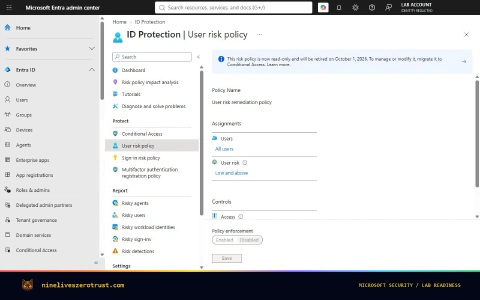
Review both the user-risk and sign-in-risk pages, then reconcile any enabled legacy policy with its Conditional Access replacement.
Review the newer risk-remediation control
Require risk remediation adds a useful distinction for organizations adopting passwordless authentication. It chooses a response using the detected threat and authentication method. A compromised-password case can require a secure password change. Passwordless risk without a compromised password can instead lead to session revocation and fresh authentication. A registered passkey alone does not decide which response applies.
The control addresses user risk and applies authentication-strength and every-time sign-in-frequency requirements. Guest and external users are unsupported, so their response path needs separate planning. Review overlapping risk policies too: current guidance describes precedence between blocking, risk remediation, and password-change controls. Adaptive risk remediation.
In the secure password-change flow, the user knows the current password and completes MFA before changing it. SSPR is a separate account-recovery flow for a user who does not know the password. Password change and SSPR.
For a representative pilot, capture the policy evaluation, the user’s prompt, successful remediation, and the next sign-in. Include an emergency-access exclusion review and a help-desk procedure for users who cannot self-remediate. For users whose recovery depends on SMS or voice, include the separate SSPR readiness checks in the plan.
Make Free CSPM an Explicit Subscription Decision
From October 27, 2026, new Azure subscriptions start with Foundational CSPM off by default. It remains free and can be enabled later. Existing subscriptions retain their configuration; AWS and GCP onboarding are outside this change. Foundational CSPM opt-in notice.
The practical impact is on subscription creation. If a platform team’s handover assumes free posture recommendations will appear automatically, that assumption needs an explicit replacement: decide whether the plan should be enabled, apply that decision, and verify the resulting configuration.
Keep the free and paid plans separate
Foundational CSPM provides capabilities such as security recommendations, the Microsoft Cloud Security Benchmark, and Secure Score. Defender CSPM is a separate paid plan with advanced capabilities including attack-path analysis, risk prioritization, and agentless assessments. Keeping free posture checks does not by itself require buying the paid plan. CSPM plan comparison.
My existing subscription showed the named Foundational CSPM plan as Free and On, alongside the separate Defender CSPM entry.
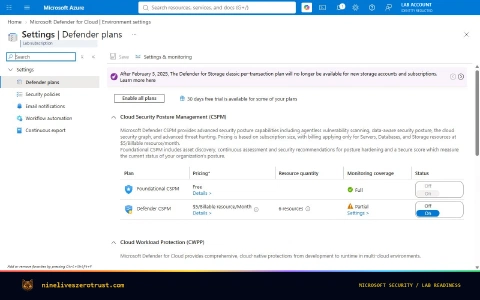
The named plan matters: Foundational CSPM and Defender CSPM are separate decisions.
For an authenticated Azure CLI session, this read-only query inspects an explicitly selected subscription:
az security pricing list \
  --subscription "<subscription-id>" \
  --query "value[].{Plan:name,Tier:pricingTier,SubPlan:subPlan}" \
  --output table
The command lists plan configuration; it does not change it. Compare the named entry with the plan UI and documentation. In my subscription, FoundationalCspm returned the tier value Standard while the portal labelled it Free. A tier string alone is not a price. CLI reference, subscription findings.
I would add four items to subscription handover: the intended plan, its observed state, evidence that the expected recommendations are available, and the team responsible for remediation. Keep this decision distinct from workload protection and paid CSPM approvals. Resolve unreadable or ambiguous configuration before marking the subscription ready.
Include the portal transition in the handover
Microsoft also identifies October 27 as the point when the Defender portal becomes the recommended Azure posture-management experience. The Azure portal remains an option in the published guidance. Include workflow and access reviews alongside the opt-in change; a new menu does not mean that existing permissions and operating procedures have moved with it. Transition notice.
Defender’s cloud experience brings inventory, recommendations, attack paths, and cloud signals into its broader security views. Its current eligibility requires a paid Defender for Cloud plan, and the current limitations exclude resources in subscriptions using only Foundational CSPM. That concerns today’s portal experience; the free plan remains free. Check the transition guidance again before changing the operating model. Defender portal overview, current limitations.
Cloud scopes, currently in preview, group environments for filtering and access management. Azure permissions do not automatically transfer to Defender’s unified RBAC configuration. Cloud scopes and access.
Replace memberOf Before Membership Stops Updating
Replace memberOf configurations before November 3, when the preview ends. Microsoft says affected dynamic groups and administrative units stop updating after that date. Access-package automatic-assignment policies using it enter quarantine starting November 3, stopping additions and removals until memberOf is removed from the rule. Only rules that use memberOf are affected. Group and administrative-unit guidance, access-package guidance.
The risk is an access population that stops following the organization. New starters can miss access, while people who move teams or leave an entitlement population can retain membership longer than intended.
Find the dependency before choosing a replacement
Inventory all three surfaces: dynamic groups, dynamic administrative units, and access-package automatic-assignment policies. For every match, identify the application access, licensing, Conditional Access targeting, or administrative scope that consumes it. That downstream use determines how carefully membership continuity must be handled.
There are two broad replacement decisions:
- Use supported attribute rules when reliable attributes express the intended population. For example,
user.department -eq "Finance"works as a design only if department is the real access criterion and its value is maintained reliably. - Use an owned assignment process when no equivalent supported rule exists. Identify who adds and removes members, the authoritative input, the reconciliation frequency, and how failures are reported.
Microsoft lists supported rule logic and assigned membership as interim paths. An attribute rule or nested-group design should not be assumed to reproduce a memberOf dependency automatically. Check both intended membership and the consuming service’s behavior. Retirement options.
Attribute ownership is part of the security design. Microsoft warns that users who can change access-driving attributes can influence dynamic membership. Review write permissions in Entra and the source directory for synchronized attributes. Replacing a group dependency with an extension attribute moves the maintenance responsibility; it still needs an owner and a reliable update process. Dynamic-rule syntax and attribute security.
Test removals as carefully as additions
Review removals now: the preview already documents that users or devices can remain in a memberOf group after removal from a source group until the rule is modified. This is an existing limitation, separate from November’s retirement. Current preview limitations.
Before cutover, compare expected users with the replacement membership and exercise a joiner and a leaver. Then check the downstream application or administrative scope. Matching today’s member count is not enough to show that future removals will work.
For access packages, plan assignment continuity before deleting or changing the old automatic policy. Microsoft warns that deleting a policy without a replacement plan can drop assignments. Automatic assignment also has its own Entra ID Governance or Suite licensing requirement. Automatic-assignment policy guidance.
For group-based licensing, add the destination membership first, confirm the license has applied, and then remove the source membership. Nested groups do not provide equivalent license assignment. Moving users between licensed groups.
The read-only inventory tools cover the three retirement surfaces and record whether each collection completed. At scale, an inaccessible collection belongs on the follow-up list, not in the zero-match count.
Build One Readiness Plan with Five Owners
These changes involve different teams, but the handoff can be consistent: identify the affected scope, assign an owner, define the intended behavior, and keep the result of a representative check.
- Identity operations: review response-role assignments and the escalation path for privileged accounts.
- SOC engineering: choose a narrow Sentinel pilot and verify its permissions, failure handling, and result location.
- Access-policy owners: move legacy risk-policy intent into Conditional Access before October 1 and validate recovery.
- Cloud platform teams: make the free posture-plan decision explicit in subscription provisioning before October 27.
- Identity governance: replace
memberOfdependencies before November 3 and verify additions and removals.
About the examples and screenshots
The full role results document the test setup, follow-up reads, audit checks, and administrator-enable edge case.
The Sentinel enrichment workflow is a proposed pilot based on Microsoft’s current guidance. My workspaces showed the classic Logic Apps authoring experience; the implementation note documents their access checks.
The risk-policy and CSPM screenshots show existing configuration. Future defaults and retirement behavior follow Microsoft’s published guidance. Source-check dates, capture timestamps, and supporting records are available in the review package and source ledger.
References
- Microsoft Tech Community. What’s new in Microsoft Entra: September 2026.
- Microsoft Learn. Microsoft Entra built-in roles.
- Microsoft Learn. Remediation actions in Microsoft Defender for Identity.
- Microsoft Learn. Privileged roles and permissions: sensitive-action limits.
- Microsoft Tech Community. AI-powered playbook generator now available to more customers.
- Microsoft Learn. What’s new in Microsoft Sentinel.
- Microsoft Tech Community. Monthly news: August 2026.
- Microsoft Learn. Microsoft Sentinel SIEM application card.
- Microsoft Learn. Generate playbooks in Microsoft Sentinel.
- Microsoft Learn. Plan costs and understand Microsoft Sentinel pricing and billing.
- Microsoft Learn. Configure and migrate Microsoft Entra ID Protection risk policies.
- Microsoft Learn. Risk-based access policies in Microsoft Entra ID Protection.
- Microsoft Learn. Remediate risks and unblock users.
- Microsoft Learn. Foundational CSPM opt-in for new Azure subscriptions.
- Microsoft Learn. Cloud security posture management in Defender for Cloud.
- Microsoft Learn. Azure CLI: az security pricing.
- Microsoft Learn. Defender for Cloud in the Microsoft Defender portal.
- Microsoft Learn. Known limitations in the Defender portal.
- Microsoft Learn. Manage cloud scopes and unified role-based access control (preview).
- Microsoft Learn. Dynamic membership rules using memberOf.
- Microsoft Learn. Configure an automatic-assignment policy for an access package.
- Microsoft Learn. Dynamic membership rules for groups in Microsoft Entra ID.
- Microsoft Learn. Assign or unassign licenses to a group in Microsoft 365.

Jerrad Dahlager, CISSP, CCSP
Cloud Security Architect · Adjunct Instructor
Marine Corps veteran and firm believer that the best security survives contact with reality.
Have thoughts on this post? I'd love to hear from you.