On this page
On March 2, 2026, Microsoft published an advisory on OAuth redirection abuse enabling phishing and malware delivery. Attackers register OAuth apps with malicious redirect URIs, then trick users into authenticating through legitimate Microsoft login flows — only to land on attacker-controlled pages after the redirect.
This isn’t credential theft. The user authenticates against real Microsoft infrastructure. The abuse happens after authentication, when Azure AD redirects to the app’s registered URI — which points to a phishing page, malware dropper, or token relay endpoint.
This post walks through building detection and hardening for this technique using Microsoft Sentinel and Entra ID Conditional Access.
Hands-on Lab: All KQL queries, PowerShell scripts, and deployment automation are in the companion repo.
How the Attack Works
The OAuth redirect abuse pattern exploits how Azure AD handles authentication errors and consent flows. As documented in RFC 9700 Section 4.11.2, attackers can deliberately trigger OAuth errors to force silent error redirects.
- App Registration — Attacker registers an OAuth app and sets the redirect URI to an attacker-controlled domain (
powerappsportals.com,github.io,surge.shwere observed in the wild) - Phishing Link — Victim receives a link initiating an OAuth authorization code flow with
prompt=none(silent auth) and an intentionally invalid scope — guaranteeing failure - Silent Auth Fails — Azure AD attempts silent authentication, fails with error
65001(user hasn’t granted permission), and redirects to the app’s registered URI witherror=interaction_required - Malicious Redirect — The victim lands on the attacker’s page, which auto-downloads a ZIP containing LNK files and HTML smuggling loaders, or redirects to an AiTM phishing framework like EvilProxy
The state parameter is repurposed to carry the victim’s email address (encoded via Base64, hex, or custom schemes), so it auto-populates on the phishing page.
The key insight: the attacker never gets the user’s access token. The goal is purely redirection to a malicious landing page after the user touches legitimate Microsoft infrastructure.
This makes the attack particularly effective:
- The URL starts with
login.microsoftonline.com— it looks legitimate prompt=nonemeans no consent dialog — no user interaction at all- Even security-aware users who decline consent still get redirected
- The redirect URI can point to
powerappsportals.com,github.io, or any free hosting service - Multiple threat actors have been observed targeting government and public-sector organizations
Detection Strategy
We need detection at two layers:
- Proactive — Find risky OAuth app registrations before they’re weaponized
- Reactive — Detect active abuse patterns in sign-in and audit logs
MITRE ATT&CK Mapping
| Technique | ID | Detection |
|---|---|---|
| Spearphishing Link | T1566.002 | Rules 1, 3 |
| Additional Cloud Credentials | T1098.001 | Rule 2 |
| Application Access Token | T1550 | Rules 1, 4 |
| User Execution: Malicious Link | T1204.001 | Rule 3 |
Sentinel Analytics Rules
Four scheduled analytics rules detect the core abuse patterns. Each runs hourly against the last 24 hours of data.
Rule 1: OAuth Consent After Risky Sign-in
Correlates SigninLogs risk indicators with AuditLogs consent events. If a user’s sign-in session shows phishing risk (unfamiliar features, anonymized IP, malicious IP) and they grant OAuth consent within 15 minutes, something is wrong.
let PhishingWindow = 15m;
let RiskySignIns = SigninLogs
    | where RiskLevelDuringSignIn in ("high", "medium")
        or RiskEventTypes_V2 has_any (
            "unfamiliarFeatures", "anonymizedIPAddress",
            "maliciousIPAddress", "suspiciousBrowser")
    | project SignInTime = TimeGenerated,
        UserPrincipalName, IPAddress,
        RiskLevelDuringSignIn, RiskEventTypes_V2;
AuditLogs
| where OperationName == "Consent to application"
| extend ConsentUser = tostring(InitiatedBy.user.userPrincipalName)
| extend AppDisplayName = tostring(TargetResources[0].displayName)
| join kind=inner (RiskySignIns)
    on $left.ConsentUser == $right.UserPrincipalName
| where TimeGenerated between (SignInTime .. (SignInTime + PhishingWindow))
| project TimeGenerated, UserPrincipalName = ConsentUser,
    AppDisplayName, RiskLevel = RiskLevelDuringSignIn, SourceIP = IPAddress
Why this matters: Legitimate consent grants don’t happen during risky sessions. If Identity Protection flags the sign-in and the user grants consent, you’re likely looking at a consent phishing attack.
Rule 2: Suspicious OAuth Redirect URI Registered
Watches for app registrations or updates that add redirect URIs pointing to free hosting, tunneling services, or non-HTTPS endpoints.
let SuspiciousDomains = dynamic([
    "ngrok.io", "ngrok-free.app", "workers.dev", "pages.dev",
    "herokuapp.com", "netlify.app", "vercel.app",
    "trycloudflare.com", "webhook.site", "requestbin.com",
    "pipedream.com"]);
AuditLogs
| where OperationName in ("Add application", "Update application")
| mv-expand ModifiedProperty = TargetResources[0].modifiedProperties
| where ModifiedProperty.displayName == "AppAddress"
| extend NewRedirectUris = tostring(ModifiedProperty.newValue)
| extend InitiatedBy_ = coalesce(
    tostring(InitiatedBy.user.userPrincipalName),
    tostring(InitiatedBy.app.displayName))
| extend AppName = tostring(TargetResources[0].displayName)
| where NewRedirectUris has_any (SuspiciousDomains)
    or NewRedirectUris has "http://"
| project TimeGenerated, AppName, NewRedirectUris, InitiatedBy_
Tuning tip: Add your organization’s legitimate development domains to an exclusion list. Developers using ngrok for local testing will generate false positives — but you should know about those too.
Rule 3: OAuth Error-Based Redirect Pattern
Detects sign-in attempts that result in specific error codes used in redirect abuse. These errors still trigger a redirect to the app’s URI, delivering the user to a malicious page.
SigninLogs
| where ResultType in ("65004", "70011", "700016", "70000", "7000218")
| where AppDisplayName !in (
    "Microsoft Office", "Azure Portal",
    "Microsoft Teams", "Outlook Mobile")
| summarize ErrorCount = count(),
    DistinctUsers = dcount(UserPrincipalName),
    Users = make_set(UserPrincipalName, 10),
    IPs = make_set(IPAddress, 10)
    by AppDisplayName, AppId, bin(TimeGenerated, 1h)
| where ErrorCount > 3 or DistinctUsers > 2
| project TimeGenerated, AppDisplayName, AppId,
    ErrorCount, DistinctUsers, Users, IPs
Key error codes:
| Code | Meaning | Redirect? |
|---|---|---|
| 65004 | User declined consent | Yes |
| 70011 | Invalid scope requested | Yes |
| 700016 | App not found in tenant | Yes |
| 70000 | Invalid grant | Yes |
| 7000218 | Missing client assertion | Yes |
Rule 4: Bulk OAuth Consent to Single App
When 3+ users consent to the same app within an hour, it strongly indicates a phishing campaign pushing users to authorize a malicious application.
AuditLogs
| where OperationName == "Consent to application"
| extend ConsentUser = tostring(InitiatedBy.user.userPrincipalName)
| extend AppName = tostring(TargetResources[0].displayName)
| extend AppId = tostring(TargetResources[0].id)
| summarize ConsentCount = count(),
    ConsentUsers = make_set(ConsentUser, 20),
    FirstConsent = min(TimeGenerated),
    LastConsent = max(TimeGenerated)
    by AppName, AppId, bin(TimeGenerated, 1h)
| where ConsentCount >= 3
| project TimeGenerated, AppName, AppId,
    ConsentCount, ConsentUsers
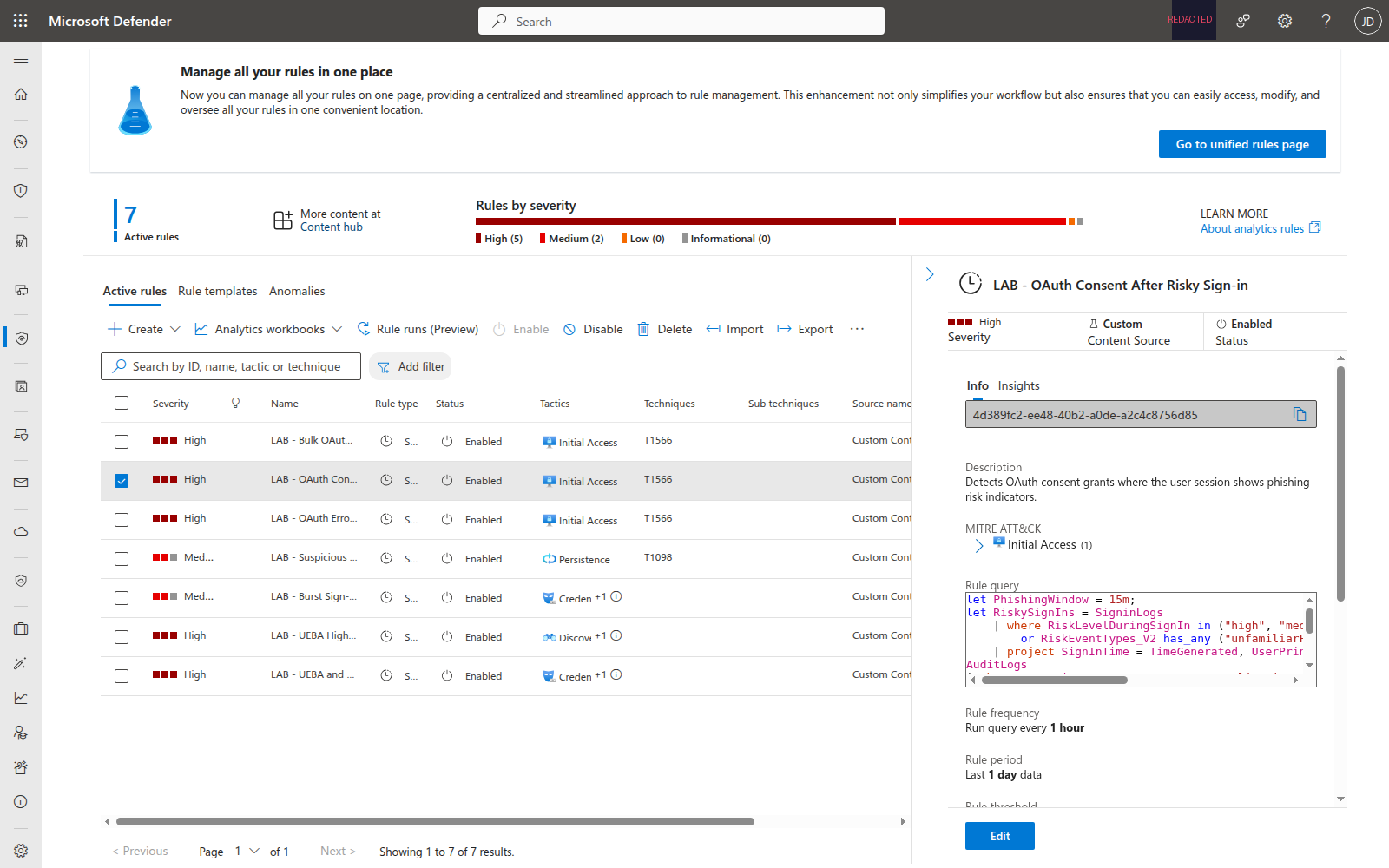
All four rules are deployed and active in Sentinel:
Hunting Queries
Beyond automated detection, five hunting queries support proactive threat hunting:
- Enumerate All OAuth Apps with Delegated Permissions — Baseline audit of every app with user-granted permissions over the last 90 days
- OAuth Sign-ins from Non-Corporate IPs — Find OAuth app authentications from unexpected locations (customize the corporate IP ranges)
- Recently Registered Apps with High-Privilege Permissions — Apps created in the last 14 days requesting
Mail.Read,Files.ReadWrite.All,Directory.ReadWrite.All, etc. - OAuth Redirect URI Inventory — Full audit trail of redirect URI changes across all app registrations
- Token Replay After OAuth Redirect Error — Detect the pattern where an OAuth error redirect is followed by a successful token acquisition from a different IP within 30 minutes — the signature of a token relay attack
The full KQL for all five hunting queries is in the companion lab. Import them into Sentinel Hunting > Queries to run proactive hunts against your OAuth telemetry.
OAuth Security Workbook
The lab deploys an Azure Workbook that provides a single-pane view of OAuth activity:
- Consent Grants Over Time — Timechart of OAuth consent events by application
- OAuth Error Redirects by Application — Table of error-based redirects grouped by app and error code
- Recent Redirect URI Changes — Audit trail of redirect URI modifications
- Top 10 Apps by Consent Count — Bar chart highlighting apps with the most user consents
The workbook uses the same KQL patterns as the analytics rules, giving SOC analysts a dashboard to investigate alerts in context.
Entra ID Hardening
Detection alone isn’t enough. The lab includes hardening scripts that reduce the attack surface:
Restrict User Consent
The most impactful control: restrict which apps users can consent to.
# Set consent policy: users can only consent to low-risk permissions
# from verified publishers
$body = @{
    defaultUserRolePermissions = @{
        permissionGrantPoliciesAssigned = @(
            "ManagePermissionGrantsForSelf.microsoft-user-default-low"
        )
    }
} | ConvertTo-Json -Depth 5

az rest --method PATCH `
    --url 'https://graph.microsoft.com/v1.0/policies/authorizationPolicy' `
    --body $body --headers 'Content-Type=application/json'
This policy means users can only self-consent to apps from verified publishers requesting low-risk permissions. Everything else requires admin approval.
Conditional Access Policy
A CA policy blocks OAuth consent when the session shows elevated risk:
- Applies to: All users
- Conditions: Sign-in risk = High or Medium, User risk = High
- Grant controls: Require MFA or compliant device
- Session controls: 1-hour sign-in frequency
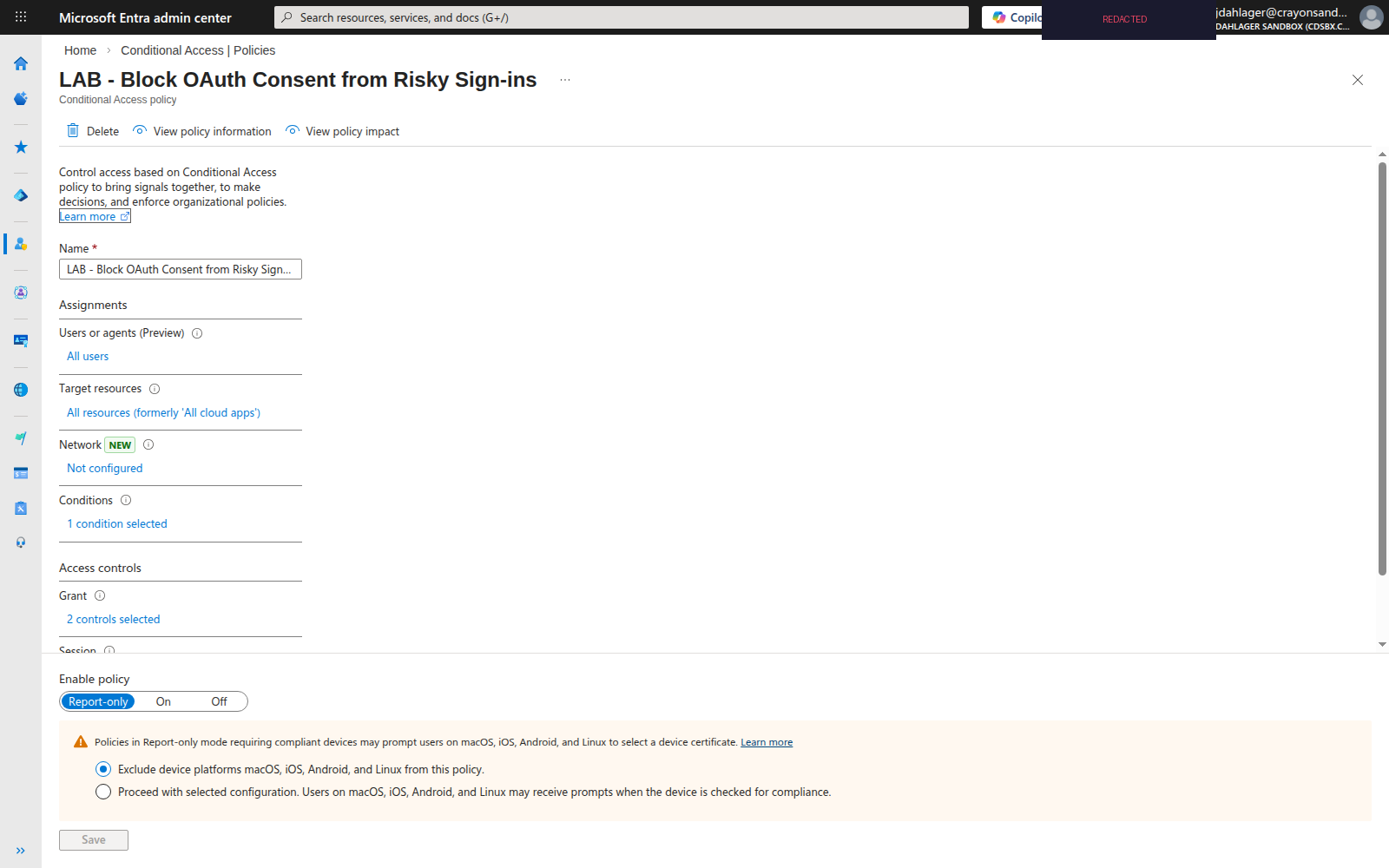
The policy deploys in report-only mode. Run it for 7 days, review the CA insights workbook for impact, then switch to enforced.
OAuth App Audit
The Audit-OAuthApps.ps1 script enumerates all app registrations and service principals via Microsoft Graph to flag:
- Apps with redirect URIs pointing to
ngrok.io,herokuapp.com,workers.dev, etc. - Apps with non-HTTPS redirect URIs (excluding localhost)
- Apps with high-privilege delegated permissions (
Mail.Read,Files.ReadWrite.All,Directory.ReadWrite.All) - User-consented permissions (vs admin-consented)
- Multi-tenant apps registered in your tenant
The audit outputs a CSV with risk scores, sorted by severity. Run it weekly.
Deployment
The entire lab deploys to an existing Microsoft Sentinel workspace:
git clone https://github.com/nine-lives-security/nine-lives-zero-trust.git
cd nine-lives-zero-trust/labs/oauth-redirect-abuse

# Deploy everything
./scripts/Deploy-Lab.ps1 \
    -ResourceGroup "rg-sentinel-lab" \
    -WorkspaceName "law-sentinel-lab"

# Detection only (skip tenant hardening)
./scripts/Deploy-Lab.ps1 \
    -ResourceGroup "rg-sentinel-lab" \
    -WorkspaceName "law-sentinel-lab" \
    -SkipHardening
The script deploys:
- 4 Sentinel analytics rules (scheduled, hourly)
- 1 Sentinel workbook (OAuth Security Dashboard)
- OAuth hardening policies (consent restriction, CA policy)
- OAuth app audit report (CSV)
See the full lab documentation for prerequisites, testing steps, and cleanup.
Key Takeaways
- OAuth redirect abuse bypasses URL filtering — The authentication URL is
login.microsoftonline.com, which every org allowlists - Error-based redirects are the real threat — Even declined consent or invalid apps trigger redirects to the registered URI
- Restrict user consent now — Verified publishers + low-risk permissions only. This single control eliminates most consent phishing
- Deploy CA policies for risky sessions — Block consent grants when Identity Protection flags the sign-in
- Audit your app registrations — Run
Audit-OAuthApps.ps1to find existing apps with suspicious redirect URIs or overprivileged permissions - Hunt, don’t just detect — The token replay hunting query (Hunt 5) catches attacks that no single-event rule will find
Resources
- Microsoft Security Blog: OAuth Redirection Abuse (March 2, 2026)
- MITRE ATT&CK: Steal Application Access Token (T1550)
- Microsoft: Configure user consent settings
- Microsoft: Conditional Access for risky sign-ins
- Companion Lab: OAuth Redirect Abuse Detection

Jerrad Dahlager, CISSP, CCSP
Cloud Security Architect · Adjunct Instructor
Marine Corps veteran and firm believer that the best security survives contact with reality.
Have thoughts on this post? I'd love to hear from you.