On this page
Review update (September 26, 2026): The merged source preserves an already-disabled user-consent policy and refuses unrecognized custom self-consent policy replacement for manual review. Reports, manifest staging and request-body files are owner-only at creation. The four rule excerpts use immutable identity/freshness and exact-host redirect checks, including current ngrok and loca.lt domains. Fifty-four offline tests and semantic analysis of all 13 rule, hunt and workbook queries passed; no new tenant mutation or live query is claimed.
Review update (September 25, 2026): Error codes and risk-event identifiers in the rules are bounded examples, not an exhaustive current campaign vocabulary. Verify the emitted values and current provider definitions before relying on coverage. ATT&CK sub-technique metadata may not survive an older Sentinel API schema. Azure CLI authentication uses its actual first-party token/role context; declaring an intended Graph scope in documentation does not prove that token has it.
Review update (September 25, 2026): The merged source joins risky sign-ins and consent on nonempty immutable user IDs, and its grant hunts extract the explicit client service-principal object ID rather than confusing the resource API with the requesting client. Source-ingestion freshness gates reduce unchanged repeated matches while preserving correlation history. Validate event schemas and identifiers before enabling the rules. Neither an error/success pair on one AppId nor a clock-hour threshold proves a complete phishing chain.
Review update (September 25, 2026): Do not describe the older hardening script as a one-way restriction: it can add a low-risk self-consent policy even when user consent was disabled. Review the intended policy state before applying it and preserve disabled consent. The local app inventory cannot enumerate apps in attacker-owned tenants; correlate actual lure URLs and sign-in failures. Risk-based detections/CA require Entra ID P2 (or the applicable licensed capability). Workbook deployment needs resource-group write permission, not only workspace scope. Classify allowed low-impact permissions explicitly; selecting
microsoft-user-default-lowdoes not automatically classifyUser.Read,openidorprofile.
On March 2, 2026, Microsoft published an advisory on OAuth redirection abuse enabling phishing and malware delivery. Microsoft described phishing-led campaigns where attackers register OAuth apps with attacker-controlled redirect URIs, then send legitimate-looking Microsoft login links that intentionally drive the browser into an authorization error path and bounce victims to attacker infrastructure.
This isn’t credential theft or classic token theft. The user still touches real Microsoft infrastructure, but the attacker wins when Entra ID redirects the browser to the app’s registered URI, which points to a phishing page, malware dropper, or relay endpoint.
This post walks through building detection and hardening for this technique using Microsoft Sentinel and Entra ID Conditional Access.
Hands-on Lab: All KQL queries, PowerShell scripts, and deployment automation are in the companion lab. Current deployment, hardening, and audit scripts require PowerShell 7.6+.
Evidence boundary (August 13, 2026): the source revision reviewed then passed 20 offline contract tests and PowerShell parsing, but this review did not deploy it to a tenant. Portal captures below are historical sandbox evidence from an earlier revision, not proof that the current pinned rules, workbook, or policy were deployed or evaluated live.
How the Attack Works
The OAuth redirect abuse pattern exploits how Entra ID handles authentication errors and consent flows. As documented in RFC 9700 Section 4.11.2 (“Authorization Server as Open Redirector”), attackers can deliberately trigger OAuth errors to force redirects through the authorization server.
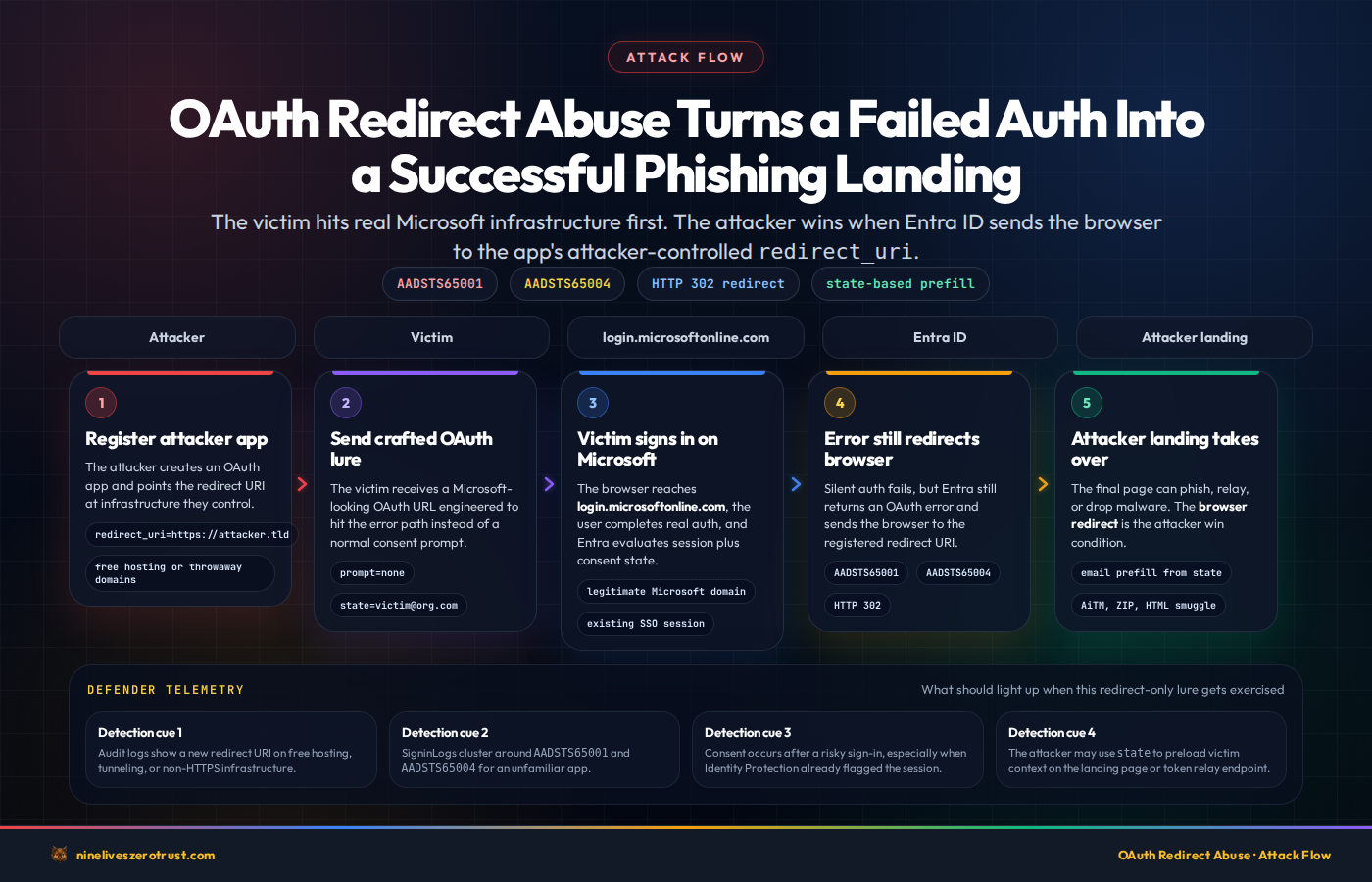
- App Registration, Attacker registers an OAuth app and sets the redirect URI to an attacker-controlled domain (
powerappsportals.com,github.io,surge.sh, andgitlab.iowere cited by Microsoft) - Phishing Link, Victim receives a link that initiates an OAuth authorization flow with parameters designed to fail at the authorization step, such as
prompt=nonecombined with an invalid or unapproved request - Authorization Error, Entra ID reaches an authorization error state such as
interaction_requiredoraccess_denied - Error Redirect, Per the OAuth 2.0 spec, Entra ID redirects the victim’s browser to the app’s registered
redirect_uriwith error parameters appended - Malicious Landing, The victim lands on the attacker’s page, which auto-downloads a ZIP containing LNK files and HTML smuggling loaders, or redirects to an AiTM phishing framework like EvilProxy
- Data Exfiltration, The
stateparameter is repurposed to carry the victim’s email address (encoded via Base64, hex, or custom schemes), so it auto-populates on the phishing page
The key insight: the redirect itself is the win. Microsoft noted the sign-in can fail and still hand the attacker a phishing or malware-delivery opportunity because the browser lands on a malicious page after touching legitimate Microsoft infrastructure.
Why This Works
- The URL starts with
login.microsoftonline.com, it looks legitimate to users and URL filters - In the observed Entra flow,
prompt=nonesuppresses the normal consent UI and drives the request down the error path - Even security-aware users who would decline consent still get redirected because the error itself triggers the redirect
- The redirect URI can point to any domain registered in the app,
github.io,netlify.app, or free hosting services - Microsoft’s advisory confirmed multiple threat actors targeting government and public-sector organizations
Which Error Outcomes Matter Most?
Microsoft’s write-up and the OAuth authorization-code flow docs identify two error outcomes that can appear in this flow:
AADSTS65001/interaction_required, common when silent auth cannot complete because the app or requested permissions do not already have the required consentAADSTS65004/access_denied, common when a user explicitly declines consent
| Error code | Common meaning in this pattern | Hunt value |
|---|---|---|
AADSTS65001 | Silent auth fails because prior consent is missing or interaction is required | Investigation context; not proof of a redirect |
AADSTS65004 | User explicitly declines consent | Investigation context; not proof of phishing |
AADSTS70011 | Invalid scope or malformed OAuth request | Supporting context only |
AADSTS700016 | App not found in tenant | Supporting context only |
AADSTS70000 | Invalid grant or broken authorization flow | Supporting context only |
AADSTS7000218 | Missing client assertion / client auth issue | Supporting context only |
Other OAuth failures such as 70011, 700016, 70000, and 7000218 can still show up while attackers probe or misconfigure the flow, but Microsoft does not document one universal redirect behavior for those numeric codes across every endpoint and flow. Treat them as supporting context, not proof that a browser redirect occurred.
Detection implication: A burst of 65001 or 65004 errors against one unfamiliar app is worth triaging, but SigninLogs does not expose the redirect URL or prove that a browser followed one. Correlate every cluster with app registration, redirect-URI, consent, ownership, and risk context.
Detection Strategy
We need detection at two layers:
- Proactive, Find risky OAuth app registrations before they’re weaponized
- Reactive, Detect active abuse patterns in sign-in and audit logs
MITRE ATT&CK Mapping
| Technique | ID | Detection |
|---|---|---|
| Spearphishing Link | T1566.002 | Rules 1 and 4 |
| Account Manipulation | T1098 | Rule 2 |
Sentinel Analytics Rules
Four scheduled analytics rules detect the core abuse patterns. Each runs hourly against a 24-hour event-time window and requires new source evidence ingested in the last hour. The correlation rule accepts freshness from either side; the simple redirect rule gates rows before expansion. Rules 3 and 4 use fixed UTC clock-hour buckets, so bursts spanning a bucket boundary can be split. This is not stateful exactly-once delivery.
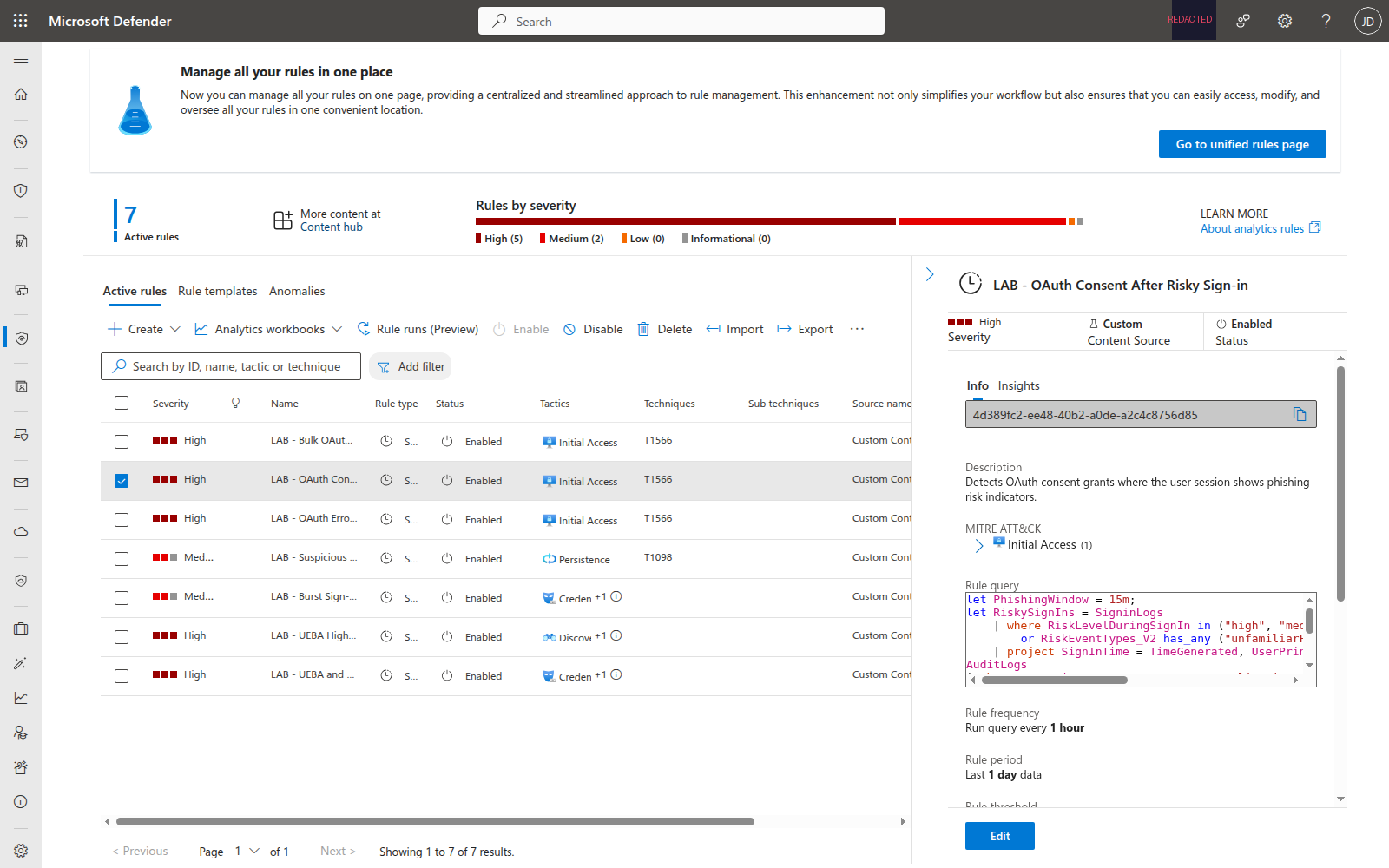
Rule 1: OAuth Consent After Risky Sign-in
Correlates SigninLogs risk indicators with AuditLogs consent events. If a user’s sign-in session shows phishing risk (unfamiliar features, anonymized IP, nation-state IP, authenticator phishing, anomalous token, investigations threat intelligence, malicious IP, or suspicious browser) and they grant OAuth consent within 15 minutes, treat the correlation as a high-priority investigation signal, not proof of abuse.
// Keep correlation history on both sides; emit only newly ingested matches.
let PhishingWindow = 15m;
let RiskySignIns = SigninLogs
    | where TimeGenerated > ago(1d)
    | extend SignInIngested = ingestion_time(), SignInUserId = tolower(UserId)
    | where isnotempty(SignInUserId)
    | where RiskLevelDuringSignIn in ("high", "medium")
        or RiskEventTypes_V2 has_any ("unfamiliarFeatures", "anonymizedIPAddress", "nationStateIP", "authenticatorPhishing", "anomalousToken", "investigationsThreatIntelligence", "maliciousIPAddress", "suspiciousBrowser")
    | project SignInTime = TimeGenerated, SignInIngested, SignInUserId, UserPrincipalName, IPAddress, RiskLevelDuringSignIn, RiskEventTypes_V2, CorrelationId;
AuditLogs
| where TimeGenerated > ago(1d)
| where OperationName == "Consent to application"
| extend ConsentIngested = ingestion_time(), ConsentUserId = tolower(tostring(InitiatedBy.user.id))
| where isnotempty(ConsentUserId)
| extend ConsentInitiatedBy = tostring(InitiatedBy.user.userPrincipalName)
| extend AppDisplayName = tostring(TargetResources[0].displayName)
| extend AppId = tostring(TargetResources[0].id)
| extend ConsentPermissions = tostring(TargetResources[0].modifiedProperties)
| join kind=inner (RiskySignIns) on $left.ConsentUserId == $right.SignInUserId
| where TimeGenerated between (SignInTime .. (SignInTime + PhishingWindow))
| where max_of(ConsentIngested, SignInIngested) > ago(1h)
| project
    TimeGenerated,
    ConsentUserId,
    UserPrincipalName = ConsentInitiatedBy,
    AppDisplayName,
    AppId,
    ConsentPermissions,
    RiskLevel = RiskLevelDuringSignIn,
    RiskEvents = RiskEventTypes_V2,
    SourceIP = IPAddress
Why this matters: Legitimate activity can coincide with a risk-flagged session, and some risk indicators can have benign explanations. A nearby consent event raises the case’s confidence and priority, but analysts should corroborate the app, publisher, permissions, user intent, IP context, and later activity before calling it consent phishing.
Rule 2: Suspicious OAuth Redirect URI Registered
Watches for app registrations or updates that add redirect URIs pointing to free hosting, tunneling services, URL shorteners, or non-HTTPS endpoints. AppAddress normally records objects with an Address member, although legacy or exported events can contain bare strings. The query normalizes both forms, compares oldValue with newValue, and evaluates additions only. It exempts Microsoft’s supported exact localhost and 127.0.0.1 HTTP loopback hosts; other HTTP hosts remain suspicious.
// Match exact hosts or their subdomains after parsing each absolute redirect URI.
let SuspiciousHostRegex = @"^([a-z0-9-]+\.)*(ngrok\.io|ngrok-free\.app|ngrok-free\.dev|ngrok\.app|ngrok\.dev|ngrok\.pizza|trycloudflare\.com|serveo\.net|localtunnel\.me|loca\.lt|workers\.dev|pages\.dev|herokuapp\.com|netlify\.app|vercel\.app|github\.io|gitlab\.io|surge\.sh|glitch\.me|replit\.dev|powerappsportals\.com|webhook\.site|requestbin\.com|pipedream\.com|bit\.ly|tinyurl\.com|t\.co|rebrand\.ly)$";
let ApprovedHttpLoopbackHosts = dynamic(["localhost", "127.0.0.1"]);
AuditLogs
| where TimeGenerated > ago(1d)
| where ingestion_time() > ago(1h)
| where OperationName in ("Add application", "Update application")
| mv-expand ModifiedProperty = TargetResources[0].modifiedProperties
| where ModifiedProperty.displayName == "AppAddress"
| extend NewAddressItems = parse_json(tostring(ModifiedProperty.newValue)),
    OldAddressItems = parse_json(tostring(ModifiedProperty.oldValue))
| extend NewAddressItems = iff(isnull(NewAddressItems), dynamic([]), NewAddressItems),
    OldAddressItems = iff(isnull(OldAddressItems), dynamic([]), OldAddressItems)
// AppAddress normally stores objects such as {"Address":"https://..."};
// legacy/exported records can contain bare strings. Normalize both shapes.
| extend NewAddressItems = array_concat(NewAddressItems, dynamic([null]))
| mv-apply NewAddressItem = NewAddressItems on (
    extend CandidateNewUri = case(
        gettype(NewAddressItem) == "dictionary", tostring(NewAddressItem.Address),
        gettype(NewAddressItem) == "string", tostring(NewAddressItem),
        "")
    | summarize NewRedirectUris = make_set_if(CandidateNewUri, isnotempty(CandidateNewUri))
)
// Append a null sentinel so an empty oldValue still produces an empty set.
| extend OldAddressItems = array_concat(OldAddressItems, dynamic([null]))
| mv-apply OldAddressItem = OldAddressItems on (
    extend CandidateOldUri = case(
        gettype(OldAddressItem) == "dictionary", tostring(OldAddressItem.Address),
        gettype(OldAddressItem) == "string", tostring(OldAddressItem),
        "")
    | summarize OldRedirectUris = make_set_if(CandidateOldUri, isnotempty(CandidateOldUri))
)
| extend AddedRedirectUris = set_difference(NewRedirectUris, OldRedirectUris)
| mv-expand RedirectUri = AddedRedirectUris to typeof(string)
| extend ParsedRedirectUri = parse_url(RedirectUri)
| extend RedirectScheme = tolower(tostring(ParsedRedirectUri.Scheme)),
    RedirectHost = trim_end(@"\.", tolower(tostring(ParsedRedirectUri.Host)))
| extend InitiatedByUserId = tostring(InitiatedBy.user.id)
| extend InitiatedByUser = tostring(InitiatedBy.user.userPrincipalName)
| extend InitiatedByApp = tostring(InitiatedBy.app.displayName)
| extend AppName = tostring(TargetResources[0].displayName)
| extend AppObjectId = tostring(TargetResources[0].id)
| where RedirectHost matches regex SuspiciousHostRegex
    or (RedirectScheme == "http" and RedirectHost !in~ (ApprovedHttpLoopbackHosts))
| project
    TimeGenerated,
    OperationName,
    AppName,
    AppObjectId,
    NewRedirectUris,
    OldRedirectUris,
    RedirectUri,
    RedirectHost,
    InitiatedByUserId,
    InitiatedByUser,
    InitiatedByApp
Tuning tip: Add your organization’s legitimate development domains to an exclusion list. Developers using ngrok for local testing will generate false positives, but you should know about those too.
Rule 3: OAuth Error Cluster by Application
Groups repeated consent, scope, app-registration, grant, and client-authentication failures by application. Those errors can appear in redirect-abuse investigations, but legitimate consent state and broken application configuration produce them too. The medium-severity rule is a triage lead; it does not prove that a redirect occurred and has no ATT&CK assignment.
// Immutable application IDs only - display names are attacker-controlled and
// Entra does not reserve first-party names, so an attacker can register a
// multi-tenant app called "Microsoft Teams" and be excluded by this rule's own
// allowlist while running the exact flow the rule exists to catch.
//
// Populate from your own tenant rather than from a published list:
//   SigninLogs
//   | where AppDisplayName in ("Microsoft Office", "Azure Portal", "Microsoft Teams", "Outlook Mobile")
//   | summarize SeenAs = make_set(AppDisplayName) by AppId
//
// Left empty deliberately. An unfilled allowlist suppresses nothing, so the rule
// is noisier rather than blind; a wrong GUID pasted in from memory would be worse.
let ApprovedAppIds = dynamic([
    // "00000000-0000-0000-0000-000000000000",  // Microsoft Office
    // "00000000-0000-0000-0000-000000000000",  // Azure Portal
    // "00000000-0000-0000-0000-000000000000",  // Microsoft Teams
    // "00000000-0000-0000-0000-000000000000"   // Outlook Mobile
]);
SigninLogs
| where TimeGenerated > ago(1d)
| extend SourceIngested = ingestion_time()
| where ResultType in (
    "65001",   // User or administrator has not consented; interaction is required
    "65004",   // User declined consent
    "70011",   // Invalid scope or other OAuth parameter issue
    "70000",   // Invalid grant; broad authentication-flow failure
    "700016",  // Application not found in tenant
    "7000218", // Request body must contain client_assertion or client_secret
    "AADSTS65001",
    "AADSTS65004",
    "AADSTS70011",
    "AADSTS700016"
)
| extend AppName = AppDisplayName
| extend AppIdUsed = AppId
| where isempty(AppIdUsed) or AppIdUsed !in~ (ApprovedAppIds)
| summarize
    LastIngested = max(SourceIngested),
    ErrorCount = count(),
    DistinctUsers = dcount(UserPrincipalName),
    Users = make_set(UserPrincipalName, 10),
    ErrorCodes = make_set(ResultType),
    IPs = make_set(IPAddress, 10)
    by AppName, AppIdUsed, bin(TimeGenerated, 1h)
| where LastIngested > ago(1h)
| where ErrorCount > 3 or DistinctUsers > 2
| project
    TimeGenerated,
    AppName,
    AppIdUsed,
    ErrorCount,
    DistinctUsers,
    Users,
    ErrorCodes,
    IPs
Why this remains a triage rule: None of these error codes carries a redirect URI, and each has benign causes. A cluster around one unfamiliar app can help prioritize an investigation only after correlation with redirect-URI changes, consent, app ownership, and risk telemetry.
Why the allowlist uses IDs: Entra application display names are
attacker-controlled. Suppressing names such as “Microsoft Teams” would let an
attacker hide behind a lookalike name, so the deployed rule and workbook accept
only tenant-reviewed immutable AppId values.
Rule 4: Bulk OAuth Consent to Single App
When 3+ distinct, nonempty Entra user object IDs consent to the same app within one fixed clock-hour bin, the cluster becomes a high-priority campaign signal. Repeated events from one account remain visible in the event count but cannot satisfy the threshold. Analysts should still confirm the app, permissions, user intent, and surrounding activity before classifying it as phishing.
let ConsentUserThreshold = 3;
let TimeWindow = 1h;
AuditLogs
| where TimeGenerated > ago(1d)
| extend SourceIngested = ingestion_time()
| where OperationName == "Consent to application"
| extend ConsentUserId = tolower(tostring(InitiatedBy.user.id)),
    ConsentUser = tostring(InitiatedBy.user.userPrincipalName)
| where isnotempty(ConsentUserId)
| extend AppDisplayName = tostring(TargetResources[0].displayName)
| extend AppId = tostring(TargetResources[0].id)
| summarize
    LastIngested = max(SourceIngested),
    ConsentEventCount = count(),
    DistinctConsentUsers = dcount(ConsentUserId),
    ConsentUserIds = make_set(ConsentUserId, 20),
    ConsentUsers = make_set(ConsentUser, 20),
    FirstConsent = min(TimeGenerated),
    LastConsent = max(TimeGenerated)
    by AppDisplayName, AppId, bin(TimeGenerated, TimeWindow)
| where LastIngested > ago(1h)
| where DistinctConsentUsers >= ConsentUserThreshold
| project
    TimeGenerated,
    AppDisplayName,
    AppId,
    ConsentEventCount,
    DistinctConsentUsers,
    ConsentUserIds,
    ConsentUsers,
    ConsentWindow = LastConsent - FirstConsent
Hunting Queries
Beyond automated detection, five hunting queries support proactive threat hunting:
- Review Recent Delegated-Grant Events, Summarize retained
Add delegated permission grantevents by the explicit client service-principal object ID over the last 90 days; this is event history, not a current inventory, and it may omit older grants or retain events for grants that were later revoked. Use the Graph audit script for current app and service-principal inventory. - OAuth Sign-ins from Non-Corporate IPs, Find OAuth app authentications from unexpected locations (customize the corporate IP ranges)
- Recently Provisioned Service Principals with High-Privilege Grants, Correlate retained service-principal provisioning and grant events by client object ID. This does not prove when the application registration was created or provide a complete live-permission inventory.
- Recent OAuth Redirect URI Changes, Review redirect URI change events retained in
AuditLogs; this is not a complete current registration inventory or an unlimited audit trail - Possible Token Relay After OAuth Redirect Error, Find one of the tracked OAuth errors (
65001,65004,70011,700016,70000, or7000218) followed by successful authentication for the same app and user from a different IP within 30 minutes. This is a triage pattern, not proof of a redirect or relay; benign network changes are possible, so corroborate the session, app, user, and IP context.
The full KQL for all five hunting queries is in the reviewed companion source. Import them into Sentinel Hunting > Queries to run proactive hunts against your OAuth telemetry.
OAuth Security Workbook
The lab deploys an Azure Workbook that provides a single-pane view of OAuth activity across four panels:
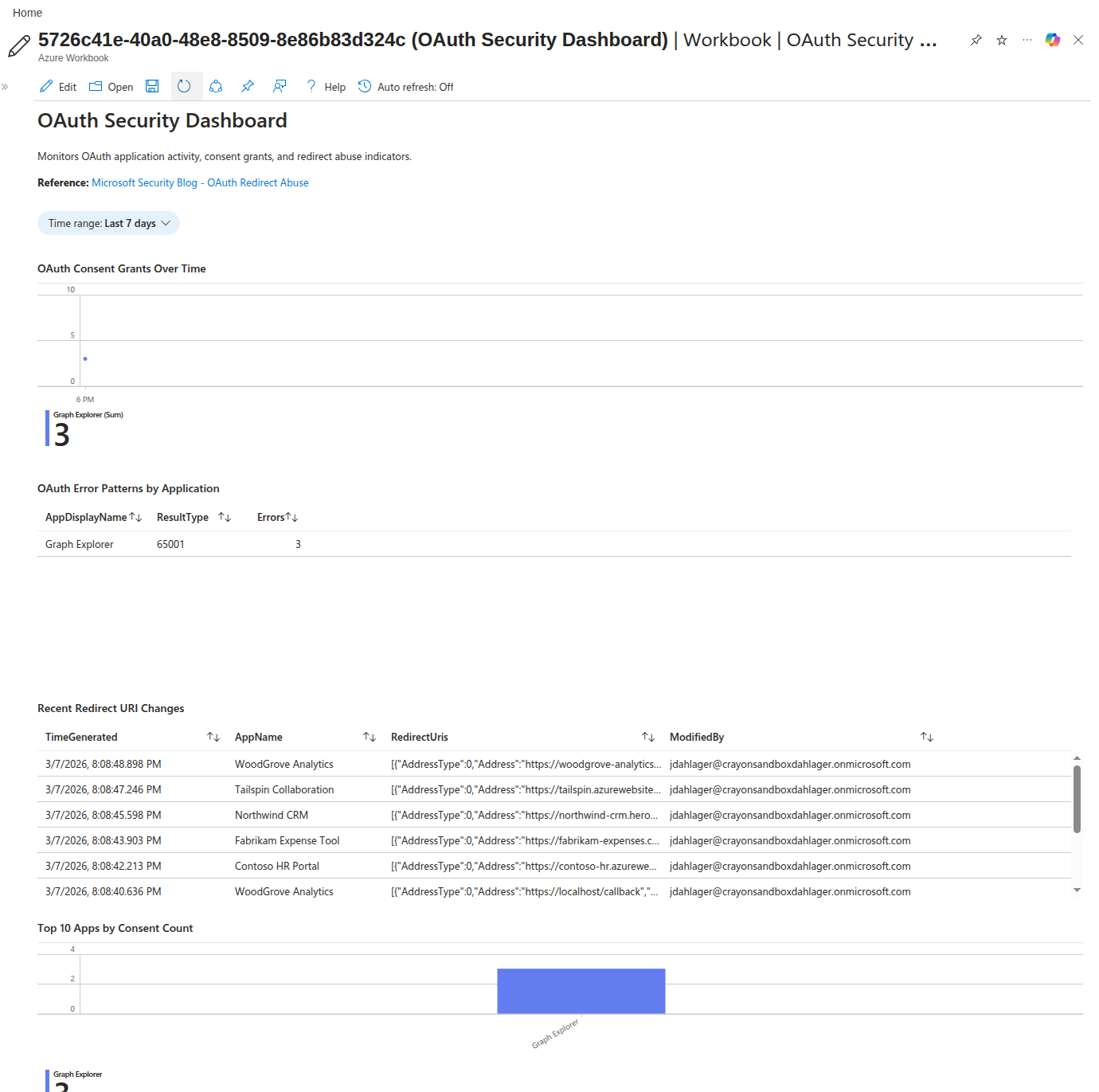
- Consent Grants Over Time, Timechart of OAuth consent events by application, showing spikes that indicate bulk consent campaigns
- OAuth Error Patterns by Application, Table of primary redirect-abuse indicators (
65001,65004) plus related OAuth failures grouped by app and error code - Recent Redirect URI Changes, Audit trail of redirect URI modifications across all app registrations
- Top 10 Apps by Consent Count, Bar chart highlighting apps with the most user consents, surfacing outliers
The workbook uses the same KQL patterns as the analytics rules, giving SOC analysts a dashboard to investigate alerts in context. The time range parameter defaults to 7 days but can be adjusted for broader investigations.
Entra ID Hardening
Detection alone isn’t enough. The lab includes hardening scripts that reduce the attack surface:
The two hardening operations have different Microsoft Graph requirements. The
authorization-policy update requires Privileged Role Administrator with
Policy.ReadWrite.Authorization; the report-only Conditional Access policy
requires Conditional Access Administrator (or Security Administrator)
with Policy.Read.All and Policy.ReadWrite.ConditionalAccess.
Restrict User Consent
The most impactful control is to restrict which apps users can consent to. Use the lab’s guarded workflow so the complete original collection is captured for rollback before any tenant-wide change:
./hardening/Set-OAuthHardening.ps1 `
  -ConfirmTenantId "<verified-tenant-guid>" `
  -ExcludedUserIds @("<break-glass-user-object-guid>") `
  -WhatIf
After reviewing the preview, omit -WhatIf to create the report-only CA policy
and apply the consent restriction. The script preserves existing
managePermissionGrantsForOwnedResource.* entries and assigns
managePermissionGrantsForSelf.microsoft-user-default-low. This materially
reduces risky third-party app approvals, but it does not revoke existing grants,
and redirect-only lures can still succeed if the attacker only needs the browser
bounce.
Conditional Access Policy
A CA policy adds step-up authentication to risky OAuth-related sign-ins:
- Applies to: All users
- Conditions: Sign-in risk = High or Medium
- Grant controls: Require MFA
- Session controls: Sign-in frequency = Every time
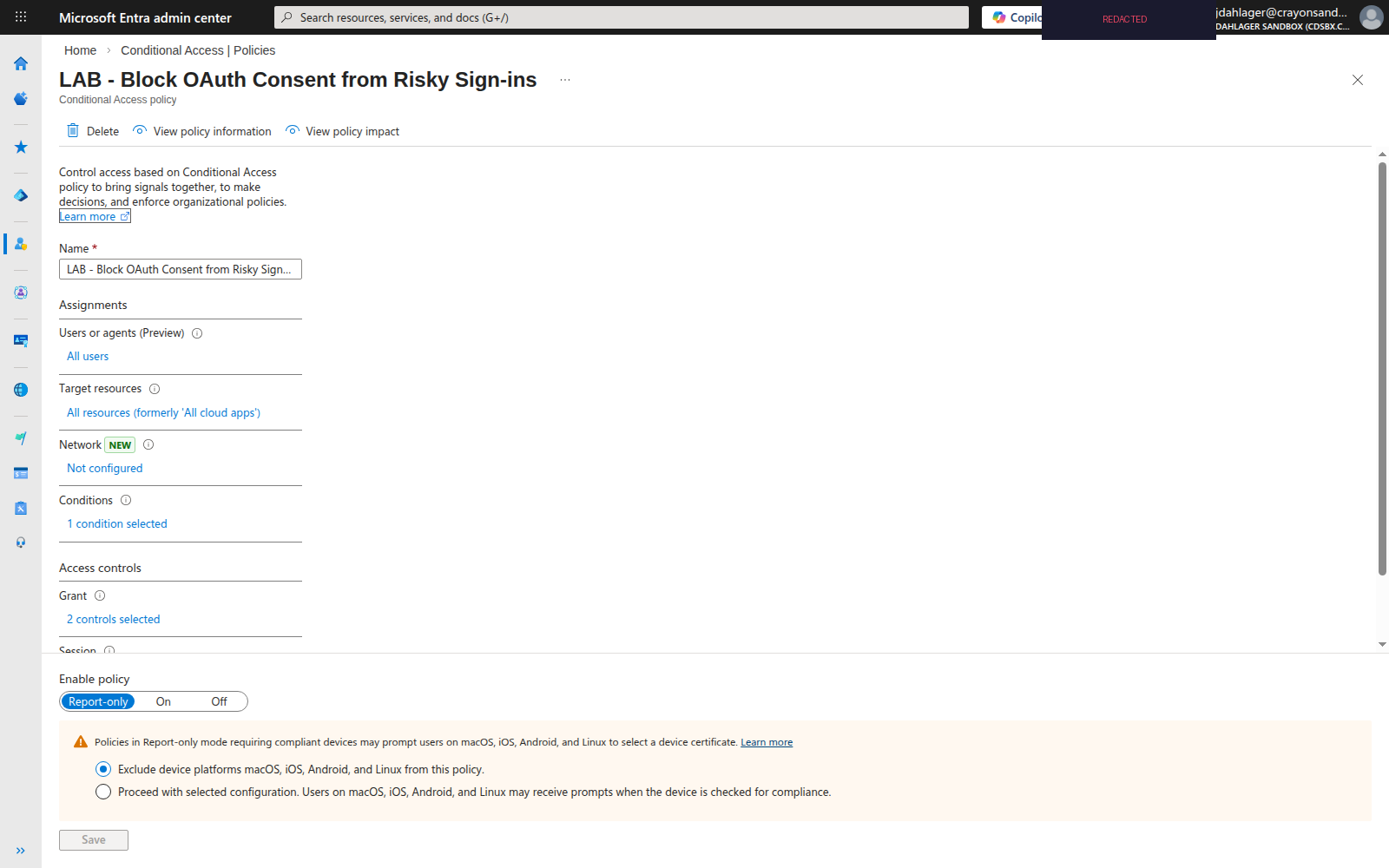
The policy deploys in report-only mode. Actual apply requires both the exact active tenant GUID and at least one reviewed emergency-access object GUID. Before its first Graph mutation, the script persists an owner-only manifest containing the tenant, original and intended consent collections, reviewed exclusions, and intended CA content hash. It atomically records Graph’s exact server-assigned CA ID before changing consent policy.
It verifies the server-created policy’s exact ID and content hash before touching tenant consent, and re-reads the consent collection immediately before and after the guarded update. Owner-only permissions are applied to manifest and temporary Graph request-body files before sensitive content is written. A declined confirmation aborts the operation instead of being mistaken for success.
The script never adopts or updates a CA policy by display name. It fails closed on a same-name foreign policy, changed exclusions, tenant mismatch, uncertain create outcome, or consent/CA drift. Run the report-only policy for 7 days, review the CA insights workbook, and only then consider enforcement. Never rely on adding break-glass exclusions after turning the policy on.
OAuth App Audit
The read-only Audit-OAuthApps.ps1 pages through local registrations, tenant service principals, delegated grants, and each principal’s outbound app-role assignments. It includes external enterprise apps and managed identities without a local registration and checks:
- Apps with redirect URIs pointing to
ngrok.io,herokuapp.com,workers.dev, etc. - HTTP redirect URIs except exact parsed loopback hosts
localhost,127.0.0.1, and[::1]; remote host/path/query text containing those strings is not exempt - Apps with high-privilege delegated permissions (
Mail.Read,Files.ReadWrite.All,Directory.ReadWrite.All) - User-consented permissions (vs admin-consented)
- Multi-tenant audience declarations
- Granted application permissions resolved against the resource principal’s app roles, with custom/default roles and unresolved definitions retained for review
The CSV separates delegated and application permissions and includes resource IDs, object type, service-principal type, and local-registration/owner context. Its score counts heuristic flags; it is not a calibrated severity ranking. Exported formula-like text receives an apostrophe prefix before spreadsheet use. Keep the report as sensitive tenant inventory.
The existing delegated Directory.Read.All permission and a supported Entra role such as Directory Readers cover these GET-only endpoints; no extra Graph write permission is required. Failed or malformed required pages abort before export. A failed run leaves an earlier CSV unchanged, so that file is not evidence of a completed new scan. Empty findings mean only that the documented checks matched no candidates, not that effective access, all custom privileges, or external home-tenant configuration is safe. See the pinned README for replication, throttling, and scope limits.
Deployment
The entire lab deploys to an existing Microsoft Sentinel workspace:
git clone https://github.com/j-dahl7/oauth-redirect-abuse-sentinel.git
cd oauth-redirect-abuse-sentinel
git checkout 21fbb382560dedabcca24c4d6327d02fa32b817e
# Deploy detection content and run the audit
./scripts/Deploy-Lab.ps1 -ResourceGroup "rg-sentinel-lab" -WorkspaceName "law-sentinel-lab"

# Preview detection + optional hardening (no cloud or local writes)
./scripts/Deploy-Lab.ps1 `
  -ResourceGroup "rg-sentinel-lab" `
  -WorkspaceName "law-sentinel-lab" `
  -ApplyHardening `
  -ConfirmTenantId "<verified-tenant-guid>" `
  -ExcludedUserIds @("<break-glass-user-object-guid>") `
  -WhatIf

# Apply optional tenant hardening in report-only mode
./scripts/Deploy-Lab.ps1 `
  -ResourceGroup "rg-sentinel-lab" `
  -WorkspaceName "law-sentinel-lab" `
  -ApplyHardening `
  -ConfirmTenantId "<verified-tenant-guid>" `
  -ExcludedUserIds @("<break-glass-user-object-guid>")
The script deploys:
- 4 Sentinel analytics rules (scheduled, hourly)
- 1 Sentinel workbook (OAuth Security Dashboard)
- OAuth hardening policies only when
-ApplyHardeningis present - OAuth app audit report (CSV)
Without -ApplyHardening, deployment remains detection plus read-only audit.
-WhatIf reports planned resources and skips the audit CSV, ownership manifest,
Graph changes, and temporary request-body files. For rollback, use the pinned
script’s -Rollback switch with -ConfirmTenantId; it restores the exact
captured consent collection and deletes only the exact manifest-owned CA ID
after fresh drift checks immediately before each mutation. A completed rollback
rerun is idempotent and performs no additional cloud mutation.
See the full lab documentation for prerequisites, testing steps, and cleanup.
Key Takeaways
- OAuth redirect abuse bypasses simple URL filtering, The link starts on
login.microsoftonline.com, which looks legitimate to users and many controls. - Error context needs correlation, Microsoft’s example included
AADSTS65001, but the same code also occurs in ordinary consent state and does not itself show a redirect. - An OAuth error cluster is a triage lead, Correlate
65001,65004, and the broader failure set with URI changes, consent events, app ownership, and risk telemetry before escalating. - Restrict user consent now, The low-risk verified-publisher policy meaningfully reduces consent phishing, but you still need to review existing grants.
- Deploy CA policies for risky sessions, Apply risk policy where the flow supports it; an authorization-error redirect can occur before an interactive step-up, and ordinary MFA is not a guarantee against AiTM relay. Prefer phishing-resistant controls and investigate the lure/redirect chain.
- Hunt, don’t just detect, The token replay hunting query (Hunt 5) is a triage hypothesis, not proof of the cross-tenant redirect chain or a complete attack detector
Resources
- Microsoft Security Blog: OAuth Redirection Abuse (March 2, 2026)
- RFC 9700: OAuth 2.0 Security Best Current Practice, Section 4.11.2 covers “Authorization Server as Open Redirector”
- Microsoft identity platform: Authorization code flow
- Microsoft identity platform: Redirect URI restrictions and loopback exceptions
- Microsoft: Configure user consent settings
- Microsoft: Conditional Access for risky sign-ins
- Azure Monitor Logs reference: SigninLogs
- Companion Lab: OAuth Redirect Abuse Detection

Jerrad Dahlager, CISSP, CCSP
Cloud Security Architect · Adjunct Instructor
Marine Corps veteran and firm believer that the best security survives contact with reality.
Have thoughts on this post? I'd love to hear from you.