On this page
Nearly 70% of incidents in the Americas now begin with stolen or misused accounts. Infostealers are the engine behind that number – families like Lumma, RedLine, and Vidar export browser cookies and session tokens directly from the victim’s machine, bypassing MFA entirely because the stolen token already carries the authentication claim. IBM X-Force tracked more than 16 million infostealer-infected devices in 2025, and the stolen sessions sell for as little as $10 on underground markets.
What makes infostealers different from credential phishing is what they steal. They don’t need your password. They export browser session cookies and cached authentication tokens directly from the victim’s machine. These tokens carry the MFA claim from the original legitimate authentication. The attacker imports them into their own browser and walks straight into Outlook, SharePoint, Teams, and OneDrive without ever seeing a password prompt or MFA challenge.
This post builds a complete Sentinel detection stack for session hijacking: 5 analytics rules, 5 hunting queries, and a workbook that surfaces the behavioral anomalies that stolen token replay leaves behind in Entra ID sign-in logs.
Hands-on Lab: All KQL queries, PowerShell scripts, and deployment automation are in the companion lab.
Check if your Sentinel workspace has non-interactive sign-in data flowing:
AADNonInteractiveUserSignInLogs
| where TimeGenerated > ago(24h)
| summarize Events = count(), DistinctUsers = dcount(UserPrincipalName), DistinctIPs = dcount(IPAddress)
If this returns zero, your Entra diagnostic settings are not routing NonInteractiveUserSignInLogs to this workspace.
How the Attack Works
The session hijacking lifecycle bypasses every authentication control because the attacker never authenticates – they inherit a session that already passed all challenges.
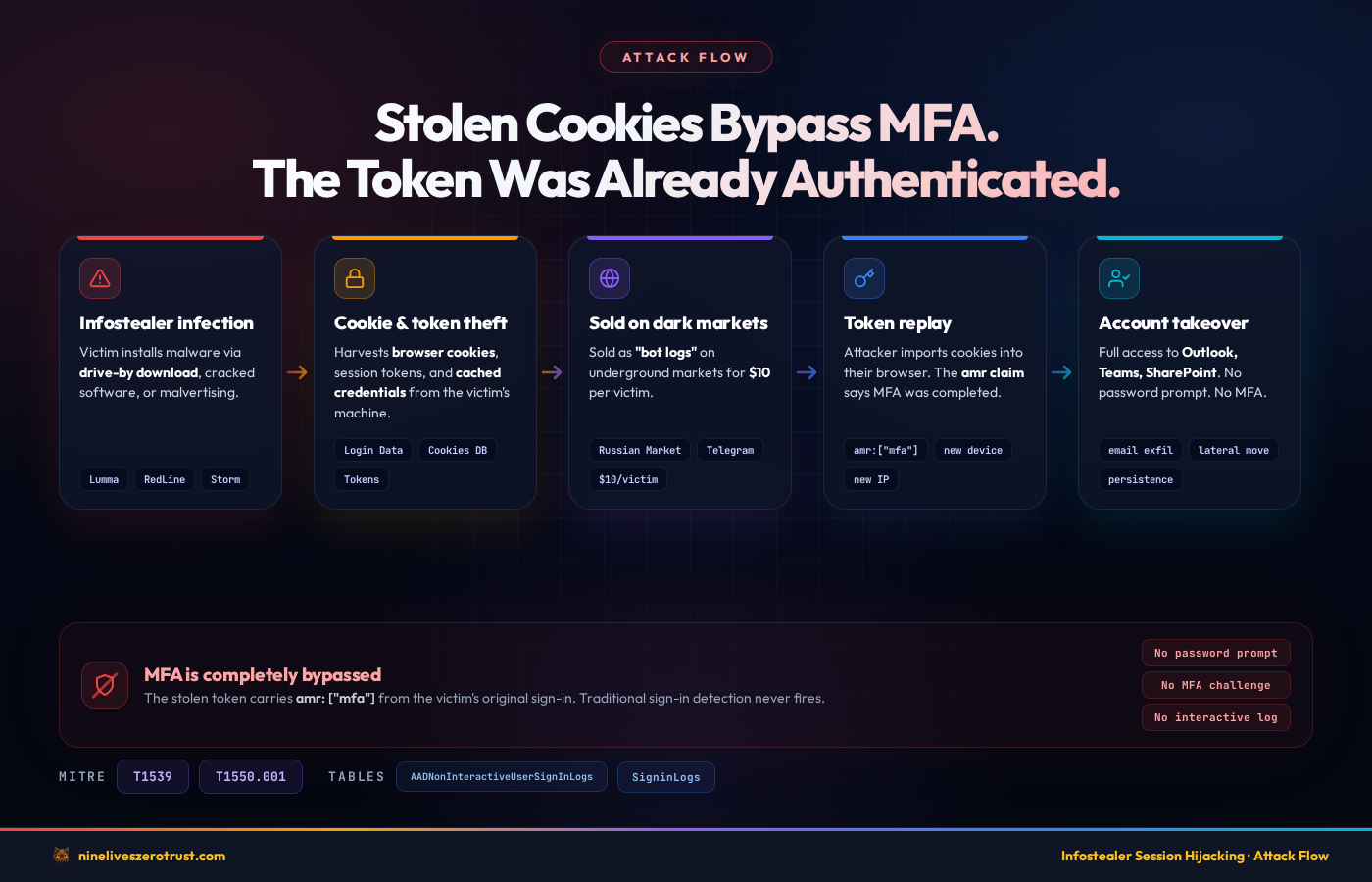
- Infostealer Infection – The victim installs an infostealer through a drive-by download, cracked software, or malvertising campaign. Common delivery mechanisms include SEO-poisoned search results, fake software update pages, and trojanized installers distributed through legitimate-looking sites.
- Cookie and Token Export – The malware harvests browser session cookies, cached authentication tokens, and saved credentials from the victim’s machine. Newer stealer tooling is designed to work around modern browser protections like Chrome’s App-Bound Encryption and move the stolen data off the endpoint quickly for replay or resale.
- Exfiltration to C2 or Market – Stolen session data is exfiltrated to the attacker’s command-and-control infrastructure or sold on underground markets (Russian Market, Genesis Market successors, private Telegram channels). The data is packaged as “bot logs” containing cookies, saved passwords, browser fingerprints, and autofill data.
- Cookie Import – The attacker (or a buyer) imports the stolen cookies into their browser using tools like EditThisCookie, cookie editor extensions, or purpose-built session replay frameworks. Some tools reconstruct the full browser fingerprint including user agent, screen resolution, and timezone to match the victim’s profile.
- Token Replay – The attacker’s browser sends the stolen session tokens and refresh tokens to Microsoft’s token endpoint. The tokens are cryptographically valid – they were issued by Entra ID after a legitimate authentication ceremony.
- Entra ID Validates the Session – Entra ID checks the token signature, expiry, audience, and scope. Everything is valid. The MFA claim is present because the victim completed MFA during the original sign-in. Entra ID grants access.
- Account Takeover – The attacker accesses Outlook, SharePoint, Teams, OneDrive, and any other application the victim had active sessions with. From here, the attacker can read email, exfiltrate documents, pivot laterally through internal links, or set up persistence through inbox rules and OAuth app registrations.
Why This Bypasses MFA
This is the critical point that makes infostealers fundamentally different from credential phishing: the stolen token carries the amr (authentication methods references) claim, which includes the MFA method used during the original sign-in. When Entra ID evaluates a Conditional Access policy that requires MFA, it checks the amr claim in the token. The claim says MFA was completed – because it was, by the victim. The attacker inherits that satisfied requirement.
There is no password prompt. There is no MFA challenge. The replay itself typically doesn’t generate an interactive SigninLogs event. The token refresh happens in the background through the AADNonInteractiveUserSignInLogs table, which many SOC teams don’t monitor.
Traditional detection rules that look for failed authentication, password spray patterns, MFA fatigue attacks, or suspicious login methods often won’t fire because none of those events are required for a session hijack.
What Makes This Hard to Detect
The stolen token is legitimate. It was issued by Entra ID’s token service after a valid authentication ceremony. There is no authentication failure, no anomalous login method, and no credential mismatch. The token signature validates correctly because it was signed by the real Entra ID signing key.
The ONLY anomalies that session hijacking produces are:
- Device mismatch – The attacker’s machine has a different device ID, operating system, or browser than the victim’s enrolled device
- IP address mismatch – The token refresh comes from an IP that has never been associated with this user
- Geographic anomaly – The attacker’s IP resolves to a different city or country than the victim’s normal location
- Behavioral changes – An unusual surge in background token refreshes, or token refreshes happening outside the victim’s normal working hours
- Impossible travel – Consecutive token refreshes from locations that are physically impossible to travel between in the elapsed time
Most of these anomalies appear primarily in the AADNonInteractiveUserSignInLogs table rather than interactive sign-in logs. Some signals (like CAE-related events) can surface in either table, but the bulk of token replay activity shows up in the non-interactive table. This is why most organizations miss session hijacking – they built their detection on the wrong table.
Detection Strategy
Our detection approach targets the behavioral footprint that token replay leaves in Entra ID sign-in telemetry. We focus on five signals: novel device/IP combinations, geographic impossibilities, volume anomalies, fingerprint mismatches, and post-revocation re-authentication. Each signal alone can generate false positives – but correlated together, they provide high-confidence detection of active session hijacking.
MITRE ATT&CK Mapping
| Technique | ID | Detection Rules |
|---|---|---|
| Steal Web Session Cookie | T1539 | Rules 1, 2, 3, 4 |
| Use Alternate Auth Material: Application Access Token | T1550.001 | Rules 1, 3, 4, 5 |
Required Log Sources
Session hijack detection depends on two Entra ID sign-in log tables:
SigninLogs– Interactive sign-in events where the user directly authenticates (password, MFA prompt, FIDO2 key). Used for correlating CAE revocations in Rule 5.AADNonInteractiveUserSignInLogs– Non-interactive sign-in events generated by token refreshes, SSO, and background authentication. This is the primary detection surface. When an attacker replays a stolen token, most refresh activity shows up here. Some CAE-related events may also appear in the interactive table, which is why Rule 5 unions both.
Both tables must be routed to your Sentinel workspace through Entra ID diagnostic settings. If you only have SigninLogs enabled, you are missing the primary evidence surface for token replay.
To enable both tables:
- Open the Entra admin center > Identity > Monitoring & health > Diagnostic settings
- Create or edit a diagnostic setting that targets your Log Analytics workspace
- Under Logs, check both SignInLogs and NonInteractiveUserSignInLogs
- Under the legacy category names, these appear as
SignInLogsandNonInteractiveUserSignInLogs
Confirm data is flowing by running a simple query in your Sentinel workspace:
AADNonInteractiveUserSignInLogs
| where TimeGenerated > ago(1h)
| count
If this returns zero and your organization has active users, the diagnostic setting is not configured correctly. Note that the AADNonInteractiveUserSignInLogs table can generate significantly more volume than SigninLogs – plan your workspace retention and cost model accordingly.
Sentinel Analytics Rules
Five scheduled analytics rules detect the core session hijacking patterns. Each rule targets a different behavioral anomaly, and together they provide layered coverage against the token replay lifecycle.
| Rule | Severity | Detects | MITRE |
|---|---|---|---|
| Token Replay from New Device or IP | High | Novel device+IP in non-interactive sign-ins vs 14-day baseline | T1539, T1550.001 |
| Impossible Travel on Token Refresh | High | Geographic impossibility between consecutive token refreshes | T1539 |
| Anomalous Non-Interactive Sign-in Surge | Medium | 3x spike in token refresh volume vs 7-day per-user baseline | T1539, T1550.001 |
| Browser or OS Mismatch in Same Session | Medium | 3+ distinct browser/OS fingerprints in a 4-hour window | T1539, T1550.001 |
| CAE Revocation + New Location Auth | High | CAE kills session, re-auth from different IP within 30 minutes | T1539, T1550.001 |
Rule 1: LAB - Token Replay from New Device or IP
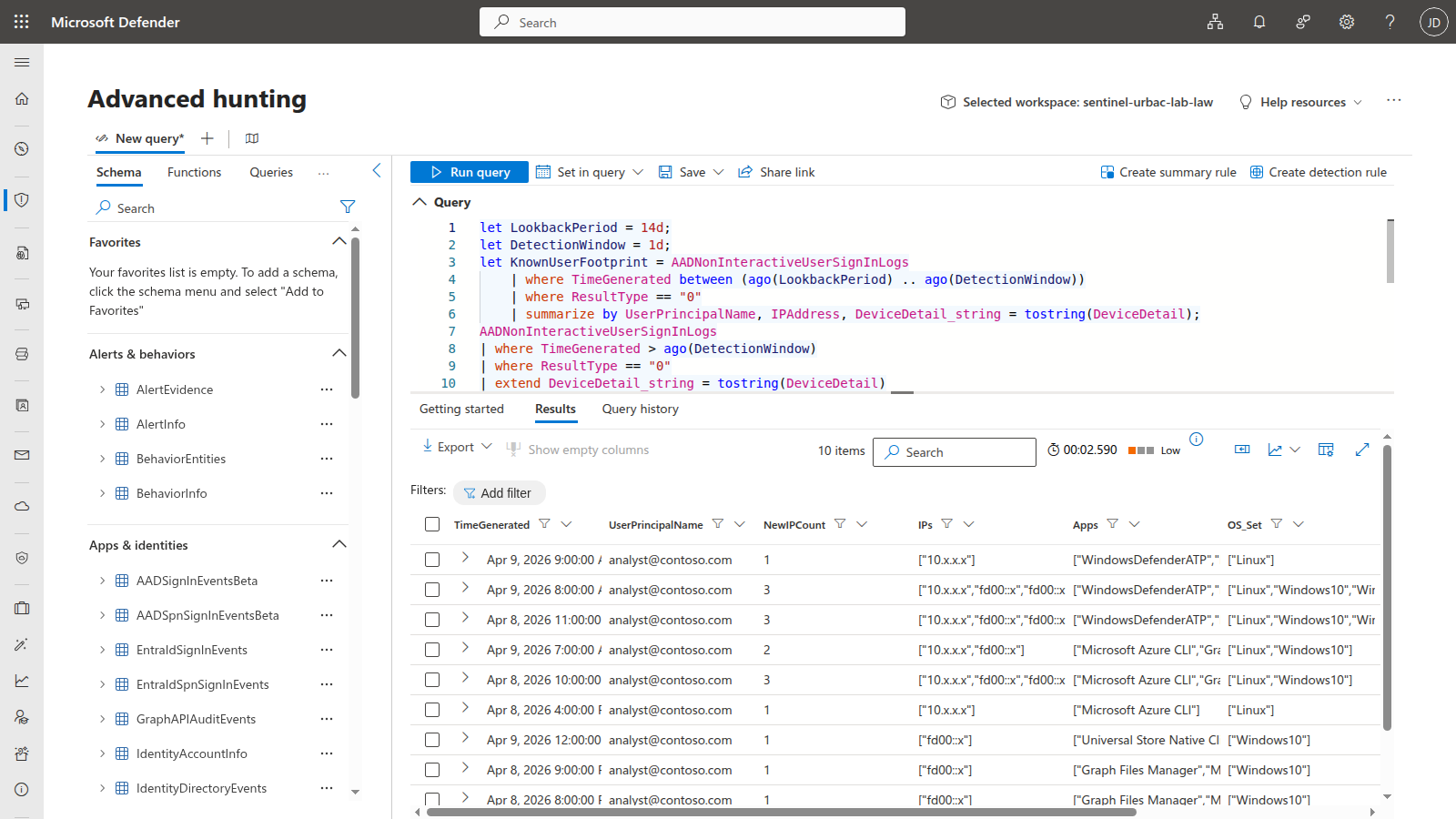
Detects non-interactive sign-ins (token refreshes) arriving from a device and IP combination never previously observed for that user within the past 14 days. Infostealers export browser cookies and replay them from attacker infrastructure – the token is valid, but the source is unknown. This rule builds a per-user baseline of known device/IP pairs and uses a leftanti join to surface novel combinations that warrant investigation.
let LookbackPeriod = 14d;
let DetectionWindow = 1d;
let KnownUserFootprint = AADNonInteractiveUserSignInLogs
    | where TimeGenerated between (ago(LookbackPeriod) .. ago(DetectionWindow))
    | where ResultType == "0"
    | summarize by UserPrincipalName, IPAddress, DeviceDetail_string = tostring(DeviceDetail);
AADNonInteractiveUserSignInLogs
| where TimeGenerated > ago(DetectionWindow)
| where ResultType == "0"
| extend DeviceDetail_string = tostring(DeviceDetail)
| extend DeviceId = tostring(parse_json(DeviceDetail).deviceId)
| extend OS = tostring(parse_json(DeviceDetail).operatingSystem)
| extend Browser = tostring(parse_json(DeviceDetail).browser)
| join kind=leftanti (KnownUserFootprint)
    on UserPrincipalName, IPAddress, DeviceDetail_string
| where isnotempty(UserPrincipalName)
| summarize
    NewIPCount = dcount(IPAddress),
    IPs = make_set(IPAddress, 10),
    Apps = make_set(AppDisplayName, 10),
    OS_Set = make_set(OS, 5),
    Browser_Set = make_set(Browser, 5),
    EventCount = count()
    by UserPrincipalName, bin(TimeGenerated, 1h)
| where NewIPCount >= 1
| project
    TimeGenerated,
    UserPrincipalName,
    NewIPCount,
    IPs,
    Apps,
    OS_Set,
    Browser_Set,
    EventCount
Tuning tips: Adjust
LookbackPeriodfor organizations with frequent travel – 7 days will catch more but generate more noise from road warriors. For organizations with a mostly static workforce, extend to 30 days for a richer baseline. Exclude service accounts that rotate IPs legitimately by adding awhere UserPrincipalName !in ("[email protected]")filter. If your organization uses VPN exit nodes that change frequently, consider joining onDeviceDetail_stringonly (droppingIPAddressfrom the baseline) and adding the IP as an enrichment column instead.
Rule 2: LAB - Impossible Travel on Token Refresh
Detects consecutive non-interactive sign-ins for the same user where the geographic distance between locations exceeds what is physically possible given the elapsed time. Uses geo_distance_2points to calculate the great-circle distance and applies a 500 km/h speed threshold, which is generous enough to accommodate commercial air travel. The 100 km minimum distance filter prevents false positives from GeoIP jitter within the same metro area. Infostealers typically operate from different geographic regions, and the non-interactive table captures the background token refreshes that interactive-only impossible travel rules miss entirely.
let SpeedThresholdKmH = 500;
let MinDistanceKm = 100;
AADNonInteractiveUserSignInLogs
| where TimeGenerated > ago(1d)
| where ResultType == "0"
| extend LocDetails = parse_json(tostring(LocationDetails))
| extend Lat = toreal(LocDetails.geoCoordinates.latitude)
| extend Lon = toreal(LocDetails.geoCoordinates.longitude)
| extend City = tostring(LocDetails.city)
| extend Country = tostring(LocDetails.countryOrRegion)
| where isnotempty(Lat) and isnotempty(Lon)
| sort by UserPrincipalName asc, TimeGenerated asc
| extend PrevLat = prev(Lat, 1), PrevLon = prev(Lon, 1),
    PrevTime = prev(TimeGenerated, 1), PrevUser = prev(UserPrincipalName, 1),
    PrevCity = prev(City, 1), PrevCountry = prev(Country, 1)
| where UserPrincipalName == PrevUser
| extend TimeDeltaHours = datetime_diff('second', TimeGenerated, PrevTime) / 3600.0
| where TimeDeltaHours > 0
| extend DistanceKm = geo_distance_2points(Lon, Lat, PrevLon, PrevLat) / 1000.0
| extend SpeedKmH = DistanceKm / TimeDeltaHours
| where SpeedKmH > SpeedThresholdKmH and DistanceKm > MinDistanceKm
| project
    TimeGenerated,
    UserPrincipalName,
    FromCity = PrevCity,
    FromCountry = PrevCountry,
    ToCity = City,
    ToCountry = Country,
    DistanceKm = round(DistanceKm, 0),
    TimeDeltaMinutes = round(TimeDeltaHours * 60, 1),
    SpeedKmH = round(SpeedKmH, 0),
    AppDisplayName,
    IPAddress
Tuning tips: Raise
SpeedThresholdKmHto 800-1000 for organizations with heavy VPN split-tunneling, where the GeoIP of the VPN exit node may differ significantly from the user’s actual location. LowerMinDistanceKmto 50 if you want to catch attackers operating from neighboring cities. For organizations with globally distributed VPN infrastructure, consider adding a VPN exit node IP exclusion list to prevent false positives from users connecting through different regional VPN gateways.
Rule 3: LAB - Anomalous Non-Interactive Sign-in Surge
Detects a spike in non-interactive sign-in volume for a user compared to their 7-day personal baseline. When an infostealer replays stolen cookies across multiple services (Outlook, Teams, SharePoint, OneDrive), it generates a burst of background token renewals that exceeds the user’s normal rhythm. The rule requires both a 3x spike ratio and an absolute minimum of 20 events to suppress alerts on users with very low baselines.
let BaselinePeriod = 7d;
let DetectionWindow = 1h;
let SpikeMultiplier = 3;
let MinAbsoluteThreshold = 20;
let Baseline = AADNonInteractiveUserSignInLogs
    | where TimeGenerated between (ago(BaselinePeriod) .. ago(DetectionWindow))
    | where ResultType == "0"
    | summarize BaselineHourlyAvg = count() / (24.0 * 7)
        by UserPrincipalName;
AADNonInteractiveUserSignInLogs
| where TimeGenerated > ago(DetectionWindow)
| where ResultType == "0"
| summarize
    CurrentCount = count(),
    DistinctApps = dcount(AppDisplayName),
    Apps = make_set(AppDisplayName, 15),
    DistinctIPs = dcount(IPAddress),
    IPs = make_set(IPAddress, 10)
    by UserPrincipalName
| join kind=inner (Baseline) on UserPrincipalName
| where CurrentCount > BaselineHourlyAvg * SpikeMultiplier
    and CurrentCount > MinAbsoluteThreshold
| extend SpikeRatio = round(CurrentCount / BaselineHourlyAvg, 1)
| project
    TimeGenerated = now(),
    UserPrincipalName,
    CurrentCount,
    BaselineHourlyAvg = round(BaselineHourlyAvg, 1),
    SpikeRatio,
    DistinctApps,
    Apps,
    DistinctIPs,
    IPs
Tuning tips: Adjust
SpikeMultiplierbased on your environment. Power users who work across many M365 apps may have naturally higher non-interactive volumes. Raise to 5x for environments with heavy Power Platform or Graph API automation. RaiseMinAbsoluteThresholdto 50 for large tenants where even normal hourly volumes are high. For a tighter detection, lower theDetectionWindowto 30 minutes and theSpikeMultiplierto 2x – but expect more false positives during application rollouts or batch processing windows.
Rule 4: LAB - Browser or OS Mismatch in Same Session
Detects when the same user has non-interactive sign-ins with 3 or more distinct user agent fingerprints (browser + OS combination) within a 4-hour window. Most users operate from 1-2 device/browser combinations throughout a day. When an infostealer replays tokens, the DeviceDetail often differs from the victim’s original user agent – especially when the attacker operates from Linux infrastructure, headless browsers, or a different OS entirely. The mismatch between the victim’s Windows/Chrome fingerprint and the attacker’s Linux/curl or macOS/Safari is a reliable signal.
let FingerprintThreshold = 3;
let TimeWindowHours = 4h;
AADNonInteractiveUserSignInLogs
| where TimeGenerated > ago(1d)
| where ResultType == "0"
| extend OS = tostring(parse_json(DeviceDetail).operatingSystem)
| extend Browser = tostring(parse_json(DeviceDetail).browser)
| where isnotempty(OS) and isnotempty(Browser)
| extend Fingerprint = strcat(OS, "|", Browser)
| summarize
    DistinctFingerprints = dcount(Fingerprint),
    Fingerprints = make_set(Fingerprint, 10),
    DistinctIPs = dcount(IPAddress),
    IPs = make_set(IPAddress, 10),
    Apps = make_set(AppDisplayName, 10),
    EventCount = count()
    by UserPrincipalName, bin(TimeGenerated, TimeWindowHours)
| where DistinctFingerprints >= FingerprintThreshold
| project
    TimeGenerated,
    UserPrincipalName,
    DistinctFingerprints,
    Fingerprints,
    DistinctIPs,
    IPs,
    Apps,
    EventCount
Tuning tips: Lower
FingerprintThresholdto 2 for high-security accounts (executives, admins, finance) where even a single unexpected fingerprint warrants investigation. Raise to 4-5 for developer populations who regularly test across multiple browsers and operating systems. Add an exclusion for known shared accounts or kiosk devices. The 4-hourTimeWindowHourswindow can be shortened to 1 hour for tighter detection at the cost of missing slower replay patterns.
Rule 5: LAB - CAE Revocation Followed by New Location Auth
Detects when Continuous Access Evaluation (CAE) terminates a session but the user re-authenticates from a different IP within 30 minutes. CAE revokes tokens mid-session when it detects risk signals like network change, user risk elevation, or critical event (password change, account disable). If a new successful authentication arrives from a different IP shortly after a CAE revocation, the attacker likely has a separate stolen token or re-obtained access through a different replayed cookie. This is a strong signal of an active adversary fighting defensive controls – the defender revoked one session and the attacker immediately presented another.
let CAEWindow = 30m;
let CAEEvents = SigninLogs
    | where TimeGenerated > ago(1d)
    | where ResultType != "0"
    | where ResultType in ("50074", "530032", "530034", "50173", "70043")
        or tostring(AuthenticationDetails) has "caePolicyId"
        or tostring(ConditionalAccessPolicies) has "continuousAccessEvaluation"
    | project CAETime = TimeGenerated, UserPrincipalName,
        CAE_IP = IPAddress, CAE_Location = Location, ResultType;
let NewAuth = union SigninLogs, AADNonInteractiveUserSignInLogs
    | where TimeGenerated > ago(1d)
    | where ResultType == "0"
    | project AuthTime = TimeGenerated, UserPrincipalName,
        Auth_IP = IPAddress, Auth_Location = Location,
        AppDisplayName;
CAEEvents
| join kind=inner (NewAuth) on UserPrincipalName
| where AuthTime between (CAETime .. (CAETime + CAEWindow))
| where CAE_IP != Auth_IP
| project
    CAETime,
    AuthTime,
    UserPrincipalName,
    CAE_IP,
    CAE_Location,
    Auth_IP,
    Auth_Location,
    AppDisplayName,
    TimeDelta = AuthTime - CAETime
Tuning tips: Adjust
CAEWindowbased on your organization’s CAE configuration. Organizations with aggressive CAE policies that frequently terminate sessions may need a shorter window (15 minutes) to reduce false positives from users who legitimately re-authenticate from a different network after a CAE event. Extend to 60 minutes if you want to catch slower adversary patterns. TheResultTypefilter targets the most common CAE-related error codes – add additional codes if your environment surfaces CAE through other result types. Consider adding a location similarity check (same country = lower severity) to prioritize alerts where the new authentication comes from a different country.
Validated in Live Lab
During the April 8-9, 2026 validation runs, the sentinel-urbac-lab-law workspace accumulated just over 300 AADNonInteractiveUserSignInLogs events and 4 SigninLogs events from the simulation and normal token activity. The validated results were:
- Rule 1 fired repeatedly –
LAB - Token Replay from New Device or IPgenerated multiple live alerts and incidents in the workspace. - Rule 3 fired after the second simulation run –
LAB - Anomalous Non-Interactive Sign-in Surgepromoted into a live incident once the burst activity exceeded the user’s 7-day baseline. - Rule 4 fired after the second simulation run –
LAB - Browser or OS Mismatch in Same Sessionalso promoted into a live incident from the multi-user-agent traffic. - Rule 2 and Rule 5 remain conditional – impossible travel still requires a second geography, and the CAE correlation rule still requires a real revocation event followed by authentication from a different IP.
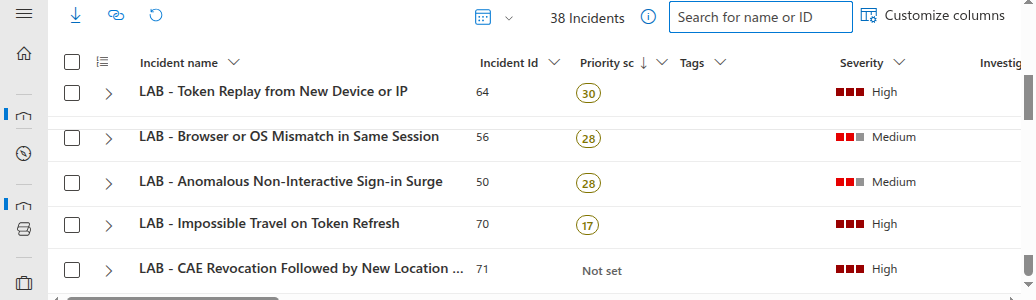
Your counts will differ by tenant size, background token volume, rule schedule timing, and whether you add the optional VPN or Azure Cloud Shell step for Rule 2.
Hunting Queries
Beyond automated detection, five hunting queries support proactive threat hunting for session hijacking indicators. These are designed for periodic execution by a threat hunter investigating suspicious accounts or running broad sweeps during incident response.
| Hunt | Purpose | Lookback |
|---|---|---|
| 1 | Users with most distinct IPs in non-interactive sign-ins | 30d |
| 2 | Token refresh patterns outside business hours | 7d |
| 3 | Sessions spanning multiple countries in a single day | 7d |
| 4 | High-risk sign-ins without MFA challenge | 14d |
| 5 | First-time device + first-time location combination | 14d |
The full KQL for all five hunting queries is in the companion lab. Import them into Sentinel Hunting > Queries to run proactive hunts against your sign-in telemetry.
Workbook: Session Hijack Threat Dashboard
The lab deploys an Azure Workbook that provides a single-pane view of session hijacking indicators across six panels:
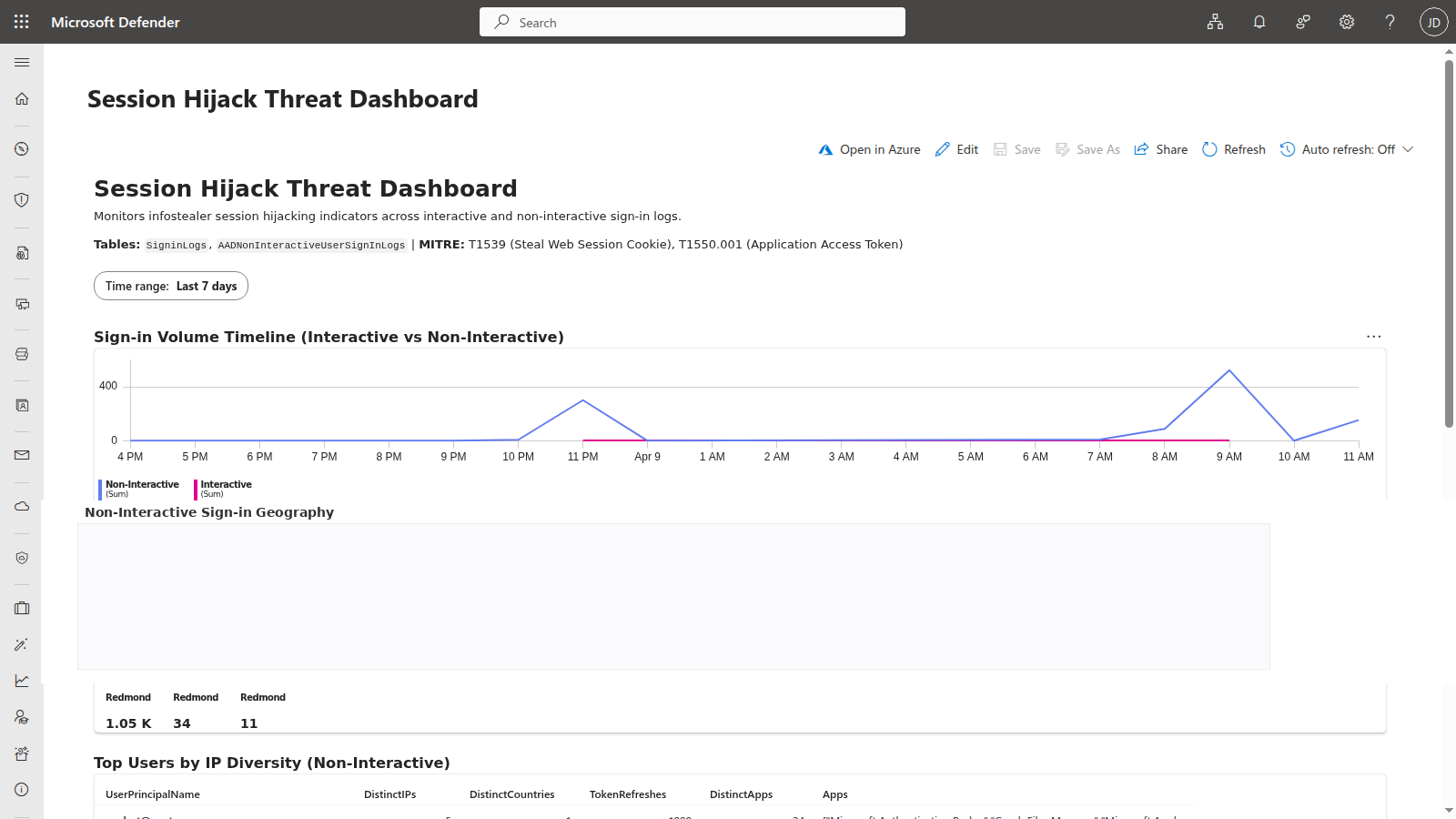
- Sign-in Volume Timeline (Interactive vs Non-Interactive) – Timechart breaking down sign-in events by type per hour. Non-interactive spikes indicate token replay bursts. The time range parameter defaults to 7 days but can be adjusted for broader investigations.
- Non-Interactive Sign-in Geography – Map visualization showing the geographic spread of non-interactive sign-in IPs. Users with tokens distributed to attacker infrastructure show clusters in unexpected regions.
- Top Users by IP Diversity (Non-Interactive) – Table ranking users by the number of unique IP addresses, countries, token refreshes, and distinct apps in their non-interactive sign-ins. Outliers with significantly more IPs than their peers warrant investigation.
- Sign-in Type Breakdown – Pie chart showing the ratio of interactive to non-interactive sign-ins. A disproportionately high non-interactive ratio for a user may indicate token replay activity.
- Risk Level Distribution – Bar chart showing the distribution of sign-in risk levels (medium, high) across the time range. Spikes in risk-flagged sign-ins correlate with Identity Protection detections.
- Device/Browser Anomaly Summary – Table showing users with 3+ distinct browser/OS combinations in non-interactive sign-ins. Highlights the fingerprint mismatch pattern characteristic of token replay from attacker infrastructure.
The workbook uses the same KQL patterns as the analytics rules, giving SOC analysts a dashboard to investigate alerts in context. Deploy it through the companion lab’s Deploy-Lab.ps1 script or import the JSON template manually from the workbook definition.
In low-risk sandboxes, the Risk Level Distribution panel may legitimately be empty until Entra ID Identity Protection emits medium or high risk signals. That is expected and does not indicate a workbook failure.
Hardening Recommendations
Detection is one half of the equation. These hardening controls reduce the attack surface and limit the window of opportunity for stolen tokens:
Enable Continuous Access Evaluation (CAE) for all users – CAE allows resource providers (Exchange Online, SharePoint, Teams) to revoke tokens in near-real-time when risk signals change. Without CAE, access tokens are valid for their full lifetime (typically 60-90 minutes) regardless of what happens after issuance. CAE is the single most impactful control against session hijacking because it can terminate a stolen session mid-use.
Enable Token Protection in Conditional Access where supported – Token Protection reduces replay by requiring device-bound sign-in session tokens instead of bearer-style reusable session material. As of April 2026, Microsoft documents support for Exchange Online, SharePoint Online, and Microsoft Teams on native desktop apps (not browser-based access). Windows is GA, iOS/iPadOS and macOS are in preview. This is one of the most direct countermeasures against session replay on supported clients and platforms.
Require compliant or Entra-joined device for sensitive apps via Conditional Access – A device compliance requirement ensures that tokens can only be used from managed devices that pass health checks. Unmanaged attacker machines will fail the compliance check, blocking access even with a valid token.
Require MFA re-authentication on sign-in risk change – Configure a Conditional Access policy that forces MFA re-authentication when Entra ID Identity Protection detects a risk level change during the session. This interrupts the attacker when risk signals like impossible travel or anomalous IP are detected.
Use Conditional Access session controls deliberately, and understand CTL limits – Sign-in frequency and CAE are more reliable modern controls than assuming short access-token lifetimes will save you. Microsoft documents that Configurable Token Lifetime policies aren’t honored for CAE-aware sessions, which can receive long-lived tokens and rely on revocation instead. For non-CAE scenarios, token lifetime tuning can still reduce replay dwell time, but it should be treated as a secondary control rather than the primary mitigation.
Deploy phishing-resistant MFA (passkeys, FIDO2) – While MFA doesn’t directly prevent token replay (the token already carries the MFA claim), phishing-resistant methods like passkeys and FIDO2 security keys prevent the initial credential theft that often accompanies infostealer infections. They also make it harder for attackers to re-authenticate if the stolen token expires.
Monitor for infostealer indicators in Defender for Endpoint – Deploy Defender for Endpoint detection rules that flag known infostealer behaviors: credential file access (
Login Data,CookiesSQLite databases), suspicious browser extension installations, and process injection into browser processes. Catching the infostealer before it exfiltrates tokens is better than detecting the replay after the fact.Block known infostealer C2 infrastructure at the network layer – Use Defender for Endpoint network protection or Entra Internet Access (Global Secure Access) web content filtering to block outbound communication with known infostealer command-and-control domains. Defender for Cloud Apps can complement this by detecting anomalous session activity and governing app-level access after a compromise.
Deployment
The lab deploys cleanly to an existing Sentinel workspace with two commands:
git clone https://github.com/j-dahl7/session-hijack-detection-sentinel.git
cd session-hijack-detection-sentinel

./scripts/Deploy-Lab.ps1 -ResourceGroup "rg-sentinel-lab" -WorkspaceName "law-sentinel-lab"
./scripts/Test-SessionHijack.ps1
If you want a stronger burst for Rule 3, re-run the simulation with -BurstCount 40. For Rule 2, perform one additional Graph API call from Azure Cloud Shell or a VPN in a different country. For cleanup, run ./scripts/Deploy-Lab.ps1 -ResourceGroup "rg-sentinel-lab" -WorkspaceName "law-sentinel-lab" -Destroy.
Key Takeaways
AADNonInteractiveUserSignInLogsis the primary evidence table – token replay often bypasses the interactiveSigninLogstable entirely.- Rule 1 is the fastest operational win – a novel device or IP baseline is easier to validate in a sandbox than CAE or impossible-travel correlation.
- Rule 3 and Rule 4 provide corroboration – volume spikes and fingerprint drift strengthen confidence when the attacker stays in the same geography.
- CAE and Token Protection are the strongest mitigations – analytics help you catch replay, but revocation and token binding reduce dwell time.
Resources
- Microsoft: What is Continuous Access Evaluation?
- Microsoft: Token protection in Conditional Access (preview)
- Microsoft: Configurable token lifetimes
- Microsoft Security Blog: Infostealers without borders
- Microsoft: Entra ID sign-in logs
- Microsoft: Non-interactive user sign-in logs
- Azure Monitor Logs reference: AADNonInteractiveUserSignInLogs
- Azure Monitor Logs reference: SigninLogs
- Darktrace Annual Threat Report 2026 announcement
- IBM X-Force: Cloud attacks are evolving: What 2025 trends mean for defenders in 2026
- MITRE ATT&CK: Steal Web Session Cookie (T1539)
- MITRE ATT&CK: Use Alternate Authentication Material - Application Access Token (T1550.001)
- Companion Lab: Infostealer Session Hijack Detection

Jerrad Dahlager, CISSP, CCSP
Cloud Security Architect · Adjunct Instructor
Marine Corps veteran and firm believer that the best security survives contact with reality.
Have thoughts on this post? I'd love to hear from you.