On this page
Review update (September 25, 2026): Cookie replay maps to T1550.004 separately from cookie theft (T1539); these rules provide investigative signals rather than proof of either technique. Keep the sign-in tables used by scheduled rules in the supported analytics tier; moving them to lake-only storage changes detection availability.
Review update (September 25, 2026): The merged hourly rules now gate on fresh source evidence while retaining complete correlation and baseline windows. Rule 1 gates newly arrived unfamiliar evidence; Rule 5 accepts freshness from either side, including a late revocation record. New related evidence can still update a group, so this is not an exactly-once guarantee. The source retains nonempty immutable
UserIdand emits account entity mappings with one alert per result; Rules 2 and 5 also map scalar IPs. Validate actual tenant telemetry and incident behavior before enabling them. Anaz restrequest may reuse a cached token and produce no new sign-in; verify actual telemetry rather than treating an HTTP success as a sign-in-generation result. Include non-interactive sign-ins when hunting replay. The retained count and workbook image are not established as the same observation window; do not combine them into a new measured total. The related README’s historical test date and broad risk-panel wording do not replace the actual pinned query contract.
Nearly 70% of incidents in the Americas now begin with stolen or misused accounts. That account-compromise statistic does not attribute every case to infostealers. Families such as Lumma, RedLine, and Vidar export browser cookies and session tokens directly from the victim’s machine, often bypassing a fresh MFA challenge because the stolen token already carries the authentication claim. IBM X-Force tracked more than 16 million infostealer-infected devices in 2025, and IBM describes per-victim credential logs, which can contain many credentials, offered for as little as $10; that is not a quoted price for one stolen session.
What makes infostealers different from credential phishing is what they steal. They don’t need your password. They export browser session cookies and cached authentication tokens directly from the victim’s machine. These tokens carry the MFA claim from the original legitimate authentication. The attacker imports them into their own browser and walks straight into Outlook, SharePoint, Teams, and OneDrive without ever seeing a password prompt or MFA challenge.
This post builds a Sentinel detection stack for session hijacking: the deployment installs 5 analytics rules and a workbook, while the repository includes 5 hunting queries that you import or run separately. Together they surface the behavioral anomalies that stolen token replay leaves behind in Entra ID sign-in logs.
Hands-on Lab: All KQL queries, PowerShell scripts, and deployment automation are in the reviewed companion revision.
Check if your Sentinel workspace has non-interactive sign-in data flowing:
AADNonInteractiveUserSignInLogs
| where TimeGenerated > ago(24h)
| summarize Events = count(), DistinctUsers = dcount(UserPrincipalName), DistinctIPs = dcount(IPAddress)
If this returns zero, verify the selected workspace, diagnostic settings, query time range, expected activity, and ingestion latency before concluding that routing is missing.
How the Attack Works
The session hijacking lifecycle can bypass fresh interactive prompts and many traditional sign-in detections because the attacker replays a session that already passed the original challenges. Presenting a stolen cookie or token is still an authentication act; the important distinction is that the attacker may not need to repeat the victim’s password entry or MFA ceremony.
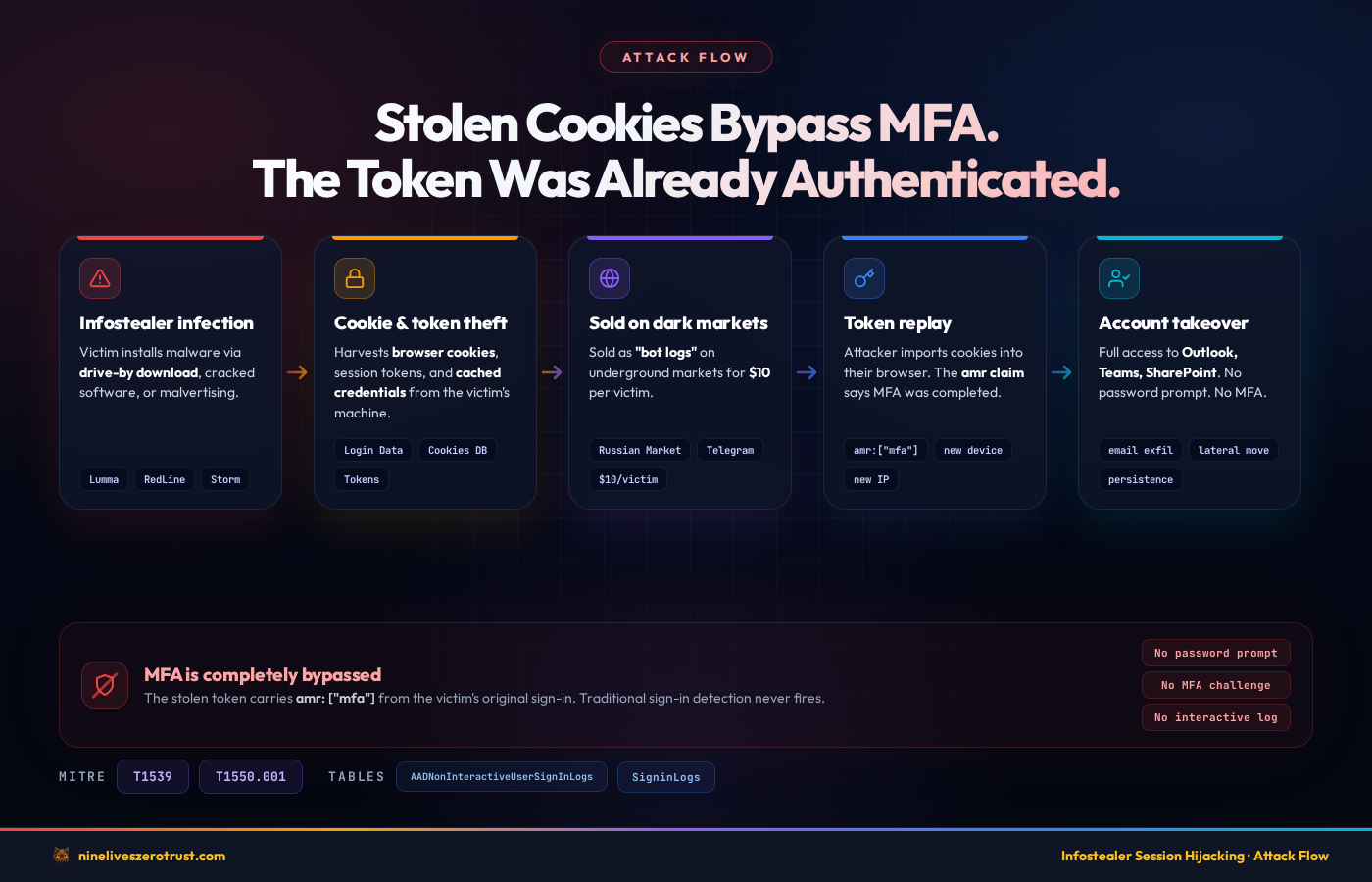
- Infostealer Infection – The victim installs an infostealer through a drive-by download, cracked software, or malvertising campaign. Common delivery mechanisms include SEO-poisoned search results, fake software update pages, and trojanized installers distributed through legitimate-looking sites.
- Cookie and Token Export – The malware harvests browser session cookies, cached authentication tokens, and saved credentials from the victim’s machine. Newer stealer tooling is designed to work around modern browser protections like Chrome’s App-Bound Encryption and move the stolen data off the endpoint quickly for replay or resale.
- Exfiltration to C2 or Market – Stolen session data is exfiltrated to the attacker’s command-and-control infrastructure or sold on underground markets (Russian Market, Genesis Market successors, private Telegram channels). The data is packaged as “bot logs” containing cookies, saved passwords, browser fingerprints, and autofill data.
- Cookie Import – For browser-session replay, the attacker (or a buyer) imports stolen application cookies into a browser using a cookie editor or purpose-built replay framework. Some tools also reproduce browser attributes such as user agent, screen resolution, and timezone. Stolen access and refresh tokens follow different protocol paths and are not simply browser cookies.
- Session or Token Replay – A service session cookie is presented back to the relying web application. An access token is presented to its resource API. A refresh token, by contrast, is redeemed at the Microsoft identity platform token endpoint for a new access token. Which artifact was stolen determines the endpoint, validation path, telemetry, and available controls.
- The Relevant Validator Evaluates It – The relying application validates its session cookie, a resource API validates an access token’s signature and claims, and the identity platform evaluates refresh-token redemption. Expiry, audience, scope or roles, revocation state, Conditional Access, Continuous Access Evaluation, and token-binding support can affect the outcome. If the artifact remains valid and no control rejects it, the service may grant access without a fresh interactive prompt.
- Account Takeover – The attacker accesses Outlook, SharePoint, Teams, OneDrive, and any other application the victim had active sessions with. From here, the attacker can read email, exfiltrate documents, pivot laterally through internal links, or set up persistence through inbox rules and OAuth app registrations.
Why Replay May Avoid a Fresh MFA Prompt
This is the critical distinction from credential phishing: the stolen session artifact represents an authentication ceremony the victim already completed. Depending on the artifact and protocol, a token may carry authentication-context claims such as amr, while an application session cookie may embody the relying service’s earlier authenticated state. Those signals show what happened at the original sign-in; they do not prove that the person replaying the artifact completed MFA.
A still-valid replay may therefore avoid a new password or MFA prompt. Refresh-token redemption and other background authentication commonly appear in AADNonInteractiveUserSignInLogs, while direct application-cookie or access-token use can surface in application, resource, or workload telemetry instead. Do not assume every replay creates an interactive SigninLogs event, or that every replay is visible in one Entra table.
Traditional rules limited to failed authentication, password spray, MFA fatigue, or interactive sign-in methods can miss this activity because those events are not required for every replay path.
What Makes This Hard to Detect
The stolen token is legitimate. It was issued by Entra ID’s token service after a valid authentication ceremony. There is no authentication failure, no anomalous login method, and no credential mismatch. The token signature validates correctly because it was signed by the real Entra ID signing key.
The main anomalies that session hijacking produces are:
- Device mismatch – The attacker’s machine has a different device ID, operating system, or browser than the victim’s enrolled device
- IP address mismatch – The token refresh comes from an IP that has never been associated with this user
- Geographic anomaly – The attacker’s IP resolves to a different city or country than the victim’s normal location
- Behavioral changes – An unusual surge in background token refreshes, or token refreshes happening outside the victim’s normal working hours
- Impossible travel – Consecutive token refreshes from locations that are physically impossible to travel between in the elapsed time
Most of these anomalies appear primarily in the AADNonInteractiveUserSignInLogs table rather than interactive sign-in logs. A revoked-grant failure or the later successful authentication can appear in either table, so Rule 5 searches both. The bulk of token replay activity still shows up in the non-interactive table. This is why organizations that monitor only interactive sign-ins can miss session hijacking.
Detection Strategy
Our detection approach targets the behavioral footprint that token replay leaves in Entra ID sign-in telemetry. We focus on five signals: novel device/IP combinations, geographic impossibilities, volume anomalies, fingerprint mismatches, and post-revocation re-authentication. Each signal alone can generate false positives – but correlated together, they can raise confidence in active session hijacking.
MITRE ATT&CK Mapping
| Technique | ID | Detection Rules |
|---|---|---|
| Steal Web Session Cookie | T1539 | Rules 1, 2, 3, 4, 5 (investigative mappings, not proof of theft) |
| Use Alternate Auth Material: Application Access Token | T1550.001 | Rules 1, 3, 4, 5 |
Required Log Sources
Session hijack detection depends on two Entra ID sign-in log tables:
SigninLogs– Interactive sign-in events where the user directly authenticates (password, MFA prompt, FIDO2 key). Rule 5 searches this table for either side of its revoked-grant correlation.AADNonInteractiveUserSignInLogs– Non-interactive sign-in events generated by token refreshes, SSO, and background authentication. This is the primary detection surface. When an attacker replays a stolen token, most refresh activity shows up here. Rule 5 also searches this table for either side of its correlation because Microsoft documents relevant requests across both interactive and non-interactive sign-in views.
Both tables must be routed to your Sentinel workspace through Entra ID diagnostic settings. If you only have SigninLogs enabled, you are missing the primary evidence surface for token replay.
To enable both tables:
- Open the Entra admin center > Entra ID > Monitoring & health > Diagnostic settings
- Create or edit a diagnostic setting that targets your Log Analytics workspace
- Under Logs, check both SignInLogs and NonInteractiveUserSignInLogs
- Under the legacy category names, these appear as
SignInLogsandNonInteractiveUserSignInLogs
Confirm data is flowing by running a simple query in your Sentinel workspace:
AADNonInteractiveUserSignInLogs
| where TimeGenerated > ago(1h)
| count
If this returns zero, check diagnostic settings, expected non-interactive activity, the selected workspace, time range, and ingestion latency. An empty result alone does not identify the cause. Note that the AADNonInteractiveUserSignInLogs table can generate significantly more volume than SigninLogs – plan your workspace retention and cost model accordingly.
Sentinel Analytics Rules
Five scheduled analytics rules detect the core session hijacking patterns. Each rule targets a different behavioral anomaly, and together they provide layered coverage against the token replay lifecycle.
| Rule | Severity | Detects | MITRE |
|---|---|---|---|
| Token Replay from New Device or IP | High | 1+ successful refresh from a user/IP/device-ID tuple absent from the earlier baseline | T1539, T1550.001 |
| Impossible Travel on Token Refresh | High | Geographic impossibility between consecutive token refreshes | T1539 |
| Anomalous Non-Interactive Sign-in Surge | Medium | 3x spike in token refresh volume vs 7-day per-user baseline | T1539, T1550.001 |
| Browser or OS Mismatch in Same Session | Medium | 3+ distinct browser/OS fingerprints for one recorded SessionId in a fixed 4-hour bucket | T1539, T1550.001 |
| Revoked Grant + New-IP Authentication | High | Entra error 50173, then a same-UserId success from a different IP within 30 minutes | T1539, T1550.001 |
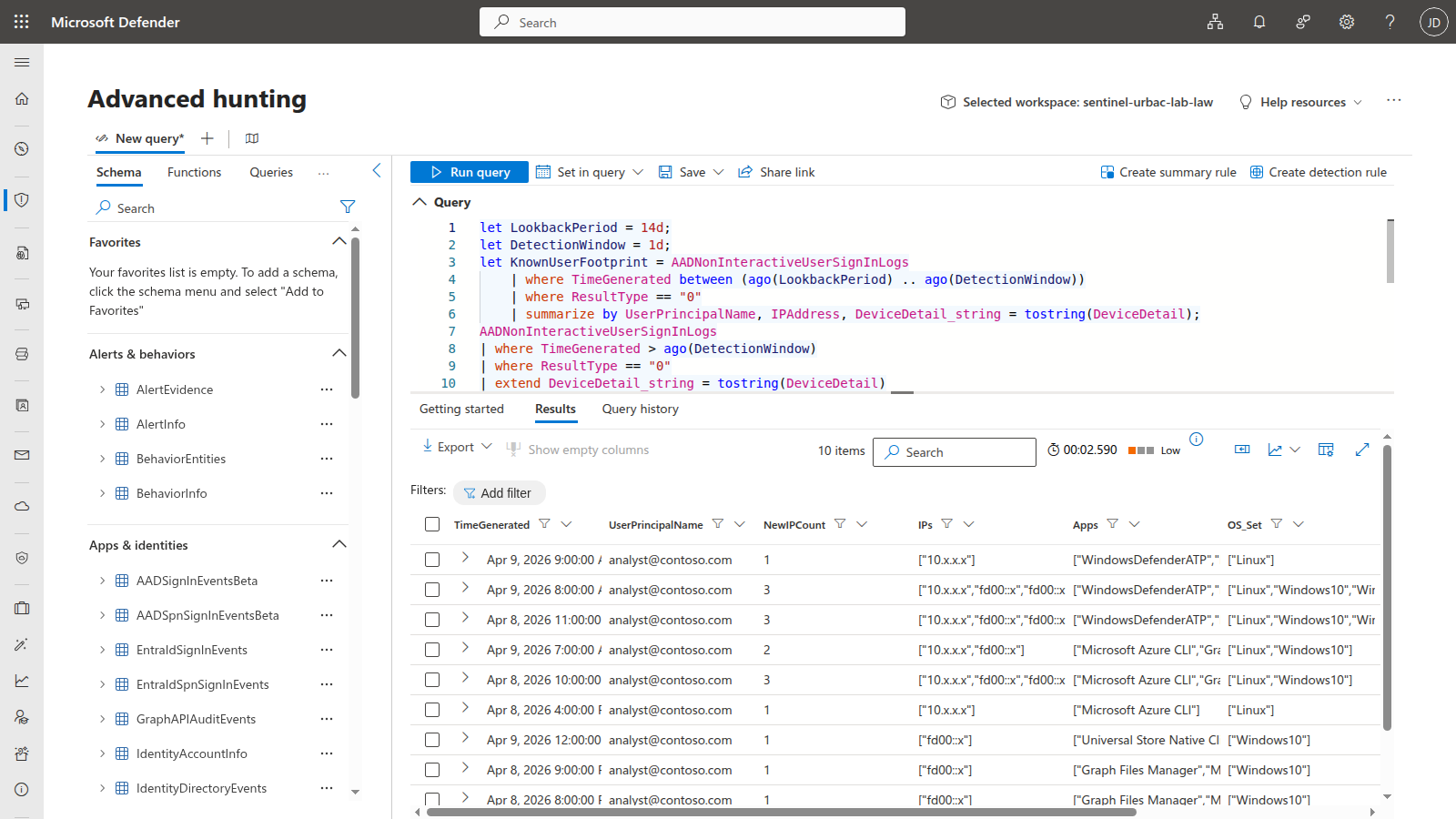
DeviceDetail bag. Tap to expand.Rule 1: LAB - Token Replay from New Device or IP
Detects successful non-interactive sign-ins whose exact immutable UserId, IP address, and Entra device-ID tuple was absent from the earlier portion of the rule’s 14-day query period. The detection branch covers the latest day, the baseline covers the interval from 14 days ago through 1 day ago, and the default threshold is one unfamiliar event. A new IP with a familiar device, or a new device ID with a familiar IP, therefore produces an unfamiliar tuple. The query extracts the stable deviceId field instead of comparing the complete serialized DeviceDetail bag; it does not fall back to an OS/browser fingerprint.
let LookbackPeriod = 14d;
let DetectionWindow = 1d;
let MinUnfamiliarEvents = 1;
let KnownUserFootprint = AADNonInteractiveUserSignInLogs
    | where TimeGenerated between (ago(LookbackPeriod) .. ago(DetectionWindow))
    | where ResultType == "0"
| where isnotempty(UserId)
    | extend DeviceId = tostring(parse_json(DeviceDetail).deviceId)
    | summarize by UserId, IPAddress, DeviceId
    | extend Known = true;
AADNonInteractiveUserSignInLogs
| where TimeGenerated > ago(DetectionWindow)
| where ResultType == "0"
| where isnotempty(UserId)
| where isnotempty(UserPrincipalName)
| extend DeviceId = tostring(parse_json(DeviceDetail).deviceId)
| extend OS = tostring(parse_json(DeviceDetail).operatingSystem)
| extend Browser = tostring(parse_json(DeviceDetail).browser)
| extend ArrivalTime = coalesce(ingestion_time(), TimeGenerated)
| join kind=leftouter (KnownUserFootprint)
    on UserId, IPAddress, DeviceId
| extend IsUnfamiliar = isnull(Known)
| summarize LatestEvidence = maxif(ArrivalTime, IsUnfamiliar), UnfamiliarEvents = countif(IsUnfamiliar), NewIPCount = dcountif(IPAddress, IsUnfamiliar), IPs = make_set_if(IPAddress, IsUnfamiliar, 10), Apps = make_set_if(AppDisplayName, IsUnfamiliar, 10), OS_Set = make_set_if(OS, IsUnfamiliar, 5), Browser_Set = make_set_if(Browser, IsUnfamiliar, 5), EventCount = count() by UserId, UserPrincipalName, bin(TimeGenerated, 1h)
| where UnfamiliarEvents >= MinUnfamiliarEvents
| where LatestEvidence > ago(1h)
| project TimeGenerated, UserId, UserPrincipalName, UnfamiliarEvents, NewIPCount, IPs, Apps, OS_Set, Browser_Set, EventCount
Tuning tips: Keep the scheduled rule’s query period at
P14D; a shorter period would empty or truncate the baseline used by this KQL. RaiseMinUnfamiliarEventsfor a noisy tenant, and explicitly exclude approved service accounts or known egress ranges where appropriate. Investigate blank or unstabledeviceIdvalues before relying on this rule, because the pinned query has no OS/browser fallback. Do not replace the extracted fields with rawDeviceDetailstring matching: JSON serialization and optional-field churn are not security signals. Correlate this alert with risk, impossible travel, endpoint, and post-revocation evidence before escalation.
Rule 2: LAB - Impossible Travel on Token Refresh
Detects consecutive non-interactive sign-ins for the same user where the geographic distance between locations exceeds the configured travel threshold. It uses geo_distance_2points, a 500 km/h threshold, and a 100 km minimum distance filter. Subsecond elapsed time is preserved; distant events at the same timestamp are labelled Simultaneous and carry a null speed instead of being dropped or divided by zero. Subsecond elapsed time is preserved; distant events at the same timestamp are labelled Simultaneous and carry a null speed instead of being dropped or divided by zero. Normal commercial aircraft can exceed 500 km/h, so legitimate air travel, VPN egress changes, mobile routing, and GeoIP error can all trigger this rule. Treat it as a triage signal and tune the speed, exclusions, and travel context for your tenant; the non-interactive table remains valuable because it captures background token refreshes that interactive-only rules miss.
let SpeedThresholdKmH = 500;
let MinDistanceKm = 100;
AADNonInteractiveUserSignInLogs
| where TimeGenerated > ago(1d)
| where ResultType == "0"
| where isnotempty(UserId)
| extend LocDetails = parse_json(tostring(LocationDetails))
| extend Lat = toreal(LocDetails.geoCoordinates.latitude)
| extend Lon = toreal(LocDetails.geoCoordinates.longitude)
| extend City = tostring(LocDetails.city)
| extend Country = tostring(LocDetails.countryOrRegion)
| where isnotnull(Lat) and isnotnull(Lon)
| extend ArrivalTime = coalesce(ingestion_time(), TimeGenerated)
| sort by UserId asc, TimeGenerated asc
| extend PrevLat = prev(Lat, 1), PrevLon = prev(Lon, 1), PrevTime = prev(TimeGenerated, 1), PrevUser = prev(UserId, 1), PrevArrivalTime = prev(ArrivalTime, 1), PrevCity = prev(City, 1), PrevCountry = prev(Country, 1)
| where UserId == PrevUser
| where max_of(ArrivalTime, PrevArrivalTime) > ago(1h)
| extend TimeDeltaHours = (TimeGenerated - PrevTime) / 1h
| where TimeDeltaHours >= 0
| extend DistanceKm = geo_distance_2points(Lon, Lat, PrevLon, PrevLat) / 1000.0
| extend Simultaneous = TimeDeltaHours == 0
| extend SpeedKmH = iff(Simultaneous, real(null), DistanceKm / TimeDeltaHours)
| where (Simultaneous or SpeedKmH > SpeedThresholdKmH) and DistanceKm > MinDistanceKm
| project TimeGenerated, UserId, UserPrincipalName, FromCity = PrevCity, FromCountry = PrevCountry, ToCity = City, ToCountry = Country, DistanceKm = round(DistanceKm, 0), Simultaneous, TimeDeltaMinutes = round(TimeDeltaHours * 60, 1), SpeedKmH = round(SpeedKmH, 0), AppDisplayName, IPAddress
Tuning tips: Raise
SpeedThresholdKmHto 800-1000 for organizations with heavy VPN split-tunneling, where the GeoIP of the VPN exit node may differ significantly from the user’s actual location. LowerMinDistanceKmto 50 if you want to catch attackers operating from neighboring cities. For organizations with globally distributed VPN infrastructure, consider adding a VPN exit node IP exclusion list to prevent false positives from users connecting through different regional VPN gateways.
Rule 3: LAB - Anomalous Non-Interactive Sign-in Surge
Detects a spike in non-interactive sign-in volume for a user compared to their 7-day personal baseline. When an infostealer replays stolen cookies across multiple services (Outlook, Teams, SharePoint, OneDrive), it generates a burst of background token renewals that exceeds the user’s normal rhythm. The rule requires both a 3x spike ratio and an absolute minimum of 20 events to suppress alerts on users with very low baselines.
let BaselinePeriod = 7d;
let DetectionWindow = 1h;
let SpikeMultiplier = 3;
let MinAbsoluteThreshold = 20;
let Baseline = AADNonInteractiveUserSignInLogs
    | where TimeGenerated between (ago(BaselinePeriod) .. ago(DetectionWindow))
    | where ResultType == "0"
| where isnotempty(UserId)
    | summarize BaselineHourlyAvg = count() / (24.0 * 7) by UserId;
AADNonInteractiveUserSignInLogs
| where TimeGenerated > ago(DetectionWindow)
| where ResultType == "0"
| where isnotempty(UserId)
| extend ArrivalTime = coalesce(ingestion_time(), TimeGenerated)
| summarize LatestEvidence = max(ArrivalTime), CurrentCount = count(), DistinctApps = dcount(AppDisplayName), Apps = make_set(AppDisplayName, 15), DistinctIPs = dcount(IPAddress), IPs = make_set(IPAddress, 10) by UserId, UserPrincipalName
| join kind=inner (Baseline) on UserId
| where CurrentCount > BaselineHourlyAvg * SpikeMultiplier and CurrentCount > MinAbsoluteThreshold
| extend SpikeRatio = round(CurrentCount / BaselineHourlyAvg, 1)
| where LatestEvidence > ago(1h)
| project TimeGenerated = now(), UserId, UserPrincipalName, CurrentCount, BaselineHourlyAvg = round(BaselineHourlyAvg, 1), SpikeRatio, DistinctApps, Apps, DistinctIPs, IPs
Tuning tips: Adjust
SpikeMultiplierbased on your environment. Power users who work across many M365 apps may have naturally higher non-interactive volumes. Raise to 5x for environments with heavy Power Platform or Graph API automation. RaiseMinAbsoluteThresholdto 50 for large tenants where even normal hourly volumes are high. For a tighter detection, lower theDetectionWindowto 30 minutes and theSpikeMultiplierto 2x – but expect more false positives during application rollouts or batch processing windows.
Rule 4: LAB - Browser or OS Mismatch in Same Session
Detects when one recorded Entra SessionId has successful non-interactive sign-ins with 3 or more browser/OS fingerprints in the same fixed 4-hour bucket. Rows without a user or SessionId are excluded, so the rule does not infer a single session from unrelated activity by the same user. A replayed session can present a different DeviceDetail fingerprint from the original client, but browser or OS diversity is supporting evidence rather than proof of compromise.
let FingerprintThreshold = 3;
let TimeWindowHours = 4h;
AADNonInteractiveUserSignInLogs
| where TimeGenerated > ago(1d)
| where ResultType == "0"
| where isnotempty(UserId)
| where isnotempty(UserPrincipalName) and isnotempty(SessionId)
| extend OS = tostring(parse_json(DeviceDetail).operatingSystem)
| extend Browser = tostring(parse_json(DeviceDetail).browser)
| where isnotempty(OS) and isnotempty(Browser)
| extend Fingerprint = strcat(OS, "|", Browser)
| extend ArrivalTime = coalesce(ingestion_time(), TimeGenerated)
| summarize LatestEvidence = max(ArrivalTime), DistinctFingerprints = dcount(Fingerprint), Fingerprints = make_set(Fingerprint, 10), DistinctIPs = dcount(IPAddress), IPs = make_set(IPAddress, 10), Apps = make_set(AppDisplayName, 10), EventCount = count() by UserId, UserPrincipalName, SessionId, bin(TimeGenerated, TimeWindowHours)
| where DistinctFingerprints >= FingerprintThreshold
| where LatestEvidence > ago(1h)
| project TimeGenerated, UserId, UserPrincipalName, SessionId, DistinctFingerprints, Fingerprints, DistinctIPs, IPs, Apps, EventCount
Tuning tips: Lower
FingerprintThresholdto 2 only after measuring normal per-session fingerprint changes for the protected population; raise it when legitimate clients rotate fingerprints within one recorded session. Thebin()expression creates fixed clock-aligned buckets, not a rolling window, so events on opposite sides of a boundary are not correlated. ShorteningTimeWindowHoursnarrows each bucket but can miss slower replay patterns.
Rule 5: LAB - Revoked Grant Followed by New-IP Authentication
Correlates Microsoft Entra error 50173 – a presented grant that expired because it was revoked – with a later successful authentication for the same nonempty immutable UserId from a different IP within 30 minutes. Both the interactive and non-interactive sign-in tables are searched on each side because either can hold the relevant request. The query intentionally avoids undocumented serialized CAE markers and does not label the sequence as CAE enforcement. Password changes, refresh-token expiry, administrator revocation, VPN changes, mobile egress, and shared proxies can all produce benign matches, so this is a triage lead rather than proof of theft.
let CorrelationWindow = 30m;
let RevokedGrants = union withsource=RevocationTable isfuzzy=true SigninLogs, AADNonInteractiveUserSignInLogs
    | where TimeGenerated > ago(1d)
    | where tostring(ResultType) == "50173"
    | where isnotempty(UserId) and isnotempty(IPAddress)
    | project RevocationArrival = coalesce(ingestion_time(), TimeGenerated), RevocationTime = TimeGenerated, UserId, RevokedUPN = UserPrincipalName, RevokedIP = IPAddress, RevocationTable;
let SuccessfulAuth = union withsource=AuthTable isfuzzy=true SigninLogs, AADNonInteractiveUserSignInLogs
    | where TimeGenerated > ago(1d)
    | where tostring(ResultType) == "0"
    | where isnotempty(UserId) and isnotempty(IPAddress)
    | project AuthArrival = coalesce(ingestion_time(), TimeGenerated), AuthTime = TimeGenerated, UserId, AuthUPN = UserPrincipalName, AuthIP = IPAddress, AppDisplayName, AuthTable;
RevokedGrants
| join kind=inner (SuccessfulAuth) on UserId
| where AuthTime > RevocationTime and AuthTime <= RevocationTime + CorrelationWindow
| where RevokedIP != AuthIP
| where max_of(RevocationArrival, AuthArrival) > ago(1h)
| project TimeGenerated = RevocationTime, RevocationTime, AuthTime, UserId, UserPrincipalName = coalesce(AuthUPN, RevokedUPN), RevokedIP, AuthIP, AppDisplayName, RevocationTable, AuthTable, TimeDelta = AuthTime - RevocationTime
Tuning tips: Keep
50173as the revoked-grant condition unless Microsoft documents another result with the same semantics. Correlate onUserId, not a mutable or reusable UPN. AdjustCorrelationWindowonly after measuring legitimate reauthentication behavior, and add approved egress, proxy, or network context before prioritizing the resulting alert. If you investigate CAE specifically, use the documentedSignInEventTypesvaluecontinuousAccessEvaluationand Microsoft’s CAE reporting views rather than guessing atAuthenticationDetailsorConditionalAccessPoliciesserialization.
Validated in Live Lab
During the April 8-9, 2026 validation runs, the lab workspace accumulated just over 300 AADNonInteractiveUserSignInLogs events and 4 SigninLogs events from the simulation and normal token activity. The validated results were:
- The original Rule 1 fired repeatedly –
LAB - Token Replay from New Device or IPgenerated multiple live alerts and incidents under its earlier raw device+IP tuple logic. - Rule 3 fired during the second validation window –
LAB - Anomalous Non-Interactive Sign-in Surgepromoted into a live incident once actual non-interactive token activity exceeded the user’s 7-day baseline. - The earlier Rule 4 fired during the second validation window – its per-user, four-hour-bucket query promoted into a live incident when the ingested Entra rows contained the required fingerprint diversity. That historical result does not prove the current
SessionId-correlated revision would have fired. - Rule 2 fired after VPN-based testing –
LAB - Impossible Travel on Token Refreshdetected cross-country travel at over 7,500 km/h when the simulation ran from a VPN endpoint in Canada. - The earlier Rule 5 fired after session revocation – it correlated a failure from one IP with successful re-authentication from a different IP within 30 minutes. That historical result does not prove the failure was documented error 50173, that both rows carried the same immutable
UserId, or that the current cross-table query would match them.
A July 11, 2026 read-only tenant review showed why repeated firing is not automatically good evidence: the legacy Rule 1 had accumulated 632 alerts and 48 still-new High incidents in 30-day retention, while the then-current per-user browser/OS rule had 285 alerts and 3 new incidents. A separate experimental 65-minute Rule 1 variant produced zero candidates in its then-current window, but that variant is not the current pinned source and is not presented as its validation. Deploying a changed rule or closing existing incidents remains an explicit owner action because both change live Sentinel state.
The incident evidence is real, but the current source audit tightened the causal claim: repeated Graph resource requests made with one cached token do not create one new Entra sign-in row per request, and an HTTP User-Agent header on /me is not guaranteed to become DeviceDetail in Entra. The helper contributed safe seed activity during those historical windows; it is not, by itself, a deterministic Rule 3 or Rule 4 incident generator.
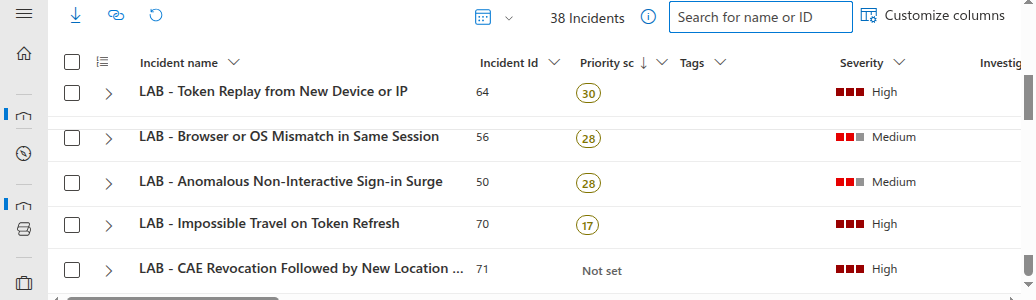
Your counts will differ by tenant size, background token volume, token issuance and refresh behavior, DeviceDetail population, rule schedule timing, and whether you add the optional VPN or Azure Cloud Shell step for Rule 2.
Hunting Queries
Beyond automated detection, five hunting queries support proactive threat hunting for session hijacking indicators. These are designed for periodic execution by a threat hunter investigating suspicious accounts or running broad sweeps during incident response.
| Hunt | Purpose | Lookback |
|---|---|---|
| 1 | Users with most distinct IPs in non-interactive sign-ins | 30d |
| 2 | Token refresh patterns outside business hours | 7d |
| 3 | Sessions spanning multiple countries in a single day | 7d |
| 4 | High-risk sign-ins without MFA challenge | 14d |
| 5 | First-time device + first-time location combination | 14d |
The full KQL for all five hunting queries is in the reviewed companion revision. Import them into Sentinel Hunting > Queries to run proactive hunts against your sign-in telemetry.
Workbook: Session Hijack Threat Dashboard
The lab deploys an Azure Workbook that provides a single-pane view of session hijacking indicators across six panels:
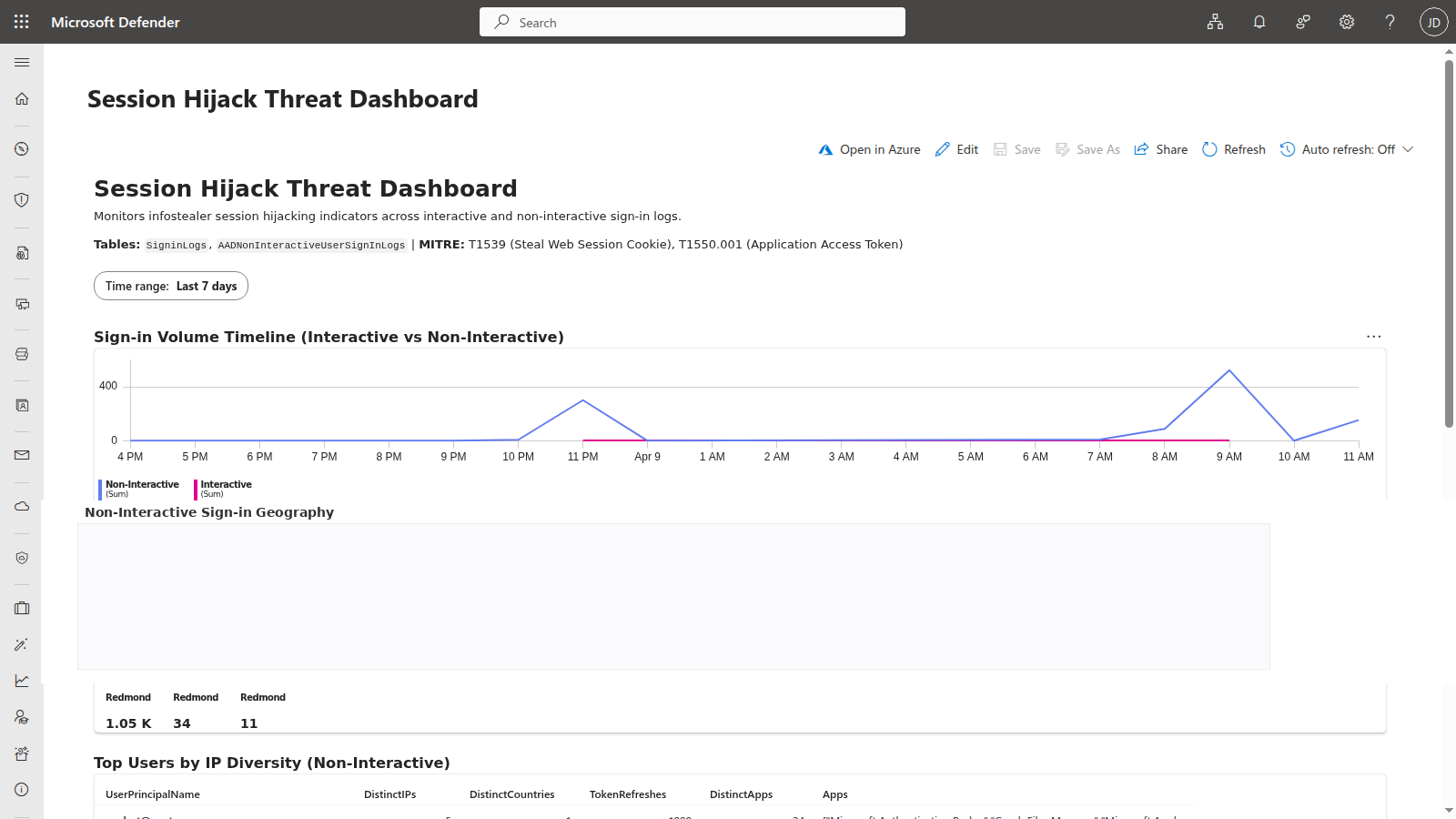
- Sign-in Volume Timeline (Interactive vs Non-Interactive) – Timechart breaking down sign-in events by type per hour. Non-interactive spikes indicate token replay bursts. The time range parameter defaults to 7 days but can be adjusted for broader investigations.
- Non-Interactive Sign-in Geography – Map visualization showing the geographic spread of non-interactive sign-in IPs. Users with tokens distributed to attacker infrastructure show clusters in unexpected regions.
- Top Users by IP Diversity (Non-Interactive) – Table ranking users by the number of unique IP addresses, countries, token refreshes, and distinct apps in their non-interactive sign-ins. Outliers with significantly more IPs than their peers warrant investigation.
- Sign-in Type Breakdown – Pie chart showing the ratio of interactive to non-interactive sign-ins. This is a tenant-wide aggregate; it does not establish any individual user’s ratio. Add a user dimension before drawing a per-user conclusion.
- Risk Level Distribution – Bar chart of every reported risk-level value except
none, includinglow,medium,high, andhiddenwhen present.hiddenmeans the risk value is not disclosed; it is not a severity rating. - Device/Browser Anomaly Summary – Table showing users with 3+ distinct browser/OS combinations in non-interactive sign-ins. Highlights the fingerprint mismatch pattern characteristic of token replay from attacker infrastructure.
The workbook uses the same KQL patterns as the analytics rules, giving SOC analysts a dashboard to investigate alerts in context. Deploy it through the companion lab’s Deploy-Lab.ps1 script or import the JSON template manually from the reviewed workbook definition.
The Risk Level Distribution panel can be empty when no selected row carries a value other than none; low or hidden values can also populate it. Check source rows, licensing, and the selected time range before interpreting an empty panel.
Hardening Recommendations
Detection is one half of the equation. These hardening controls reduce the attack surface and limit the window of opportunity for stolen tokens:
Verify that Continuous Access Evaluation (CAE) is not disabled, then validate its coverage – supported CAE-aware resources and clients can enforce critical events close to real time. CAE is not universal, however, and it does not make every issued token instantly revocable; test the protected resource, client, and expected sign-in telemetry in your own tenant.
Pilot Token Protection in Conditional Access only where Microsoft lists support – Token Protection requires supported device-bound sign-in session tokens. Microsoft’s current platform matrix lists native Windows, iOS/iPadOS, and macOS support as generally available for the listed resources. Browser support remains preview on Windows and macOS for selected web apps accessing Azure Resource Manager; it is not general browser coverage. Use report-only evaluation and confirm the exact platform, client, and resource combination before enforcement.
Require a compliant or Entra-joined device for sensitive apps via Conditional Access – this raises the bar for new token issuance and refresh from unmanaged clients, but it does not cryptographically bind an already-issued bearer token to the physical device. Pair device requirements with Token Protection where supported and with endpoint and session-response controls rather than treating device compliance as a replay guarantee.
Apply risk-based Conditional Access and validate session response – Require the appropriate controls when an evaluated sign-in meets your configured risk threshold. A later risk change does not universally force an immediate MFA prompt on every active session. Microsoft’s CAE critical-event list includes high user risk, subject to supported-resource behavior. Current Microsoft guidance includes supported SharePoint Online behavior; do not retain the older blanket exclusion. Validate the actual client/resource response and revoke affected sessions during confirmed compromise.
Use Conditional Access session controls deliberately, and understand CTL limits – Sign-in frequency and CAE are more reliable modern controls than assuming short access-token lifetimes will save you. Microsoft documents that Configurable Token Lifetime policies aren’t honored for CAE-aware sessions, which can receive long-lived tokens and rely on revocation instead. For non-CAE scenarios, token lifetime tuning can still reduce replay dwell time, but it should be treated as a secondary control rather than the primary mitigation.
Deploy phishing-resistant MFA (passkeys, FIDO2) – These methods resist credential phishing and make fresh authentication harder for an attacker with only a stolen password. They do not stop malware on an infected endpoint from stealing accessible cookies or tokens, and they do not by themselves prevent replay of a still-valid bearer session. Pair them with endpoint protection and supported token binding.
Monitor for infostealer indicators in Defender for Endpoint – Deploy Defender for Endpoint detection rules that flag known infostealer behaviors: credential file access (
Login Data,CookiesSQLite databases), suspicious browser extension installations, and process injection into browser processes. Catching the infostealer before it exfiltrates tokens is better than detecting the replay after the fact.Block known infostealer C2 infrastructure at the network layer – Use Defender for Endpoint network protection or Entra Internet Access (Global Secure Access) threat-intelligence filtering to block outbound communication with known infostealer command-and-control domains. Defender for Cloud Apps can complement this by detecting anomalous session activity and governing app-level access after a compromise.
Deployment
The lab deploys cleanly to an existing Sentinel workspace with two commands:
git clone https://github.com/j-dahl7/session-hijack-detection-sentinel.git
cd session-hijack-detection-sentinel
git checkout 69928069250bf7277a8fa62d9a16e298900ec44a

./scripts/Deploy-Lab.ps1 -ResourceGroup "rg-sentinel-lab" -WorkspaceName "law-sentinel-lab"
./scripts/Test-SessionHijack.ps1
Test-SessionHijack.ps1 performs benign low-privilege Graph /me calls with varied request headers and a controlled request burst. Use it to validate authentication and create seed activity, not as proof that Rules 3 and 4 must fire.
Increasing -BurstCount creates more Graph resource requests, but cached-token requests may not create additional Entra refresh rows. Validate Rule 3 with controlled real token issuance or refresh volume and Rule 4 with activity that carries one nonempty SessionId plus genuinely different DeviceDetail values for that recorded session.
Triggering Rules 2 and 5
Rule 1 may fire when the resulting token activity comes from a genuinely new IP or device. Rules 3 and 4 depend on actual Entra sign-in telemetry rather than the number or headers of downstream Graph calls. Rules 2 and 5 require extra steps because they depend on geographic diversity and session revocation events that the helper cannot generate from a single machine.
Rule 2 (Impossible Travel) needs sign-in events from two different geographic locations within a short time window. The most reliable method is a VPN:
- Run
Test-SessionHijack.ps1from your normal network - Connect to a VPN in a different city or country
- From PowerShell 7.4+ on Windows (not WSL, WSL may bypass the VPN), run:
az rest --method GET --url "https://graph.microsoft.com/v1.0/me" - Wait for the analytics rule to evaluate (up to 1 hour)
In our lab testing, switching from a US home IP to a Canadian VPN endpoint produced an impossible travel detection at over 7,500 km/h. Azure Cloud Shell is another option, but its IP may resolve to the same region depending on your tenant.
Rule 5 (Revoked Grant) needs a real 50173 row followed by a same-UserId success from a different IP. Use a dedicated low-privilege lab identity because revoking sign-in sessions invalidates that user’s refresh tokens across applications:
- At approved egress IP A, sign in to an application that uses refresh tokens. Confirm the raw sign-in row and record its nonempty
UserId. - As an authorized administrator, revoke only that lab user’s sign-in sessions. The Microsoft Graph
revokeSignInSessionsoperation is one option, but review its permissions and tenant impact before using it. - Let the existing client at IP A attempt a token refresh. Confirm a
SigninLogsorAADNonInteractiveUserSignInLogsrow withResultType == "50173". The revocation call alone does not guarantee that a client will make or log this failed request. - Only after the 50173 failure, reauthenticate the same lab user from approved egress IP B within 30 minutes.
- Confirm a success (
ResultType == "0") with the same nonemptyUserIdand a differentIPAddress, then run Rule 5 manually over the matching window before waiting for its hourly schedule.
Error 50173 can also follow a password change or refresh-token expiry, and a changed IP can reflect normal VPN, mobile, or proxy behavior. The sequence is therefore a triage lead, not proof of stolen tokens or CAE enforcement.
For cleanup, run ./scripts/Deploy-Lab.ps1 -ResourceGroup "rg-sentinel-lab" -WorkspaceName "law-sentinel-lab" -Destroy.
Key Takeaways
AADNonInteractiveUserSignInLogsis the primary evidence table – token replay often bypasses the interactiveSigninLogstable entirely.- Rule 1 is the fastest operational win – an unfamiliar user/IP/device-ID tuple is easier to validate in a sandbox than revoked-grant or impossible-travel correlation. The rule can also fire for a new combination of individually familiar values; it does not prove that either value is globally new.
- Rule 3 and Rule 4 provide corroboration – volume spikes and fingerprint drift strengthen confidence when the attacker stays in the same geography.
- CAE and Token Protection are important mitigations where supported – analytics help you catch replay, while timely enforcement and token binding can reduce replay opportunity on covered resources, clients, and platforms.
Resources
- Microsoft: What is Continuous Access Evaluation?
- Microsoft: Error 50173 – provided grant expired because it was revoked
- Microsoft: Monitor and troubleshoot CAE sign-ins
- Microsoft: Token protection availability and prerequisites
- Microsoft: Configurable token lifetimes
- Microsoft Security Blog: Infostealers without borders
- Microsoft: Entra ID sign-in logs
- Microsoft: Non-interactive user sign-in logs
- Azure Monitor Logs reference: AADNonInteractiveUserSignInLogs
- Azure Monitor Logs reference: SigninLogs
- Darktrace Annual Threat Report 2026 announcement
- IBM X-Force: Cloud attacks are evolving: What 2025 trends mean for defenders in 2026
- MITRE ATT&CK: Steal Web Session Cookie (T1539)
- MITRE ATT&CK: Use Alternate Authentication Material - Application Access Token (T1550.001)
- Reviewed companion source: Infostealer Session Hijack Detection

Jerrad Dahlager, CISSP, CCSP
Cloud Security Architect · Adjunct Instructor
Marine Corps veteran and firm believer that the best security survives contact with reality.
Have thoughts on this post? I'd love to hear from you.