On this page
If you’ve worked with Terraform and secrets, you’ve probably wondered: “Wait, is my password actually in that state file?”
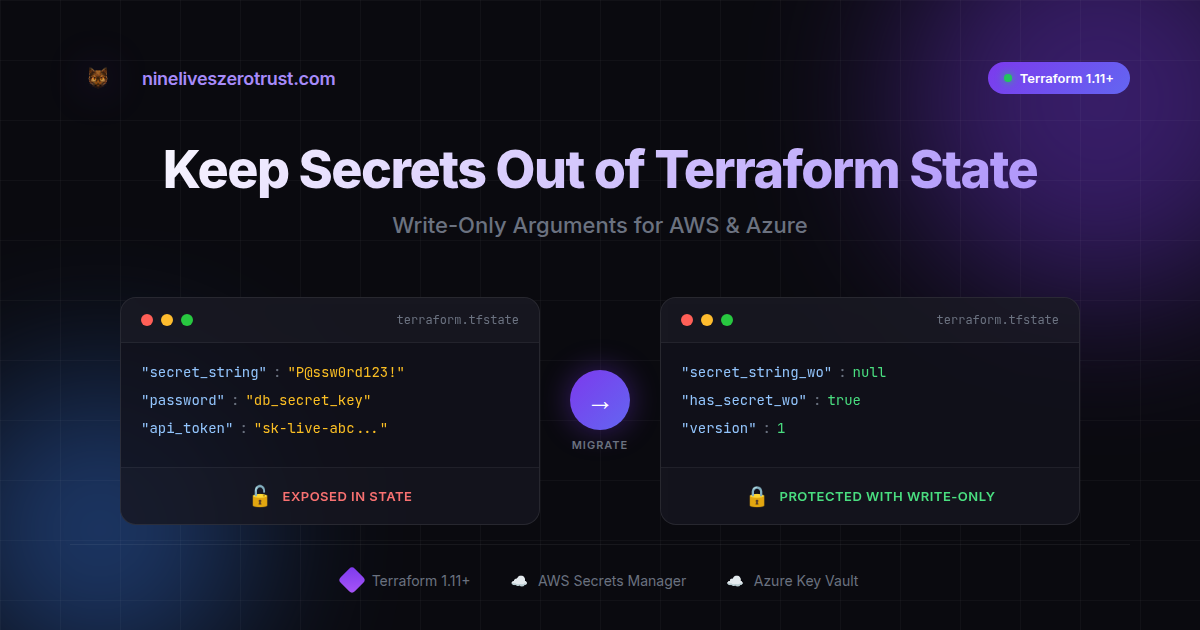
The answer has historically been: yes. The sensitive = true flag does a great job hiding values from CLI output, but the state file itself still contains those values. This wasn’t a bug - it’s how Terraform tracked resource state. But it did mean treating state files as highly sensitive data.
The good news: Terraform 1.10 and 1.11 changed the game. HashiCorp introduced ephemeral values and write-only arguments - purpose-built features that let you work with secrets without them ever touching state or plan files.
Hands-on Lab: All code examples are available in the companion repo so you can try it yourself.
TL;DR:
sensitive = truehides output — secrets can still land in state and saved plan files.- Terraform 1.11+ write-only + 1.10+ ephemeral keeps secrets out of those artifacts.
- If you ever used the old pattern in shared state, assume compromise and rotate.
Requirements:
- Terraform v1.11+ for write-only arguments
- Terraform v1.10+ for ephemeral values
- A provider/resource that supports
_wo+_wo_versionarguments (see provider support below)
Understanding How Terraform Handles Secrets (The Traditional Way)
The sensitive Flag - What It Does
variable "db_password" {
  type      = string
  sensitive = true
}
When you run terraform plan, you see:
+ password = (sensitive value)
This is the sensitive flag doing its job - keeping secrets out of your terminal and logs.
What sensitive Was Designed For
The sensitive flag does exactly what it’s supposed to:
- Redacts values in CLI output (
plan,apply,output) - Redacts values in HCP Terraform/Enterprise UI
- Signals to other Terraform users that this value is sensitive
What it was never designed to do is encrypt or exclude values from state. That’s not a flaw - Terraform needs to track resource attributes to detect drift and plan changes. Until recently, there wasn’t a mechanism to say “send this value to the provider but don’t store it.”
From HashiCorp’s docs:
“Terraform state can contain sensitive values… If you manage any such resources with Terraform, treat the state itself as sensitive data.”
Note: sensitive values can also appear in plan files - not just state. This matters if you’re saving plans for review or audit.
This is good guidance, and most teams secure their state backends accordingly.
See It In Action - The Traditional Approach
Let’s make this concrete. We’ll create a secret in AWS Secrets Manager using the traditional pattern and inspect what ends up in state.
The Traditional Approach
# Generate a random password
resource "random_password" "db_password" {
  length  = 24
  special = true
}

# Store it in Secrets Manager - THE OLD WAY
resource "aws_secretsmanager_secret_version" "db_creds" {
  secret_id     = aws_secretsmanager_secret.db_creds.id
  secret_string = random_password.db_password.result  # Stored in state!
}
Boilerplate resources (secret container, key vault, providers) omitted for brevity — see companion repo for full configs.
Inspecting the State
# Pull state and find the password
terraform state pull | jq '.resources[] | select(.type == "random_password") | .instances[].attributes.result'

The password is right there in the state file. Anyone with access to state can see it.
The Modern Approach - Write-Only Arguments (Terraform 1.11+)
This is where it gets exciting. Terraform 1.10 introduced ephemeral values - values that exist during a run but aren’t persisted. Terraform 1.11 extended this with write-only arguments - resource arguments that accept values but never store them in state.
How Write-Only Works
- You pass a value to a
_woargument (likesecret_string_wo) - Terraform sends it to the provider/API
- The value is never written to state or plan files
- Write-only arguments come with a companion
*_wo_versionvalue stored in state; increment it to trigger an update
The Modern Approach
# Generate password as EPHEMERAL - never stored in state
ephemeral "random_password" "db_password" {
  length  = 24
  special = true
}

# Store it using WRITE-ONLY argument - value never in state
resource "aws_secretsmanager_secret_version" "db_creds" {
  secret_id = aws_secretsmanager_secret.db_creds.id

  # Write-only: value sent to AWS, but NOT stored in state
  secret_string_wo         = ephemeral.random_password.db_password.result
  secret_string_wo_version = 1  # Bump this to trigger rotation
}
The Result
# Check the secret version resource - no password stored
terraform state pull | jq '.resources[] | select(.type == "aws_secretsmanager_secret_version") | .instances[].attributes | {secret_string, secret_string_wo, has_secret_string_wo}'

The state shows:
secret_string:""(empty)secret_string_wo:null(never stored)has_secret_string_wo:true(confirms write-only was used)
Verify in AWS
The secret is actually there in AWS - just not in Terraform state:
# Verify the secret exists in AWS (replace with your secret name)
aws secretsmanager get-secret-value --secret-id "demo-db-password" --query 'SecretString' --output text

Azure Too: Key Vault with Write-Only
The same pattern works for Azure Key Vault:
Traditional (Secret in State)
resource "random_password" "db_password" {
  length = 24
}

resource "azurerm_key_vault_secret" "db_password" {
  name         = "db-password"
  value        = random_password.db_password.result  # In state!
  key_vault_id = azurerm_key_vault.demo.id
}
# Check state for the password
terraform state pull | jq '.resources[] | select(.type == "random_password") | .instances[].attributes.result'

Modern (Write-Only)
ephemeral "random_password" "db_password" {
  length = 24
}

resource "azurerm_key_vault_secret" "db_password" {
  name             = "db-password"
  value_wo         = ephemeral.random_password.db_password.result  # NOT in state
  value_wo_version = 1
  key_vault_id     = azurerm_key_vault.demo.id
}
# Check state - value_wo is null, never stored
terraform state pull | jq '.resources[] | select(.type == "azurerm_key_vault_secret") | .instances[].attributes | {value, value_wo, value_wo_version}'

The secret exists in Azure but the state is clean.
Things to Know (Practical Tips)
Tip 1: Understanding the Version Bump Pattern
Since Terraform can’t diff what it doesn’t store, write-only args use a version field:
secret_string_wo         = ephemeral.random_password.db_password.result
secret_string_wo_version = 1  # Bump to 2 to trigger rotation
When you need to rotate:
- Change the version number
- Terraform sees the version changed
- Terraform sends the new value to the provider
This is actually elegant - it gives you explicit control over when secrets update.
Tip 2: Check Provider Support First
Write-only is new and providers are actively adding support. Currently supported in:
aws_secretsmanager_secret_version(secret_string_wo)aws_db_instance(password_wo)aws_rds_cluster(master_password_wo)azurerm_key_vault_secret(value_wo)- More being added regularly
Tip 3: Ephemeral Values Have Intentional Restrictions
Ephemeral values can only be referenced in specific contexts:
- Write-only arguments on managed resources
- Other ephemeral blocks
- Provider configuration
- Locals (for intermediate processing)
- Certain ephemeral-marked variables/outputs
You can’t pass ephemeral values to regular (non-write-only) resource arguments - Terraform will error. This is by design: it enforces the security model and prevents accidental state persistence.
Tip 4: Migration May Recreate Resources
Migration Gotcha: Switching an existing resource from
secret_stringtosecret_string_womay trigger replacement depending on the provider/resource behavior. Plan this like a rotation event: test in non-prod first, and assume consumers might see a new secret version.
Help Your Team Adopt It - CI/CD Guidance
Here’s a simple check that flags traditional patterns:
# Check for legacy secret patterns
if grep -r "secret_string\s*=" --include="*.tf" | grep -v "secret_string_wo"; then
  echo "Found secret_string usage. Consider migrating to secret_string_wo."
fi
Pro tip (CI enforcement): Trivy v0.63.0 release notes cover raw Terraform config scanning. Enable it with --raw-config-scanners=terraform (note: must be paired with --misconfig-scanners terraform). The companion repo includes a trivy.yaml config that enables this, plus the custom grep script above for comprehensive coverage.
# Run Trivy with the repo's config
trivy config . --config trivy.yaml
A full scanner script and GitHub Actions workflow are included in the companion repo.
The Zero Trust Checklist
Even with write-only arguments, treat state as sensitive:
State Backend Security
- Use remote state (S3, Azure Blob, GCS, Terraform Cloud)
- Enable encryption at rest and in transit
- Restrict access with IAM/RBAC (least privilege)
- Enable access logging/auditing
Secret Handling
- Use write-only arguments where available
- Use ephemeral resources for runtime secret fetching
- Never store actual secret values - store references (ARNs, paths)
- Rotate secrets regularly (the
_wo_versionpattern helps)
If It Leaked, Rotate
If you’ve ever applied the old pattern with a shared backend, assume the secret is compromised. State files get copied, cached, backed up, and retained in version history. The safest recovery move is to rotate the secret after you migrate to write-only, and treat old state versions/backups as sensitive artifacts that need secure deletion.
Conclusion
Terraform has always required careful handling of state files because they could contain sensitive values. The sensitive flag helped with CLI output, but the state file itself was always the thing to protect.
Terraform 1.10 and 1.11 change this equation. Write-only arguments and ephemeral values give us a first-class way to handle secrets - they reach their destination without ever touching state or plan files.
Your action items:
- Check your current state files to understand what’s there
- Identify resources that support write-only arguments
- Start with new resources, then migrate existing ones
- Add CI guidance to help your team adopt the new patterns
This is Terraform evolving to meet real-world security needs. Nice work, HashiCorp.
Have you migrated to write-only arguments yet? I’d love to hear about your experience - what worked, what challenges you hit, or questions you’re still working through. Find me on LinkedIn or my other socials linked below.
Resources
- Companion Lab Repo
- HashiCorp: Ephemeral Values in Terraform
- HashiCorp: Terraform 1.11 Write-Only Arguments
- Terraform Docs: Write-Only Arguments
- AWS Provider: secret_string_wo
- AzureRM Provider: value_wo
- Trivy v0.63.0 Release Notes
- Trivy Custom Rego Policies

Jerrad Dahlager, CISSP, CCSP
Cloud Security Architect · Adjunct Instructor
Marine Corps veteran and firm believer that the best security survives contact with reality.
Have thoughts on this post? I'd love to hear from you.