On this page
Review update (September 25, 2026): The reviewed provider pins are historical evidence, not an evergreen supported toolchain. Before a new deployment, review Key Vault API retirement and AzureRM major-version migration notes. Keep state protections even with write-only arguments: guarantees apply to supported arguments and execution contexts, not arbitrary outputs or an explicitly state-storing resource. Refresh providers/tool versions only with matching tests and new evidence; do not relabel the December screenshots as a new run.
Review update (September 25, 2026): The September 25 source repair ignores only schema- and type-validated Key Vault authorization metadata; actual secret-value fields remain flagged. Its 21 offline tests passed, along with upstream CI, without a fresh cloud apply. The local Trivy commands now match CI’s HIGH/CRITICAL gate; disabled purge protection remains an explicit MEDIUM disposable-lab exception requiring review. An exit-zero scanner result means no likely secret-bearing value was found under that contract, not a guarantee that every artifact is secret-free. Older screenshots show secret retrieval/state-pull commands; they are historical demonstrations, not the recommended verification workflow. Use metadata-only cloud checks and the redacting scanner, never copy a displayed secret.
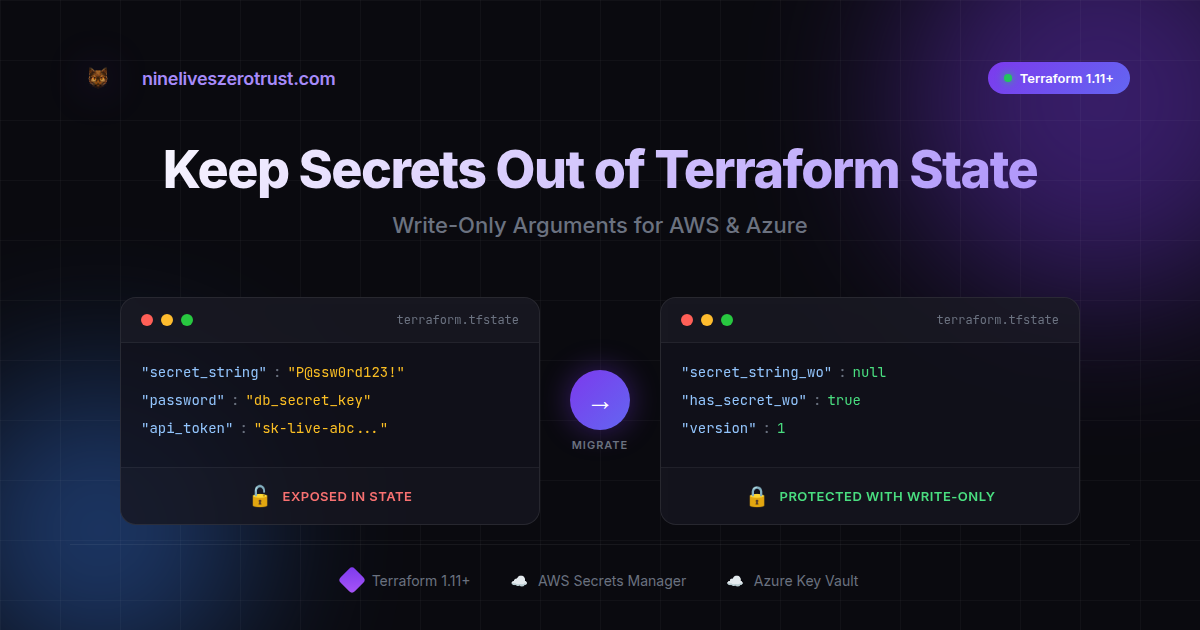
If you’ve worked with Terraform and secrets, you’ve probably wondered: “Wait, is my password actually in that state file?”
The answer has historically been: yes. The sensitive = true flag does a great job hiding values from CLI output, but the state file itself still contains those values. This wasn’t a bug - it’s how Terraform tracked resource state. But it did mean treating state files as highly sensitive data.
The good news: Terraform 1.10 and 1.11 changed the game. HashiCorp introduced ephemeral values and write-only arguments - purpose-built features that let you work with secrets without persisting those supported argument values in state or plan files. Other resources, outputs, logs and historical state can still retain secret material.
Hands-on Lab: All code examples are available in the reviewed companion revision so you can try it yourself.
TL;DR:
sensitive = truehides output, secrets can still land in state and saved plan files.- Terraform 1.11+ write-only + 1.10+ ephemeral keeps secrets out of those artifacts.
- If you ever used the old pattern in shared state, assume compromise and rotate.
Requirements:
- Terraform v1.11+ for write-only arguments
- Terraform v1.10+ for ephemeral values
- Random provider v3.7.0+ for ephemeral
random_password- AWS provider v5.88.0+ for
secret_string_wo- AzureRM provider v4.23.0+ for Key Vault
value_wo- A provider/resource that supports
_wo+_wo_versionarguments (see provider support below)
The reviewed companion revision selects Terraform 1.14.9 and locks AWS
5.100.0, AzureRM 4.25.0, and Random 3.7.2 with signed provider checksums. Use
terraform init -lockfile=readonly for the lab so those reviewed selections do
not drift during a normal run.
Understanding How Terraform Handles Secrets (The Traditional Way)
The sensitive Flag - What It Does
variable "db_password" {
  type      = string
  sensitive = true
}
When you run terraform plan, you see:
+ password = (sensitive value)
This is the sensitive flag doing its job - keeping secrets out of your terminal and logs.
What sensitive Was Designed For
The sensitive flag does exactly what it’s supposed to:
- Redacts normal CLI output (
plan,apply,output);terraform output -jsonand-rawexpose sensitive values by design (sensitive-data guidance) - Redacts values in HCP Terraform/Enterprise UI
- Signals to other Terraform users that this value is sensitive
What it was never designed to do is encrypt or exclude values from state. That’s not a flaw - Terraform needs to track resource attributes to detect drift and plan changes. Until recently, there wasn’t a mechanism to say “send this value to the provider but don’t store it.”
HashiCorp documents that state and saved plans can contain sensitive resource values and should be protected as sensitive artifacts.
Note: sensitive values can also appear in plan files - not just state. This matters if you’re saving plans for review or audit.
This is good guidance, and most teams secure their state backends accordingly.
See It In Action - The Traditional Approach
Let’s make this concrete. We’ll create a secret in AWS Secrets Manager using the traditional pattern and inspect what ends up in state.
The Traditional Approach
# Generate a random password
resource "random_password" "db_password" {
  length  = 24
  special = true
}

# Store it in Secrets Manager - THE OLD WAY
resource "aws_secretsmanager_secret_version" "db_creds" {
  secret_id     = aws_secretsmanager_secret.db_creds.id
  secret_string = random_password.db_password.result  # Stored in state!
}
Boilerplate resources (secret container, key vault, providers) omitted for brevity, see the reviewed companion revision for full configs.
Proving the State Exposure Safely
# From the companion repository root. Reports locations, never values.
bash scripts/leak-check.sh 00-bad-secret-in-state
# Expected exit status: 1 (likely secret-bearing fields found)

# Metadata-only resource inventory
terraform -chdir=00-bad-secret-in-state state list

The screenshot uses a disposable synthetic value to illustrate the historical failure mode. Do not reproduce it by printing live state attributes: anyone with access to state already has access to the persisted value.
The Modern Approach - Write-Only Arguments (Terraform 1.11+)
This is where it gets exciting. Terraform 1.10 introduced ephemeral values - values that exist during a run but aren’t persisted. Terraform 1.11 extended this with write-only arguments - resource arguments that accept values but never store them in state.
How Write-Only Works
- You pass a value to a
_woargument (likesecret_string_wo) - Terraform sends it to the provider/API
- The value is never written to state or plan files
- Write-only arguments come with a companion
*_wo_versionvalue stored in state; increment it to trigger an update
The Modern Approach
# Generate password as EPHEMERAL - never stored in state
ephemeral "random_password" "db_password" {
  length  = 24
  special = true
}

# Store it using WRITE-ONLY argument - value never in state
resource "aws_secretsmanager_secret_version" "db_creds" {
  secret_id = aws_secretsmanager_secret.db_creds.id

  # Write-only: value sent to AWS, but NOT stored in state
  secret_string_wo         = ephemeral.random_password.db_password.result
  secret_string_wo_version = 1  # Bump this to trigger rotation
}
The Result
# The secure example should pass the redacting scanner.
bash scripts/leak-check.sh 01-good-write-only
# Expected exit status: 0 (no likely secret-bearing value found)

terraform -chdir=01-good-write-only state list

The scanner checks for populated known secret-bearing fields without exposing
their values. Exit 0 is a useful regression signal, not proof that the entire
state is harmless; continue to protect the backend as sensitive.
Verify in AWS
The secret is actually there in AWS - just not in Terraform state:
# Verify identifiers and version metadata without retrieving SecretString.
aws secretsmanager describe-secret \
  --secret-id "demo-db-password-good-EXAMPLE" \
  --query '{Name:Name,ARN:ARN,VersionIdsToStages:VersionIdsToStages}'

Azure Too: Key Vault with Write-Only
The same pattern works for Azure Key Vault:
Before planning either companion Azure example, set ARM_SUBSCRIPTION_ID to
the exact disposable subscription you intend to use and verify the active
tenant and subscription with az account show. The pinned AzureRM 4.25.0 requires explicit subscription selection. Newer providers can fall back to the Azure CLI default, so keep the explicit disposable subscription setting.
Set TF_VAR_operator_ip_cidr to exactly one canonical, globally routable public
IPv4 /32 for the trusted operator. Both Azure examples enforce the same
deny-by-default Key Vault ACL and reject private, shared, loopback, link-local,
documentation, benchmarking, multicast, reserved, IPv6, and broad ranges. If
you need private addressing, use a private endpoint or virtual-network design;
Azure Key Vault IP rules are for public IPv4 addresses. This keeps network
exposure identical so the exercise compares only the secret-state behavior of
traditional value and write-only value_wo.
export TF_VAR_operator_ip_cidr="YOUR_CURRENT_PUBLIC_IPV4/32"
Traditional (Secret in State)
resource "random_password" "db_password" {
  length = 24
}

resource "azurerm_key_vault_secret" "db_password" {
  name         = "db-password"
  value        = random_password.db_password.result  # In state!
  key_vault_id = azurerm_key_vault.demo.id
}
# Reports the finding location but never the password.
bash scripts/leak-check.sh 02-azure-traditional
# Expected exit status: 1

Modern (Write-Only)
ephemeral "random_password" "db_password" {
  length = 24
}

resource "azurerm_key_vault_secret" "db_password" {
  name             = "db-password"
  value_wo         = ephemeral.random_password.db_password.result  # NOT in state
  value_wo_version = 1
  key_vault_id     = azurerm_key_vault.demo.id
}
# The write-only example should have no likely secret-bearing value.
bash scripts/leak-check.sh 03-azure-write-only
# Expected exit status: 0 for the reviewed write-only fixture; actual secret values still fail.

# Metadata-only Azure verification; list-versions does not print the value.
az keyvault secret list-versions \
  --vault-name "kv-demo-wo-EXAMPLE" \
  --name "db-password" \
  --query '[].{id:id,enabled:attributes.enabled,updated:attributes.updated}'

The secret exists in Azure, but the supported secret value is omitted from Terraform state. Continue treating state as sensitive because it can contain other resource metadata and values.
Things to Know (Practical Tips)
Tip 1: Understanding the Version Bump Pattern
Since Terraform can’t diff what it doesn’t store, write-only args use a version field:
secret_string_wo         = ephemeral.random_password.db_password.result
secret_string_wo_version = 1  # Bump to 2 to trigger rotation
When you need to rotate:
- Change the version number
- Terraform sees the version changed
- Terraform sends the new value to the provider
This is actually elegant - it gives you explicit control over when secrets update.
Tip 2: Check Provider Support First
Write-only is new and providers are actively adding support. Currently supported in:
aws_secretsmanager_secret_version(secret_string_wo, AWS provider 5.88.0+)aws_db_instance(password_wo)aws_rds_cluster(master_password_wo)azurerm_key_vault_secret(value_wo, AzureRM provider 4.23.0+)- More being added regularly
Tip 3: Ephemeral Values Have Intentional Restrictions
Ephemeral values can only be referenced in specific contexts:
- Write-only arguments on managed resources
- Other ephemeral blocks
- Provider configuration
- Locals (for intermediate processing)
- Certain ephemeral-marked variables/outputs
You can’t pass ephemeral values to regular (non-write-only) resource arguments - Terraform will error. This is by design: it enforces the security model and prevents accidental state persistence.
Tip 4: Migration May Recreate Resources
Migration Gotcha: Switching an existing resource from
secret_stringtosecret_string_womay trigger replacement depending on the provider/resource behavior. Plan this like a rotation event: test in non-prod first, and assume consumers might see a new secret version.
Help Your Team Adopt It - CI/CD Guidance
The companion repository uses a source-policy check that understands the two intentional insecure fixtures and fails only if a secure example regresses:
python3 scripts/check_terraform_security.py
python3 -m unittest discover -s tests -v
Pro tip (CI enforcement): The Trivy v0.63.0 changelog records raw Terraform data support for Rego policies. Enable it with --raw-config-scanners=terraform (note: must be paired with --misconfig-scanners terraform). The companion repo includes a trivy.yaml config plus the source-policy and redacting state scanners above.
# Run Trivy with the repo's config
trivy config 01-good-write-only --config trivy.yaml --severity HIGH,CRITICAL --exit-code 1
trivy config 03-azure-write-only --config trivy.yaml --severity HIGH,CRITICAL --exit-code 1
# MEDIUM purge-protection is a deliberate disposable-lab exception; review it separately.
The workflow pins the Trivy action and version, initializes Terraform with the committed provider locks in read-only mode, and treats secure-example findings as failures. A redacting state scanner is also included in the reviewed companion revision.
The Zero Trust Checklist
Even with write-only arguments, treat state as sensitive:
State Backend Security
- Use remote state (S3, Azure Blob, GCS, HCP Terraform)
- Enable encryption at rest and in transit
- Restrict access with IAM/RBAC (least privilege)
- Enable access logging/auditing
Secret Handling
- Use write-only arguments where available
- Use ephemeral resources for runtime secret fetching
- Avoid persisting actual secret values where a supported write-only argument or reference-based design is available
- Rotate secrets regularly (the
_wo_versionpattern helps)
If It Leaked, Rotate
If you’ve ever applied the old pattern with a shared backend, assume the secret is compromised. State files get copied, cached, backed up, and retained in version history. The safest recovery move is to rotate the secret after you migrate to write-only, and treat old state versions/backups as sensitive artifacts that need secure deletion.
Conclusion
Terraform has always required careful handling of state files because they could contain sensitive values. The sensitive flag helped with CLI output, but the state file itself was always the thing to protect.
Terraform 1.10 and 1.11 change this equation. Write-only arguments and ephemeral values give us a first-class way to handle secrets - they reach their destination without ever touching state or plan files.
Your action items:
- Check your current state files to understand what’s there
- Identify resources that support write-only arguments
- Start with new resources, then migrate existing ones
- Add CI guidance to help your team adopt the new patterns
This is Terraform evolving to meet real-world security needs. Nice work, HashiCorp.
Have you migrated to write-only arguments yet? I’d love to hear about your experience - what worked, what challenges you hit, or questions you’re still working through. Find me on LinkedIn or my other socials linked below.
Resources
- Reviewed Companion Lab Source
- HashiCorp: Ephemeral Values in Terraform
- HashiCorp: Terraform 1.11 Write-Only Arguments
- Terraform Docs: Write-Only Arguments
- AWS Provider: secret_string_wo
- AzureRM Provider: value_wo
- Trivy v0.63.0 Changelog
- Trivy Custom Rego Policies

Jerrad Dahlager, CISSP, CCSP
Cloud Security Architect · Adjunct Instructor
Marine Corps veteran and firm believer that the best security survives contact with reality.
Have thoughts on this post? I'd love to hear from you.