On this page
AI coding assistants need Contributor access to deploy infrastructure. Backup automation needs Key Vault secrets at 2 AM. Security scanners need Reader access on a schedule.
The easy answer is standing permissions-give each service principal what it needs and move on. But that leaves dozens of non-human identities with 24/7 access to sensitive resources, and most of them use that access for minutes per day.
Zero Standing Privilege (ZSP) flips this: no identity starts with access to anything. Permissions are granted just-in-time, scoped to the task, and automatically revoked.
This post walks through building a ZSP gateway using Azure Functions that manages time-bounded access for AI agents, automation workflows, and service principals. We’ll cover the NHI access pattern in detail, then briefly show how the same gateway handles human admins too.
Hands-on Lab: All Bicep templates, PowerShell scripts, and Python code are in the companion repo.
Why NHI Security Matters Now
For every human in an Azure tenant, there may be 50-100 or more non-human identities (industry reports range from 17:1 to over 100:1 depending on methodology):
- AI coding agents requesting temporary access to deploy infrastructure
- Backup automation needing Key Vault secrets only during backup windows
- CI/CD pipelines requiring Contributor access for deployments
- Security scanners needing read access on a schedule
- Agentic workflows chaining multiple Azure services together
Most have standing access they use for minutes per day-or never.
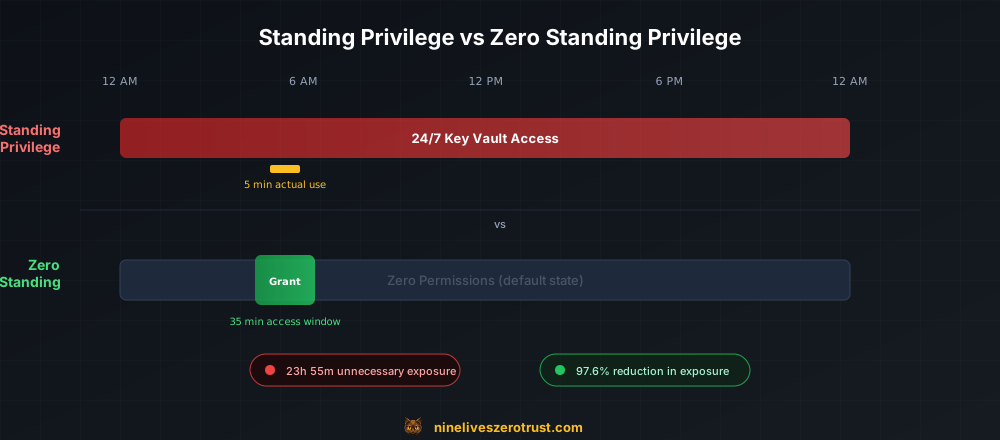
A service principal that runs a nightly backup has 24/7 Key Vault access for a 5-minute task. That’s 23 hours and 55 minutes of unnecessary exposure. An AI agent with permanent Contributor access is a credential theft away from a full environment compromise.
The Risk Surface
| Scenario | Standing Privilege Risk | ZSP Mitigation |
|---|---|---|
| Stolen SP credentials | Immediate Key Vault access | Credentials alone insufficient-no standing permissions |
| Compromised AI agent | Attacker inherits Contributor role | Agent has zero access until workflow triggers grant |
| Lateral movement | Pivot via always-on service accounts | Service accounts have zero access between runs |
| Supply chain attack | Compromised dependency has ambient access | No ambient access to exploit |
Microsoft PIM helps with human admin access, but it doesn’t solve the NHI problem. Service principals can’t activate PIM roles. They need a different pattern.
Architecture: ZSP Gateway
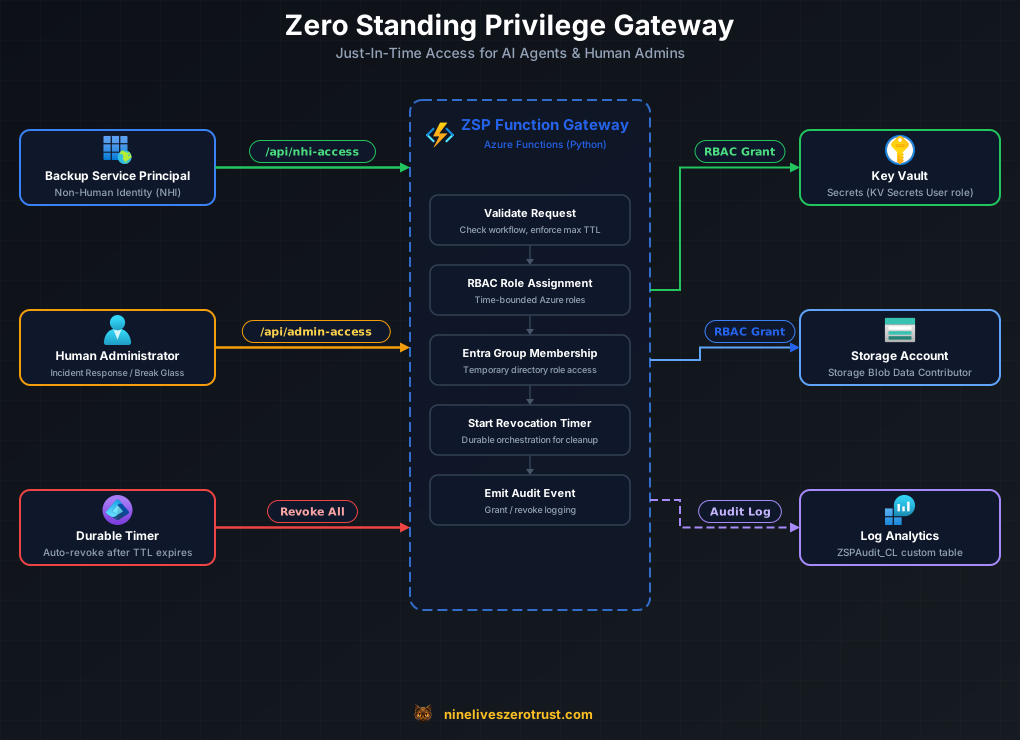
The ZSP gateway is an Azure Function App that brokers all privileged access. It exposes two endpoints:
/api/nhi-access- Grants time-bounded Azure RBAC role assignments to service principals/api/admin-access- Grants temporary Entra group membership to human admins
Both patterns use Azure Durable Functions for reliable scheduled revocation.
Infrastructure
The lab deploys with Bicep + PowerShell:
- Azure Function App (Flex Consumption, Python 3.11) with system-assigned managed identity
- Key Vault and Storage Account as target resources for demo
- Application Insights and Log Analytics for observability
- Data Collection Endpoint + Rule (DCE/DCR) for custom audit logging to
ZSPAudit_CL - Entra ID groups with directory role assignments (for human admin path)
- Backup service principal with zero initial permissions (for NHI demo)
The managed identity has GroupMember.ReadWrite.All, Directory.Read.All, and RoleManagement.ReadWrite.Directory Graph API permissions, User Access Administrator on the resource group for managing role assignments (in production, consider the more restrictive Role Based Access Control Administrator role), and Monitoring Metrics Publisher on the DCR for sending audit logs. The RoleManagement.ReadWrite.Directory permission is required because the ZSP groups are role-assignable-standard group membership permissions (GroupMember.ReadWrite.All) are insufficient for managing membership of role-assignable groups.
NHI Access: The Core Pattern
How It Works
- A workflow (timer, API call, or AI agent) calls
/api/nhi-access - The gateway validates the request and creates a scoped Azure RBAC role assignment
- A Durable Functions timer is scheduled to revoke the assignment
- Everything is logged to Log Analytics
The Request
curl -X POST "$FUNCTION_URL/api/nhi-access" \
  -H "Content-Type: application/json" \
  -H "x-functions-key: $FUNCTION_KEY" \
  -d '{
    "sp_object_id": "BACKUP_SP_OBJECT_ID",
    "scope": "/subscriptions/.../providers/Microsoft.KeyVault/vaults/<keyvault-name>",
    "role": "Key Vault Secrets User",
    "duration_minutes": 10,
    "workflow_id": "nightly-backup"
  }'
The response:
{
  "status": "granted",
  "assignment_id": "/subscriptions/.../roleAssignments/cb11eadc-...",
  "assignment_name": "cb11eadc-0c5d-4961-b124-607a1d74e691",
  "sp_object_id": "c9c5947a-...",
  "scope": "/subscriptions/.../Microsoft.KeyVault/vaults/zsp-lab-kv",
  "role": "Key Vault Secrets User",
  "expires_at": "2026-01-27T21:06:16.156493",
  "duration_minutes": 10,
  "workflow_id": "nightly-backup",
  "orchestrator_instance_id": "b10a200905204d0bb10d54fc4e1a73e0"
}
The orchestrator_instance_id tracks the Durable Functions timer that will revoke access. After 10 minutes, the orchestrator fires and deletes the role assignment. The service principal is back to zero permissions.
The Grant Logic
The NHI access handler validates the request, creates the role assignment via the Azure SDK, and schedules revocation:
# nhi_access.py (simplified from lab code)

from azure.mgmt.authorization import AuthorizationManagementClient
from azure.mgmt.authorization.models import RoleAssignmentCreateParameters
from azure.identity import DefaultAzureCredential
import uuid
from datetime import datetime, timedelta, timezone

ROLE_DEFINITIONS = {
    "Key Vault Secrets User": "4633458b-17de-408a-b874-0445c86b69e6",
    "Key Vault Secrets Officer": "b86a8fe4-44ce-4948-aee5-eccb2c155cd7",
    "Key Vault Reader": "21090545-7ca7-4776-b22c-e363652d74d2",
    "Storage Blob Data Reader": "2a2b9908-6ea1-4ae2-8e65-a410df84e7d1",
    "Storage Blob Data Contributor": "ba92f5b4-2d11-453d-a403-e96b0029c9fe",
    "Reader": "acdd72a7-3385-48ef-bd42-f606fba81ae7",
    "Contributor": "b24988ac-6180-42a0-ab88-20f7382dd24c",
}

async def grant_nhi_access(sp_object_id, scope, role_name, duration_minutes, workflow_id):
    credential = DefaultAzureCredential()
    subscription_id = scope.split("/")[2]  # extract from scope
    auth_client = AuthorizationManagementClient(credential, subscription_id)

    role_guid = ROLE_DEFINITIONS[role_name]
    assignment_name = str(uuid.uuid4())
    full_role_id = f"/subscriptions/{subscription_id}/providers/Microsoft.Authorization/roleDefinitions/{role_guid}"

    assignment = auth_client.role_assignments.create(
        scope=scope,
        role_assignment_name=assignment_name,
        parameters=RoleAssignmentCreateParameters(
            role_definition_id=full_role_id,
            principal_id=sp_object_id,
            principal_type="ServicePrincipal"
        )
    )

    return {
        "status": "granted",
        "assignment_id": assignment.id,
        "assignment_name": assignment_name,
        "sp_object_id": sp_object_id,
        "scope": scope,
        "role": role_name,
        "expires_at": (datetime.now(timezone.utc) + timedelta(minutes=duration_minutes)).isoformat(),
        "duration_minutes": duration_minutes,
        "workflow_id": workflow_id
    }
The key design decision: the gateway should be the only identity with permission to create role assignments. Service principals start at zero and can’t escalate themselves. In production, enable Entra authentication on the Function App so only approved callers can request access - function keys alone aren’t sufficient to enforce this boundary.
Scheduled Access with Timer Triggers
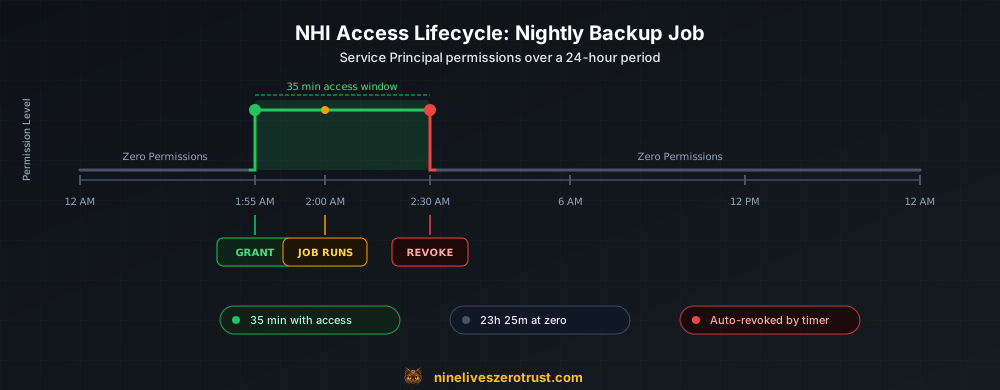
For predictable workloads like nightly backups, the gateway uses timer-triggered functions:
@app.timer_trigger(schedule="%BACKUP_JOB_SCHEDULE%", arg_name="timer", run_on_startup=False)
@app.durable_client_input(client_name="client")
async def backup_job_access_grant(timer: func.TimerRequest, client):
    """Grant backup SP access before the nightly job runs."""
    duration = int(os.environ.get("BACKUP_JOB_DURATION_MINUTES", 35))

    # Grant Key Vault access
    kv_result = await grant_nhi_access(
        sp_object_id=os.environ["BACKUP_SP_OBJECT_ID"],
        scope=os.environ["KEYVAULT_RESOURCE_ID"],
        role_name="Key Vault Secrets User",
        duration_minutes=duration,
        workflow_id="nightly-backup"
    )

    # Grant Storage access
    stor_result = await grant_nhi_access(
        sp_object_id=os.environ["BACKUP_SP_OBJECT_ID"],
        scope=os.environ["STORAGE_RESOURCE_ID"],
        role_name="Storage Blob Data Contributor",
        duration_minutes=duration,
        workflow_id="nightly-backup"
    )

    # Schedule revocation for both grants
    expiry_time = datetime.now(timezone.utc) + timedelta(minutes=duration)
    for result, scope, role in [
        (kv_result, os.environ["KEYVAULT_RESOURCE_ID"], "Key Vault Secrets User"),
        (stor_result, os.environ["STORAGE_RESOURCE_ID"], "Storage Blob Data Contributor"),
    ]:
        await client.start_new("revocation_orchestrator", client_input={
            "revocation_type": "role_assignment",
            "assignment_id": result["assignment_id"],
            "sp_object_id": os.environ["BACKUP_SP_OBJECT_ID"],
            "scope": scope,
            "role": role,
            "expiry_time": expiry_time.isoformat()
        })
The pattern: grant access 5 minutes before the job, revoke 35 minutes after. The service principal has zero permissions for 23+ hours per day.
Automatic Revocation
Revocation uses Azure Durable Functions orchestrators with timer delays:
@app.orchestration_trigger(context_name="context")
def revocation_orchestrator(context: df.DurableOrchestrationContext):
    input_data = context.get_input()

    # Wait until the absolute expiry time
    expiry_time = datetime.fromisoformat(input_data["expiry_time"]).replace(tzinfo=timezone.utc)
    yield context.create_timer(expiry_time)

    # Revoke the assignment
    if input_data["revocation_type"] == "group_membership":
        yield context.call_activity("revoke_group_membership_activity", input_data)
    elif input_data["revocation_type"] == "role_assignment":
        yield context.call_activity("revoke_role_assignment_activity", input_data)

    return {"status": "revoked", "completed_at": datetime.now(timezone.utc).isoformat()}
The orchestrator receives an absolute expiry_time rather than a relative delay-this way the timer is deterministic even if the orchestrator replays (a core Durable Functions concept). Durable Functions survive Function App restarts-if the app scales down and back up, the timer still fires. This is more reliable than in-memory timers or queue visibility timeouts. Note that Durable Functions timers in Python have a maximum duration of 6 days-more than enough for access windows measured in minutes or hours, but worth knowing if you extend durations.
One subtlety: the expiry_time must be timezone-aware (utc) because Durable Functions compares it against context.current_utc_datetime, which is always timezone-aware. Synchronous activity functions run in a thread pool, so they use asyncio.new_event_loop() to call async SDK methods:
@app.activity_trigger(input_name="activityPayload")
def revoke_role_assignment_activity(activityPayload: str):
    import asyncio
    input_data = json.loads(activityPayload) if isinstance(activityPayload, str) else activityPayload

    loop = asyncio.new_event_loop()
    try:
        loop.run_until_complete(revoke_nhi_access(
            assignment_id=input_data["assignment_id"]
        ))
        loop.run_until_complete(log_access_event(
            event_type="AccessRevoke",
            identity_type="nhi",
            principal_id=input_data["sp_object_id"],
            target=input_data["scope"],
            target_type="AzureResource",
            role=input_data.get("role"),
            result="Success"
        ))
    finally:
        loop.close()

    return {"status": "revoked"}
The input_name="activityPayload" with type str is required-the Azure Functions .NET host serializes the input as a JSON string, so the Python worker must accept str and deserialize it.
AI Agent Integration Patterns
The /api/nhi-access endpoint is designed for machine callers. Here are patterns for common AI agent scenarios:
Pattern 1: AI Coding Agent Deploying Infrastructure
An AI coding assistant needs temporary Contributor access to deploy changes:
# AI agent workflow
async def deploy_infrastructure(agent_context):
    # Request temporary access
    response = await httpx.post(f"{ZSP_GATEWAY}/api/nhi-access", json={
        "sp_object_id": agent_context.service_principal_id,
        "scope": f"/subscriptions/{SUB_ID}/resourceGroups/{RG_NAME}",
        "role": "Contributor",
        "duration_minutes": 30,
        "workflow_id": f"agent-deploy-{agent_context.session_id}"
    })

    # Now deploy with temporary permissions
    await run_bicep_deployment(agent_context.template)

    # Access auto-revokes after 30 minutes
Pattern 2: Security Scanner on Schedule
A scanning agent needs Reader access across resource groups:
# Timer trigger grants access, scanner runs, access revokes
@app.timer_trigger(schedule="0 0 */6 * * *", arg_name="timer")  # Every 6 hours
async def security_scan_access(timer):
    for rg in RESOURCE_GROUPS_TO_SCAN:
        await grant_nhi_access(
            sp_object_id=SCANNER_SP_ID,
            scope=rg,
            role="Reader",
            duration_minutes=60,
            workflow_id="security-scan"
        )
Pattern 3: Event-Driven Access
An AI agent responds to incidents and needs temporary elevated access:
# Event Grid trigger when security alert fires
@app.event_grid_trigger(arg_name="event")
async def incident_response_access(event):
    alert = event.get_json()

    # Grant security team's automation SP temporary access
    await grant_nhi_access(
        sp_object_id=INCIDENT_RESPONSE_SP_ID,
        scope=alert["resource_id"],
        role="Reader",
        duration_minutes=120,
        workflow_id=f"incident-{alert['id']}"
    )
Audit Trail
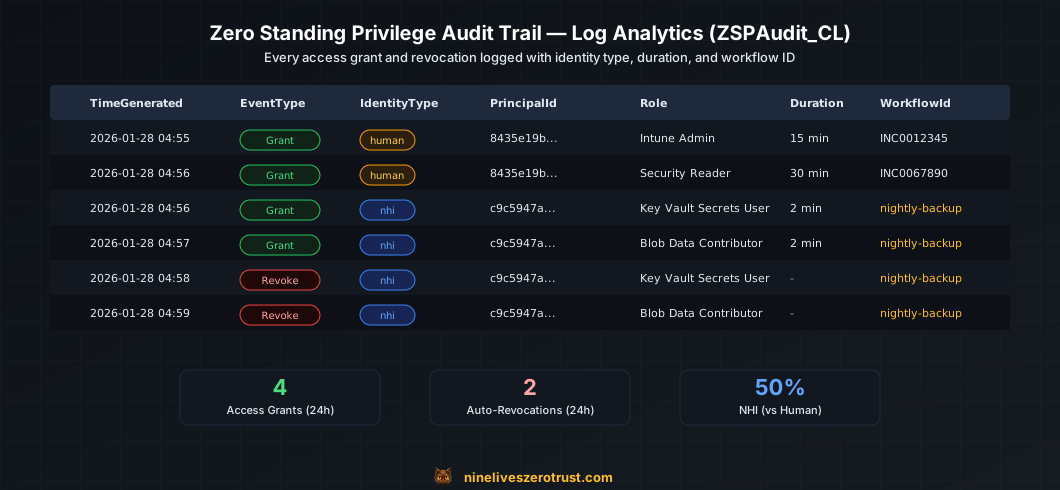
Every access grant and revocation is logged to a custom Log Analytics table (ZSPAudit_CL) via the Azure Monitor Ingestion API. The pipeline uses a Data Collection Endpoint (DCE) and Data Collection Rule (DCR) to route structured audit events into Log Analytics. This is critical for NHI access since there’s no human to ask “why did you need this?”
What Gets Logged
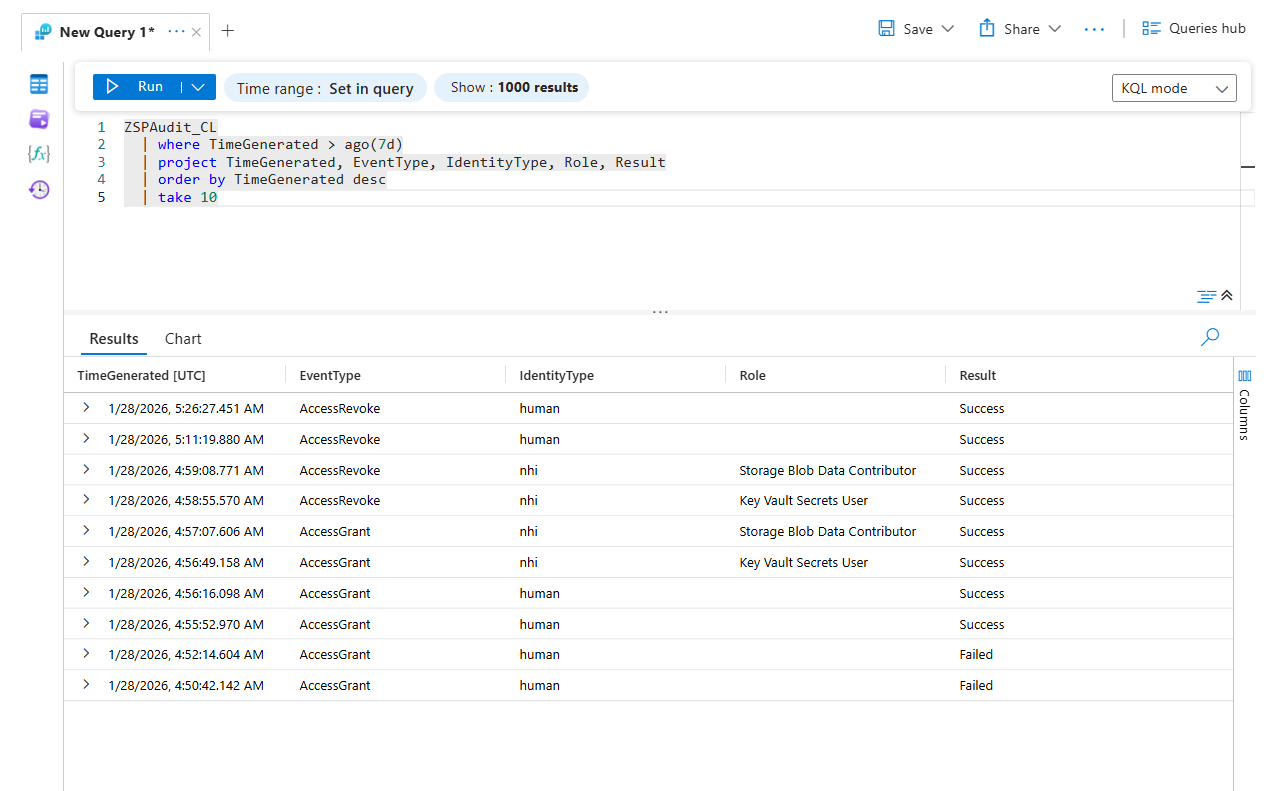
Every grant and revocation produces a log entry in ZSPAudit_CL. Here’s a real grant/revoke pair from the lab:
{
  "TimeGenerated": "2026-01-28T04:56:49.158538Z",
  "EventType": "AccessGrant",
  "IdentityType": "nhi",
  "PrincipalId": "c9c5947a-a7cb-4d63-b177-1e860c7f4b28",
  "Target": "/subscriptions/.../Microsoft.KeyVault/vaults/zsp-lab-kv",
  "TargetType": "AzureResource",
  "Role": "Key Vault Secrets User",
  "DurationMinutes": 2,
  "WorkflowId": "nightly-backup",
  "ExpiresAt": "2026-01-28T04:58:48.598527",
  "Result": "Success"
}
{
  "TimeGenerated": "2026-01-28T04:58:55.570995Z",
  "EventType": "AccessRevoke",
  "IdentityType": "nhi",
  "PrincipalId": "c9c5947a-a7cb-4d63-b177-1e860c7f4b28",
  "Target": "/subscriptions/.../Microsoft.KeyVault/vaults/zsp-lab-kv",
  "TargetType": "AzureResource",
  "Role": "Key Vault Secrets User",
  "Result": "Success"
}
The 2-minute gap between grant (04:56:49) and revoke (04:58:55) matches the requested duration_minutes: 2.
Useful KQL Queries
All NHI access grants (last 24 hours):
ZSPAudit_CL
| where TimeGenerated > ago(24h)
| where IdentityType == "nhi"
| where EventType == "AccessGrant"
| project TimeGenerated, PrincipalId, Target, Role, DurationMinutes, WorkflowId
| order by TimeGenerated desc
NHI access outside expected windows:
ZSPAudit_CL
| where IdentityType == "nhi"
| where EventType == "AccessGrant"
| extend Hour = datetime_part("hour", TimeGenerated)
| where Hour < 1 or Hour > 3  // Expected window is 1-3 AM
| project TimeGenerated, PrincipalId, Target, WorkflowId
Unusual access patterns (more than 5 grants per hour for same SP):
ZSPAudit_CL
| where TimeGenerated > ago(7d)
| where IdentityType == "nhi"
| where EventType == "AccessGrant"
| summarize count() by bin(TimeGenerated, 1h), PrincipalId
| where count_ > 5
The WorkflowId field ties grants back to the automation that requested them-essential for investigating anomalies.
Bonus: This Also Works for Human Admins
The same gateway handles temporary admin access via Entra group membership. The pattern is simpler: empty security groups hold directory roles, and the gateway temporarily adds users.
How It Works
- Create Entra security groups like
SG-Intune-Admins-ZSPand assign them directory roles - Groups start empty - no one has the role
- Admin calls
/api/admin-accesswith justification - Gateway adds user to group temporarily
- Durable Functions timer removes them
curl -X POST "$FUNCTION_URL/api/admin-access" \
  -H "Content-Type: application/json" \
  -H "x-functions-key: $FUNCTION_KEY" \
  -d '{
    "user_id": "YOUR_USER_OBJECT_ID",
    "group_id": "INTUNE_ADMIN_GROUP_ID",
    "duration_minutes": 15,
    "justification": "Deploying new compliance policy - INC0012345"
  }'
This is the same pattern CyberArk uses for ZSP in their M365 implementation. It works with any Entra role, doesn’t require PIM eligible assignments, and provides clear audit trails.
Deploying the Lab
Prerequisites
- Azure subscription with Owner access
- Azure CLI configured (
az login) - PowerShell 7+ (
pwsh) - Entra ID P1 or P2 license (for group-based role assignment)
- Privileged Role Administrator directory role (required to create role-assignable Entra groups)
Quick Start
git clone https://github.com/nine-lives-security/nine-lives-zero-trust.git
cd nine-lives-zero-trust/labs/zsp-azure
./scripts/Deploy-Lab.ps1
The script handles everything:
- Deploys Azure resources via Bicep (Resource Group, Key Vault, Storage, Function App, Log Analytics, DCE)
- Creates Entra ID objects (ZSP groups, directory role assignments, backup SP)
- Creates the
ZSPAudit_CLcustom table and Data Collection Rule (DCR) - Grants Graph API permissions and RBAC roles to the Function App managed identity
- Configures Function App settings with Entra object IDs, DCR endpoint, and schedule
- Deploys Function code
- Runs a smoke test
Test NHI Access
After deployment, the script outputs the required values:
FUNCTION_URL="https://<project>-gw-<suffix>.azurewebsites.net"
FUNCTION_KEY="<from deployment output>"
BACKUP_SP_ID="<from deployment output>"
KEYVAULT_ID="<from deployment output>"

curl -X POST "$FUNCTION_URL/api/nhi-access" \
  -H "Content-Type: application/json" \
  -H "x-functions-key: $FUNCTION_KEY" \
  -d '{
    "sp_object_id": "'"$BACKUP_SP_ID"'",
    "scope": "'"$KEYVAULT_ID"'",
    "role": "Key Vault Secrets User",
    "duration_minutes": 10,
    "workflow_id": "manual-test"
  }'
Check Azure IAM - the SP has the role. Wait 10 minutes - the assignment is automatically removed.
Verify Revocation
# Check role assignments on the Key Vault
az role assignment list \
  --assignee "$BACKUP_SP_ID" \
  --scope "$KEYVAULT_ID" \
  --query "[].roleDefinitionName"
# After expiry: returns empty list
For full deployment details, troubleshooting, and cleanup instructions, see the companion lab.
Production Considerations
Authentication
The lab uses function keys for simplicity. For production, enable Entra authentication on the Function App and require OAuth tokens from approved clients.
Approval Workflows
Add human-in-the-loop for sensitive roles:
async def request_with_approval(request):
    if request.role in ["Contributor", "Owner"]:
        # Create approval request in Teams/ServiceNow
        return {"status": "pending_approval", "approval_id": "..."}
    else:
        # Auto-approve low-risk roles
        return await grant_access(request)
Break-Glass Accounts
ZSP should not create lockout scenarios. Maintain 1-2 emergency accounts with standing Global Admin, stored in a physical safe, monitored for any use.
Scope Constraints
In production, the gateway should enforce allowed scopes per service principal. Don’t let any SP request any role on any resource-maintain an allowlist.
Key Takeaways
NHIs are the bigger risk surface. Organizations often have 50-100 service principals per human user, and most have standing access they rarely use.
AI agents amplify the problem. Agentic workflows that chain Azure services need scoped, temporary access-not standing Contributor roles.
The gateway pattern centralizes control. One identity (the Function App) manages all role assignments. Service principals can’t escalate themselves.
Automatic revocation is non-negotiable. Durable Functions provide reliable timers that survive restarts.
Audit everything with workflow IDs. Without
workflow_id, tracing NHI access back to the automation that requested it becomes impossible.This also works for humans. The same gateway handles admin access via group membership, providing one system for all privileged access.
Resources
- Lab: Zero Standing Privilege Gateway
- Microsoft Graph PIM APIs
- CyberArk ZSP for Entra Groups
- Zero Standing Privileges - Cloud Security Alliance
- Azure Durable Functions
- Azure Monitor Logs Ingestion API
- Azure Built-in Roles Reference
- Bicep Documentation

Jerrad Dahlager, CISSP, CCSP
Cloud Security Architect · Adjunct Instructor
Marine Corps veteran and firm believer that the best security survives contact with reality.
Have thoughts on this post? I'd love to hear from you.