On this page
Review update (September 25, 2026): The merged September 25 source rejects ambiguous/dot-segment scopes and mismatched ARM response identities, uses explicit managed identity with closed SDK clients, and moves synchronous operations off the async loop. Host, Durable and deployment storage now use system identity; existing apps require the documented drain/RBAC/storage migration and retained histories before reopening. Shared Key is disabled. New Key Vault templates use explicit RBAC and omit the deployer’s standing vault-admin grant; old grants are not automatically revoked. Default reruns preserve recorded maximum duration. The source passed 141 offline tests plus Bicep/PowerShell checks; no tenant migration, grant, revocation or key rotation was performed.
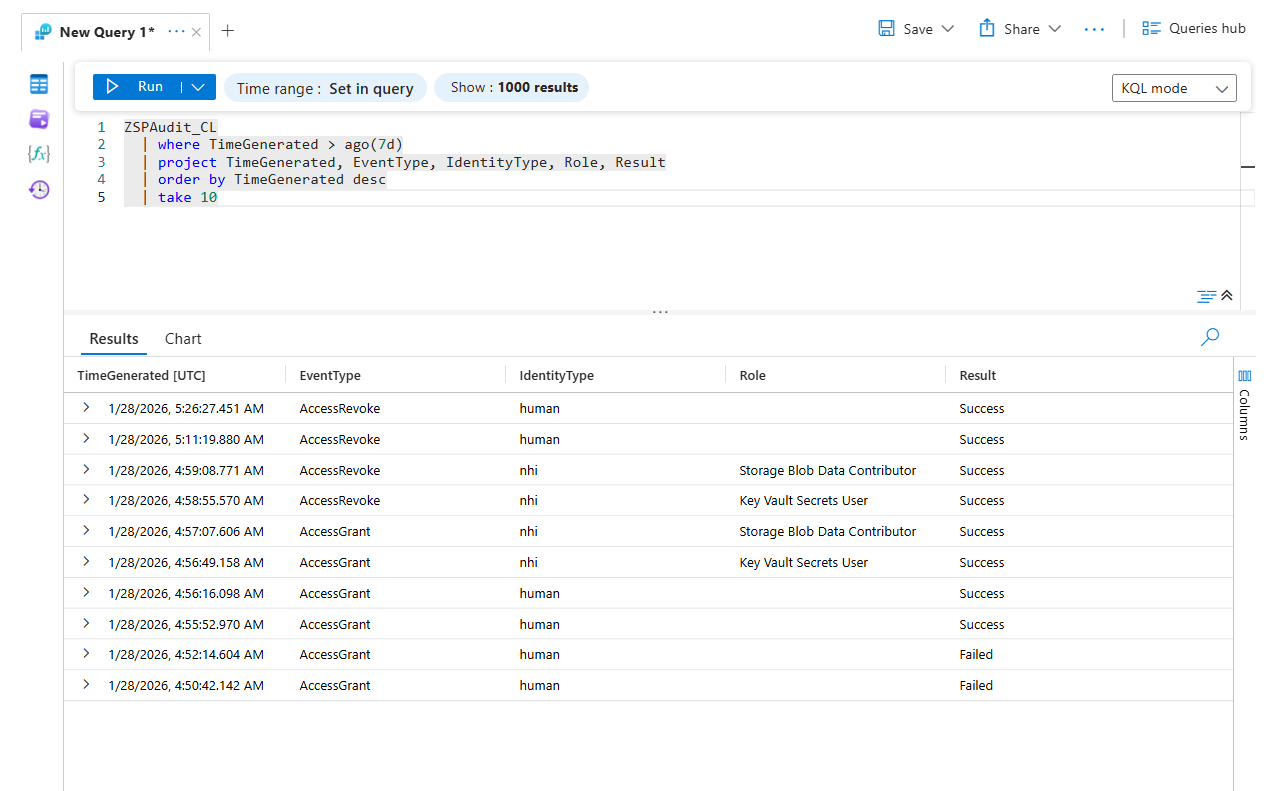
Review update (September 25, 2026): For a deployed broker, select the intended managed identity explicitly rather than relying on an unrestricted development credential chain. PIM time-bound active assignments are an alternative for supported NHI scenarios, even though NHIs cannot activate eligible assignments like users. A DCE is optional when a direct DCR endpoint is supported. Storage data-plane expiry is not a complete boundary while principals retain Shared Key/listKeys access. The historical audit screenshot shows January 28, 2026; it was added after the original article date and does not establish a new run.
Review update (September 25, 2026): The broker remains Tier 0, including its Function storage account, keys, deployment path and managed identity. Entra NHI inventory is preview and excludes managed identities from that tab; use additional inventory for those identities. Human administration should evaluate PIM/PIM for Groups before a custom broker. The current architecture illustration labels the gateway use case “Incident Response”; emergency access accounts remain independent of this gateway. The static workflow names in sketches must be present in the gateway allowlist.
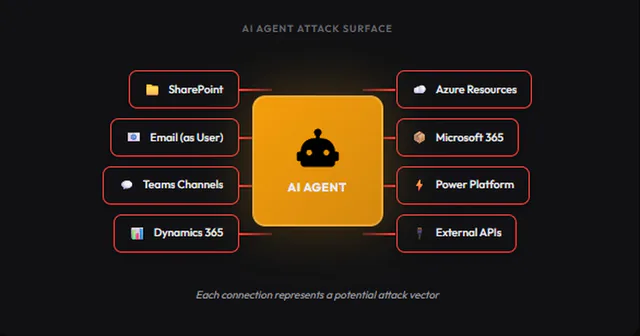
AI coding assistants may need scoped deployment permissions. Backup automation needs Key Vault secrets at 2 AM. Security scanners need Reader access on a schedule.
The easy answer is standing permissions, give each service principal what it needs and move on. But that can leave non-human identities with 24/7 access to sensitive resources even when a workload needs the target privilege only during a short execution window.
Zero Standing Privilege (ZSP) flips this for the subject identities: the requesting service principals and administrators start without the target roles. Permissions are granted just-in-time, scoped to the task, and scheduled for revocation. Operators must verify removal and effective access.
This post walks through building a ZSP gateway using Azure Functions that manages time-bounded access for AI agents, automation workflows, and service principals. We’ll cover the NHI access pattern in detail, then briefly show how the same gateway handles human admins too.
Tier 0 boundary: the gateway itself retains tenant-wide
RoleManagement.ReadWrite.Directory, which can assign any directory role, including Global Administrator, plus scoped Azure role-management authority. This lab moves standing privilege off the requestors and into one audited workload; it does not eliminate standing privilege. Treat the Function App, its deployment path, and its managed identity as Tier 0.
Hands-on Lab: Deployment steps, architecture notes, and supporting assets are in the companion lab.
Why NHI Security Matters Now
Non-human identities span service principals, managed identities, workload identities, and agent identities. Their prevalence and privilege vary by tenant, so inventory the identities and effective permissions in your own environment instead of applying a generic human-to-machine ratio. Microsoft’s non-human identity inventory provides tenant-specific views of risky, highly privileged, overprivileged, and unused identities.
- AI coding agents requesting temporary access to deploy infrastructure
- Backup automation needing Key Vault secrets only during backup windows
- CI/CD pipelines requiring Contributor access for deployments
- Security scanners needing read access on a schedule
- Agentic workflows chaining multiple Azure services together
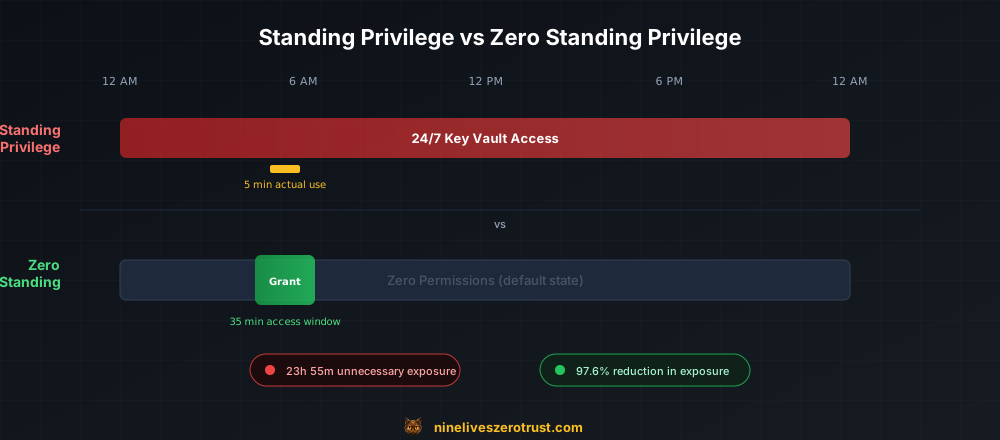
Standing access can outlive the task by hours or days.
For example, a service principal that runs a five-minute nightly backup but keeps its Key Vault role all day has 23 hours and 55 minutes of standing access outside that task. A compromised AI agent with a permanent Contributor role can affect every resource in that assignment’s scope.
The Risk Surface
| Scenario | Standing Privilege Risk | ZSP Mitigation |
|---|---|---|
| Stolen SP credentials | Immediate Key Vault access | Credentials alone do not confer the target Key Vault role between approved windows |
| Compromised AI agent | Attacker inherits Contributor role | Requestor has no target role until the gateway grants an approved window |
| Lateral movement | Pivot via always-on service accounts | Verified cleanup removes the lab-owned target grant between runs; the Tier 0 broker remains privileged |
| Supply chain attack | Compromised dependency has ambient access | No ambient target role from this lab between approved windows; unrelated baseline permissions remain outside this pattern |
Microsoft PIM is centered on interactive human and group activation workflows; this lab does not rely on an NHI self-activation path. Instead, its audited gateway grants an approved service principal a deterministic, time-bounded Azure RBAC assignment and owns the later revocation.
Architecture: ZSP Gateway
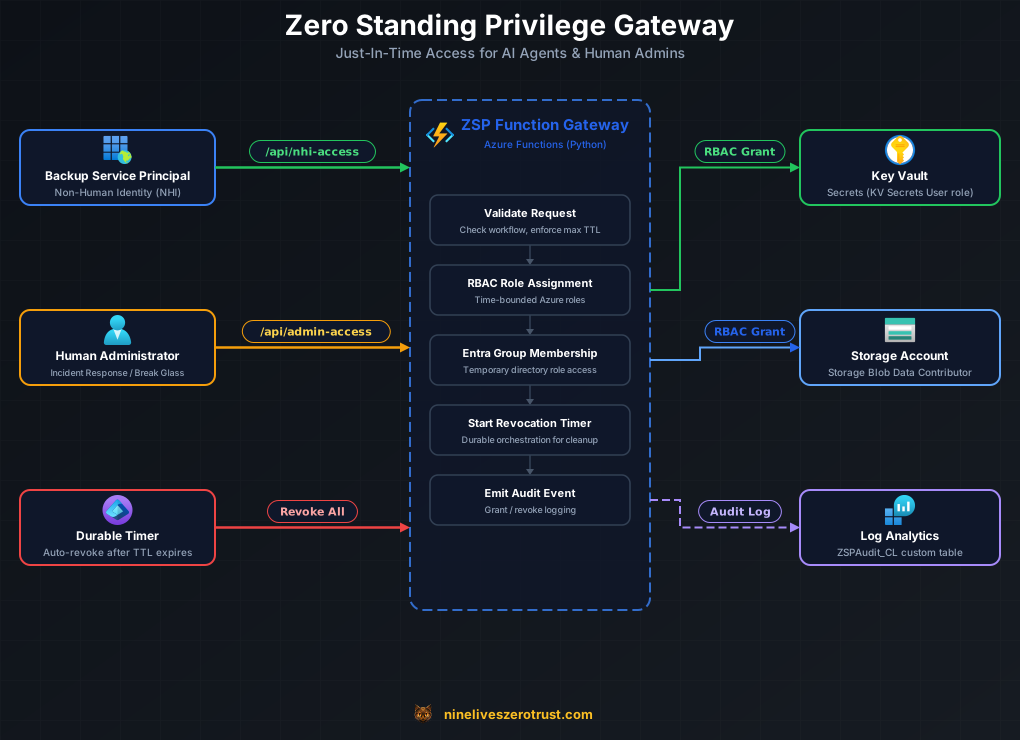
The ZSP gateway is an Azure Function App that brokers the lab’s target entitlements. Its access-request endpoints are:
/api/nhi-access- Grants time-bounded Azure RBAC role assignments to service principals/api/admin-access- Grants temporary Entra group membership to human admins
The additional /api/access-status/{id} route returns a restricted authenticated
status projection. Both access patterns use the v2 Azure Durable Functions saga
for policy admission, preflight, grant, wait, and revoke. The HTTP trigger records the lifecycle first; it never grants privilege before Durable history exists.
Infrastructure
The lab deploys with Bicep + PowerShell:
- Azure Function App (Flex Consumption, Python 3.12) with system-assigned managed identity
- Key Vault and Storage Account as target resources for demo
- Application Insights and Log Analytics for observability
- Data Collection Endpoint + Rule (DCE/DCR) for custom audit logging to
ZSPAudit_CL - Entra ID groups with directory role assignments (for human admin path)
- Backup service principal with zero initial permissions (for NHI demo)
The pinned grant script assigns GroupMember.ReadWrite.All (application ID dbaae8cf-10b5-4b86-a4a1-f871c94c6695) and RoleManagement.ReadWrite.Directory Graph API permissions. It no longer grants Directory.Read.All. Existing broad grants are reported for exact-ID review, not silently revoked. It also assigns User Access Administrator on the resource group for managing role assignments (in production, evaluate Role Based Access Control Administrator with constrained delegation conditions; the role alone can still grant powerful assignments), and Monitoring Metrics Publisher on the DCR for sending audit logs. The RoleManagement.ReadWrite.Directory permission is required because the ZSP groups are role-assignable. Standard group membership permissions (GroupMember.ReadWrite.All) are insufficient for managing membership of role-assignable groups.
Audit ingestion is a privilege-safety dependency, not optional telemetry. The
/api/health readiness endpoint returns HTTP 503 and status: degraded when
the DCR endpoint or immutable DCR ID is missing or malformed. Admission,
scheduled requests, and grant activities repeat that check before privilege
changes. Configuration also binds ingestion to the exact DCE resource, and the
runtime restricts destinations to Azure Monitor origins without redirects. This
checks configuration and transport boundaries; health does not send a test event
or prove Log Analytics delivery.
NHI Access: The Core Pattern
How NHI Access Works
- A workflow (timer, API call, or AI agent) calls
/api/nhi-access - The gateway validates allowlists and starts a Durable lifecycle
- The endpoint returns HTTP 202 with a restricted status URL; this records acceptance, not active access
- The v2 orchestration records policy admission; preflight/grant activities recheck it before creating the scoped assignment, reporting active state, and scheduling revocation
- Activities write correlated audit events; transport or cleanup failures require monitoring and recovery
The Request
Use the canonical smoke test for
manifest and live ARM ownership checks. For these illustrative Bash calls, first
verify FUNCTION_URL against the exact owned Function resource hostname and
securely load its ordinary host Function key into FUNCTION_KEY. Bash and jq
are required. The helpers below validate the response URL and bound polling.
# Reuse these helpers for NHI and admin responses on this verified Function origin.
lifecycle_status_url() {
  local id url
  id="$(printf '%s' "$1" | jq -er '.id')" || return 1
  [[ "$id" =~ ^[A-Za-z0-9_-]{1,100}$ ]] || return 1
  url="$(printf '%s' "$1" | jq -er '.statusQueryGetUri')" || return 1
  [[ "$url" == "${FUNCTION_URL%/}/api/access-status/$id" ]] || return 1
  printf '%s\n' "$url"
}

wait_for_lifecycle() {
  local url="$1" target="$2" deadline=$((SECONDS + $3)) status id runtime
  id="${url#"${FUNCTION_URL%/}/api/access-status/"}"
  [[ "$id" =~ ^[A-Za-z0-9_-]{1,100}$ ]] || return 1
  [[ "$url" == "${FUNCTION_URL%/}/api/access-status/$id" ]] || return 1
  while (( SECONDS < deadline )); do
    sleep 2
    status="$(curl --fail --silent --show-error --connect-timeout 10 --max-time 30 \
      --max-redirs 0 -H "X-Functions-Key: $FUNCTION_KEY" "$url")" || return 1
    runtime="$(printf '%s' "$status" | jq -er '.runtimeStatus | strings')" || return 1
    case "$runtime" in
      Failed|Terminated|Canceled|Suspended) return 1 ;;
      Completed) [[ "$target" == "revoked" ]] || return 1 ;;
      Running|Pending) ;;
      *) return 1 ;;
    esac
    if [[ "$(printf '%s' "$status" | jq -r '.customStatus.status // empty')" == "$target" ]]; then
      printf '%s\n' "$status"
      return 0
    fi
  done
  printf 'Lifecycle did not reach %s before the timeout; inspect operator history and entitlements.\n' "$target" >&2
  return 1
}

NHI_RESPONSE="$(curl --fail --silent --show-error --connect-timeout 10 --max-time 60 --max-redirs 0 -X POST "$FUNCTION_URL/api/nhi-access" \
  -H "Content-Type: application/json" \
  --header @<(printf 'x-functions-key: %s\n' "$FUNCTION_KEY") \
  -d '{
    "sp_object_id": "BACKUP_SP_OBJECT_ID",
    "scope": "/subscriptions/.../providers/Microsoft.KeyVault/vaults/<keyvault-name>",
    "role": "Key Vault Secrets User",
    "duration_minutes": 10,
    "workflow_id": "nightly-backup"
  }')" || exit 1

STATUS_URL="$(lifecycle_status_url "$NHI_RESPONSE")" || exit 1
The HTTP 202 response preserves the polling field without a reusable management capability:
{
  "id": "b10a200905204d0bb10d54fc4e1a73e0",
  "status": "accepted",
  "statusQueryGetUri": "https://<project>-gw-<suffix>.azurewebsites.net/api/access-status/b10a200905204d0bb10d54fc4e1a73e0"
}
Poll the validated status URL with X-Functions-Key and do not use the entitlement until the custom status is active:
STATUS="$(wait_for_lifecycle "$STATUS_URL" active 90)" || exit 1
printf '%s' "$STATUS" | jq '{runtimeStatus, customStatus}'
ASSIGNMENT_ID="$(printf '%s' "$STATUS" | jq -er '.customStatus.grants[0].assignment_id')" || exit 1
customStatus.status == "active" means the lifecycle recorded a grant; verify the exact returned assignment ID in Azure before relying on it. A failed, terminated, unavailable, or timed-out lifecycle requires investigation and does not prove absence. The lifecycle attempts owned revocation at expiry; verify both revoked status and the exact entitlement’s absence.
Assignment state and effective resource access are separate checks. Microsoft documents propagation delays for Azure RBAC grants and removals, commonly up to ten minutes, with longer cache behavior for some managed-identity membership scenarios. The timer bounds the gateway’s assignment lifecycle; it does not guarantee that every resource starts or stops authorizing requests at that exact second. Verify permitted access after the grant and denied access after revocation using the actual target resource and client.
The Grant Logic
The HTTP handler validates and schedules only. Inside the Durable lifecycle, a grant activity creates the role assignment via the Azure SDK; the orchestration owns the absolute expiry and compensating revocation:
# Architecture pseudocode only. The pinned lab adds deterministic assignment
# names, exact scope/role validation, absence preflight, and compensating cleanup.

from azure.mgmt.authorization import AuthorizationManagementClient
from azure.mgmt.authorization.models import RoleAssignmentCreateParameters
from azure.identity import ManagedIdentityCredential

ROLE_DEFINITIONS = {
    "Key Vault Secrets User": "4633458b-17de-408a-b874-0445c86b69e6",
    "Key Vault Reader": "21090545-7ca7-4776-b22c-e363652d74d2",
    "Storage Blob Data Reader": "2a2b9908-6ea1-4ae2-8e65-a410df84e7d1",
    "Storage Blob Data Contributor": "ba92f5b4-2d11-453d-a403-e96b0029c9fe",
    "Reader": "acdd72a7-3385-48ef-bd42-f606fba81ae7",
}

def grant_nhi_access(
    sp_object_id, scope, role_name, duration_minutes, workflow_id,
    assignment_name, expires_at
):
    subscription_id = scope.split("/")[2]  # validated scope in the canonical implementation
    with ManagedIdentityCredential() as credential:
        with AuthorizationManagementClient(credential, subscription_id) as auth_client:
            role_guid = ROLE_DEFINITIONS[role_name]
            full_role_id = f"/subscriptions/{subscription_id}/providers/Microsoft.Authorization/roleDefinitions/{role_guid}"

            assignment = auth_client.role_assignments.create(
                scope=scope,
                role_assignment_name=assignment_name,
                parameters=RoleAssignmentCreateParameters(
                    role_definition_id=full_role_id,
                    principal_id=sp_object_id,
                    principal_type="ServicePrincipal"
                )
            )

            return {
                "status": "granted",
                "assignment_id": assignment.id,
                "assignment_name": assignment_name,
                "sp_object_id": sp_object_id,
                "scope": scope,
                "role": role_name,
                "expires_at": expires_at,
                "duration_minutes": duration_minutes,
                "workflow_id": workflow_id
            }
This synchronous sketch explains the SDK call, not the deployable safety contract. Do not invoke blocking SDK calls directly from an async event loop; use a synchronous activity or an explicit offload. The pinned nhi_access.py enforces exact entitlement and collision rules; policy allowlists are checked by the gateway in function_app.py. It consumes the deterministic assignment name and absolute expiry supplied by the Durable lifecycle, and returns the evidence needed for compensation. The broker holds the role-management permission; callers use its configured allowlists rather than receiving that credential. A shared Function key does not bind a caller to a particular user or service principal: its holder can request the lab’s allowed targets. Production needs authenticated caller identity mapped to authorization policy. Unrelated baseline permissions remain outside this lab’s guarantee.
Scheduled Access with Timer Triggers
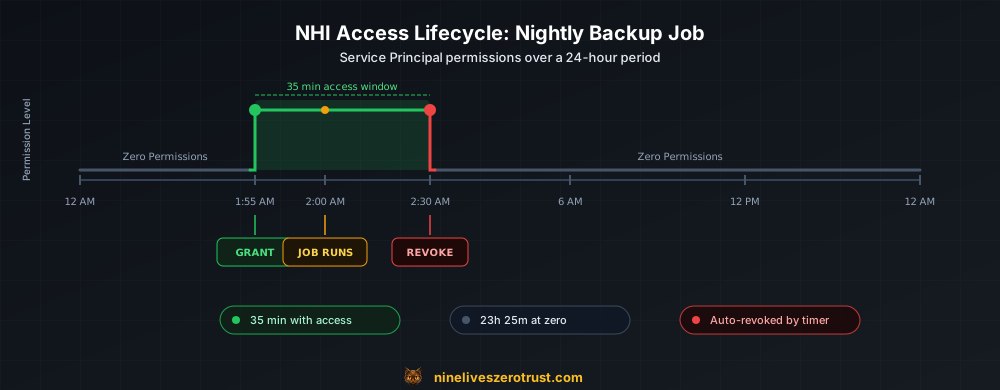
For predictable workloads like nightly backups, the gateway uses timer-triggered functions. The default grant timer is 01:55 UTC; match the workload schedule explicitly rather than assuming local time:
# Architecture pseudocode only; use the pinned v2 timer for full policy admission.
@app.timer_trigger(schedule="%BACKUP_JOB_SCHEDULE%", arg_name="timer", run_on_startup=False)
@app.durable_client_input(client_name="client")
async def backup_job_access_grant(timer: func.TimerRequest, client):
    """Record one lifecycle for the backup bundle; grant nothing here."""
    duration = int(os.environ.get("BACKUP_JOB_DURATION_MINUTES", 35))
    grants = []
    for scope, role in (
        (os.environ["KEYVAULT_RESOURCE_ID"], "Key Vault Secrets User"),
        (os.environ["STORAGE_RESOURCE_ID"], "Storage Blob Data Contributor"),
    ):
        grants.append(validate_nhi_request({
            "sp_object_id": os.environ["BACKUP_SP_OBJECT_ID"],
            "scope": scope,
            "role": role,
            "duration_minutes": duration,
            "workflow_id": "nightly-backup",
        }, _maximum_access_duration()))
    instance_id = await client.start_new(
        "access_lifecycle_orchestrator_v2",
        client_input={
            "api_version": 2,
            "access_type": "nhi_bundle",
            "duration_minutes": duration,
            "workflow_id": "nightly-backup",
            "grants": grants,
        },
    )
The timer validates the full bundle and starts one durable saga; it does not make out-of-band grants. The pattern is still to open the access window shortly before the job and revoke after the configured duration, aiming to leave the service principal without those target roles outside the job window. Verify cleanup and effective access; the schedule alone is not evidence of either.
Automatic Revocation
Grant and revocation live in the same Durable Functions orchestrator:
# Architecture pseudocode only. The pinned orchestrator handles both single
# and bundled grants, audit fail-closed behavior, compensation, and ownership.
@app.orchestration_trigger(context_name="context")
def access_lifecycle_orchestrator_v2(context: df.DurableOrchestrationContext):
    request = yield context.call_activity_with_retry(
        "authorize_access_lifecycle_activity", retry_options, context.get_input()
    )
    expiry_time = context.current_utc_datetime + timedelta(
        minutes=request["duration_minutes"]
    )

    context.set_custom_status({"status": "granting"})
    grant = yield context.call_activity_with_retry(
        "grant_nhi_access_activity", retry_options, request
    )
    context.set_custom_status({
        "status": "active",
        "expires_at": expiry_time.isoformat(),
        "grants": [grant],
    })
    yield context.create_timer(expiry_time)
    context.set_custom_status({"status": "revoking"})
    yield context.call_activity_with_retry(
        "revoke_role_assignment_activity", retry_options, grant
    )
    context.set_custom_status({"status": "revoked"})
The snippet is intentionally reduced to the lifecycle shape. The pinned orchestrator is authoritative for bundle compensation, audit fail-closed checks, and admin entitlement ownership. It derives an absolute expiry_time from context.current_utc_datetime, which remains deterministic during replay. With retained history and compatible handlers, Durable Functions can replay recorded grants and timers after a Function restart. Deleting history, retiring a handler with active instances, terminating an orchestration, losing permissions, or an ownership conflict can still strand a grant. The migration runbook below must be completed before replacing legacy handlers. Durable Functions timers in Python have a maximum duration of 6 days, more than enough for access windows measured in minutes or hours, but worth knowing if you extend durations.
Keep expiry timestamps timezone-aware and derive them from the deterministic orchestration clock. The pinned implementation uses asynchronous activities and normalizes either a JSON string or a decoded object with _activity_payload; it does not create an event loop inside a synchronous activity. This reduced example illustrates that calling convention:
@app.activity_trigger(input_name="activityPayload")
async def revoke_role_assignment_activity(activityPayload):
    input_data = _activity_payload(activityPayload)
    result = await revoke_nhi_access(assignment_id=input_data["assignment_id"])
    # Full source records success/failure with LifecycleId and EntitlementId.
    return result
Use the complete pinned activity for deployment: the reduced snippet omits its correlated success/failure audit handling. A mandatory str annotation is not part of that implementation.
AI Agent Integration Patterns
The /api/nhi-access endpoint is designed for machine callers. In the examples below, request_access_and_wait sends the function key in x-functions-key, accepts only HTTP 202, polls the returned status URL, and returns only after customStatus.status becomes active. A production helper must fail closed on failed, terminated, or unexpectedly completed instances.
These are integration sketches, not requests accepted by the default lab configuration. The gateway separately validates principal, role, scope, and exact workflow-ID allowlists. ALLOWED_WORKFLOW_IDS defaults to manual-test and nightly-backup; use reviewed stable workflow IDs and explicitly configure the intended scope and identity before adapting these examples. Per-session or per-incident IDs do not automatically match that allowlist, and should not be used to bypass it.
Pattern 1: AI Coding Agent Deploying Infrastructure
An AI coding assistant may need temporary deployment access. Contributor is not enabled by the lab’s default role allowlist; add any elevated custom role to both the role-definition map and deployment allowlist only after constraining scope and reviewing the threat model:
# AI agent workflow
async def deploy_infrastructure(agent_context):
    await request_access_and_wait({
        "sp_object_id": agent_context.service_principal_id,
        "scope": f"/subscriptions/{SUB_ID}/resourceGroups/{RG_NAME}",
        "role": "Approved Deployment Custom Role",
        "duration_minutes": 30,
        "workflow_id": "manual-test"  # replace only with a reviewed static allowlist entry
    })

    # Run only after durable status confirms active access.
    await run_bicep_deployment(agent_context.template)
Pattern 2: Security Scanner on Schedule
A scanning agent needs Reader access across resource groups:
# Timer trigger starts a durable lifecycle, waits for active, then scans.
@app.timer_trigger(schedule="0 0 */6 * * *", arg_name="timer")  # Every 6 hours
async def security_scan_access(timer):
    for rg in RESOURCE_GROUPS_TO_SCAN:
        await request_access_and_wait({
            "sp_object_id": SCANNER_SP_ID,
            "scope": rg,
            "role": "Reader",
            "duration_minutes": 60,
            "workflow_id": "security-scan",
        })
Pattern 3: Event-Driven Access
An AI agent responds to incidents and needs temporary elevated access:
# Event Grid trigger when security alert fires
@app.event_grid_trigger(arg_name="event")
async def incident_response_access(event):
    alert = event.get_json()

    await request_access_and_wait({
        "sp_object_id": INCIDENT_RESPONSE_SP_ID,
        "scope": alert["resource_id"],
        "role": "Reader",
        "duration_minutes": 120,
        "workflow_id": "manual-test"  # keep incident ID in separate correlation metadata,
    })
Audit Trail
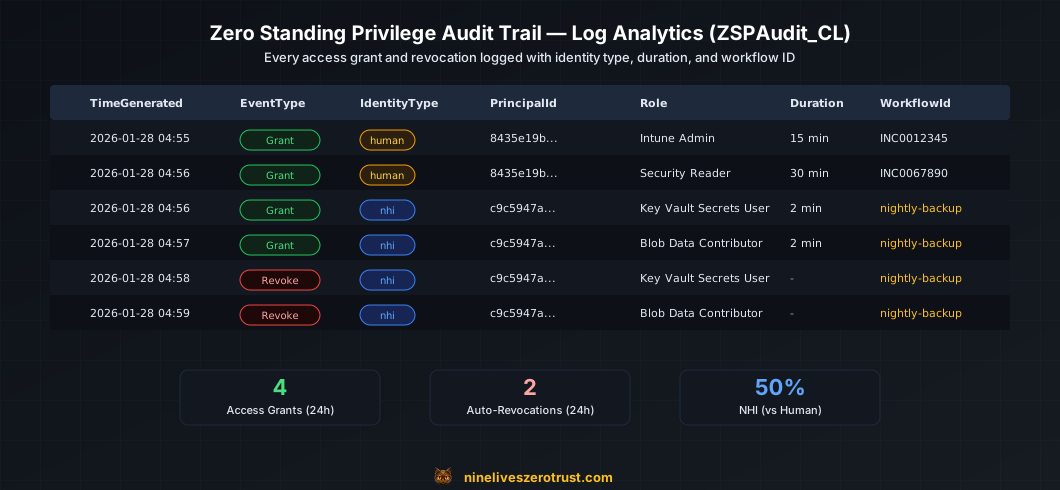
Grant and revocation activities attempt correlated writes to a custom Log Analytics table (ZSPAudit_CL) via the Azure Monitor Ingestion API. The pipeline uses a Data Collection Endpoint (DCE) and Data Collection Rule (DCR) to route structured audit events into Log Analytics. This is critical for NHI access since there’s no human to ask “why did you need this?”
Every new event also carries LifecycleId, the Durable orchestration instance
ID, and EntitlementId, the deterministic admin owner key or complete Azure
role-assignment resource ID. That pair is the exact correlation key for a grant
and its revoke; principal and target are not unique across repeated lifecycles.
What Gets Logged
Successful audit ingestion produces entries in ZSPAudit_CL; transport failures are not proof that a row arrived. This
illustrative pair is synthesized in the current schema using historical example timestamps; it was not captured from a deployment (identifiers are placeholders):
{
  "TimeGenerated": "2026-01-28T04:56:49.158538Z",
  "EventType": "AccessGrant",
  "IdentityType": "nhi",
  "PrincipalId": "<backup-service-principal-object-id>",
  "Target": "/subscriptions/.../Microsoft.KeyVault/vaults/zsp-lab-kv",
  "TargetType": "AzureResource",
  "Role": "Key Vault Secrets User",
  "DurationMinutes": 2,
  "WorkflowId": "nightly-backup",
  "LifecycleId": "b10a200905204d0bb10d54fc4e1a73e0",
  "EntitlementId": "/subscriptions/<subscription-id>/.../providers/Microsoft.Authorization/roleAssignments/<assignment-guid>",
  "ExpiresAt": "2026-01-28T04:58:48.598527+00:00",
  "Result": "Success"
}
{
  "TimeGenerated": "2026-01-28T04:58:55.570995Z",
  "EventType": "AccessRevoke",
  "IdentityType": "nhi",
  "PrincipalId": "<backup-service-principal-object-id>",
  "Target": "/subscriptions/.../Microsoft.KeyVault/vaults/zsp-lab-kv",
  "TargetType": "AzureResource",
  "Role": "Key Vault Secrets User",
  "LifecycleId": "b10a200905204d0bb10d54fc4e1a73e0",
  "EntitlementId": "/subscriptions/<subscription-id>/.../providers/Microsoft.Authorization/roleAssignments/<assignment-guid>",
  "ExpiresAt": "2026-01-28T04:58:48.598527+00:00",
  "Result": "Success"
}
These synthesized timestamps span about two minutes. They illustrate the schema and do not prove live cleanup timing or effective authorization changes.
Useful KQL Queries
All NHI access grants (last 24 hours):
ZSPAudit_CL
| where TimeGenerated > ago(24h)
| where IdentityType == "nhi"
| where EventType == "AccessGrant"
| project TimeGenerated, PrincipalId, Target, Role, DurationMinutes, WorkflowId, LifecycleId, EntitlementId
| order by TimeGenerated desc
NHI access outside expected windows:
ZSPAudit_CL
| where IdentityType == "nhi"
| where EventType == "AccessGrant"
| extend Hour = datetime_part("hour", TimeGenerated)
| where Hour < 1 or Hour > 3  // Expected window is 1-3 AM
| project TimeGenerated, PrincipalId, Target, WorkflowId, LifecycleId, EntitlementId
Unusual access patterns (more than 5 grants per hour for same SP):
ZSPAudit_CL
| where TimeGenerated > ago(7d)
| where IdentityType == "nhi"
| where EventType == "AccessGrant"
| summarize count() by bin(TimeGenerated, 1h), PrincipalId
| where count_ > 5
WorkflowId explains which automation requested access. LifecycleId plus
EntitlementId correlates the recorded grant and successful revoke for that
exact lifecycle; the audit record does not prove current resource authorization. The lab’s overdue-grant hunt uses a leftanti join on both keys. Older
rows missing either key are labeled LegacyUncorrelated and sent to manual
review; they are never guessed into a match using principal and target.
Bonus: This Also Works for Human Admins
The same gateway handles temporary admin access via Entra group membership. The pattern is simpler: empty security groups hold directory roles, and the gateway temporarily adds users.
How Admin Access Works
- Create Entra security groups like
SG-Intune-Admins-ZSPand assign them directory roles - Groups start empty - no one has the role
- Admin calls
/api/admin-accesswith justification - A Durable Entity claims the user/group owner lock; a concurrent lifecycle for the same pair is rejected
- The lifecycle adds the user, reports active status, waits, verifies exact ownership, removes the membership, and releases the lock
ADMIN_RESPONSE="$(curl --fail --silent --show-error --connect-timeout 10 --max-time 60 --max-redirs 0 -X POST "$FUNCTION_URL/api/admin-access" \
  -H "Content-Type: application/json" \
  --header @<(printf 'x-functions-key: %s\n' "$FUNCTION_KEY") \
  -d '{
    "user_id": "YOUR_USER_OBJECT_ID",
    "group_id": "INTUNE_ADMIN_GROUP_ID",
    "duration_minutes": 15,
    "justification": "Deploying new compliance policy - INC0012345"
  }')" || exit 1

ADMIN_STATUS_URL="$(lifecycle_status_url "$ADMIN_RESPONSE")" || exit 1
The HTTP 202 response only accepts the request. Reuse wait_for_lifecycle "$ADMIN_STATUS_URL" active 90, which sends X-Functions-Key, and verify the exact user/group membership before administrative work. The restricted status projection intentionally omits admin membership details.
Owner Lock and Manual Recovery
Microsoft Graph does not attach a per-membership owner token to a group edge. The lab therefore serializes each user/group pair through an admin_entitlement_owner Durable Entity. The lifecycle verifies the exact orchestration owner before compensation or expiry revocation, and retains the lock when safe cleanup cannot be proven.
If the entity confirms another owner, status becomes ownership_lost. If owner
verification itself throws, status becomes ownership_unverified. Both paths
attempt a correlated failed-revoke audit event, retain the lock, and deliberately
leave the membership untouched. Stop new requests for that pair. Correlate the
instance history, Entra audit logs, and current membership; manually remove the
member only if the failed lifecycle created it. Once the entitlement is confirmed
absent, repair or purge that owner entity (or reset/redeploy the task hub in this
disposable lab), then verify again. Never clear the lock first, and never change
privileged ZSP group memberships manually while a lifecycle is active.
This gateway manages group membership directly rather than using PIM eligible assignments. Its role-assignable groups and allowed roles must remain explicitly constrained, and the Tier 0 broker remains a standing-privilege boundary.
Deploying the Lab
Prerequisites
- Azure subscription with Owner access
- Azure CLI configured (
az login) - PowerShell 7+ (
pwsh) - Entra ID P1 or P2 license (for group-based role assignment)
- Privileged Role Administrator directory role (required to create role-assignable Entra groups)
Lifecycle v2 Migration Comes First
The current source retires the old access_lifecycle_orchestrator and
revocation_orchestrator handlers. Legacy in-flight histories and timers cannot
replay those handlers after the new code is deployed. For an existing app,
restrict new admission and the backup timer while the old workers drain; inventory
all instances and reconcile their exact group memberships and RBAC assignments,
including failed or terminated instances. Verify cleanup in Azure/Graph and rotate
previously exposed Durable extension system keys before reopening admission.
Neither this source update nor a timer’s elapsed duration performs or proves that
work. Previously issued keys remain usable until actually rotated.
For a fresh app, verify that the task hub has no legacy histories. Read the
pinned lifecycle migration runbook
before supplying -ConfirmLifecycleMigration. The switch is an acknowledgement,
not an inventory, drain, cleanup, or key-rotation check. It gates all changes,
including runs with -SkipFunctionDeploy; direct publishing still requires the
same operator migration process.
Quick Start
Live-mutation warning:
Deploy-Lab.ps1has no-WhatIfmode. It performs live Azure, Microsoft Graph, Entra directory-role, RBAC, Function deployment, and smoke-test operations. Verify the active subscription and tenant, inspect every parameter, confirm the Tier 0 permission boundary, and use an isolated lab environment before running it.
# From the public canonical lab repository:
git clone https://github.com/j-dahl7/zsp-azure-lab.git
cd zsp-azure-lab
git checkout b94f4c8824025c7db6760cf09153f9eaa5255b51
pwsh ./scripts/Deploy-Lab.ps1 -ConfirmLifecycleMigration
After the operator migration work, the script:
- Deploys Azure resources via Bicep (Resource Group, Key Vault, Storage, Function App, Log Analytics, DCE)
- Creates Entra ID objects (ZSP groups, directory role assignments, backup SP)
- Creates the
ZSPAudit_CLcustom table and Data Collection Rule (DCR) - Grants Graph API permissions and RBAC roles to the Function App managed identity
- Configures Function App settings with Entra object IDs, DCR endpoint, and schedule
- Deploys Function code
- Runs a smoke test
Run the Canonical Smoke Test
The deployment script runs this test with its verified outputs and ordinary host
Function key. For a later rerun, securely load that key into $FunctionKey and use
the original .zsp-deployment.json manifest plus the exact resource IDs:
./scripts/Test-Lab.ps1 `
  -FunctionAppUrl "https://<project>-gw-<suffix>.azurewebsites.net" `
  -FunctionAppResourceId "/subscriptions/<sub>/resourceGroups/<project>-rg/providers/Microsoft.Web/sites/<function-app>" `
  -ManifestPath "./.zsp-deployment.json" `
  -FunctionKey $FunctionKey `
  -BackupSpObjectId "<backup-sp-object-id>" `
  -KeyVaultResourceId "/subscriptions/<sub>/resourceGroups/<project>-rg/providers/Microsoft.KeyVault/vaults/<keyvault-name>" `
  -WaitForRevocation
The script checks the active account, manifest and live resource-group ownership, and exact ARM Function hostname before sending the key. It authenticates every poll and refuses redirects or an unexpected status URL. The key must authorize both the admission and status routes; a key limited to a different individual Function may not work. Do not substitute a Durable extension or host master key.
Test NHI Access
After deployment, use its verified resource values and securely retrieve the ordinary host Function key. Reuse the validation/polling helpers from The Request above:
FUNCTION_URL="https://<project>-gw-<suffix>.azurewebsites.net"
FUNCTION_KEY="<ordinary host Function key retrieved securely>"
BACKUP_SP_ID="<from deployment output>"
KEYVAULT_ID="<from deployment output>"

NHI_RESPONSE="$(curl --fail --silent --show-error --connect-timeout 10 --max-time 60 --max-redirs 0 -X POST "$FUNCTION_URL/api/nhi-access" \
  -H "Content-Type: application/json" \
  --header @<(printf 'x-functions-key: %s\n' "$FUNCTION_KEY") \
  -d '{
    "sp_object_id": "'"$BACKUP_SP_ID"'",
    "scope": "'"$KEYVAULT_ID"'",
    "role": "Key Vault Secrets User",
    "duration_minutes": 10,
    "workflow_id": "manual-test"
  }')" || exit 1

STATUS_URL="$(lifecycle_status_url "$NHI_RESPONSE")" || exit 1
Use the authenticated helper, then verify the exact assignment in Azure:
STATUS="$(wait_for_lifecycle "$STATUS_URL" active 90)" || exit 1
ASSIGNMENT_ID="$(printf '%s' "$STATUS" | jq -er '.customStatus.grants[0].assignment_id')" || exit 1
HTTP 202 alone does not prove that the role exists. The lifecycle schedules revocation after ten minutes, subject to working history, handlers, permissions, and ownership. Neither a timeout nor a terminal orchestration state proves removal.
Verify Revocation
STATUS="$(wait_for_lifecycle "$STATUS_URL" revoked 900)" || exit 1
az role assignment list --assignee "$BACKUP_SP_ID" --scope "$KEYVAULT_ID" --output json \
  | jq --exit-status --arg id "$ASSIGNMENT_ID" '[.[] | select((.id | ascii_downcase) == ($id | ascii_downcase))] | length == 0'
This tests absence of the lifecycle’s exact assignment. Unrelated baseline roles may remain; also test that the target resource now denies the relevant operation.
For full deployment details, troubleshooting, and cleanup instructions, see the companion lab.
The current API returns no Durable management key or management URLs. Send the
ordinary Function key only in X-Functions-Key, including on status polls. The
status route rejects query parameters and exposes only bounded, policy-scoped
state and matching deterministic NHI assignment IDs; raw input, output, errors,
and admin user/group details are omitted. Shared Function keys authenticate
possession, not an individual user identity. Use separate operator Azure access
for full history or legacy-instance investigation.
Production Considerations
Authentication
The lab uses function keys for simplicity. For production, enable Entra authentication on the Function App and require OAuth tokens from approved clients.
Approval Workflows
Add human-in-the-loop for sensitive roles:
# Second gate only: identity, scope and workflow allowlists must pass first.
AUTO_APPROVED_ROLE_IDS = {"acdd72a7-3385-48ef-bd42-f606fba81ae7"}  # Reader

async def request_with_approval(request):
    role_id = ROLE_DEFINITIONS.get(request.role)
    if role_id not in AUTO_APPROVED_ROLE_IDS:
        # Unknown, custom and elevated roles need a separate approved workflow.
        return {"status": "pending_approval"}
    return await grant_access(request)
Break-Glass Accounts
Follow Microsoft’s emergency-access guidance: maintain at least two cloud-only emergency accounts with permanent active Global Administrator assignments, independent phishing-resistant authentication, securely stored credentials, monitoring for every use, and regular access tests. Their access must remain available if the gateway or normal activation path fails.
Scope Constraints
In production, the gateway should enforce allowed scopes per service principal. Don’t let any SP request any role on any resource; maintain an allowlist.
Key Takeaways
NHIs are a distinct risk surface. Do not apply a generic industry ratio to service principals alone. Inventory your own service principals, managed identities, workload identities, agent identities, credentials, and effective permissions; Microsoft’s non-human identity inventory explicitly separates risky, highly privileged, overprivileged, and unused populations.
AI agents amplify the problem. Agentic workflows that chain Azure services need scoped, temporary access, not standing Contributor roles.
The gateway pattern centralizes control. The Function identity manages the lab’s role assignments. Shared-key callers remain restricted by global lab allowlists; production requires caller-specific authorization.
Schedule and verify revocation. Durable history supports replay with compatible handlers; exact entitlement checks, monitoring, and recovery remain necessary.
Serialize human membership ownership. A Durable Entity owner lock prevents overlapping user/group lifecycles and blocks unsafe revocation when ownership cannot be proven.
Audit request purpose and exact lifecycle identity.
WorkflowIdexplains the automation;LifecycleIdplusEntitlementIdcorrelates one grant with its revoke without guessing.This also works for humans. The same gateway handles the lab’s admin group memberships and scoped workload entitlements.
Resources
- Lab: Zero Standing Privilege Gateway
- Microsoft Graph PIM APIs
- Zero Standing Privileges - Cloud Security Alliance
- Azure Durable Functions
- Azure Monitor Logs Ingestion API
- Azure Built-in Roles Reference
- Bicep Documentation

Jerrad Dahlager, CISSP, CCSP
Cloud Security Architect · Adjunct Instructor
Marine Corps veteran and firm believer that the best security survives contact with reality.
Have thoughts on this post? I'd love to hear from you.