
Source maintenance reviewed September 4, 2026: this updated source passed its offline and CI checks. Historical tenant evidence below retains its original dates; no fresh tenant deployment or detection result is asserted here.
A hands-on lab deploying a ZSP gateway that manages time-bounded access for non-human identities (AI agents, service principals, automation) and human administrators.
Cost: Variable by region, execution volume, logging, storage, and retention. Review current Azure Functions, Storage, and Log Analytics pricing before deployment. Cleanup: Run the repository’s manifest-driven cleanup script. It validates immutable Entra object IDs and provenance before deleting those objects; Azure resource-group deletion is a separate explicit switch.
Blog Post: For detailed explanations of the architecture and security concepts, see Just-In-Time Access for AI Agents.
Why NHI Security Matters
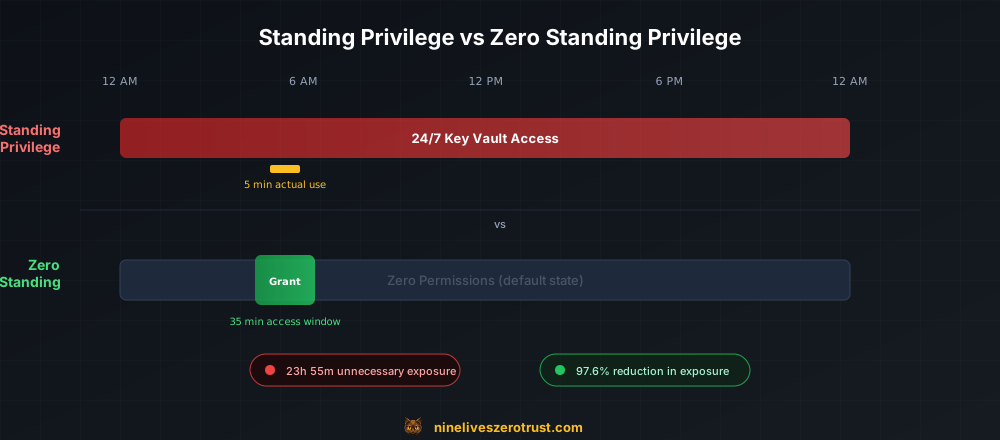
AI agents and automation workflows need Azure access. Giving them standing permissions is the wrong answer:
- AI coding assistants requesting temporary access to deploy infrastructure
- Backup automation needing Key Vault secrets only during backup windows
- CI/CD pipelines requiring temporary scoped write access for deployments
- Security scanners needing read access on a schedule
This lab demonstrates the Zero Standing Privilege pattern for the subject service principals and human administrators: they start without the target roles and receive time-bounded access on demand.
Tier 0 boundary: the broker is not zero-privilege. Its Function managed identity retains tenant-wide
RoleManagement.ReadWrite.Directory, which can assign any directory role, including Global Administrator, plus scoped Azure role-management authority. The design relocates standing privilege into one audited workload; it does not eliminate it. Treat the Function App, deployment principals, and code path as Tier 0 assets. The canonical README’s What This Does Not Eliminate section is required reading before deployment.
Prerequisites
- Azure subscription with Owner access
- Azure CLI configured (
az login) - PowerShell 7+ (
pwsh) - Entra ID P1 or P2 license (for group-based role assignment)
- Privileged Role Administrator directory role (required to create role-assignable Entra groups)
- Permission to create applications/service principals, grant the documented Microsoft Graph application permissions with admin consent, activate/assign the two directory roles, and create Azure role assignments
- Log Analytics Contributor and Monitoring Contributor capabilities used for the custom table and DCR, whether supplied directly or through a broader lab role
- (Optional) Azure Functions Core Tools for local testing
Architecture
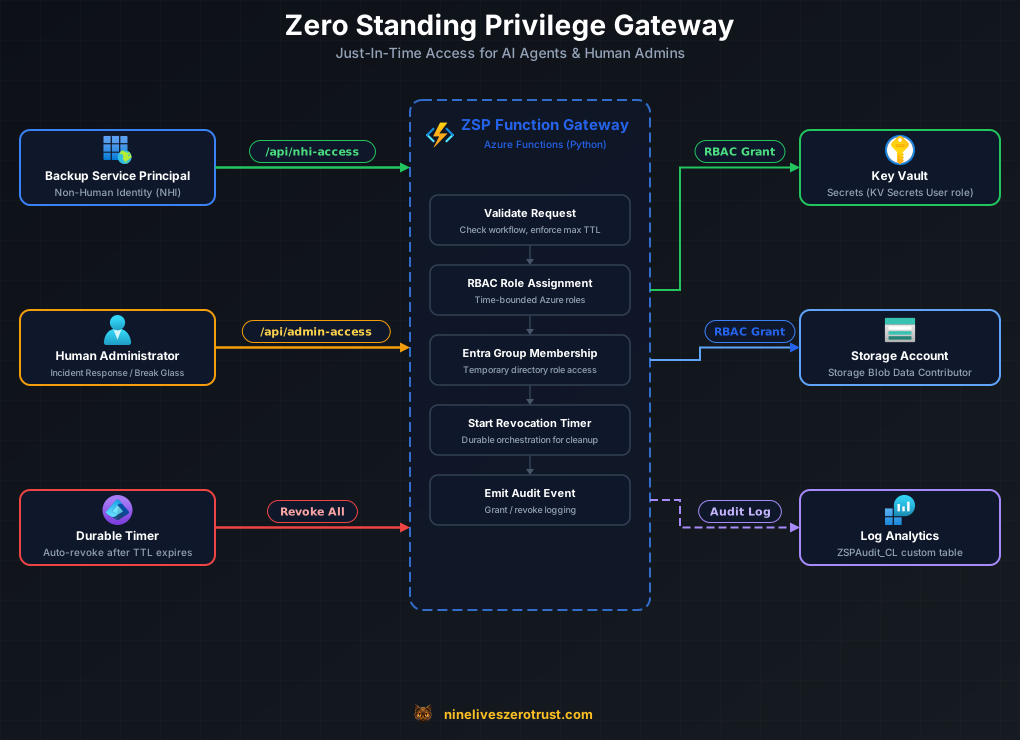
Components:
- Access Requestors — Backup Service Principal (NHI), Human Administrator, Durable Timer (auto-revoke)
- ZSP Function Gateway — Validates requests, creates RBAC role assignments, manages Entra group membership, schedules revocation timers, emits audit events
- Target Resources — Key Vault (secrets), Storage Account (blob data)
- Audit Pipeline — Data Collection Endpoint (DCE) + Data Collection Rule (DCR) → Log Analytics
ZSPAudit_CLcustom table
Quick Start
1. Open the Lab Files
# From a local checkout of this repository:
cd labs/zsp-azure
Lifecycle v2 Migration Comes First
The current source retires the old access_lifecycle_orchestrator and
revocation_orchestrator handlers. Legacy in-flight histories and timers cannot
replay those handlers after the new code is deployed. For an existing app,
restrict new admission and the backup timer while the old workers drain; inventory
all instances and reconcile their exact group memberships and RBAC assignments,
including failed or terminated instances. Verify cleanup in Azure/Graph and rotate
previously exposed Durable extension system keys before reopening admission.
Neither this source update nor a timer’s elapsed duration performs or proves that
work. Previously issued keys remain usable until actually rotated.
For a fresh app, verify that the task hub has no legacy histories. Read the
pinned lifecycle migration runbook
before supplying -ConfirmLifecycleMigration. The switch is an acknowledgement,
not an inventory, drain, cleanup, or key-rotation check. It gates all changes,
including runs with -SkipFunctionDeploy; direct publishing still requires the
same operator migration process.
2. Deploy
Live-mutation warning:
Deploy-Lab.ps1has no-WhatIfmode. It performs live Azure, Microsoft Graph, Entra directory-role, RBAC, Function deployment, and smoke-test operations. Before running it, inspect the active subscription and tenant, review every parameter, confirm the Tier 0 permission boundary, and use only an isolated lab environment.
pwsh ./scripts/Deploy-Lab.ps1 -ConfirmLifecycleMigration
Or with custom settings:
pwsh ./scripts/Deploy-Lab.ps1 -ConfirmLifecycleMigration -ProjectName "my-zsp" -Location "westus2"
The script will:
- Deploy Azure resources via Bicep (Resource Group, Key Vault, Storage, Function App, Log Analytics, DCE)
- Create Entra ID objects (ZSP groups, directory role assignments, backup SP)
- Create the
ZSPAudit_CLcustom table and Data Collection Rule (DCR) - Grant Graph API permissions and RBAC roles to the Function App managed identity
- Configure Function App settings with Entra object IDs, DCR endpoint, and schedule
- Deploy Function code
- Run a smoke test
Run the Canonical Smoke Test
The deployment script runs this test with its verified outputs and ordinary host
Function key. For a later rerun, securely load that key into $FunctionKey and use
the original .zsp-deployment.json manifest plus the exact resource IDs:
./scripts/Test-Lab.ps1 `
  -FunctionAppUrl "https://<project>-gw-<suffix>.azurewebsites.net" `
  -FunctionAppResourceId "/subscriptions/<sub>/resourceGroups/<project>-rg/providers/Microsoft.Web/sites/<function-app>" `
  -ManifestPath "./.zsp-deployment.json" `
  -FunctionKey $FunctionKey `
  -BackupSpObjectId "<backup-sp-object-id>" `
  -KeyVaultResourceId "/subscriptions/<sub>/resourceGroups/<project>-rg/providers/Microsoft.KeyVault/vaults/<keyvault-name>" `
  -WaitForRevocation
The script checks the active account, manifest and live resource-group ownership, and exact ARM Function hostname before sending the key. It authenticates every poll and refuses redirects or an unexpected status URL. The key must authorize both the admission and status routes; a key limited to a different individual Function may not work. Do not substitute a Durable extension or host master key.
3. Save the Endpoints
After deployment completes, note the outputs (resource names include a unique suffix):
Function App URL: https://<project>-gw-<suffix>.azurewebsites.net
ZSP Groups:
  Intune Admins:   <group-id>
  Security Reader: <group-id>
Backup Service Principal: <sp-object-id>
Before requesting access, call GET /api/health with the function key in the x-functions-key header. HTTP 200 with
status: healthy means the audit endpoint and DCR identifier pass the configuration checks; the health handler does not send a test event or verify its arrival in Log Analytics. Missing or
malformed DCR_ENDPOINT or DCR_RULE_ID settings return HTTP 503 with
status: degraded; request admission, scheduled grants, and grant activities
all fail closed before changing privilege. Configuration binds the endpoint to
the exact DCE resource; runtime ingestion accepts public Azure Monitor origins
and cannot follow redirects with its managed-identity token. If configuring
separately, Configure-Function.ps1 now also requires -DceResourceId. Existing deployments must update the
ZSPAudit_CL table and DCR schema before deploying this Function version.
Test NHI Access (Primary Use Case)
Grant Service Principal Access
The canonical smoke test above performs full destination and ownership checks.
For these illustrative Bash calls, first verify FUNCTION_URL against the exact
owned ARM Function resource hostname and use the same ordinary Function key.
The helpers require Bash and jq; they validate the returned status path and
limit polling. Request temporary Key Vault access for the configured backup service principal:
FUNCTION_URL="https://<project>-gw-<suffix>.azurewebsites.net"
FUNCTION_KEY="<ordinary host Function key retrieved securely>"
BACKUP_SP_ID="<backup-sp-object-id>"
KEYVAULT_ID="/subscriptions/<sub>/resourceGroups/<project>-rg/providers/Microsoft.KeyVault/vaults/<keyvault-name>"

# Reuse these helpers for NHI and admin responses on this verified Function origin.
lifecycle_status_url() {
  local id url
  id="$(printf '%s' "$1" | jq -er '.id')" || return 1
  [[ "$id" =~ ^[A-Za-z0-9_-]{1,100}$ ]] || return 1
  url="$(printf '%s' "$1" | jq -er '.statusQueryGetUri')" || return 1
  [[ "$url" == "${FUNCTION_URL%/}/api/access-status/$id" ]] || return 1
  printf '%s\n' "$url"
}

wait_for_lifecycle() {
  local url="$1" target="$2" deadline=$((SECONDS + $3)) status id runtime
  id="${url#"${FUNCTION_URL%/}/api/access-status/"}"
  [[ "$id" =~ ^[A-Za-z0-9_-]{1,100}$ ]] || return 1
  [[ "$url" == "${FUNCTION_URL%/}/api/access-status/$id" ]] || return 1
  while (( SECONDS < deadline )); do
    sleep 2
    status="$(curl --fail --silent --show-error --connect-timeout 10 --max-time 30 \
      --max-redirs 0 -H "X-Functions-Key: $FUNCTION_KEY" "$url")" || return 1
    runtime="$(printf '%s' "$status" | jq -er '.runtimeStatus | strings')" || return 1
    case "$runtime" in
      Failed|Terminated|Canceled|Suspended) return 1 ;;
      Completed) [[ "$target" == "revoked" ]] || return 1 ;;
      Running|Pending) ;;
      *) return 1 ;;
    esac
    if [[ "$(printf '%s' "$status" | jq -r '.customStatus.status // empty')" == "$target" ]]; then
      printf '%s\n' "$status"
      return 0
    fi
  done
  printf 'Lifecycle did not reach %s before the timeout; inspect operator history and entitlements.\n' "$target" >&2
  return 1
}

NHI_RESPONSE="$(curl --fail --silent --show-error --connect-timeout 10 --max-time 60 --max-redirs 0 -X POST "$FUNCTION_URL/api/nhi-access" \
  -H "Content-Type: application/json" \
  -H "x-functions-key: $FUNCTION_KEY" \
  -d '{
    "sp_object_id": "'"$BACKUP_SP_ID"'",
    "scope": "'"$KEYVAULT_ID"'",
    "role": "Key Vault Secrets User",
    "duration_minutes": 10,
    "workflow_id": "manual-test"
  }')" || exit 1

echo "$NHI_RESPONSE" | jq .
STATUS_URL="$(lifecycle_status_url "$NHI_RESPONSE")" || exit 1
Expected HTTP 202 admission response (hostname is a placeholder):
{
  "id": "b10a200905204d0bb10d54fc4e1a73e0",
  "status": "accepted",
  "statusQueryGetUri": "https://<project>-gw-<suffix>.azurewebsites.net/api/access-status/b10a200905204d0bb10d54fc4e1a73e0"
}
The 202 response means the safety workflow was accepted, not that access is
already active. Poll the validated status URL with the Function key and wait for customStatus.status to
become active:
STATUS="$(wait_for_lifecycle "$STATUS_URL" active 90)" || exit 1
printf '%s' "$STATUS" | jq '{runtimeStatus, customStatus}'
ASSIGNMENT_ID="$(printf '%s' "$STATUS" | jq -er '.customStatus.grants[0].assignment_id')" || exit 1
Only then should the role assignment be used. A failed, terminated, or already completed orchestration means access must not be assumed.
The lifecycle status describes the assignment, not an instantaneous authorization boundary at every resource. Azure RBAC grants and removals can take time to propagate. Validate permitted access after the grant and denied access after revocation against the actual target resource and client; do not treat a timer expiry or deleted assignment alone as proof that cached access has ended.
Verify the Exact Role Assignment and Revocation
Use the assignment ID from the restricted active status response. Other baseline assignments are outside this lifecycle and must not be treated as its grant.
az role assignment list --assignee "$BACKUP_SP_ID" --scope "$KEYVAULT_ID" --output json \
  | jq --exit-status --arg id "$ASSIGNMENT_ID" '[.[] | select((.id | ascii_downcase) == ($id | ascii_downcase))] | length == 1'

# For this 10-minute request, allow a bounded 15-minute observation window.
STATUS="$(wait_for_lifecycle "$STATUS_URL" revoked 900)" || exit 1
az role assignment list --assignee "$BACKUP_SP_ID" --scope "$KEYVAULT_ID" --output json \
  | jq --exit-status --arg id "$ASSIGNMENT_ID" '[.[] | select((.id | ascii_downcase) == ($id | ascii_downcase))] | length == 0'
A timeout, unavailable/unauthorized status, or failed/terminated lifecycle requires operator investigation; it does not prove that privilege is absent. After exact assignment removal, test denied access at the target resource to account for authorization propagation and caching.
Test Human Admin Access
The gateway also supports human administrators who need temporary Entra ID role access:
Request Admin Access
ADMIN_RESPONSE="$(curl --fail --silent --show-error --connect-timeout 10 --max-time 60 --max-redirs 0 -X POST "$FUNCTION_URL/api/admin-access" \
  -H "Content-Type: application/json" \
  -H "x-functions-key: $FUNCTION_KEY" \
  -d '{
    "user_id": "YOUR_ENTRA_USER_OBJECT_ID",
    "group_id": "<intune-admin-group-id>",
    "duration_minutes": 15,
    "justification": "Investigating device compliance issue - ticket INC0012345"
  }')" || exit 1

echo "$ADMIN_RESPONSE" | jq .
ADMIN_STATUS_URL="$(lifecycle_status_url "$ADMIN_RESPONSE")" || exit 1
Poll the validated ADMIN_STATUS_URL using the same authenticated helper:
ADMIN_STATUS="$(wait_for_lifecycle "$ADMIN_STATUS_URL" active 90)" || exit 1
Then verify the exact requested user/group membership before administrative work. The restricted status response intentionally omits admin membership details.
Verify the Exact Membership and Revocation
Set the same immutable user and group IDs used in the request. Observe that specific membership; another group’s member list is not evidence for this request.
ADMIN_USER_ID="<same-user-object-id-as-request>"
ADMIN_GROUP_ID="<same-group-object-id-as-request>"
az ad group member list --group "$ADMIN_GROUP_ID" --output json \
  | jq --exit-status --arg id "$ADMIN_USER_ID" '[.[] | select((.id | ascii_downcase) == ($id | ascii_downcase))] | length == 1'

ADMIN_STATUS="$(wait_for_lifecycle "$ADMIN_STATUS_URL" revoked 1200)" || exit 1
az ad group member list --group "$ADMIN_GROUP_ID" --output json \
  | jq --exit-status --arg id "$ADMIN_USER_ID" '[.[] | select((.id | ascii_downcase) == ($id | ascii_downcase))] | length == 0'
The second check concerns only this user’s membership, not whether the entire group is empty. Also verify the actual administrative operation is denied after revocation; membership state alone does not settle cached authorization.
Admin Lifecycle Ownership and Recovery
Human-admin requests for the same user/group pair are serialized through a Durable Entity owner lock. A second lifecycle cannot adopt the membership while another instance owns it. Before compensation or expiry revocation, the orchestrator verifies that the exact same instance still owns the lock; it releases the lock only after the membership has been removed successfully.
If the entity confirms a different owner, status becomes ownership_lost. If
the ownership lookup itself fails, status becomes ownership_unverified. Both
paths attempt a correlated failed-revoke audit event, retain the owner lock, and
refuse to delete the membership. If either status appears, cleanup fails, or a
lifecycle fails with its owner lock retained:
- Stop new requests for that user/group pair and preserve the orchestration ID.
- Inspect the Durable instance history, Entra audit logs, and current group membership to determine whether the failed lifecycle created the membership.
- Remove the user manually only after that attribution is confirmed. A Graph group-membership edge has no per-membership owner token, so do not remove a pre-existing or independently managed membership.
- After confirming the entitlement is absent, repair or purge the matching
admin_entitlement_ownerDurable Entity state. In this disposable lab, a task-hub reset/redeployment is the fallback if targeted entity recovery is unavailable. - Re-run verification before accepting another request.
Never clear the entity first: doing so can allow an overlapping grant while the old membership still exists. For the same reason, do not modify privileged ZSP group memberships manually during an active lifecycle.
The current API returns no Durable management key or management URLs. Send the
ordinary Function key only in X-Functions-Key, including on status polls. The
status route rejects query parameters and exposes only bounded, policy-scoped
state and matching deterministic NHI assignment IDs; raw input, output, errors,
and admin user/group details are omitted. Shared Function keys authenticate
possession, not an individual user identity. Use separate operator Azure access
for full history or legacy-instance investigation.
View Audit Logs
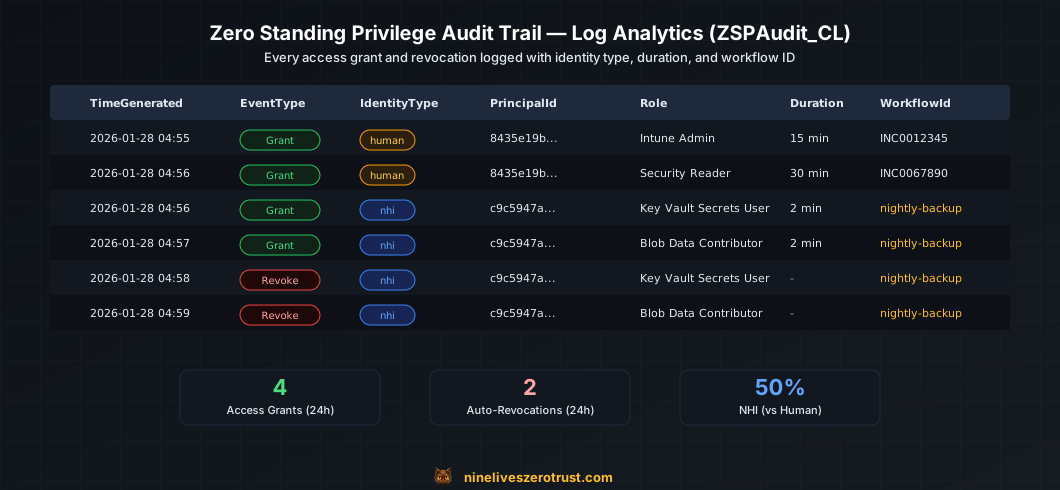
Events written for grants, revokes, and ownership-guard failures contain two exact
correlation keys: LifecycleId is the Durable orchestration instance ID, and
EntitlementId is the deterministic admin ownership key or complete Azure role
assignment resource ID. Use both fields together; principal and target alone
cannot distinguish repeated lifecycles safely.
Query Log Analytics
WORKSPACE_ID="<log-analytics-workspace-id>"

az monitor log-analytics query \
  --workspace "$WORKSPACE_ID" \
  --analytics-query "ZSPAudit_CL | where TimeGenerated > ago(1h) | project TimeGenerated, EventType, IdentityType, PrincipalId, Target, LifecycleId, EntitlementId" \
  --output table
Sample Queries
All access grants (last 24 hours):
ZSPAudit_CL
| where TimeGenerated > ago(24h)
| where EventType == "AccessGrant"
| project TimeGenerated, IdentityType, PrincipalId, Target, Role, DurationMinutes, LifecycleId, EntitlementId
| order by TimeGenerated desc
Failed access attempts:
ZSPAudit_CL
| where TimeGenerated > ago(24h)
| where Result == "Failed"
| project TimeGenerated, IdentityType, PrincipalId, LifecycleId, EntitlementId, ErrorMessage
Expired grants without an exact successful revoke:
let grace = 15m;
let exact_grants =
    ZSPAudit_CL
    | where EventType == "AccessGrant" and Result == "Success"
    | where isnotempty(ExpiresAt)
    | extend Expiry = todatetime(ExpiresAt)
    | where Expiry < ago(grace)
    | where isnotempty(LifecycleId) and isnotempty(EntitlementId)
    | summarize GrantTime = min(TimeGenerated), LastExpiry = max(Expiry),
        PrincipalId = take_any(PrincipalId), Target = take_any(Target),
        Role = take_any(Role), IdentityType = take_any(IdentityType)
      by LifecycleId, EntitlementId;
let exact_revokes =
    ZSPAudit_CL
    | where EventType == "AccessRevoke" and Result == "Success"
    | where isnotempty(LifecycleId) and isnotempty(EntitlementId)
    | summarize RevokeTime = max(TimeGenerated) by LifecycleId, EntitlementId;
let exact_findings =
    exact_grants
    | join kind=leftanti exact_revokes on LifecycleId, EntitlementId
    | extend CorrelationStatus = "Exact",
        Finding = "Expired lifecycle entitlement with no successful revoke";
let legacy_findings =
    ZSPAudit_CL
    | where EventType == "AccessGrant" and Result == "Success"
    | where isnotempty(ExpiresAt)
    | extend LastExpiry = todatetime(ExpiresAt)
    | where LastExpiry < ago(grace)
    | where isempty(LifecycleId) or isempty(EntitlementId)
    | extend CorrelationStatus = "LegacyUncorrelated",
        Finding = "Legacy expired grant lacks exact lifecycle correlation; review manually";
union exact_findings, legacy_findings
| order by LastExpiry asc
Alert on CorrelationStatus == "Exact". Route LegacyUncorrelated rows to
manual review instead of guessing a match from principal and target.
NHI access outside normal patterns:
ZSPAudit_CL
| where TimeGenerated > ago(7d)
| where IdentityType == "nhi"
| where EventType == "AccessGrant"
| summarize count() by bin(TimeGenerated, 1h), PrincipalId
| where count_ > 5
File Structure
The bundled lab is an exact mirror of the pinned upstream revision. Its main
surfaces are bicep/, function/, and scripts/; the bundle also includes
the upstream validation workflow, dependency pins, unit and contract tests,
license, and canonical README. In particular, cleanup is implemented by
scripts/Cleanup-Lab.ps1. Use the pinned repository tree
as the authoritative inventory instead of copying a second file tree into this page.
Configuration Options
Maximum Access Duration
Edit the -MaxAccessDurationMinutes parameter when deploying:
./scripts/Deploy-Lab.ps1 -ConfirmLifecycleMigration -MaxAccessDurationMinutes 240
Supported Roles (NHI)
The gateway supports these Azure built-in roles:
| Role | Use Case |
|---|---|
| Key Vault Secrets User | Read secrets during backup |
| Key Vault Reader | Read vault metadata |
| Storage Blob Data Reader | Read backup data |
| Storage Blob Data Contributor | Write backup data |
| Reader | Read-only access to resources |
Add Custom Roles
Edit function/nhi_access.py to add role definition IDs:
ROLE_DEFINITIONS = {
    # ... existing roles ...
    "Custom Role Name": "xxxxxxxx-xxxx-xxxx-xxxx-xxxxxxxxxxxx",
}
Also configure ALLOWED_NHI_ROLES with the complete reviewed role-name allowlist. A name added only to ROLE_DEFINITIONS is still rejected by admission. Preserve principal, workflow-ID, and scope restrictions; do not broaden them merely to make an example succeed.
Cleanup
Before cleanup, stop new requests and scheduled grants, inventory all instances through operator management access (including legacy instances), revoke and verify every active group membership and RBAC grant, and confirm the two privileged groups have no direct members. Deleting the Function App while revocation timers are outstanding can strand privilege.
Preview the manifest-recorded exact-ID cleanup first:
./scripts/Cleanup-Lab.ps1 -ConfirmProject "zsp-lab" -WhatIf
The preview performs read-only Azure and Graph lookups and validates the active tenant/subscription, project confirmation, manifest consistency, immutable Entra object IDs, provenance, exact names, group emptiness, application/service-principal linkage, and resource-group ownership tags. It never falls back to display-name discovery.
Remove the exact manifest-recorded Entra groups, application, and service principal:
./scripts/Cleanup-Lab.ps1 -ConfirmProject "zsp-lab"
For full cleanup, explicitly include the exact owner-tagged Azure resource group:
./scripts/Cleanup-Lab.ps1 -ConfirmProject "zsp-lab" -DestroyAzureResources -WhatIf
./scripts/Cleanup-Lab.ps1 -ConfirmProject "zsp-lab" -DestroyAzureResources
Resource-group deletion is asynchronous. Preserve the manifest and rerun cleanup after Azure reports the group absent; only then can the script prove every recorded object is gone and remove the manifest. Never replace this workflow with raw resource-group deletion or Entra deletion by display name.
Troubleshooting
Deployment Fails on Entra ID Objects
Entra ID has eventual consistency and the scripts include retry logic. If a
deployment fails, preserve .zsp-deployment.json. Reassess the lifecycle
migration requirements and any partial grants before rerunning the main
manifest-aware orchestrator with the same project name:
./scripts/Deploy-Lab.ps1 -ConfirmLifecycleMigration -ProjectName "zsp-lab"
On a normal rerun the complete identity set is loaded from the manifest. If the
manifest is unavailable but the original four immutable Entra object IDs are known,
follow the explicit all-four Expected*ObjectId example in the canonical README.
Do not invoke Setup-EntraID.ps1 by display name or supply only a partial ID set;
both paths fail closed to prevent adopting foreign tenant objects.
Function App Returns 500
Check Application Insights for errors:
az monitor app-insights query \
  --apps "zsp-lab-insights" \
  --resource-group "zsp-lab-rg" \
  --analytics-query "exceptions | where timestamp > ago(1h) | project timestamp, problemId, outerMessage"
Graph API Permission Denied
Inspect the failed permission and verify the exact owned Function identity first. The repair command below performs Tier 0 permission changes, not a read-only status check; review the intended Graph roles and both Azure scopes before use:
pwsh ./scripts/Grant-Permissions.ps1 \
  -FunctionAppPrincipalId "<function-principal-id>" \
  -ResourceGroupId "<resource-group-id>" \
  -DcrScope "<exact-data-collection-rule-resource-id>"